

Once you’ve decided to add a screening call run by an agent, the next question is where it belongs. You can place it after resume review, where it confirms a shortlist, or send it before any human review, where the conversation helps build that shortlist.
Metaview defaults to review first. Screening sits after Application Review and before a human interview. Your team makes a deliberate choice to put the call first.
Pattern A: review first, then screen
Application Review reads every application against the role’s Ideal Candidate Profile. It buckets the applications as Great, Good, Okay, or Poor and shows its reasoning. A human makes every accept or reject call.
A recruiter then progresses the applicants they want to assess through conversation. Screening gathers evidence about how those candidates communicate before a human interview. That’s Metaview’s two-step framing: Application Review identifies the applications worth a conversation, and Screening adds conversational evidence for the shortlist.
The team links the screen with an ATS stage used after resume review. After the call, Metaview syncs the summary and candidate information there. The recruiter chooses whether to advance or reject the candidate, and Metaview syncs that decision too.
Before each call, the agent reads the candidate’s CV or resume and the job criteria. It also uses the role’s Ideal Candidate Profile and workspace knowledge about how the company hires. That context lets it tailor follow-up questions to the individual.
The resume pass still determines who reaches the call. If an important criterion isn’t visible until the conversation, Application Review never sees that evidence. A recruiter may never progress an applicant whose fit becomes clear only after they speak.
Pattern B: screen first
Your team puts the call first when the role needs conversational evidence before resume review. For this pattern, your team sends every applicant an individual link that places the call ahead of application review. Choosing that route is a deliberate departure from Metaview’s review-first default.
The AI candidate screening call uses the application each candidate already submitted to personalize its questions. That gives the agent candidate-specific context before a recruiter reads the resume.
Sending the link to every applicant creates a larger set of completed calls for recruiters to review. Bulk advance and reject actions help recruiters work through that set, but they don’t remove the review work or the recruiter’s responsibility for each decision.
Candidates complete the call on their own time, so there is no scheduling or chasing. Decide up front how your process will treat candidates who never complete by the deadline.
Fraud checks run before any human filter. The agent flags warning signs of candidate fraud, including responses that appear AI-assisted or fraudulent. If your team requires candidates to keep video on, it also checks for signs of chatbot use or of candidates reading from a second screen or a script. Every flag remains evidence for a human.
Choose this pattern when the conversational evidence justifies the larger completed-call review volume.
How to choose between the two patterns
Start with the role criteria. Your role work should already include a criterion-to-instrument mapping that assigns each criterion to resume review or a conversation. Use that mapping here.
Pattern A fits when the criteria that matter are visible in the application. Pattern B earns its place when the most important criteria only become observable through a conversation. The placement should follow the evidence the recruiter needs for the next decision. Metaview ships with review first; moving the call ahead of review is a departure a team makes on purpose, for role-specific reasons.
Then check your review capacity. Screening is built for roles taking 100 to 300+ applications, with standardized job descriptions. Under the screen-first pattern, that volume can become completed-call output for your recruiters to assess.
Applicant count alone can’t settle the choice. Pattern A limits call volume through resume review. Pattern B widens the conversation pool, so assign a clear owner for assessed fit, notes, and fraud flags before the screen goes live.
| Decision point | Pattern A: review first, then screen | Pattern B: screen first |
|---|---|---|
| Metaview’s default | Yes, Screening sits between Application Review and a human interview | No, the team chooses to put the call first |
| What the step is for | Confirm a shortlist | Gather conversational evidence before resume review |
| Who gets the link | Applicants a recruiter progresses after resume review | Every applicant |
| How the link is sent | Linked to an ATS stage | Shared individually |
| Volume of screens | Lower | Higher |
| When to choose it | Most role criteria show on the resume, and you want fewer calls and less note review | The criteria that matter most only show in conversation, and your team can review the higher call volume |
| What the recruiter reads first | The resume, then call notes for the shortlist | The assessed-fit column and notes across every applicant |
Set up the step you chose
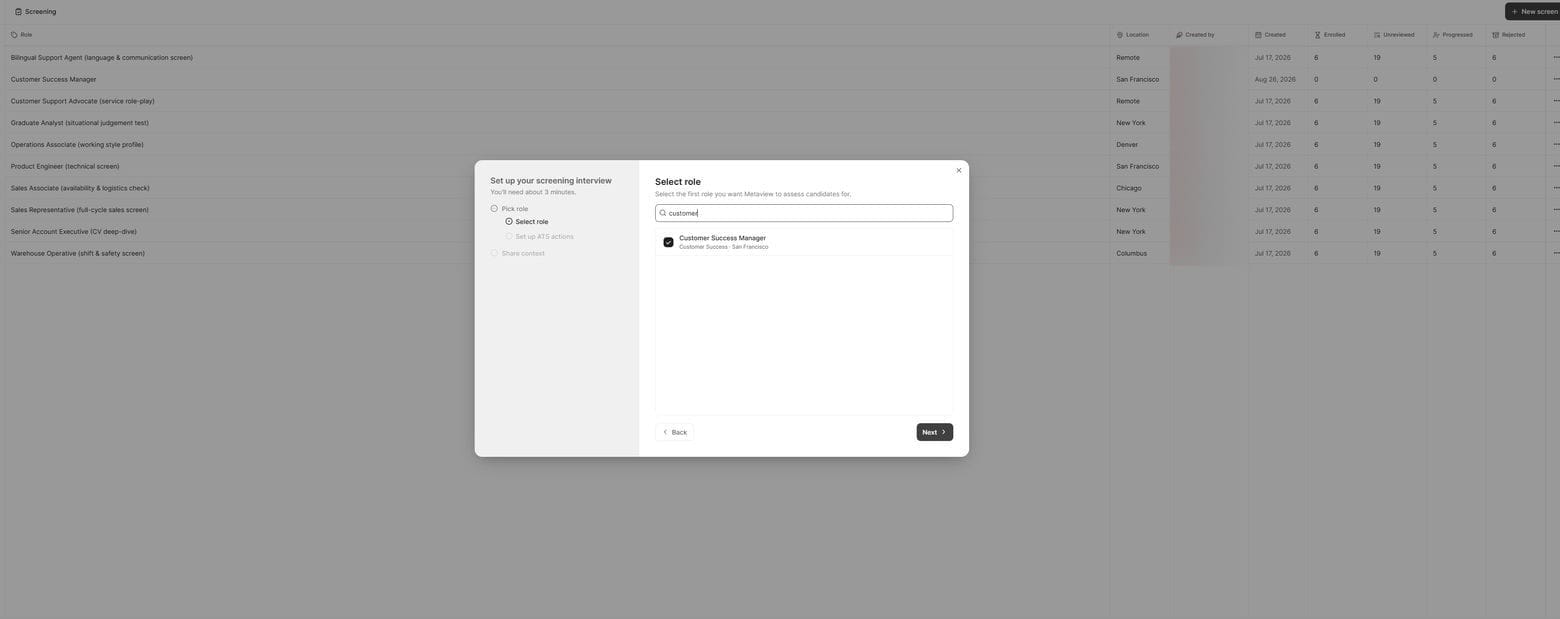
You handle setup in this order: Build it, Send it, Review it. The placement changes the delivery route, while the assessment plan stays tied to the role.
- Build it. Point Metaview at a role, and it creates a structured assessment plan in minutes. Each question comes with a prose scoring rubric. Its named bands describe the evidence expected at each level. A team could write its own “great” band as: “a sustained, specific track record, including timeframes and what others relied on.” You can customize any rubric. Questions can come from a job post or an existing screening interview. A separate guide covers how to conduct a recruiter phone screen. Don’t send anything until you’ve tested one question or run a full end-to-end preview of the call.
- Send it. For Pattern A, link the call to the ATS stage after resume review. For Pattern B, share the link individually with every applicant. Keep the delivery route consistent with the placement you chose.
- Review it. Decide who on your team will examine the scored, evidenced write-up. Metaview provides structured evidence from every completed call for the recruiter who decides who moves forward.

What the candidate gets
The candidate experience starts with a link. There’s no login or account to create, and the candidate can use a desktop or mobile device. Your branding can appear through a logo, customized invitation emails, and a welcome video that introduces the company or role.
The screening call is a real two-way conversation. It adapts to the role and the candidate’s answers, asks follow-up questions, and lets the candidate ask questions back and get answers. Question formats include:
- Voice
- Video
- Scenarios
- Open text
Candidates can leave video off unless your team requires them to keep it on.
Teams can include an opt-out link in the invitation under either pattern. Pattern B’s wider send makes the control more consequential because every applicant receives the link.
What comes back to you
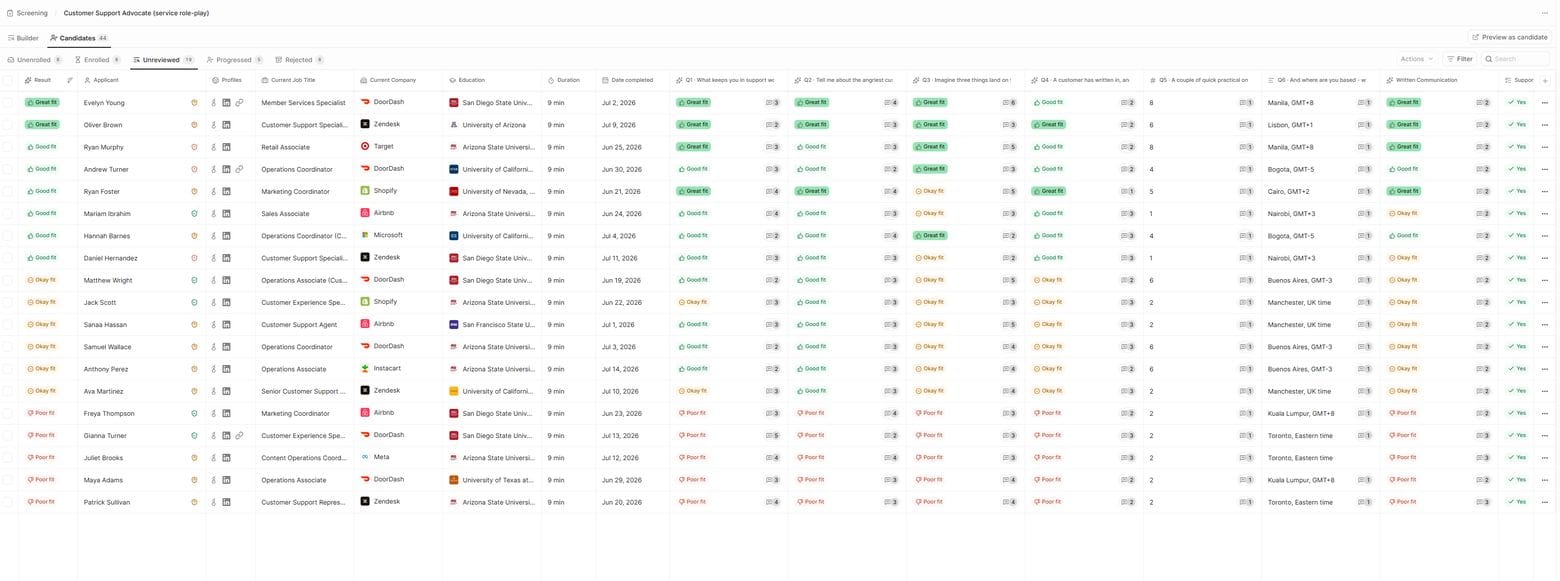
The recruiter’s queue shows one topline fit rating for each completed call: Poor, Okay, Good, or Great. A documented explanation shows the reason for that rating and grounds it in the conversation. Where consent has been given, the Screening call recording captures every spoken word. Whichever placement the team picks, the recruiter reviewing the completed call can check the write-up against what was actually said. The recruiter also gets a transcript mapped question by question, along with background safety and candidate fraud checks, plus the audio recording where consent has been given. The call is recorded only if the candidate consents.
Each question carries its own prose rubric. The named bands tell the agent what to look for in the candidate’s answer. Recruiters can bulk advance or reject candidates from this output. For every completed call, a recruiter makes the progress or reject decision using Metaview’s evidence.
Metaview monitors how recruiters interact with candidate results, including approvals, rejections, and the reasoning recruiters enter in the feedback log. If several rejections mention "remote only, we need in office," Metaview recognizes the pattern and recommends a rubric change, such as adding an in-office requirement.
A recruiter can accept or dismiss that recommendation. The agent doesn’t rewrite the rubric without human approval. The patterns come from the decisions your recruiters record, so placement determines which applicants those records cover.
Choose the placement for each screen
When your team configures a screen, it chooses which candidates receive the call and how they enter it. That choice sets whether Screening follows resume review or gathers conversational evidence first.
Revisit the placement when the role criteria change or when your team lacks the capacity to review completed calls and find the evidence needed for the next decision.
Choose review first when most role criteria show on paper and you want less call output to review. Reserve screen first for roles where the most important criteria require a conversation and your team can review every call.
Put Screening in the right place.
See how Metaview fits Screening into your hiring process while your team decides what happens after each completed call.
Frequently asked
Are Screening call recordings available for review?
With the candidate’s consent, the call recording and question-by-question transcript are available for review.
What information syncs to the ATS after a Screening call?
The ATS receives a summary of the call, the candidate’s information, and the progress or reject decision once a human recruiter makes it.
Who decides which candidates move forward after Screening?
A recruiter reviews the evidence from each completed call and decides whether the candidate advances. Metaview does not make that decision.
How much time does a Screening call usually take?
A typical call lasts 7 to 10 minutes. Candidates can take it when it suits them, with no scheduling required.
