
A requisition postmortem is a written review of the process record left by a closed req. Within days, memory begins to replace that record. The review captures it while the people who ran the process can still correct it.
The recruiter who owned the req completes the written one-page review within a week of any terminal state. A fixed template keeps the work comparable and gives readers a clear place to correct the process record before it’s filed.
The review doesn’t go beyond the hiring decision or use evidence created after that decision. It can proceed as soon as the req is filled, closed unfilled, or canceled because every section concerns the process that has already happened.
What this review is, and what it refuses to be
The case for learning from a closed req begins with a useful premise: “Every closed req is training data for the next one.” This postmortem applies that premise to the process record up to the hiring decision.
The article on recruiter intake meetings uses an open-questions column to record what the intake has not resolved. This review can’t support broader judgments because it reads only the process record. Those judgments belong in a separate exercise.
A filled req and a canceled req can both reveal careful steps or gaps in the process. The team still needs to read the record in either case because the terminal state doesn’t tell the whole story.
The review doesn’t produce sourcing-capacity or headcount recommendations. It won’t prescribe the number of interview rounds or treat a cancellation as proof that the process failed.
The decision debrief remains where the candidate decision gets made. This written review starts with the evidence in the process record, so it won’t reopen that decision.
Pull the record before you write
Open the page with an inventory of the records that existed for this req. The inventory shows what the page can support, so readers won’t mistake an unsupported explanation for a recorded finding.
Pull these minimum inputs:
- The intake record, including its open-questions list
- The interview records and scorecards that exist
- The stage timestamps from the ATS
- The offer and close correspondence
Beside the interview records, include a list of captured calls from the req. Where consent is given, Metaview’s Notetaker joins the interview as a visible participant and captures every spoken word. The reviewer can consult the transcript before describing what the call covered. The Notetaker also turns the conversation into structured notes.
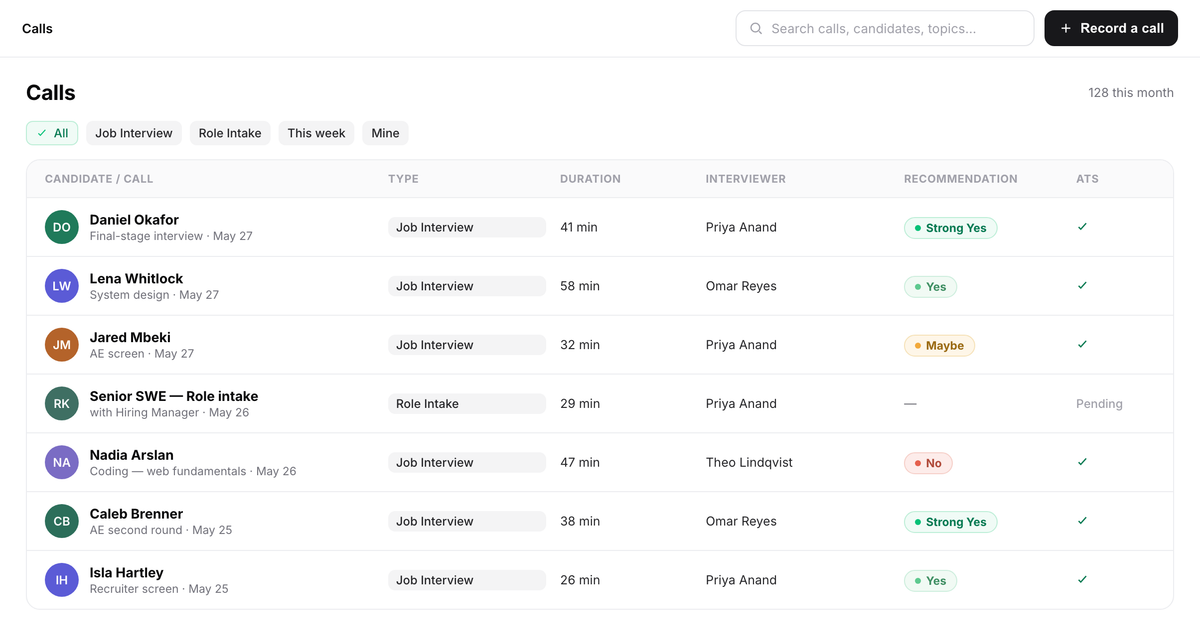
- 1Each captured call, with the candidate and the stage it belonged to.
- 2Call type and duration sit beside each record.
- 3The final columns show the interviewer’s submitted recommendation, when present, and ATS sync status.
Write down every missing input as a capture gap. If the intake record is present but its open questions weren’t resolved, the page says so. If scorecards are missing at a decision point, record the absent artifact.
When the records cannot support an answer, keep the line “the record can’t answer this” on the finished page. A person’s recollection cannot fill a missing scorecard or resolve an unanswered intake question.
Keep the page and the hypothesis log apart from candidate records. Remove candidate identifiers, copied candidate statements, and accusations against named interviewers. Candidate-experience findings describe the recorded topic or process step that prompted a question, concern, or flag. Store both process documents under the team’s existing access and retention policies.
The one-pager: 5 sections, each opened by the record
The fixed template gives each review the same 5 questions. Start every section by naming the records used for that answer, then describe the finding those records support. That order matters because readers can’t tell whether a polished explanation hides a missing scorecard or an intake question that stayed open.
| Section | The records that answer it | The question it answers |
|---|---|---|
| Intake agreement | Intake record, open questions | What did the search chase? |
| Stage flow and timing | ATS stage timestamps | Where did the process move or wait? |
| Criteria coverage | Interview records, scorecards | Which agreed criteria were covered? |
| Decision-point evidence | Scorecards, debrief records | How well did the record support each call? |
| Candidate experience | Captured calls, correspondence | What did candidates raise or flag? |
For the intake section, compare the recorded agreement with what the search pursued. Stage flow reports the sequence and timestamps available in the ATS. Check the records from the interviews that happened against the agreed criteria. Any gap stays visible, so the page doesn’t overstate the coverage.
At each decision point, describe the quality of the evidence using only what the artifacts show. Candidate-experience findings use recorded questions, concerns, and flags without identifying detail. If a section has no support, keep “the record can’t answer this.” Findings name steps and artifacts and never judge an individual or reopen a candidate decision.
A filled intake section might start with its source records and then state the finding. When those sources leave a gap, it ends by naming the question they can’t answer:
Records used: The intake notes, the job description version stored with the req, and the scorecard template attached to the interview plan. These artifacts show what the team wrote down at intake and what the later interview materials carried forward.
Finding: The intake notes and job description name the same core requirement. The scorecard template carries it into the interview plan, while an open question from the intake notes is absent from both later artifacts.
The record can’t answer this: The artifacts don’t show whether the open question was discussed outside the documented intake or why it was absent from the later materials. The finished section records that limit.
The triage: short page or full page
Every terminal req gets a page. The short form is the default, and the flags below escalate it to the full page. The short form keeps the fixed 5-section structure, with each straightforward section limited to a record reference and one finding line.
Use the full page when any of the 4 flags appears:
- The decision was contested
- The req closed unfilled or was canceled
- The role was the first of its kind
- Someone asks to relitigate a call
The last flag routes the request back to the process record around the decision. It doesn’t reopen the candidate decision. The reviewer checks what criteria, interview records, and scorecards were available when the call was made and records any gap the page can support.
The recruiter circulates the finished page asynchronously to the people who ran the process. Set a window for factual corrections and marked disputes before filing the page.
Readers can correct the factual record or dispute how the page describes a process step. A correction might add an existing scorecard or fix a timestamp. Hold a short live conversation only when a marked dispute still needs one, then file the corrected page with the dispute recorded.
Decide which changes to make now and which to evaluate later
Ship an immediate fix when it restores a requirement already in the record. Examples include a template section that existed and went unfilled, an agreed intake turnaround the team missed, or an interview-kit question every interviewer skipped. Assign an owner and make the change in the intake template, interview kit, gate definitions, or stage design.
A documented template field that went unused ships now as a restoration; a proposed field that does not exist goes into the hypothesis log.
Because a single req proves very little, the Head of Talent reads across the pages after every 5 completed reviews or at quarter-end, whichever comes first, and evaluates only issues that recur. It then decides whether to adopt the change.
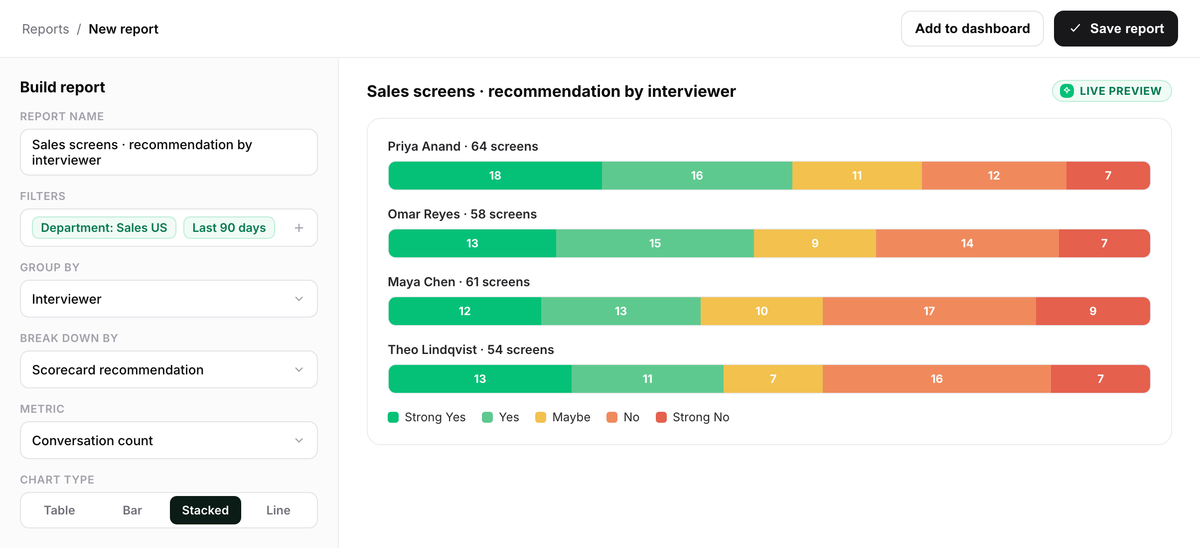
- 1The Filters row sets the department and reporting period.
- 2Group by and Metric define the interviewer cut and conversation-count measure.
- 3The live preview shows stacked bars segmented by interviewers’ own submitted recommendations.
The decision framework handles standards the same way by moving changes into a separate calibration.
The article on hiring managers describes a quick post-acceptance retro that sends one change into the next req. This postmortem also covers searches that close before an offer. New changes from those reviews stay in the hypothesis log until recurrence gives the team a reason to evaluate them.
For a canceled req, record the business cancellation as context. Mark where the record ends. Then review the intake choices, stage movement, interview coverage, and decision evidence available up to that point, leaving later questions unanswered.
Complete the record across Metaview and the ATS
For the inventory, include the conversations and documents available through Metaview alongside the stage timestamps from the ATS. With AI-written interview notes, you can combine several conversations and documents, such as a recording, resume, and job description, into one multi-source notes document. The document doesn’t reach beyond the sources attached to it.
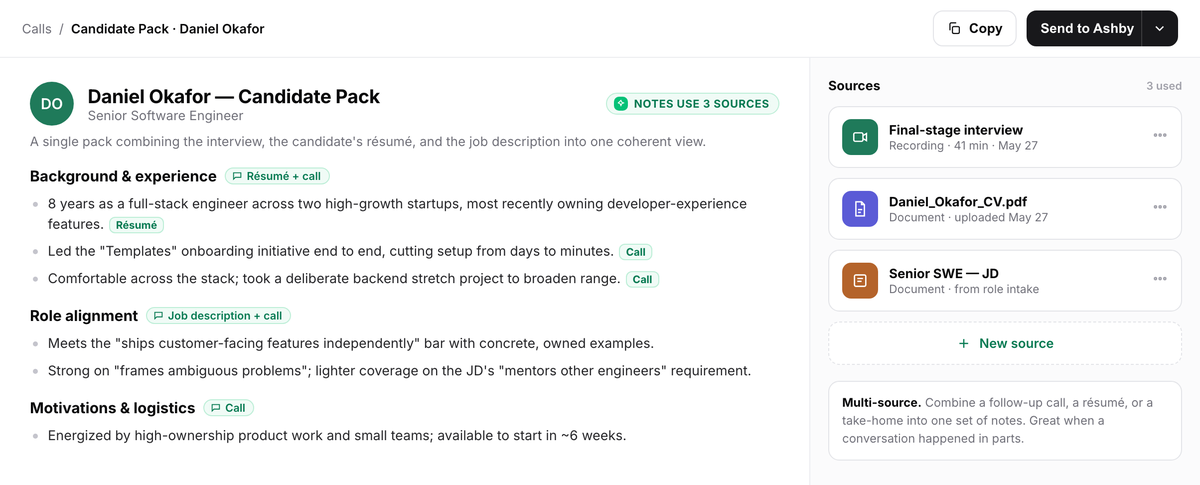
- 1The header shows how many sources the notes drew on.
- 2The Sources panel lists the attached final-stage interview recording, CV, and job-description document.
- 3Section-level source tags sit beside headings, and per-claim tags appear on lines whose source differs.
Metaview Reports lets you query your organization’s own interview data in the product or through the Metaview MCP. Reports has no post-hire dimension. Pull stage timestamps from the ATS for the system-of-record sequence and timing. Metaview’s integrations directory lists its available connections.
Metaview supplies the captured conversations, structured notes, and reporting. Your team creates and stores the postmortem. The Deel case study shows a customer talent team running Reports over its own interview data; your own Reports queries can supply the “Criteria coverage” and “Decision-point evidence” sections.
Frequently asked questions
How long does this take for each req?
The short form is a 15-minute review when the record has already been pulled. If collecting the inputs takes longer than writing the page, record that delay as a capture finding because the next review will face the same problem.
We don’t record interviews. Can we still run this?
The review can still run without recorded interviews. ATS timestamps, scorecards, and the intake doc can support parts of the page. More sections will say “the record can’t answer this,” and that inventory gives you the proper place to begin improving capture.
Doesn’t writing down process failures create a record HR won’t like?
Draft each finding around the artifact and the date shown in the record. Name the intake doc or scorecard first, then describe the gap it contains. Circulate the page only to people covered by the team’s current access rules.
Why not wait for the outcome review?
The process record is complete when the req closes, and it decays fastest immediately afterward. Outcome data can support a separate review of how the hire performed once it is available. This review records how the recruiting process ran, and it deliberately stops at the hiring decision.
Why not just cover this in the QBR?
A QBR reviews the quarter’s aggregates. This page reviews one req’s record while the people who ran it can still correct the facts. The collected pages give the QBR concrete cases to examine when a process issue recurs.
Make the page the closing step for every req. Give the recruiter a week, keep each answer tied to the records, assign an owner to every restoration, and send new ideas to the hypothesis log.
Capture the interviews your next review will read.
Metaview’s Notetaker joins interviews as a visible participant and creates structured notes.
