
Every interview comes with work around it, from booking the rounds to chasing last week’s scorecards.
Which interview software you need depends on which part of that work is slowing your hiring team down.
We’ve compared ten platforms that hiring teams use for this work.
The best interview software platforms at a glance.
The table below shows what each tool does, who it suits best, and what you get back from it.
| Tool | What it does | Best for | What you get back |
|---|---|---|---|
| Metaview Screening | Screening | Two-way screening calls on the candidate’s schedule | An assessed fit with its reasoning, plus the recording and transcript |
| Metaview Notetaker | Notes and scorecards | Interview write-ups built from the conversation | Structured notes linked to their sources, and a scorecard draft to review |
| GoodTime | Scheduling | Interview scheduling at enterprise scale | Booked loops, replacement interviewers, and scheduling analytics |
| HireVue | Video interviews | Enterprise video interviews and assessments | Recordings, ratings, and AI scores, with AI summaries as an add-on |
| Spark Hire | Video interviews | One-way video at smaller companies | Recordings, team ratings, and optional AI summaries |
| VidCruiter | Video interviews | Structured live and recorded interviews | Recordings, scorecards, AI-scored answers, and panel scores |
| Paradox | Screening and scheduling | Frontline, high-volume hiring | Candidates screened and booked, plus interviewer feedback |
| BrightHire | Notes and scorecards | Interview notes across several hiring systems | Notes, scorecard drafts, and interview quality reports |
| Greenhouse | Notes and scorecards | Structured interviews inside Greenhouse | Interview kits, notes mapped to the kit, and scorecard summaries |
| Ashby | Reporting | Interview reporting and analytics | Reports, dashboards, alerts, and feedback summaries |
What is interview software?
Interview software is what your hiring team uses to run interviews. It covers screening applicants, booking each round, holding the interview, capturing what was said, and turning it into scores and reports. Most tools specialize in one or two of these steps, and most work with your applicant tracking system (ATS), so the results land where your hiring team already works.
Some search results for interview software are apps that help job seekers practice. They’re useful for candidates, but this list covers the tools hiring teams use.
Our top picks for interview software.
We started from the tools that come up in Google results for interview software and in AI assistants’ answers about interview notes and screening. We picked these ten because each does three things well:
- It’s built for hiring teams and the interviews they run.
- Where it scores or summarizes a candidate, it shows you what that is based on, like the recording, the transcript, or the reasoning.
- It keeps the hiring decision with people, and anything it does on its own follows a rule your hiring team chose.
The 10 best interview software platforms in detail.
After our own two entries, the rest follow the interview process: scheduling, video interviews, screening, notes, and reporting. Each entry ends with how the tool is priced, plus the price itself for the other eight tools where their vendor publishes one. Prices change often, so confirm them before you buy.
1. Metaview Screening: Best for two-way screening calls on the candidate’s schedule.
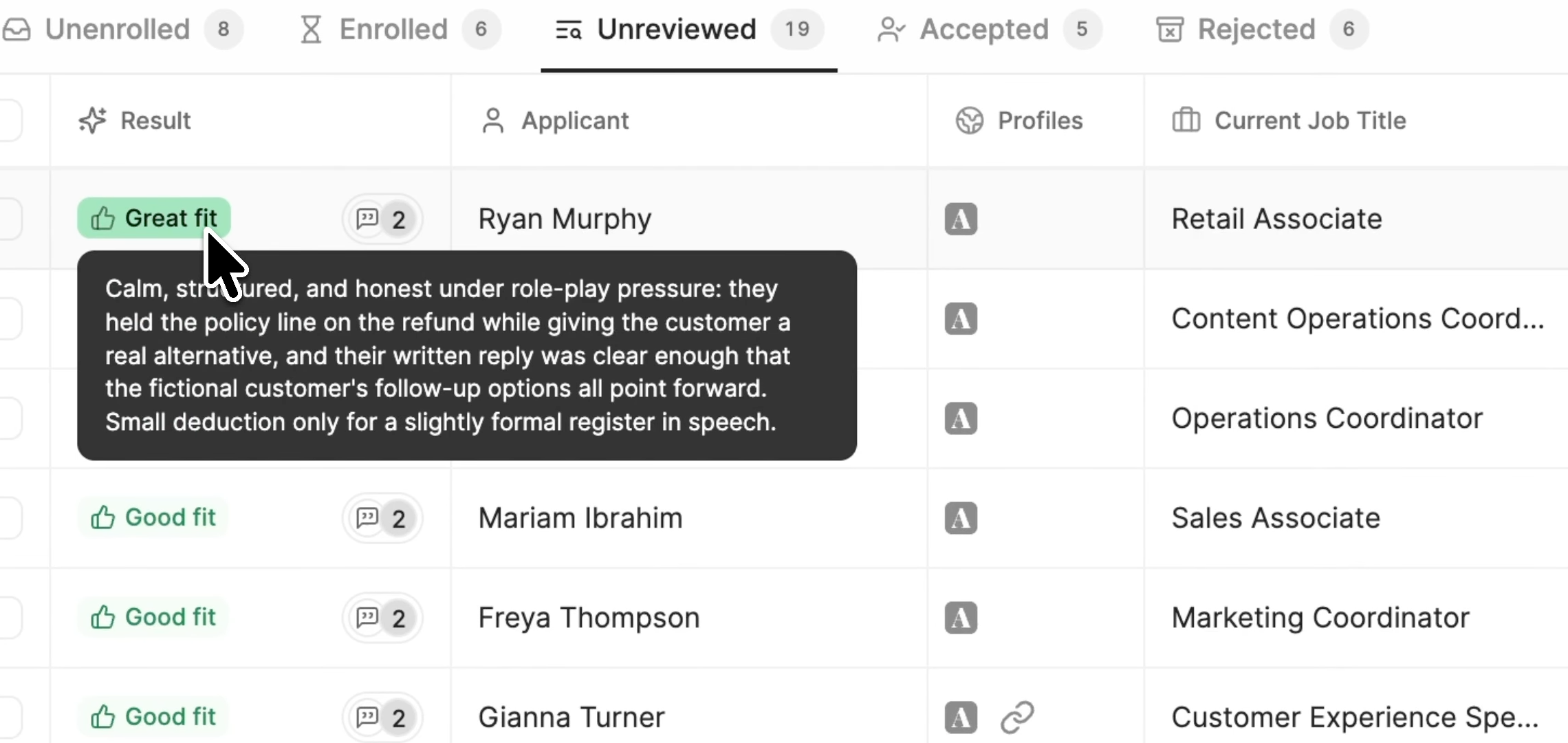
Metaview Screening is a voice-led AI agent that holds a two-way screening call with every candidate you send it to: it asks the questions you set, follows up on what candidates say, and takes their questions about the role.
It’s built for volume. Candidates open a link and join without signing up, on desktop or mobile, whenever suits them. No one waits for a slot on your recruiters’ calendars.
Screening scores each candidate’s responses against criteria your hiring team sets, and your recruiter gets a rating of each candidate’s fit, with the reasons behind it. Once a call is complete, a recruiter decides whether the candidate moves forward.
Video is optional unless your hiring team requires it. Screening adheres to the EU AI Act and New York City Local Law 144. Your hiring team can also let candidates opt out of the screening call.
You can attach Screening to a stage in your ATS or send a candidate the link yourself.
It’s a weaker fit for executive searches and one-of-a-kind roles that need a bespoke assessment.
Key features
- Recording and transcript: Mapped question by question, beside the assessed fit.
- Your branding: Add your logo, a welcome video, and your own invitation emails.
- Most major languages: Including Spanish, French, German, Arabic, Hindi, and Japanese.
- Fraud flags: Signs of fraud marked for a recruiter to review.
Best for: High-volume teams hiring for roles where hearing someone answer tells you more than their resume does.
Pricing: For high-volume screening, book a demo with us to talk through pricing.
2. Metaview Notetaker: Best for interview notes and scorecards.
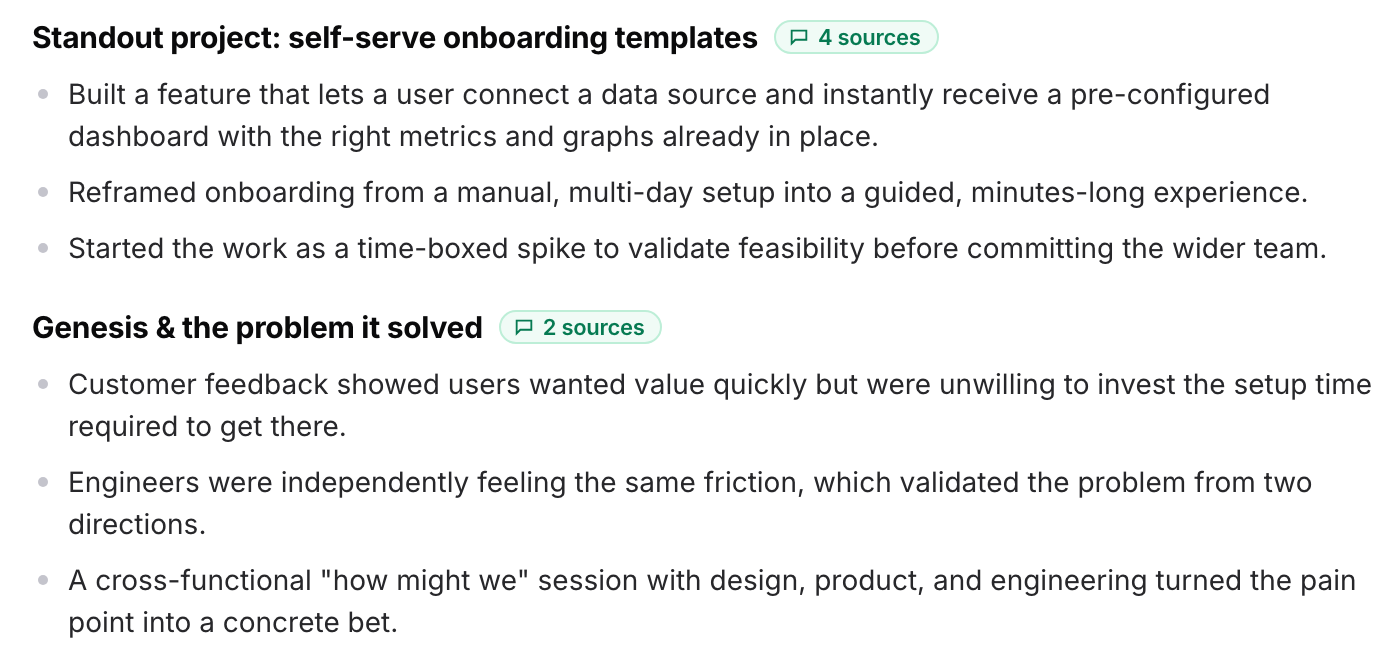
The Metaview Notetaker records and transcribes your interviews, then turns each conversation into structured notes your interviewers can work from.
The Notetaker captures every spoken word across the interviews it records, so the notes start from everything the candidate said.
Our standard consent message to candidates reads: “If both you and the interviewer consent, you will see a ‘Metaview Notetaker’ appear as a participant during the interview.”
After the interview, the Notetaker drafts the scorecard from the conversation for the interviewer to review, rate, and submit. Scorecards go straight into Ashby and Lever.
In Greenhouse, you paste the draft in, or our browser extensions fill in the scorecard’s objective sections for you, as they can in Ashby. Either way, the interviewer adds the ratings and the hiring recommendation.
Your notes and scorecards are what your hiring team brings to the debrief. Our co-founder and chief executive officer, Siadhal Magos, put it this way:
Similarly, an efficient, well-run interview process is nothing without a world-class debrief meeting to close it out.”

For reporting across your hiring team’s interviews, our Reports add-on is a separate product you can include in your subscription for a flat fee.
Key features
- Linked sources: Each section of the notes links back to the moment in the transcript it came from.
- Video and phone: Zoom, Google Meet, Microsoft Teams, and Webex calls, plus phone screens.
- Multi-source notes: Several conversations, the resume, and the job description in one document.
Best for: Teams running lots of interviews that want notes and scorecards built from what candidates said.
Pricing: The Notetaker comes with a free plan, and its paid plan is priced per user.
3. GoodTime: Best for interview scheduling at enterprise scale.
GoodTime has worked on interview scheduling since 2017, and it’s made for enterprise teams booking complex interviews: multi-day panels, interviews across time zones, and high-volume hiring events.
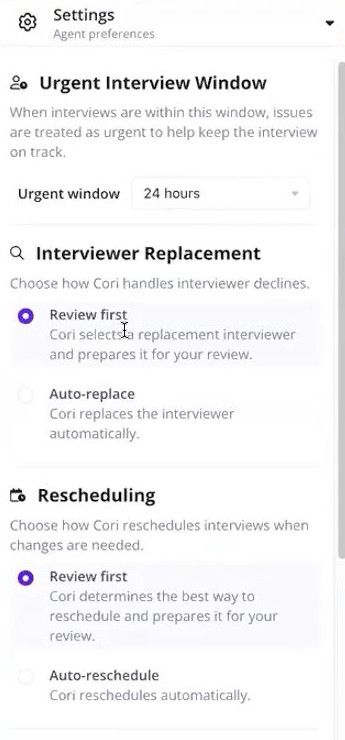
Its AI agent, Cori, handles the booking inside your ATS. GoodTime has also added an AI notetaker that drafts scorecard feedback for interviewers to review and edit.
GoodTime pairs each candidate with interviewers based on skills, load, time zone, and training status, and it spreads interviews so the same people don’t get overloaded. That matching is the part we like most.
For each kind of change, such as a reschedule or a replacement interviewer, you choose whether Cori asks a coordinator to review it first or confirms it on its own.
Before any of that pays off, you build interview templates, interviewer pools, availability, and scheduling rules. That’s a lot of machinery if your hiring team books a few interviews a week.
Key features
- Replacement interviewers: GoodTime replaces an interviewer who declines with the next best fit.
- Text and WhatsApp: Candidates confirm or change interview times by message.
- Scheduling analytics: Time to schedule, turnaround, and lead time.
- Works inside your ATS: Workday, SAP SuccessFactors, iCIMS, Greenhouse, SmartRecruiters, Lever, Jobvite, and Ashby.
Best for: Enterprise teams with complex interview loops to book.
Pricing: Not published. GoodTime bases its pricing on the number of candidates annually rather than the number of users, and it prepares a proposal on request.
4. HireVue: Best for enterprise video interviews and assessments.
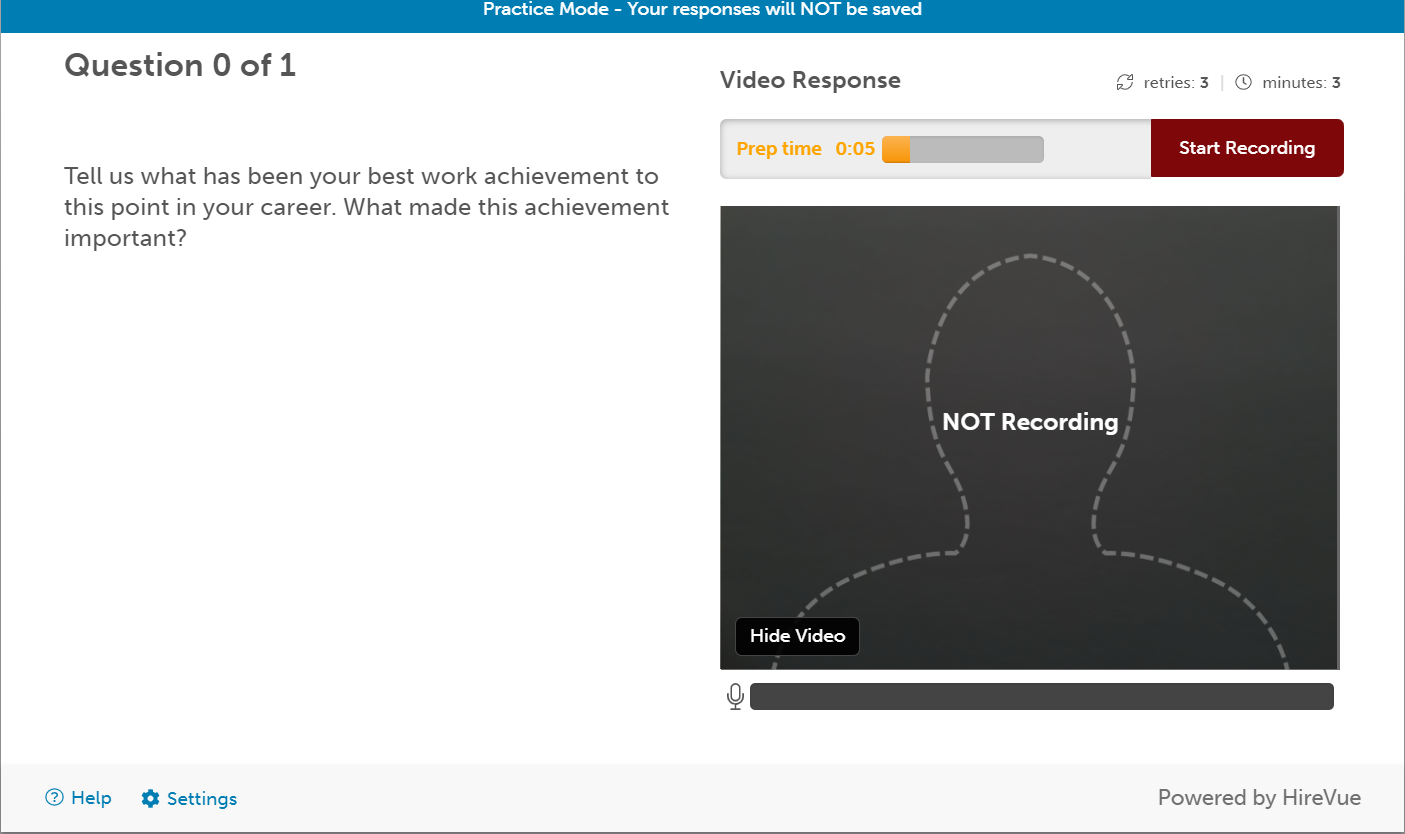
HireVue started in 2004 by mailing webcams to candidates so they could interview from far away. Its on-demand interviews let candidates record answers to set questions on their own time, and today it also offers assessments, scheduling, and live interviews.
In 2020, HireVue stopped using facial analysis in its AI-scored assessments after concerns from candidates and AI researchers. Its AI now scores only what candidates say, based on how expert human raters judged answers to similar competency-based questions. You can also set rules that move candidates on automatically, such as everyone above a score.
Reviewers on TrustRadius say it saves time over phone screens and lets your hiring team stop watching an interview once they’ve seen enough. The downsides they mention are trouble reaching support and a wish for more control over email templates.
One candidate on Reddit withdrew their application rather than record a HireVue interview, citing privacy.
It’s an established choice for enterprise hiring teams, though a small team may find it more than it needs.
Key features
- On-demand and live video: Recorded answers or live calls, in HireVue or on Zoom, Microsoft Teams, and Webex.
- Interview Builder: Suggested competencies, questions, and criteria for a role.
- Self-scheduling: Candidates book their own interviews from synced calendars.
- AI summaries: Transcripts, summaries, and highlights through Interview Insights, an add-on.
- ATS integrations: Including Workday, SAP SuccessFactors, Oracle, iCIMS, and Greenhouse.
Best for: Hiring teams at enterprise scale that want video interviews, assessments, and scheduling from one vendor.
Pricing: Not published. HireVue prices through its sales team.
5. Spark Hire: Best for one-way video interviews at smaller companies.
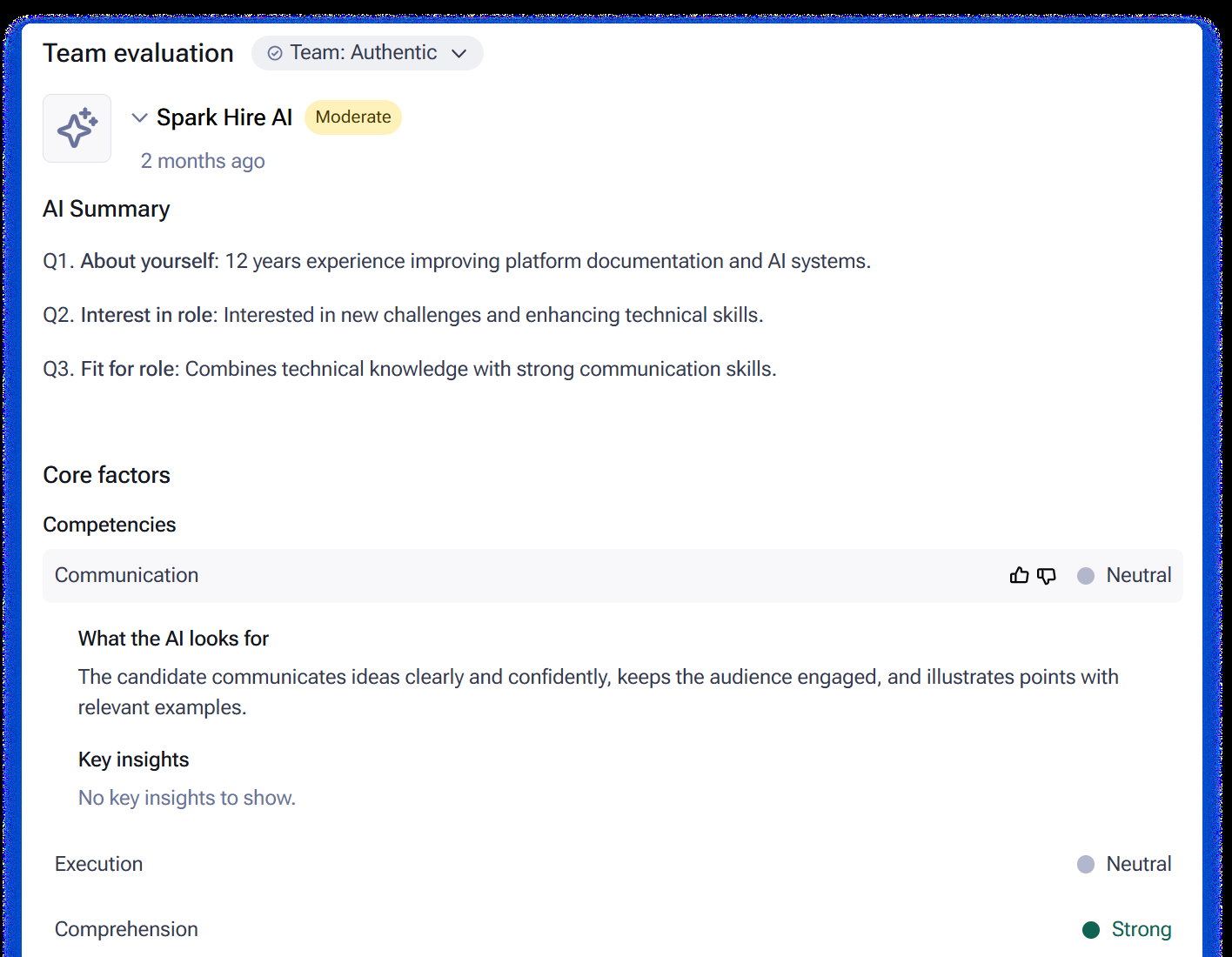
Spark Hire has offered video interviewing since 2012, and small and medium-sized organizations are still its focus. In 2023 it bought Comeet, an ATS, and Chally, an assessment provider, so it also sells a full recruiting system next to its video product.
You record or upload your questions, set the limits for each answer, and send candidates a link by email, text, or bulk invite. Candidates record when it’s convenient, even on a phone, and your reviewers rate each answer out of five stars before marking the interview “Passed,” “Failed,” or “Undecided.”
Optional AI adds transcripts, summaries, and an AI Video Review of English answers, and all of it starts switched off. Spark Hire also runs live interviews, with questions only the host can see.
TrustRadius users describe it as easy to use for recruiters and candidates alike.
Key features
- Live and one-way interviews: Unlimited on the monthly and annual plans.
- Per-question controls: Think time, takes, and answer length.
- Blind review: Teammates’ evaluations hidden until a reviewer submits their own.
- ATS integrations: Including Greenhouse, Lever, Workable, and iCIMS.
Best for: Small and mid-size teams replacing phone screens with one-way video.
Pricing: From $249 a month billed annually, with unlimited jobs and users. On the monthly plan, it’s from $299 a month for up to five jobs at a time and five users. Both prices exclude sales tax and vary by company size.
6. VidCruiter: Best for structured live and recorded interviews.
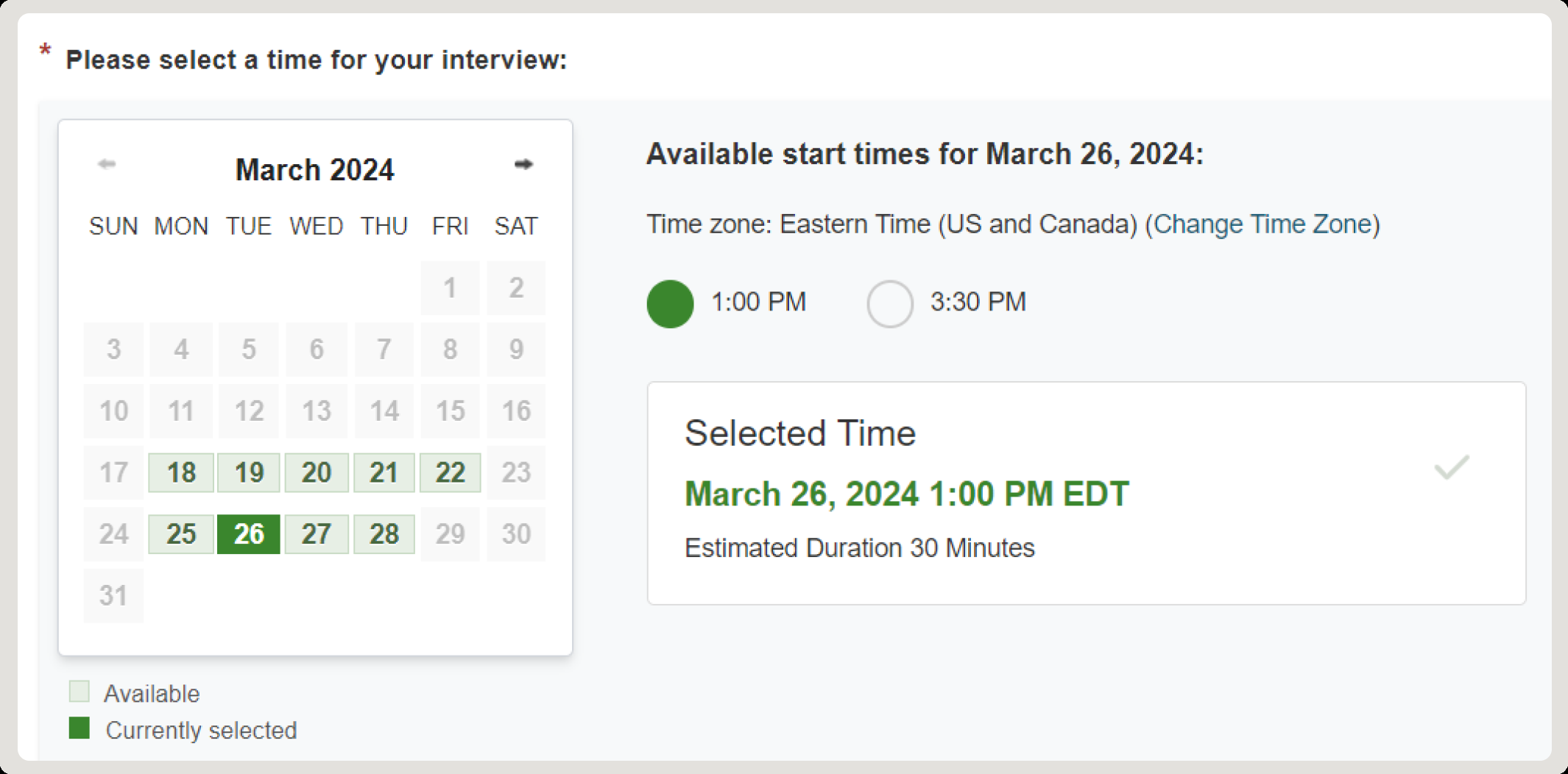
VidCruiter was founded in 2009 by Sean Fahey, who had been recruiting sales agents across Canada for an insurance firm and saw the need for an online way to filter applicants. It started with video interviews and has grown into full recruiting software with its own ATS. Today it serves enterprise teams and the public sector.
Your recruiters build questions as text or video, each with its own thinking time, recording time, and attempts. Live interviews run one-on-one, as a panel, as a group, or as multiple mini interviews (a run of short, timed interviews), in VidCruiter or in Zoom, Microsoft Teams, and Google Meet. That range of structured formats is its strength.
Optional AI screening scores pre-recorded answers from one to five against a rubric your hiring team approves, adds a written rationale, and lets hiring managers review, adjust, or override any result.
Users on TrustRadius praise its easy setup and its support team. Their complaints are thin documentation in places, and a feature list long enough to overwhelm new users. Some also found the ATS integration slow to get working, though a few said the problem may have been on their side.
Key features
- Pre-recorded and live: One question bank, scorecards, and reporting for both.
- Panel scores: Collaborative ratings and an aggregate score across the panel.
- ATS integrations: Workday, Lever, Workable, SmartRecruiters, and others, or VidCruiter as your ATS.
Best for: Larger employers and public bodies that run structured, panel, or high-volume interviews.
Pricing: Not published. VidCruiter quotes on request.
7. Paradox: Best for conversational screening in frontline hiring.
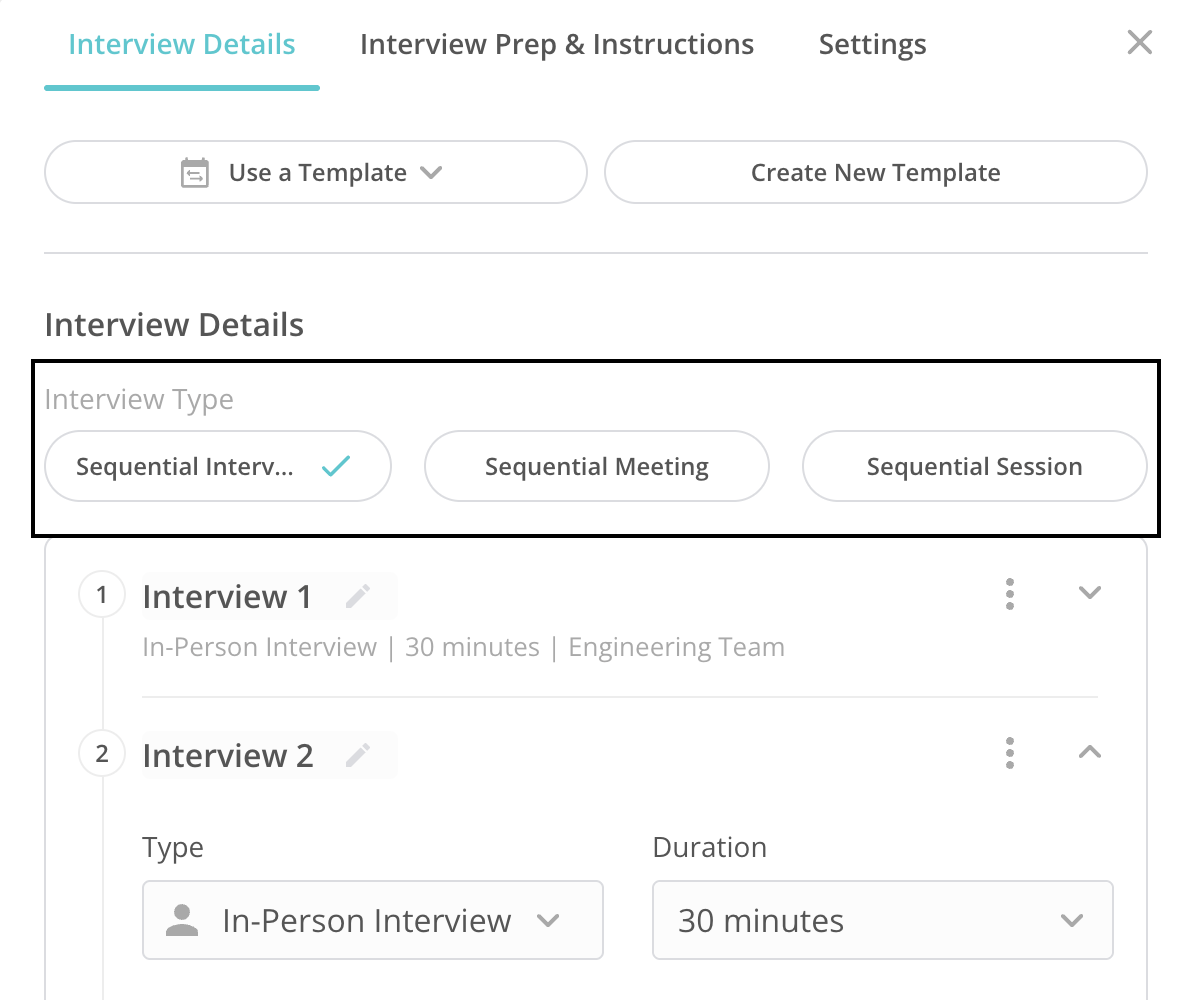
Paradox is the company behind Olivia, a conversational assistant for high-volume hourly hiring, and Workday bought it in 2025. You can run it as your ATS or on top of the one you have.
Candidates can apply from their phones and answer Olivia’s screening questions in a conversation your hiring team builds. Qualified candidates then get interview times straight from your interviewers’ calendars, and Olivia can turn down the ones who don’t fit, based on rules your hiring team sets.
Paradox is set up to get a qualified applicant booked quickly, which frontline hiring often needs. Some screening templates need Paradox as your ATS. Which features you get also depends on your package. If most of your hiring is salaried roles with several interview rounds, other tools on this list will fit better.
Key features
- Text-to-apply: Applications that start from a text, a QR code, WhatsApp, or Facebook Messenger.
- Automated scheduling: In-person, virtual, panel, and sequential interviews, with reminders.
- Interviewer feedback: Olivia asks interviewers for their feedback after each interview.
- Video: Recorded screening prompts and in-browser interviews.
- Languages: More than 30.
Best for: Employers hiring frontline and hourly workers in high volume.
Pricing: Not published. Paradox prices through a demo.
8. BrightHire: Best for interview notes across several ATSs.
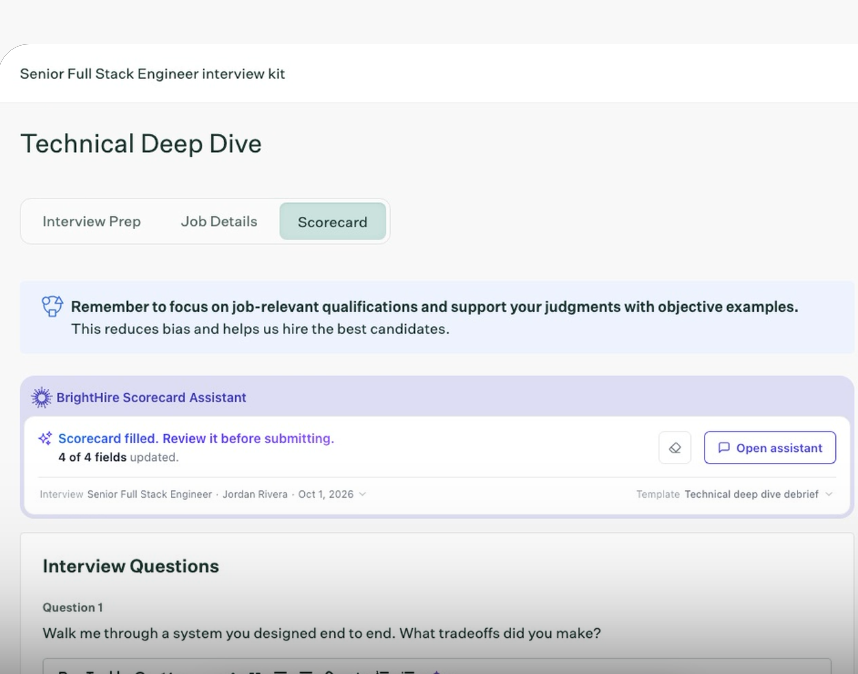
BrightHire has made software that records and analyzes interviews since 2019, and Zoom bought it in December 2025. It still runs as its own brand and covers phone and in-person interviews as well as Zoom, Google Meet, and Microsoft Teams calls.
From each recording, BrightHire’s Scorecard Assistant fills in the scorecard in your ATS, and the interviewer finishes it. It works in Greenhouse, Ashby, Workday, Lever, Gem, and SmartRecruiters through a Chrome extension.
One talent acquisition manager on Reddit, using it with Greenhouse, called it “fine, but not great” and didn’t want to pay for a separate tool on top of the ATS.
Key features
- AI notes: Structured around your competencies and mapped to ATS scorecard fields.
- Candidate summaries: Responses and topic coverage across a candidate’s interviews.
- Coaching tips: Emailed to interviewers, with links to moments in their interviews.
- Insights reports: Reports on the quality of your hiring team’s interviews.
Best for: Teams on a mix of ATSs that want interview notes and scorecard drafts in one tool.
Pricing: Not published. BrightHire offers Recruiters, Teams, and Enterprises tiers on request.
9. Greenhouse: Best for structured interviews inside Greenhouse.
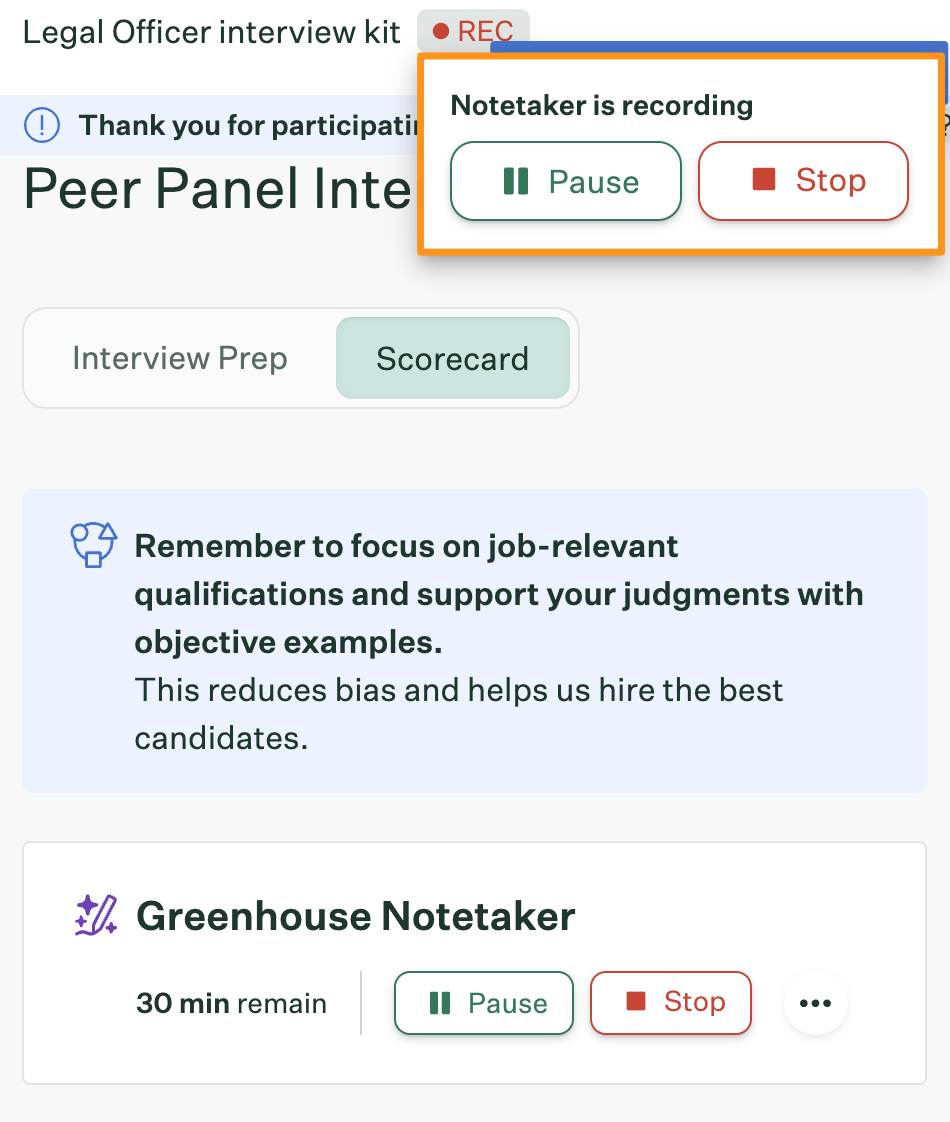
Greenhouse helped pioneer structured hiring, and its interview kits and scorecards are still at the center of the product.
You set an interview plan of stages and interviews. Each interview has a kit that tells the interviewer which attributes to focus on, which questions to ask, and how to prepare. AI can also suggest questions and scorecard attributes.
Greenhouse added its own notetaker, Greenhouse Notetaker, in August 2026. It joins Zoom, Google Meet, and Microsoft Teams interviews once the candidate consents while booking, records and transcribes the interview, and writes question notes mapped to the kit. Each interview it joins uses one credit, so ask how many your plan includes.
One recruiter on Reddit said they enjoy Greenhouse even though it’s “super clicky.” Their company was moving to another system, and they were weighing whether to fight to keep Greenhouse, since the new system didn’t seem to offer interview plans or scorecards.
Key features
- Scorecards: A rating for each attribute, plus an overall recommendation.
- Searchable transcripts: Clickable timestamps and an overall summary of each recorded interview.
- Scorecard summaries: Agreements, disagreements, and key quotes for the debrief.
- Reports: More than 40 pre-built, plus custom reports and dashboards.
Best for: Teams already hiring in Greenhouse that want structured interviews in the same place.
Pricing: Not published. Greenhouse prices by plan, hiring volume, and complexity.
10. Ashby: Best for interview reporting and analytics.
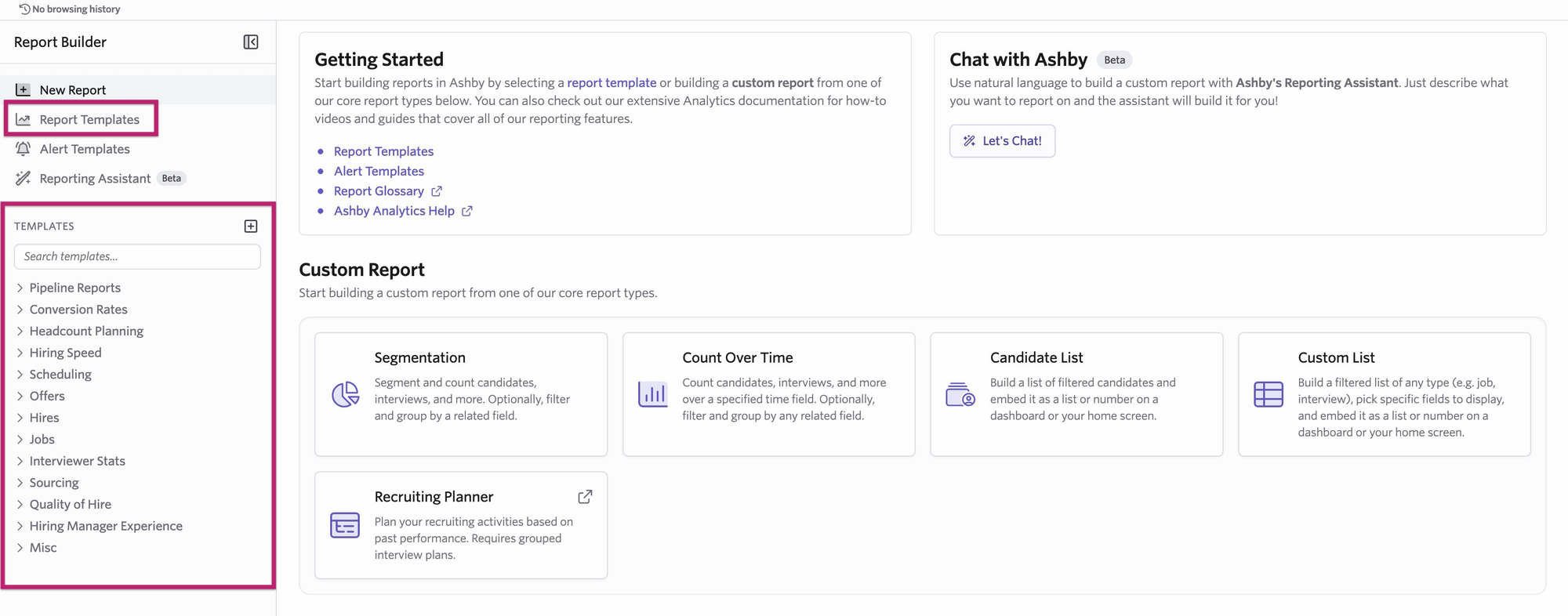
Ashby was founded in 2018. It’s an all-in-one ATS, and it also sells Ashby Analytics on its own for teams that want to keep Greenhouse or Lever.
You get ready-made reports on things like interview volume and time in process, plus the tools to build your own.
On TrustRadius, users point to custom reports they can build without a data scientist on the team, and to responsive support. One TrustRadius reviewer who called the reporting “top notch” still wanted more scheduling features and more customization in admin settings.
If reporting is your priority, it’s a strong pick. We think Ashby makes the most sense if you’ll also run your recruiting on it, since all your hiring data then sits in one system. Custom dashboards need its Plus plan or above.
Key features
- Report builder: Templates, custom reports, and an AI assistant you describe a report to.
- Dashboards: Per job and across the team.
- Alerts: Email or Slack messages that hold your hiring team to its service-level agreements.
- Feedback summaries: With citations back to each interviewer’s feedback.
- Interviewer limits: Caps on interviews per person each day or week.
Best for: Teams that want to report on every part of their interview process.
Pricing: The Foundations plan is for companies with up to 100 employees. It starts at $300 a month for up to 10 employees and rises with company size to $900 a month, with 10% off for an annual commitment. The Plus and Enterprise plans, and Ashby Analytics, are priced on request.
Which interview software should you choose?
Based on our comparison, here’s where each tool fits best:
- Choose Metaview Screening if you hire at volume and want a two-way screening call with every candidate you’ve decided to assess.
- Choose the Metaview Notetaker if you want one set of notes that pulls in a candidate’s interviews, resume, and job description.
- Consider GoodTime if matching and rebooking interviewers is what holds up your loops.
- Consider HireVue if you’re hiring at enterprise scale and want AI scores on recorded answers.
- Consider Spark Hire if you’re a smaller team that wants one-way video at a price you can see up front.
- Consider VidCruiter if you need multiple mini interviews or panel scoring, or want your interview tool to be your ATS too.
- Consider Paradox if your hourly applicants do everything on their phones and you want them screened and booked by message.
- Consider BrightHire if your hiring teams work in several ATSs, or you want coaching for your interviewers.
- Consider Greenhouse if you already run your hiring in Greenhouse and would rather add its notetaker than another tool.
- Consider Ashby if reporting is your top priority and you’re open to running your recruiting on it.
In this clip, Siadhal shares an analogy for what these tools leave your recruiters to do: as AI handles more of the work, the recruiter’s role is going to move from play-by-play commentator to the pundit who brings the expertise.
If last week’s scorecards still aren’t in, start with notes. If booking the loops is what drags, start with scheduling, and if screening calls fill your days, start with screening.
Spend less of your week on screening calls and interview notes.
See how Metaview Screening and the Notetaker fit the interviews your hiring team already runs.
Frequently asked.
Can one tool cover the whole interview process?
A few come close, and they’re full recruiting systems, such as VidCruiter, Ashby, and Greenhouse, that run interviews inside the same product as your ATS. Our Agentic Recruiting Platform covers screening, interview notes, and reporting, and works alongside the ATS and scheduling tools you already use.
How should you tell candidates an interview is recorded?
Your policy and local law set the rules, so tell candidates before the interview and explain how to opt out. BrightHire can email candidates about recording before their first interview, with an option to opt out. With the Metaview Notetaker, you set up the notice candidates get, and any candidate can decline recording from it. Two candidates on Reddit who were offered an opt-out asked whether taking it would hurt their chances, so say plainly how you treat it.
Can interview software move or reject candidates on its own?
Some can, within rules you set. Ashby can auto-reject applicants whose form answers match conditions you choose, and VidCruiter can advance applicants automatically, while a person still decides on the rest. Each automatic rule is a hiring decision made ahead of time, so set it with the care you’d give any other hiring decision.
How much does interview software cost?
Most of these vendors price on request. Whatever the base price, check the extras too: Spark Hire charges more to connect to Dayforce or Workday, and Ashby sells advanced scheduling as an add-on and prices its AI application review by credit. Our agents are priced separately, Screening and the Notetaker included, and several have a free plan to start.
Does interview software work with my ATS?
Most of it does, so the better question is what lands in the ATS and what stays in the interview tool. BrightHire puts interview replays and highlights in the ATS from its Teams tier, and Paradox updates each candidate’s status there as they move. We integrate with a wide range of ATS platforms, including Ashby, Greenhouse, Lever, Gem, and SmartRecruiters, and what reaches each one depends on the ATS and the agent.
How do candidates take a one-way video interview?
They open a link and record their answers to your questions before a deadline, usually with a set number of tries. With HireVue, you set the number of attempts and the deadline. Spark Hire lets candidates pause and come back before the deadline, and VidCruiter works on any device without an app.
