
AI recruiters do the work that eats your week: searching for candidates, reaching out to them, chasing the ones who stop replying, and sorting through everyone who applies.
We’d pick the AI recruiter that takes on the part of hiring that costs you the most time. It should also stop where you want a person to step in, such as a screening call or a decision about who moves forward. Each one still needs someone on your team: one of the eight tools below pauses itself after four days without activity.
If you’re still shopping or looking for something better, we’ve compared eight of the best AI recruiters for sourcing, outreach, and screening, and marked the point where you take over in each.
Eight AI recruiters compared.
Each row shows what the tool handles without you and the point where you step in.
| AI recruiter | Best for | What it does on its own | Where you take over |
|---|---|---|---|
| fillmore | Outbound, from a brief to a booked screening call | Researches candidates and builds target lists, writes the outreach and follow-ups, and books a screening call once you approve it | Each meeting request, which you approve or decline in one tap, with the pipeline in Slack throughout |
| Metaview | High-volume inbound applications and screening conversations | Application Review sorts every application by fit against the profile your hiring team approves, and Metaview Screening holds voice-led screening conversations | Each accept or reject in Application Review, and the choice of who moves forward after every completed call |
| hireEZ | Enterprise teams that want one agent across the funnel | Sources, ranks by fit, drafts outreach, prescreens candidates, and schedules interviews | The plan it drafts, and each move forward or out |
| Paradox | High-volume hourly hiring over text | Screens applicants by text on your knockout questions and schedules interviews for those who qualify | Any conversation you take over, and the candidates your workflow sends for review |
| LinkedIn Hiring Assistant | Teams that source mostly on LinkedIn | With instant outreach on, finds candidates and sends InMails and follow-ups, then prescreens replies | When its sourcing goal is met, or any thread you take over |
| Juicebox | Daily sourcing for roles you hire for again and again | Sources a batch each day and, in “Automatic” mode, approves leads and runs your outreach or shortlist step | Each reply, plus lead approval in “Manual” mode |
| Alex | First-round screening by phone, video, or text | Holds first-round conversations, scores them, and books candidates who clear your bar | The next round, and the decision on everyone else, unless a rule you set acts first |
| Ribbon | Voice screening in frontline and multi-site hiring | Invites candidates and holds scored voice screening calls | The scored calls, and each candidate’s status |
What does an AI recruiter do?
An AI recruiter takes on whole stages of the outbound and inbound work. On the outbound side, it finds people who haven’t applied and reaches out to see if they’re interested, and some keep the conversation going until a call is booked.
On the inbound side, it works through the people who apply. It can sort applications against criteria you set, hold a first screening conversation with the candidates you choose, or both. Either way, your time goes to the candidates who fit.
Compared with the recruiting software you already run, the difference is who does the work:
- You run each search yourself
- Its AI features help with one task at a time
- You move the work from one step to the next
- Works from a brief you give it
- Takes on a whole stage of the job
- Works through the stage until your hiring team takes over
Our three tests for an AI recruiter.
We started from our own two, fillmore and our inbound agents, and the AI recruiters that come up when you search for the term or ask an AI assistant about it. Each does three things:
- It works from a brief, whether that’s a job description, a list of requirements, or your screening rules.
- It shows its work, from who it found to what candidates said, and your hiring team can steer it as it goes.
- It connects to tools you already use, like Slack or your applicant tracking system (ATS).
The 8 best AI recruiters in detail.
Start with the entry built for the work you’d hand off first. After our own two, the order isn’t a ranking.
1. fillmore: Best for outbound from a brief to a booked screening call.
fillmore is the AI coworker we built for outbound recruiting, and it works in Slack. Give it a role and a brief, and it researches prospective candidates, builds target lists, writes personalized outreach, and manages the follow-ups. When a candidate wants to meet, the request comes to you in Slack, and once you approve it with one tap, fillmore books the screening call.
We built it so your recruiters can hand over the outbound legwork and keep the conversations that need them. In the video below, our chief executive, Siadhal Magos, explains why he thinks AI will be good for recruiters.
fillmore never assesses, scores, ranks, or decides on a candidate. Your recruiters review the pipeline, and you and your hiring managers can refine a search, adjust the outreach, pause a campaign, or redirect it in Slack, the way you’d message a teammate.
Not sure which roles to give it first? We’ve mapped out which roles suit an outbound agent.
Key features
- Plain-language briefs: Start from a role, a brief, or a rough description of who you want.
- Target lists: Prospective candidates researched for each role.
- Personalized outreach: A message written for each person, plus the follow-ups.
- Slack-based control: Steer each search from Slack.
Best for: Hiring teams that spend more of the week searching and chasing replies than talking to candidates.
2. Metaview: Best for high-volume inbound applications and screening conversations.
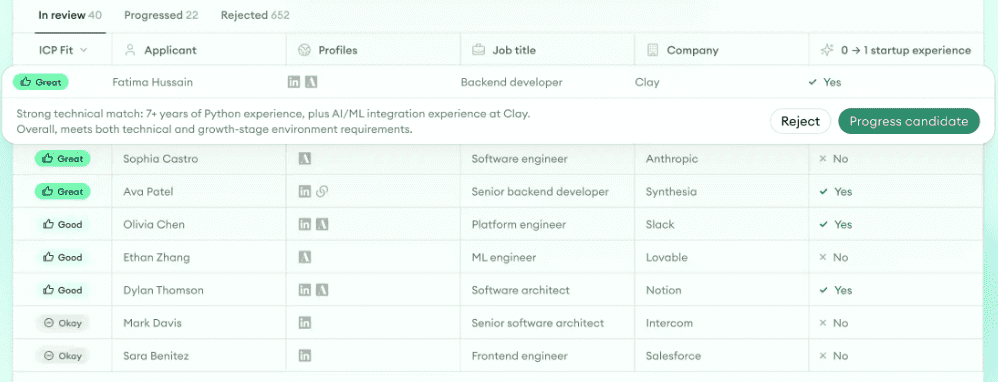
Our two inbound agents are Application Review and Metaview Screening. When applications pile up, they show you the reasons behind each candidate’s fit before anyone decides who moves forward.
With the reasons in front of you, you can check each result instead of doing the review again yourself.
Application Review reads every application synced from your ATS, checks it against the ideal candidate profile you’ve approved, and sorts applicants into fit groups, each with its reasoning. The ATSs we support include Greenhouse, Ashby, and Lever. Every accept and reject decision stays with a recruiter.
Siadhal Magos, our co-founder, explains why we built it:
No one gets into recruiting to be a human spam filter. With Application Review, recruiters can respond at the speed candidates expect without sacrificing quality or burning out their teams.”

With Metaview Screening, the candidates your hiring team picks get a voice-led screening conversation they can take on desktop or mobile, with no login, whenever it suits them. Candidates can ask it questions during the call.
Each completed call leaves you a recording, a transcript, and a fit rating that shows its reasons, and a recruiter then chooses who moves on.
AI Sourcing is our sourcing agent: unlike fillmore, it finds candidates without contacting them. From one plain-language prompt, it looks through your connected ATS, the web, and conversations your hiring team has recorded with us, and returns candidates, each with the reason it was picked.
Among those conversations are interviews recorded with the Metaview Notetaker, which records only if consent is given and captures every spoken word. The next time a similar role opens, AI Sourcing can search what those candidates told you.
Key features
- Fit groups with reasons: Every application read against your approved profile.
- Voice-led screening: Calls on desktop or mobile, with a recording and transcript for your hiring team.
Best for: Hiring teams with heavy inbound volume that want every application read and a screening conversation with the candidates they choose.
Pricing: We have a free plan, and our paid plans are priced per agent.
3. hireEZ: Best for enterprise teams that want one agent across the funnel.
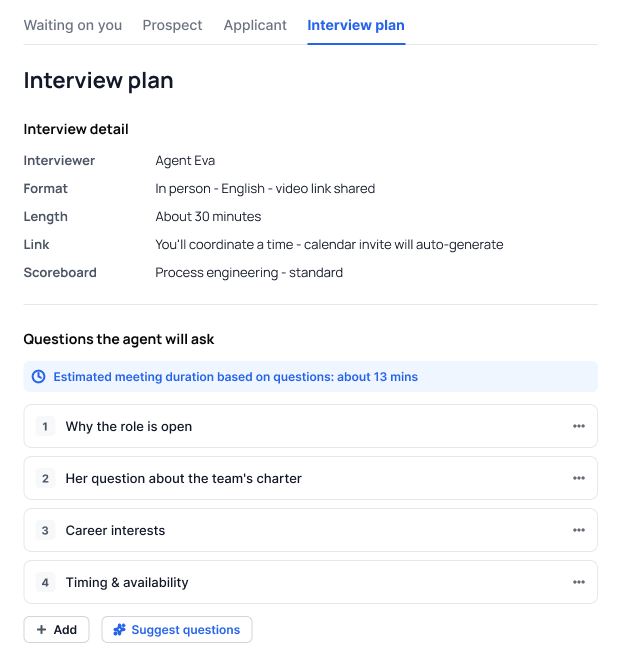
hireEZ’s EZ Agent runs on top of the ATS you already have, including Workday, SAP SuccessFactors, iCIMS, and Greenhouse. EZ Agent comes back with candidate options and the reasoning behind them once you’ve briefed it on the role, the must-haves, your rules, and an Ideal Candidate Persona.
Then it works across the funnel. It sources from 45 or more job boards and niche platforms plus your ATS, ranks candidates by job fit, and drafts personalized outreach by email, text, and InMail. It can also prescreen candidates by voice or chat around the clock and coordinate interview times.
EZ Agent drafts a plan for you to check before it acts, and it asks for your approval before it moves anyone forward or rejects them.
Key features
- Persona-based briefs: The persona and the rules you’re hiring to, in your own words.
- Ranking by job fit: Candidates from job boards, niche platforms, and your ATS, ranked with context.
- Outreach across channels: Email, text, and InMail, with the follow-ups sequenced.
- Voice or chat prescreens: A conversation summary and a job-fit analysis for each candidate.
- Integrity checks: Flags for AI-assisted answers and inconsistent profiles.
Best for: Enterprise recruiting teams that want sourcing through scheduling handled on top of the ATS they keep.
Pricing: Priced through sales for enterprise teams.
4. Paradox: Best for high-volume hourly hiring over text.
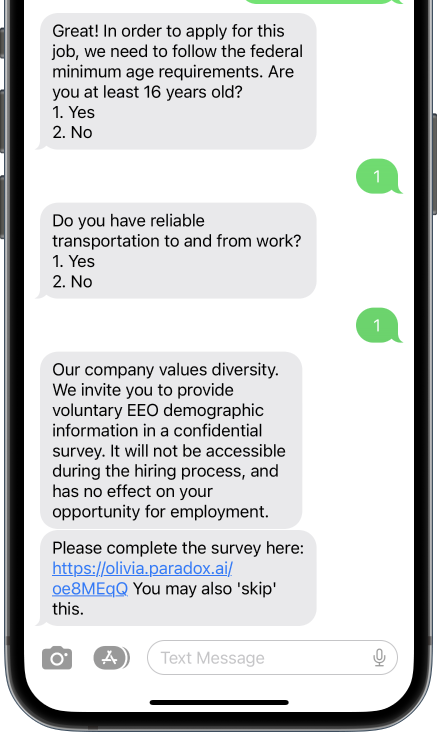
Olivia, Paradox’s Candidate Experience Agent, talks to applicants by text over SMS, WhatsApp, Facebook Messenger, or web chat. Candidates can start from a text-to-apply keyword or a QR code.
Olivia checks each candidate against the job’s requirements, and it can schedule an interview for anyone who qualifies and point others to different jobs. It also answers candidates’ questions, handles rescheduling and reminders, and can translate messages into the candidate’s language.
You write the screening questions and set the workflows, and you can take over any conversation. In Paradox’s Conversational ATS, each answer can move a candidate to a status you set. Use a review status for those moves, so no candidate is moved by mistake. Each candidate’s full conversation is in their profile.
Key features
- Text-based screening: Knockout questions over SMS, WhatsApp, Messenger, or web chat.
- Text to apply: A keyword or a QR code starts the application from a phone.
- Automatic scheduling: Interviews booked and rescheduled for qualified candidates, with reminders.
- Workflows you set: Your hiring team decides what happens after each answer.
- Workday fit: Paradox is part of Workday and works inside Workday Recruiting through a browser extension.
Best for: Frontline employers hiring hourly staff at volume by text.
Pricing: Custom pricing through a demo.
5. LinkedIn Hiring Assistant: Best for teams that source mostly on LinkedIn.
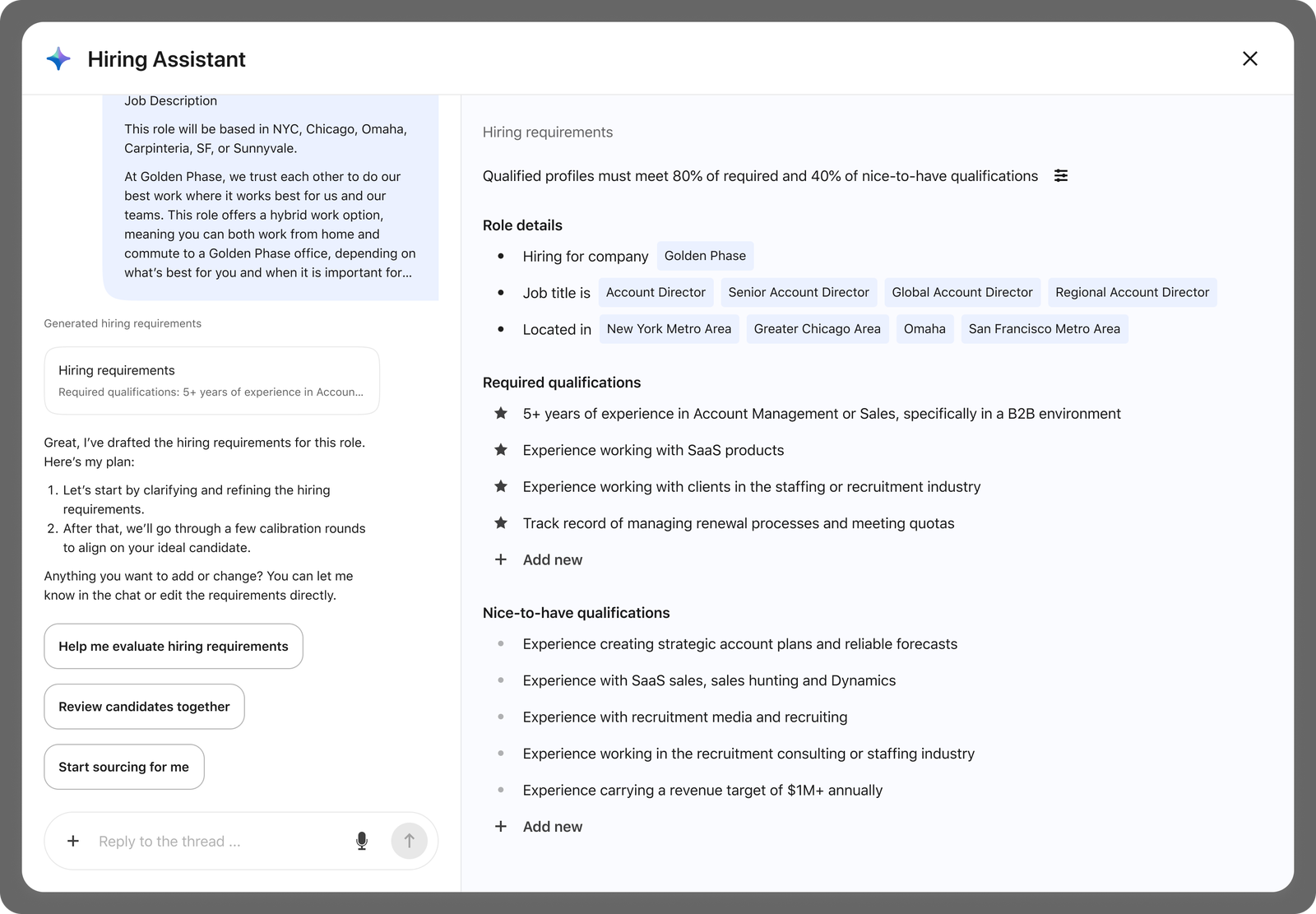
Hiring Assistant is an AI agent built into LinkedIn Recruiter and sold as an add-on. You can start a project from a job description, a link to the job post, or an ideal candidate’s name. It then drafts the role and suggests required and nice-to-have qualifications for you to check.
With instant outreach on, it runs the search on its own. It finds candidates, sends the first InMails and the follow-ups, and prescreens the people who reply until it reaches the sourcing goal you set for the project. Then it pauses until you review.
Candidates see a note that they’re messaging Hiring Assistant, and it asks their permission in the InMail thread before it prescreens them. You can read a summary and take over the conversation at any point. Hiring Assistant shows how each candidate’s qualifications match your criteria, and you decide who moves forward.
Key features
- Drafted requirements: Required and nice-to-have qualifications from your job description.
- Instant outreach: InMails and follow-ups sent until your sourcing goal is met.
- Prescreening in InMail: Questions asked once a candidate agrees, with a summary for you.
- Learning from feedback: Your thumbs up and down shape the next candidates it finds.
- Hiring manager input: Feedback from hiring managers in Microsoft Teams.
Best for: Recruiting teams on LinkedIn Recruiter that want sourcing and first outreach handled over InMail.
Pricing: An add-on to LinkedIn Recruiter, priced through sales. Each license has monthly limits, such as 200 sourced candidates on the first tier for LinkedIn Recruiter Corporate.
6. Juicebox: Best for daily sourcing on roles you hire for again and again.
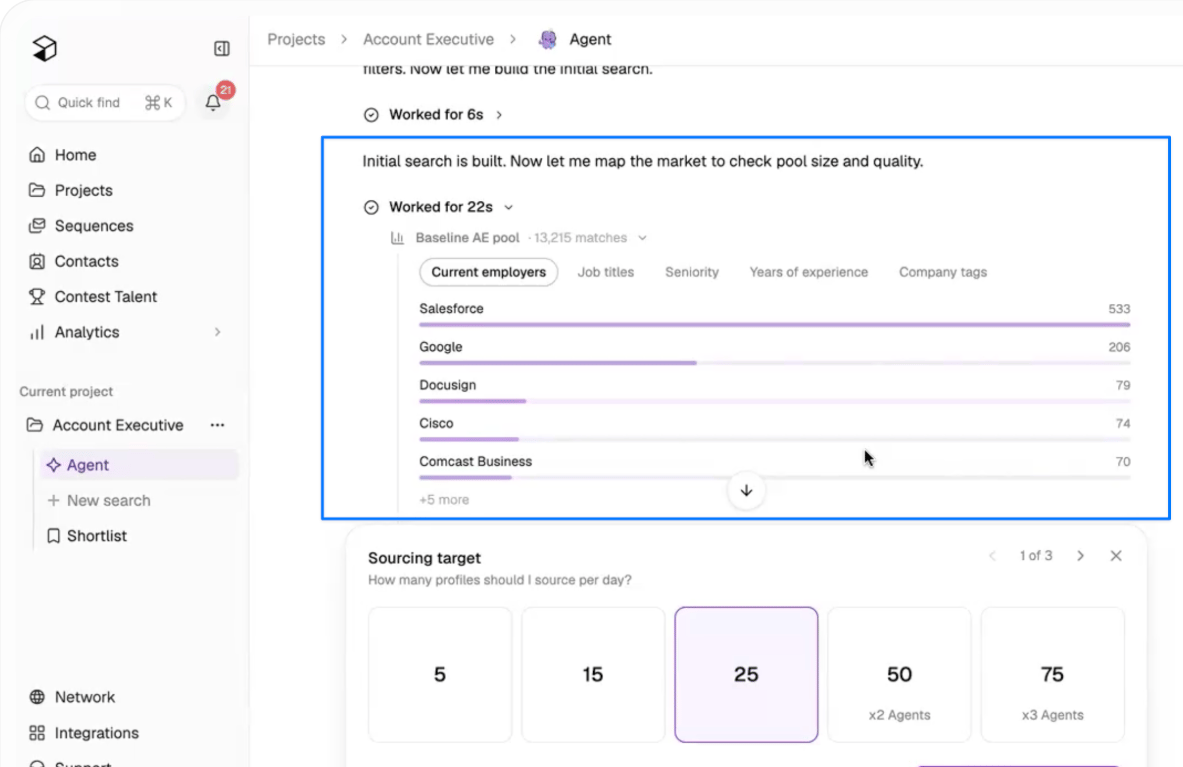
Each Juicebox Agent sources against the criteria you set and delivers a fresh batch of leads every morning, with a note on why each one fits. You can describe the role in plain language or point the Agent at a job description link, a LinkedIn profile to match, or a job in your ATS.
Before it searches, the Agent maps the talent market and tests versions of the search. After that, your approvals and feedback teach it what a good lead looks like.
In “Manual” mode, you approve each lead before any outreach. In “Automatic” mode, the Agent approves matching leads and runs the step you picked, sending your email sequence or adding them to the shortlist. Emails go from your own mailbox, and a sequence stops as soon as a candidate replies.
It works best on repeatable or high-volume roles. An Agent pauses after four days without activity, so in “Manual” mode, someone needs to keep reviewing its batches.
Key features
- Market mapping: The talent pool by employer, title, seniority, and experience.
- Daily leads: A new batch every morning, with a reason for each profile.
- Approval modes: “Manual” to approve every lead, or “Automatic” to let the Agent approve leads and run your chosen step.
- Email sequences: Sent from your connected mailbox and stopped when a candidate replies.
Best for: Recurring searches you’d otherwise rerun by hand every week.
Pricing: Agents are an add-on to a paid plan, at $199 per agent a month, whether you pay monthly or yearly. Paid plans start at $99 per seat a month, billed annually.
7. Alex: Best for first-round screening by phone, video, or text.
Alex, the AI recruiter from Apriora, holds two-way first-round conversations with applicants by video, phone, SMS, or WhatsApp, and asks follow-up questions as it goes. It handles invitations, reminders, and rescheduling. When a candidate clears your bar, it books them onto your hiring team’s calendar.
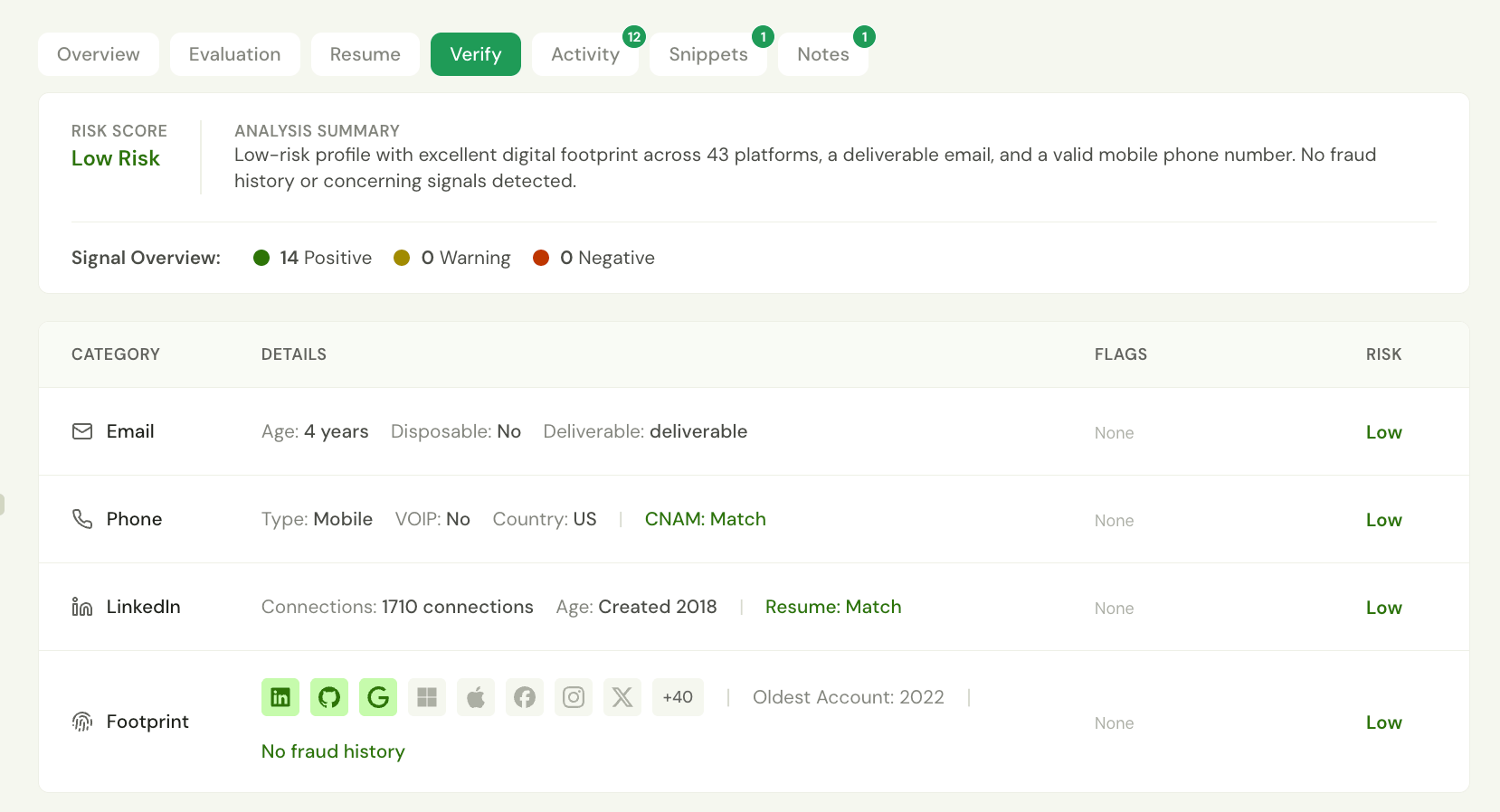
Start each first round from a job in your ATS, a posting link, a job description, or a template, and Alex drafts the questions, each with its own rubric. A report can include a transcript, a recording, scores, a summary, and integrity checks for fraud and cheating, and you can ask Alex how a candidate answered.
Alex leaves the final hiring decision to your hiring team, unless you build workflow rules that advance a candidate or send a rejection on a score.
Before a web interview starts, candidates see that they’ll be talking to AI, and they can ask for a person instead, an option that’s on by default.
Key features
- Four channels: Video, phone, SMS, and WhatsApp.
- Generated rubrics: Questions drafted for each first round, each with its own rubric.
- Scored reports: Transcripts, recordings, scores, and summaries in one report.
- Fraud detection: Fraud, cheating, and identity checks, with a risk level.
Best for: Giving every applicant a first-round conversation, by video, phone, or text.
Pricing: Quoted through sales after a demo.
8. Ribbon: Best for voice screening in frontline and multi-site hiring.
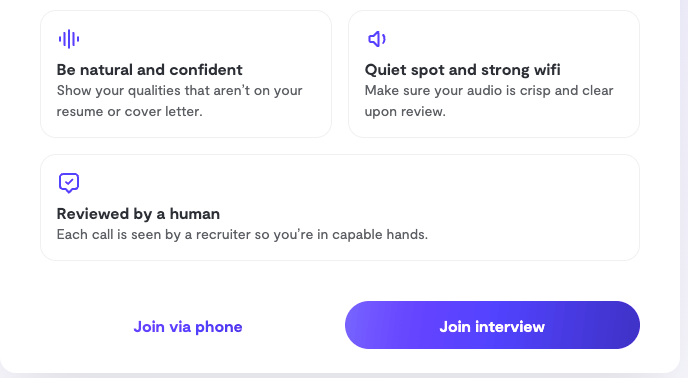
When a candidate reaches a stage you pick in your ATS, Ribbon can invite them by email, SMS, or WhatsApp to a structured voice screening call they can take at any hour. It follows up when an answer needs more detail, and video is there if you want it.
Check the questions, scoring criteria, language, and voice for each role before the screen goes live. After each call, you get a summary, a scorecard with the quotes and timestamps behind each score, the recording, and the transcript.
Hiring decisions stay with your hiring team. Integrity checks flag scripted or AI-assisted answers, a second person in frame, and risky contact details for a recruiter to review.
Before anything is recorded, candidates see an AI-use notice and a consent notice.
Key features
- Voice screening calls: Structured calls at any hour, with follow-up questions.
- Stage-based invitations: Email, SMS, or WhatsApp invites when a candidate reaches an ATS stage, on Scale and Enterprise plans.
- Evidence-backed scorecards: Each score tied to what the candidate said, with a timestamp.
- Integrity monitoring: Flags for scripted answers, lookaways, and risky contact details.
Best for: High-volume hourly and frontline hiring teams, including staffing firms and employers hiring across many sites.
Pricing: Self-serve plans with a 7-day free trial.
How do you choose an AI recruiter?
Run these five checks in order, from your team’s own hours to the tool’s first week of messages.
Log a week of your team’s hiring hours.
For one week, note the hours your recruiters spend sourcing, writing outreach, chasing replies, and holding first screens. Then pick the AI recruiter built for the biggest of those.
Ask to see the steps you’d run every day.
In a demo, have the vendor take you from the brief to the hand-over, and treat everything else as optional. When you write the brief for your AI recruiter, mark which requirements are fixed, like a license or a location, and which are only nice to have.
Check it against a hire you’ve already made.
If you can get a trial or a free plan, run the tool on a role you’ve filled before, with outreach switched off. You know who the strong candidates were. Where it misses someone you hired or picks someone you’d have skipped, look at why before you decide. If a better brief closes the gap, keep going. If the gap is still there after you’ve rewritten the brief, look at another tool.
For a tool that holds screening calls, take a few practice calls yourself first, if the tool allows it.
Settle which steps stay manual.
Some of these AI recruiters can take a step on their own, like sending outreach, moving a candidate on a knockout answer, or advancing or rejecting someone on a score. Before you switch anything on, agree with your hiring team on which steps stay manual, and ask the vendor what a person approves before the first message goes out.
List anyone the tool shouldn’t contact, such as current employees or people you spoke to this year, before outreach starts.
Read every message from week one.
Every message and screening call carries your company’s name. Have whoever runs the tool read every message and review every call from its first week, then adjust the brief, the tone, or the settings before you add more roles or decide it can’t do the job.
Our two picks, for outbound and inbound.
If outbound recruiting eats your week, fillmore is our pick, and it’s the one we built for that job. It keeps at a search until someone’s interested, then books the call once you approve it in Slack, so your recruiters’ first conversation is with a candidate who wants one.
If applications are piling up, Application Review and Metaview Screening are the pair we’d pick.
Give your AI recruiters the legwork and keep the decisions.
See how fillmore books screening calls from a brief, and how our inbound agents handle the applications coming in.
Frequently asked.
Can an AI recruiter spot fraudulent candidates?
Several can flag it for a person to check. Application Review flags applications that show signs of identity deception or automated applying, and Metaview Screening flags AI-assisted or fraudulent-looking answers during the call. Among the others, hireEZ, Alex, and Ribbon run integrity checks on their screening calls.
Can an AI recruiter replace a human recruiter?
No, it takes stages like sourcing, outreach, and first-round screening off a recruiter’s plate, which leaves more time for the part of recruiting that’s about people: getting to know candidates, what motivates them, and whether they’ll suit the hiring manager. We’ve also created an explainer on what AI and recruiters each do best.
Do AI recruiters learn from your feedback?
Some do. LinkedIn Hiring Assistant and Juicebox learn from your feedback, and so does our Application Review: it learns from your recruiters’ decisions to progress or reject candidates. It then suggests changes to your ideal candidate profile, and someone on your hiring team approves them before anything changes.
Should candidates know they’re talking to an AI recruiter?
Tell candidates up front when a step is run by AI, and offer them a person where your policy or local law asks for one. With Metaview Screening, which adheres to the EU AI Act and New York City Local Law 144, your hiring team can offer candidates the option to opt out of the screening conversation.
How are AI recruiters priced?
Juicebox publishes its prices, per agent for its Agents and per seat for its plans, and hireEZ publishes a solo plan and quotes enterprise teams through sales. Paradox, LinkedIn, and Alex quote through their sales teams, and we price our paid plans per agent. Before you compare, count the agents and seats you’d need in a month, since that’s what those prices scale with.
What’s the difference between an AI recruiter and AI sourcing software?
AI sourcing software finds candidates and stops there. An AI recruiter carries them further, through outreach and follow-ups or a first screening conversation. Our own AI Sourcing is sourcing software in that sense, which is why we’d point you to fillmore for outbound. If search is all you need, we’ve rounded up the best AI sourcing tools too.
