
When a role pulls in hundreds of applications, someone on your hiring team has to read every resume first. Your keyword filters and the rules in your applicant tracking system (ATS) take some of that load, but they still let good people slip through.
Good AI resume screening software reads each application against what the role needs and tells you why each candidate landed where they did. The tools worth paying for give you a first pass you can check, and they leave the call on every candidate with a person.
Whether you’re replacing a keyword filter or weighing what your ATS already includes, we’ve compared the main options. Here are the ten best AI resume screening tools for high-volume hiring, with what each one gives you back and how it’s priced.
The best AI resume screening tools at a glance.
Here’s what each tool is best for, what it works with, and what you get back for each applicant.
| Tool | Best for | Works with | What you get back |
|---|---|---|---|
| Metaview Application Review | High-volume AI resume screening | Eight supported ATSs, including Greenhouse, Ashby, and Lever | Each applicant grouped by fit, with the reasoning and any fraud flag |
| Greenhouse | Weighted matching inside Greenhouse | Greenhouse (built in) | A match category, with matched and missing skills |
| Workable | Screening plus candidate follow-up | Workable (built in) | A score out of 100, with reasoning for each criterion |
| Lever | Evidence-backed fit at no extra cost | Lever (built in) | A fit percentage, with the evidence for each requirement |
| Workday HiredScore | Enterprise hiring on Workday | Workday Recruiting (built in) | A grade from A to D, with the rationale behind it |
| Ashby | Criterion-by-criterion review with citations | Ashby (built in) | A result on each criterion, with citations from the resume |
| Manatal | Small teams and agencies that pay per user | Manatal (built in) | A match percentage, with line-by-line reasons and gaps |
| Pinpoint | Scores that come with interview focus areas | Pinpoint (built in) | A score out of 10, with a verdict, strengths, and concerns |
| Gem | Teams that already source in Gem | Gem’s own ATS, Greenhouse, Workday, iCIMS, or SuccessFactors | A weighted match percentage, with a plain-language summary |
| Brainner | Pairing resume review with identity checks | More than 30 ATSs, including Greenhouse, Lever, and Workday | A ranking with a reason for each criterion, plus an identity check |
What good AI resume screening software needs to do.
AI resume screening software reads your applications first, before anyone on your team does. You write down what the role needs, the things your best recruiter would look for, and AI checks each resume against them.
When you’re hiring at volume, every applicant deserves the same careful read. Before you buy, check whether the software can:
- Read every application against your criteria, including the ones that arrive after you’ve started reviewing.
- Flag applications that look fake, so a person can take a closer look.
- Explain each result, so you can check it against the resume.
Here’s how that kind of reading differs from a keyword filter:
- Match the exact words on a resume
- Miss candidates who describe a skill another way
- Show the word matched, not why the candidate fits
- Read each resume against criteria in plain language
- Give credit for related job titles and skills
- Can show the reasoning behind each result
In the end, judge each tool on the hours it hands back to your hiring team and how strong its shortlists are.
Our top picks for AI resume screening tools.
Each of these ten does three things we’d want from any tool on a high-volume role:
- It reads each candidate’s resume, rather than screening candidates through a conversation or an assessment.
- It leaves the decision on each candidate with your hiring team, apart from rules you choose to switch on.
- It works inside or next to an ATS you may already use.
Prices change often, so confirm each one with the vendor before you buy.
The 10 best AI resume screening tools in detail.
Seven of these are built into an ATS, and the other three, ours included, work alongside the ATS you already run.
1. Metaview: Best for high-volume AI resume screening.
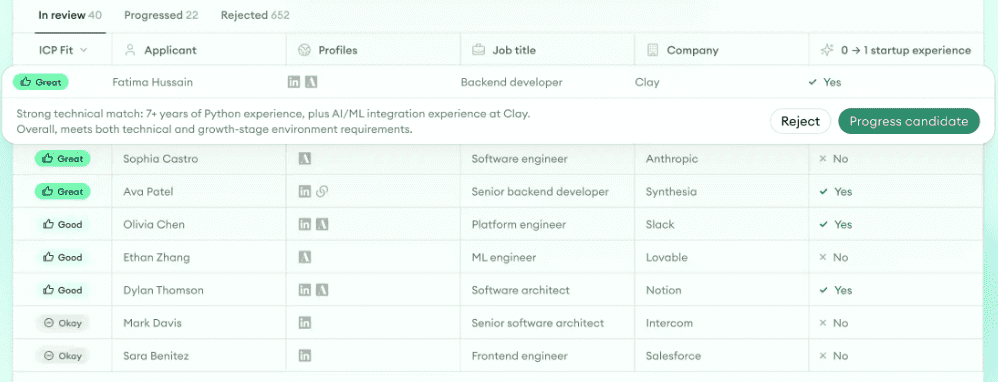
Metaview Application Review is our AI agent for inbound applications. It drafts an ideal candidate profile from your job description, your hiring team edits and approves it, and then it reads every application against that profile. Applicants are grouped by fit, each with the reasoning behind it, so you can start with the closest matches.
Three things make it our pick for high-volume roles. First, new applications from a supported ATS are evaluated automatically in the background, so a late applicant gets the same read as an early one. Second, when you update the profile, Application Review re-evaluates every applicant against the new version, so changing your criteria partway through a role doesn’t mean starting over.
Third, fraud detection is on by default, with no setup. Every application is checked for identity deception and for signs it was submitted by an automated tool, and each flag comes with a risk level and a plain-language explanation.
As your hiring team accepts and rejects candidates, Application Review learns from those decisions and suggests refinements to the profile for you to approve.
Application Review sits beside your ATS rather than inside it, so you keep the system you have. Candidates sync in from your ATS if it’s one we support, such as Greenhouse, Ashby, Lever, or Workable. Accept and reject decisions sync back to Ashby, Greenhouse, Lever, and SmartRecruiters. With any other ATS we support, such as Workable, your team also records each decision in the ATS.
A recruiter makes every accept and reject call, flagged or not, and Application Review never auto-rejects. Our co-founder Siadhal Magos puts it this way:
Application Review represents a fundamental shift in how AI should work in recruiting, not as a replacement for human judgment, but as infrastructure that handles operational scale while keeping recruiters focused on what matters: connection and decision-making”

Application Review works as one agent within our Agentic Recruiting Platform. When you want to hear from the candidates who fit, you can send them to Metaview Screening for a voice-led screening conversation. After each completed call, the decision on who moves forward stays with a recruiter.
When the candidates you advance reach the interview stage, the Metaview Notetaker records an interview only if consent is given. It captures every spoken word, so your interviewer’s scorecard draft starts from what the candidate said.
Key features
- Ideal candidate profile: Drafted from your job description, then edited and approved by your team.
- Fit groups with reasoning: The reason each applicant landed in their group, ready to check against the resume.
- Custom criteria: Your own checks added as extra columns, such as deal size experience or location fit.
- Fraud flags: On by default, each with a risk level and an explanation.
- Self-calibration: Suggested profile refinements from your team’s decisions, approved by a person.
Best for: High-volume hiring teams that need every application read, late arrivals included.
Pricing: You can start on our free plan, and each paid plan is priced per agent. Book a demo and our team will work out the right price for your hiring volume.
2. Greenhouse: Best for weighted matching inside Greenhouse.
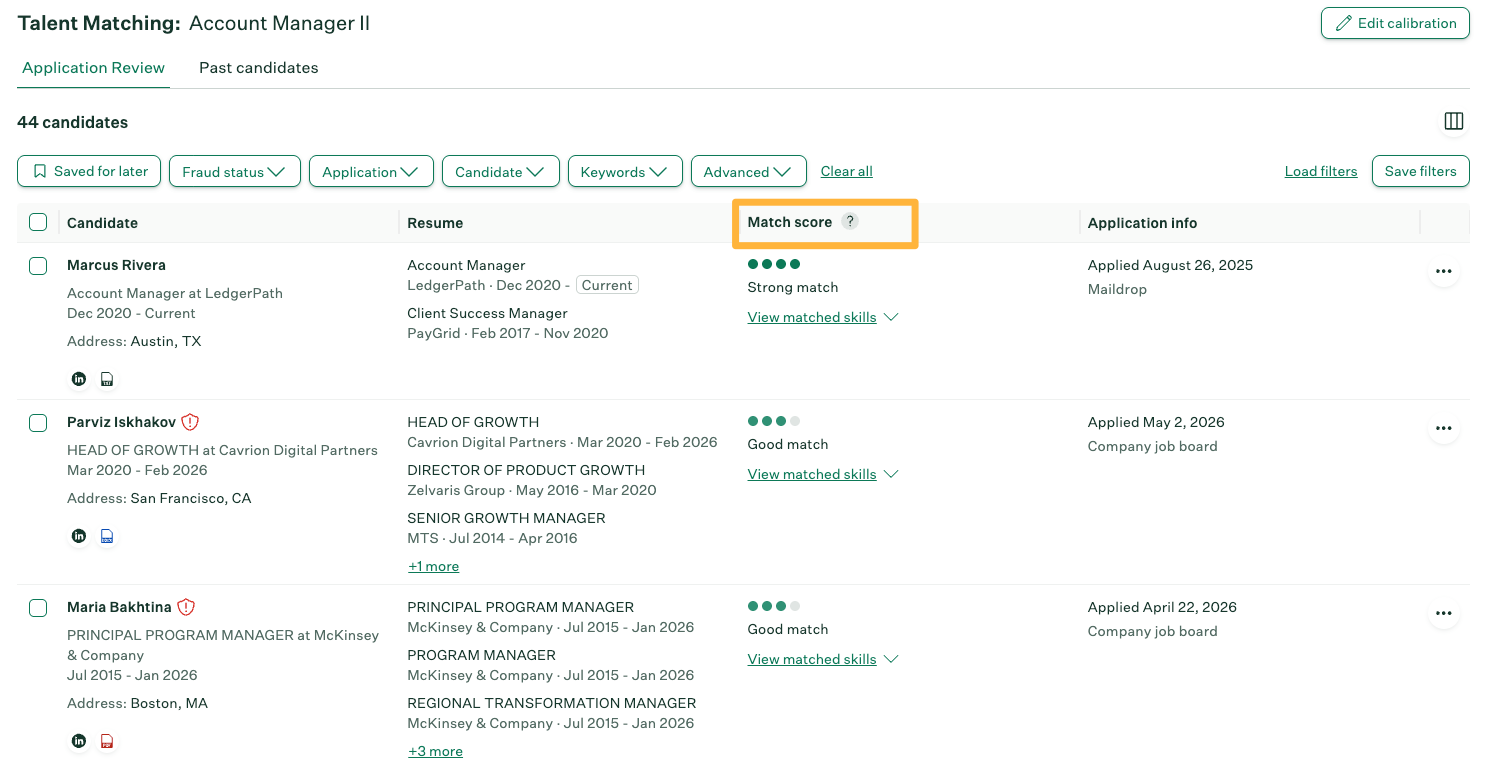
Greenhouse Talent Matching starts from a calibration you set for each role. It covers the skills, experience, and job titles the role needs, plus the industry if you like, each weighted by importance. A beta assistant can draft it for you from a plain-language description of the role.
Each candidate lands in a match category, from “Strong match” to “Limited match,” with the skills they matched and missed. Matching terms are highlighted on the resume. Candidates whose resume can’t be processed land in “Needs manual review,” for a person to assess.
You advance or reject from the results, one candidate or several at a time. Greenhouse also checks applications for fraud on the Plus and Pro plans, using phone, email, internet protocol (IP) address, and location signals, and it offers identity verification.
Talent Matching works from the resume. If the answers on your application form weigh most for a role, like shift availability or a license, review them alongside the match.
Key features
- Weighted calibration: Skills, experience, job titles, and industry, each with its own importance.
- Match categories: “Strong match,” “Good match,” “Partial match,” or “Limited match,” with matched and missing skills.
- Highlighted resumes: Matching terms marked on the resume.
- Bias guardrails: Protected attributes blocked from calibrations, plus monthly third-party bias audits.
Best for: Greenhouse customers who want weighted, explainable matching in the same system as their fraud checks.
Pricing: Custom, by plan. Ask whether Talent Matching comes with your plan or with the Real Talent add-on.
3. Workable: Best for screening plus candidate follow-up.
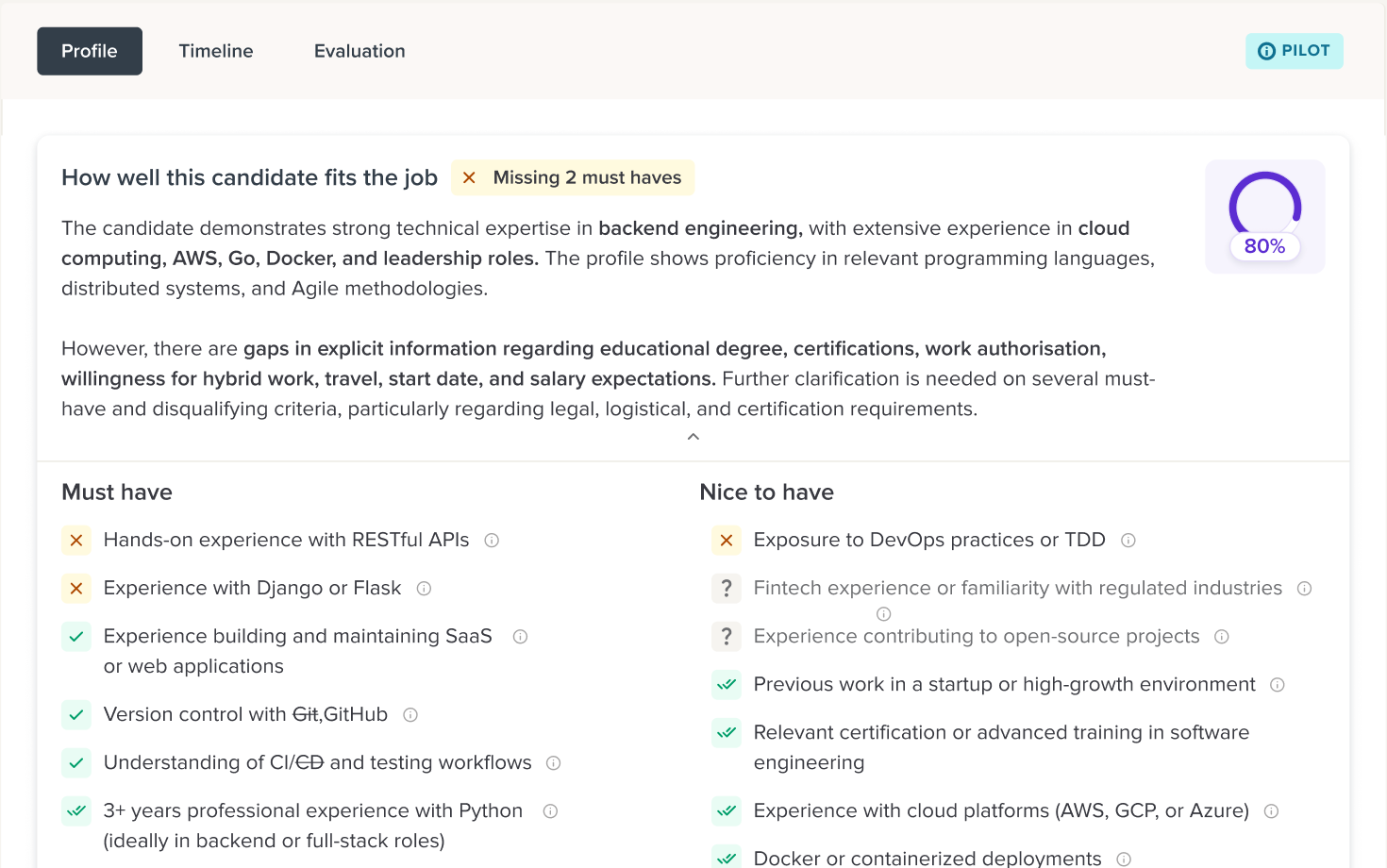
In Workable, you build an ideal candidate profile in a guided conversation with the Screening Agent. The Screening Agent then evaluates everyone who applies against that profile, giving the must-haves more weight. Each candidate gets a score out of 100, with each criterion given a status such as “Met,” “Partially met,” “Not met,” or “Unknown,” and the reasoning behind it.
Where details are missing, its Engagement Agent messages the candidate to fill the gaps, then scores them again. You can also let the agents advance strong candidates or disqualify anyone who misses a dealbreaker.
Auto-disqualify starts turned off, and the agents stop acting on a candidate as soon as someone on your team does. The Screening Agent works on jobs created with the Workable Agent, and you can upgrade older jobs to use it. Ask which languages it covers before you roll it out across regions.
At high volume, the cost adds up, since screening uses an AI credit for each candidate. Put hard requirements in knockout questions instead: they disqualify applicants before screening and use no credits.
Key features
- Guided profile: A conversation that turns your hiring needs into a structured ideal candidate profile.
- Weighted must-haves: Must-have criteria count for more in the overall score.
- Candidate follow-up: Messages that fill gaps in a candidate’s information before re-scoring.
- Optional automation: Auto-advance and auto-disqualify, each set by account, job, or candidate.
- AI-assisted tagging: Applications made with automated tools tagged so you can filter them.
Best for: Teams on Workable that want screening and candidate follow-up in one workflow, with automation they control.
Pricing: Plans from $299 a month (Standard, for 1 to 20 employees, billed annually). Each plan includes AI credits, and extra credits cost $0.095 to $0.12 each, depending on the bundle.
4. Lever: Best for evidence-backed fit at no extra cost.
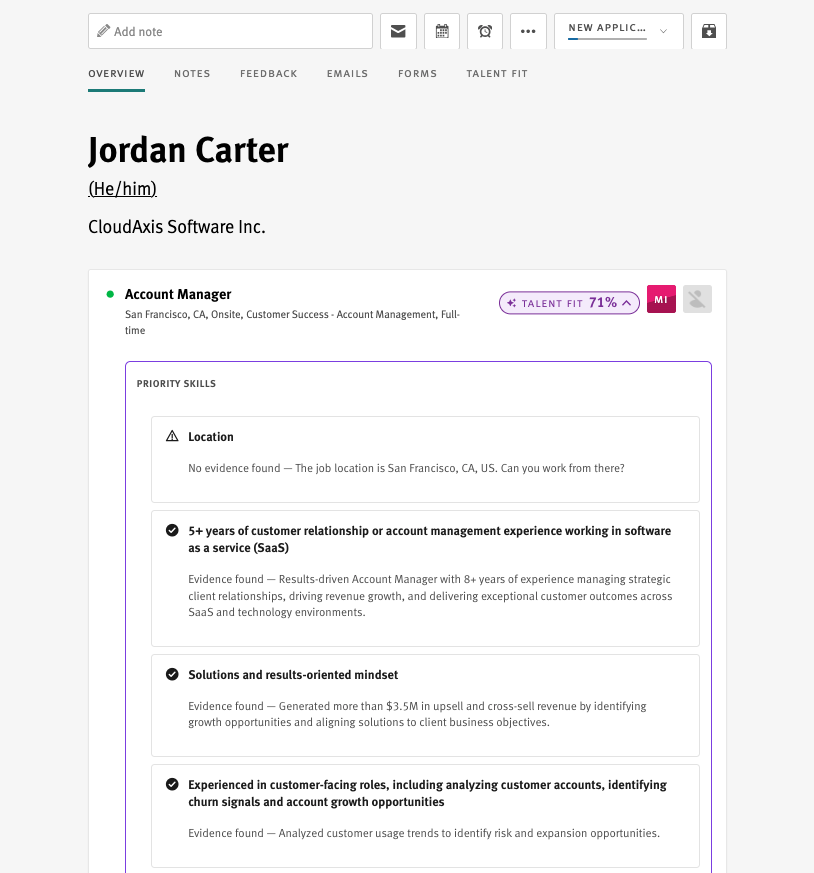
Talent Fit, Lever’s built-in matching, turns your job description into a list of requirements and checks each new applicant’s resume against them.
You get a percentage for each candidate it evaluates, with every requirement marked “Evidence found,” “Unclear,” or “Evidence not found.” The unclear ones make good questions for the first call.
Every candidate stays in your pipeline for review, with or without a result. To change what Talent Fit measures, edit the job description.
Key features
- Generated requirements: Skills and credentials drawn from the job description.
- Evidence per requirement: Marked found, unclear, or not found, so a recruiter can check it.
- Fit percentage: A single figure for every candidate Talent Fit evaluates.
- Fraud Signals: Email, phone, application volume, and company background checks.
Best for: Lever teams that want explainable fit for their applicants without adding a separate tool or cost.
Pricing: Custom quote. Talent Fit is included at no additional cost.
5. Workday HiredScore: Best for enterprise hiring on Workday.
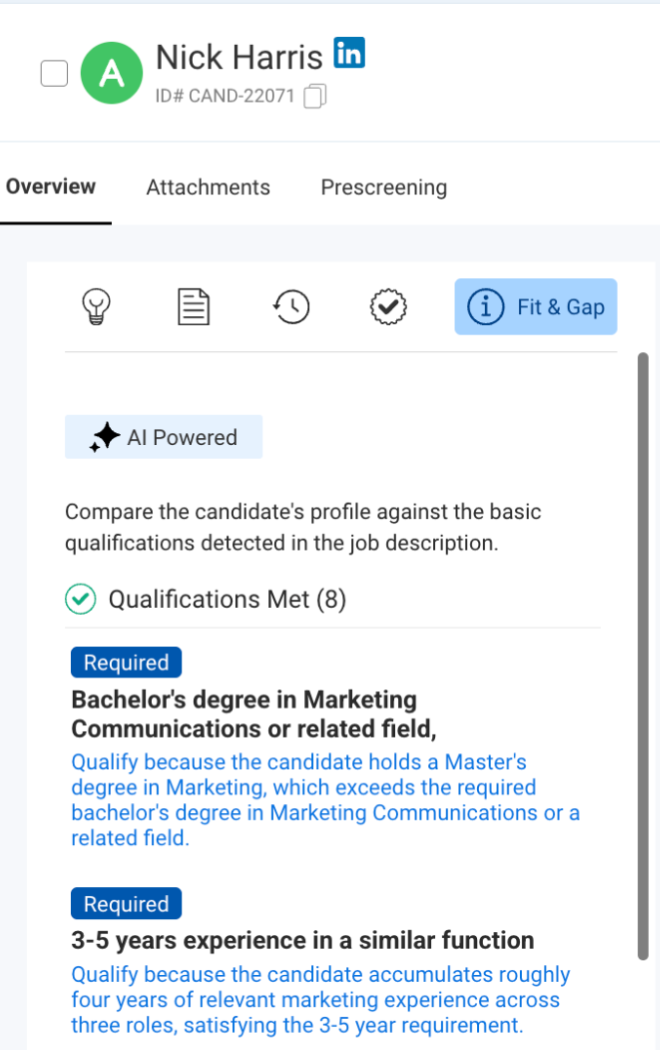
Workday HiredScore grades applicants from A to D on how well their resume matches the required and preferred qualifications in the job description. Each grade comes with the rationale behind it. Meeting every required qualification earns an A or a B, and the preferred qualifications a candidate matches help decide which.
Since August 2026, you can ask Workday Support to turn on “Fit & Gap.” It marks each qualification met or not met, with a plain-language explanation and a pointer to the resume. Recruiters advance or reject from the same view, and they can change a grade and record why.
Grades follow the job description closely, so write its qualifications as clear, separate requirements in priority order. Plan who reads the applications that come through without a grade, such as those with no resume or one that won’t parse.
Key features
- A to D grades: Each one comes with its rationale.
- Fit & Gap: Met or not met for each qualification, with pointers to the resume.
- Grade overrides: Recruiters can adjust a grade and note the reason.
- Workday workflows: Works in Workday Recruiting and Microsoft Teams.
Best for: Large organizations already running Workday Recruiting.
Pricing: Not published. Contact Workday for a quote.
6. Ashby: Best for criterion-by-criterion review with citations.
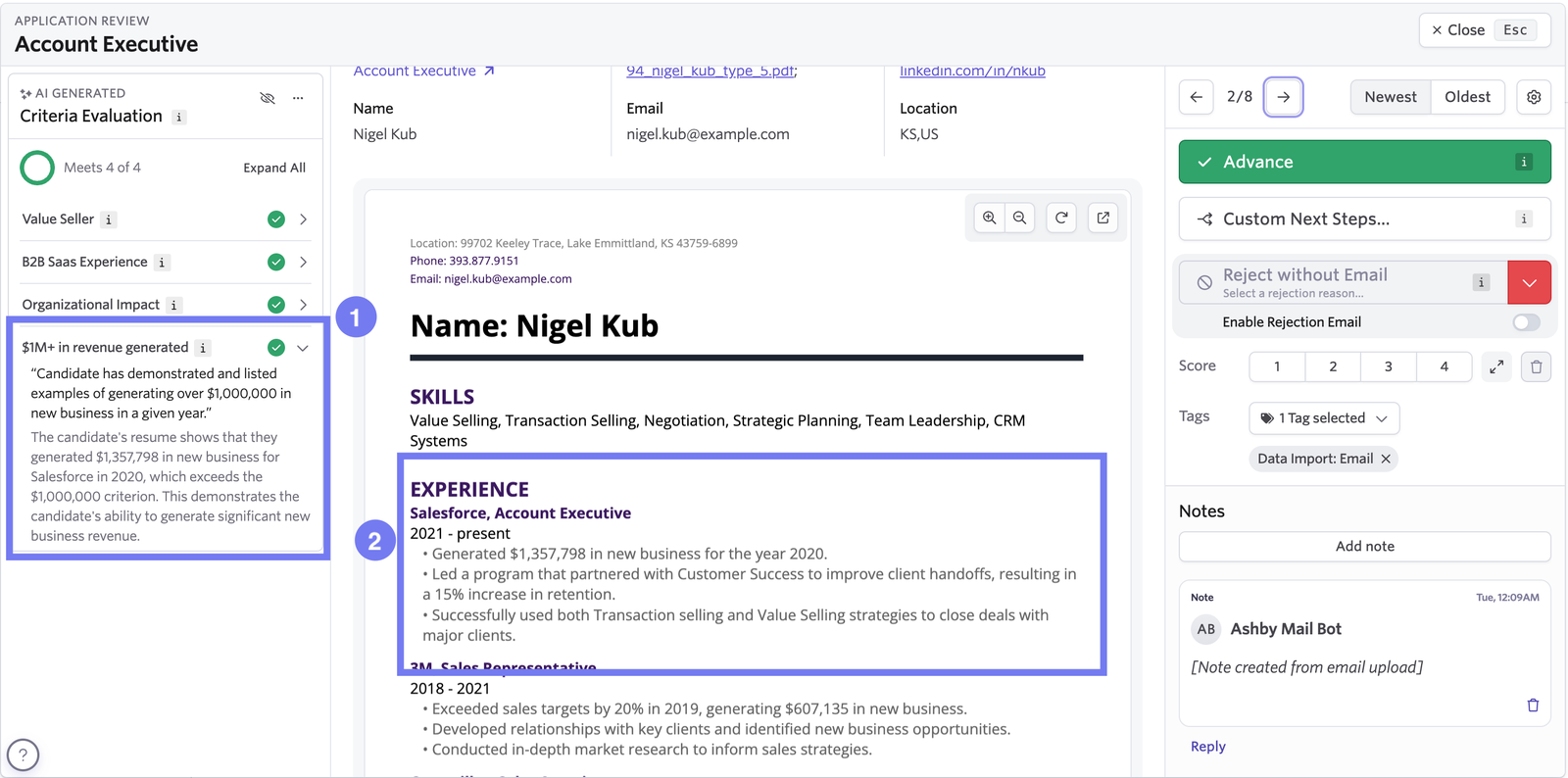
With Ashby’s AI-Assisted Application Review, you write criteria for each job, and the AI checks every applicant against them, one requirement at a time. You can start from criteria suggested from the job posting, reuse ones from other jobs, or write your own. Ashby checks each one for clarity and for equal employment opportunity risks before it runs.
For each criterion, you see whether the applicant meets it, doesn’t meet it, or the AI is undecided, with the reasoning and a citation from the resume. You can filter by any mix of criteria, add a column showing the share of criteria each candidate meets, and act on the filtered list in bulk.
A reviewer still makes each advance or reject call. Writing criteria for every job takes some setup. The feature is part of Ashby’s own ATS, so it suits teams already hiring in Ashby.
Key features
- Suggested criteria: Drafted from the job posting or reused from other jobs.
- Criteria validation: A check on each criterion before it runs.
- Cited reasoning: Each result links to the resume text behind it.
- Filtering: Any combination of criteria and results, with bulk actions.
- Fraud detection: Device, IP address, email, and phone checks, with a summary of what was found.
Best for: Ashby customers who want to review applications requirement by requirement, with the evidence in view.
Pricing: Included on every Ashby plan. Each plan comes with AI credits, each candidate evaluation uses one, and you can buy more.
7. Manatal: Best for small teams and agencies that pay per user.
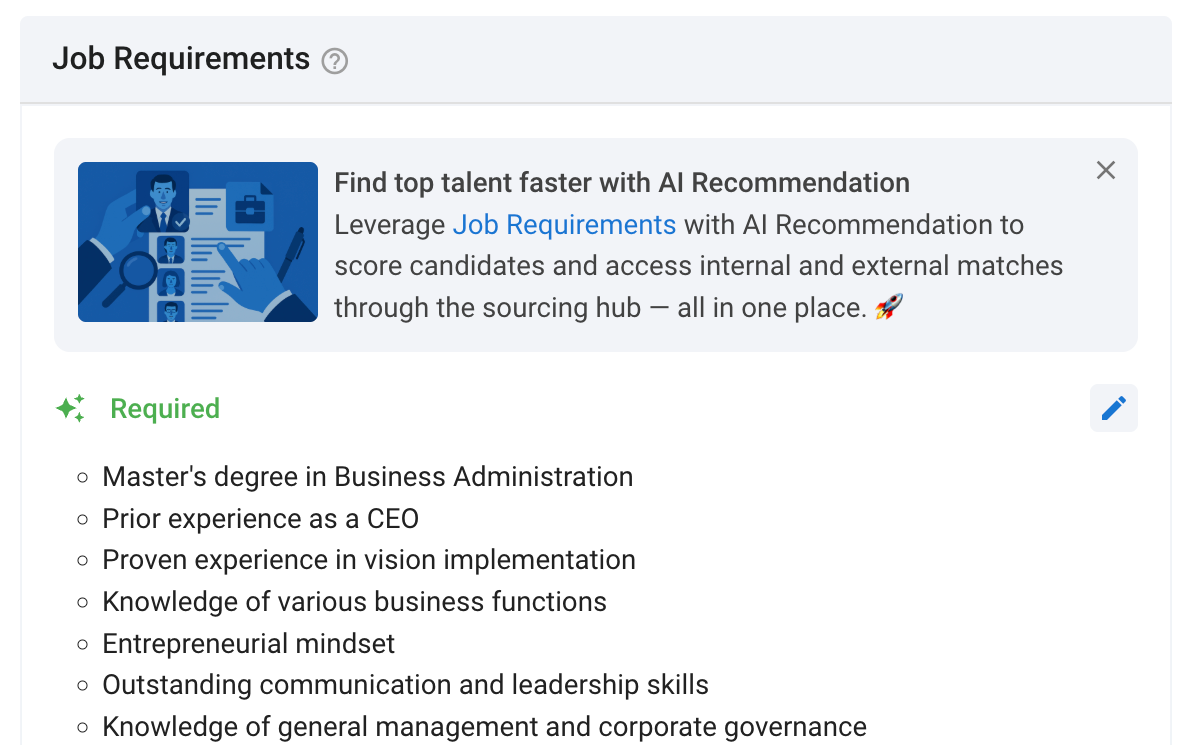
Manatal’s AI Recommendations reads a job description and pulls out up to 10 criteria, split into required and preferred, and you can weight them. It works best from a detailed job description.
It then ranks candidates from your whole database against those criteria, past applicants included. Each one gets a match percentage, line-by-line reasons, and the requirements they’re missing, and you make every decision from there.
The feature is still in beta, with fair usage limits, so ask about those limits before a high-volume push.
Key features
- Extracted criteria: Up to 10 required and preferred criteria from the job description.
- Adjustable weights: Extra influence for the requirements you care about most.
- Database-wide ranking: Candidates already in your database ranked alongside new applicants.
- Gap analysis: The requirements each candidate is missing.
- Included AI: Recommendations on every paid plan.
Best for: Small recruiting teams and agencies that want AI ranking on a per-user plan.
Pricing: From $15 per user a month on the Professional plan, billed yearly, which covers up to 15 jobs and 10,000 candidates.
8. Pinpoint: Best for scores that come with interview focus areas.
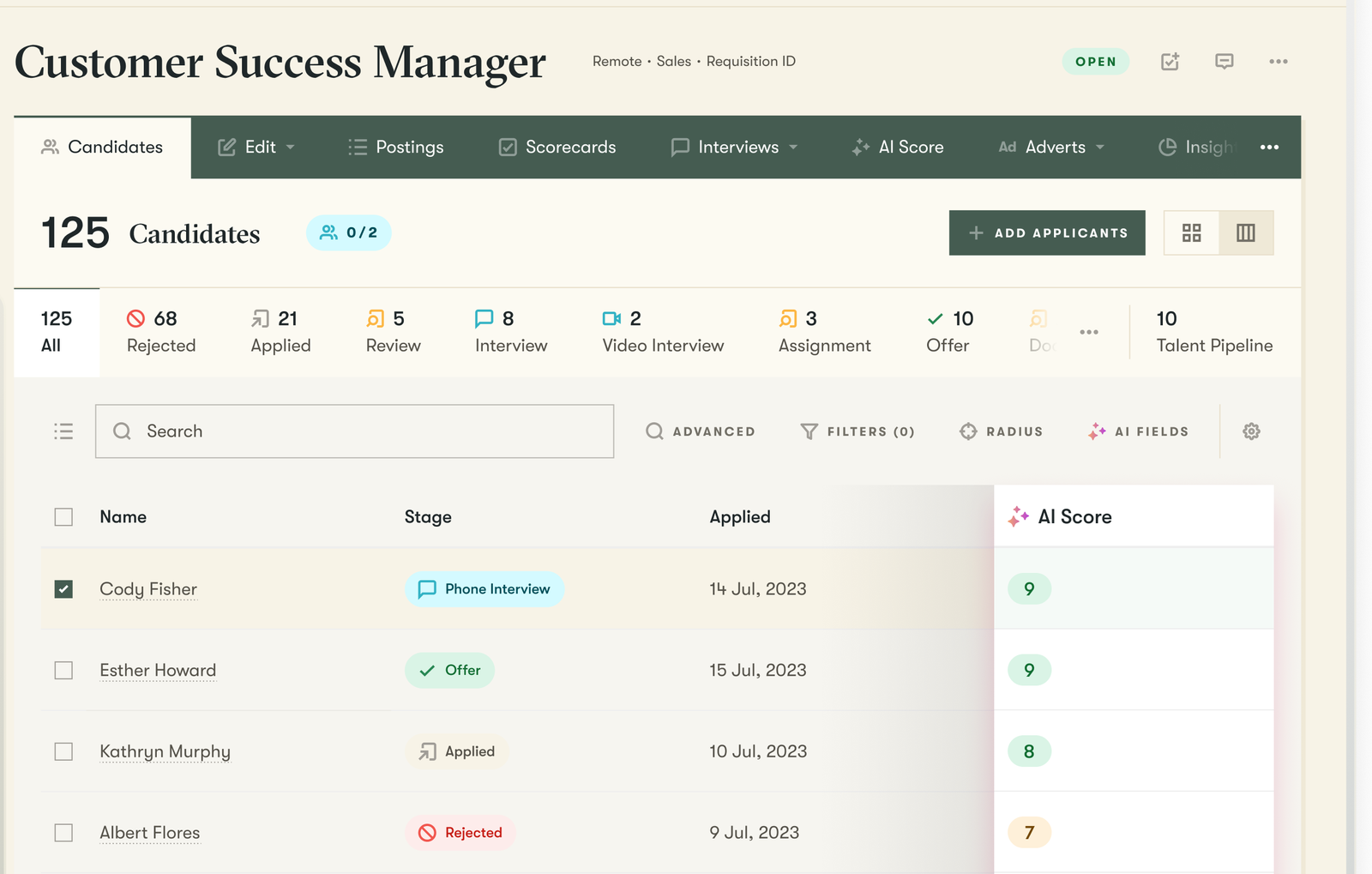
AI Match Score, Pinpoint’s scoring feature, starts with a few questions about the role. It then suggests up to 10 criteria, and you mark each as must-have, preferred, or nice to have. Before you turn it on, you can test it on up to five candidates and adjust the criteria.
Scores run out of 10, and each comes with a written verdict, strengths, concerns, and suggested focus areas for the interview. Pinpoint scores candidates against role-specific criteria rather than ranking them against each other, and a person makes every advance and reject decision.
Pinpoint skips applicants without a resume attached, so check those yourself. Scoring also uses Pinpoint credits, so ask how many a high-volume role needs.
Key features
- Guided criteria: Up to 10 suggested criteria, each with a priority you set.
- Test run: Scoring on a handful of candidates before you turn it on.
- Interview focus areas: Suggested topics to probe, with every score.
- Scores where you work: On the candidate profile, in the split view, and in the interview kit.
- Rejection rules: Separate automations that act on multiple-choice or yes-or-no application answers.
Best for: In-house teams that want each score to point to what to ask in the interview.
Pricing: Quote only. AI Match Score uses Pinpoint credits.
9. Gem: Best for teams that already source in Gem.
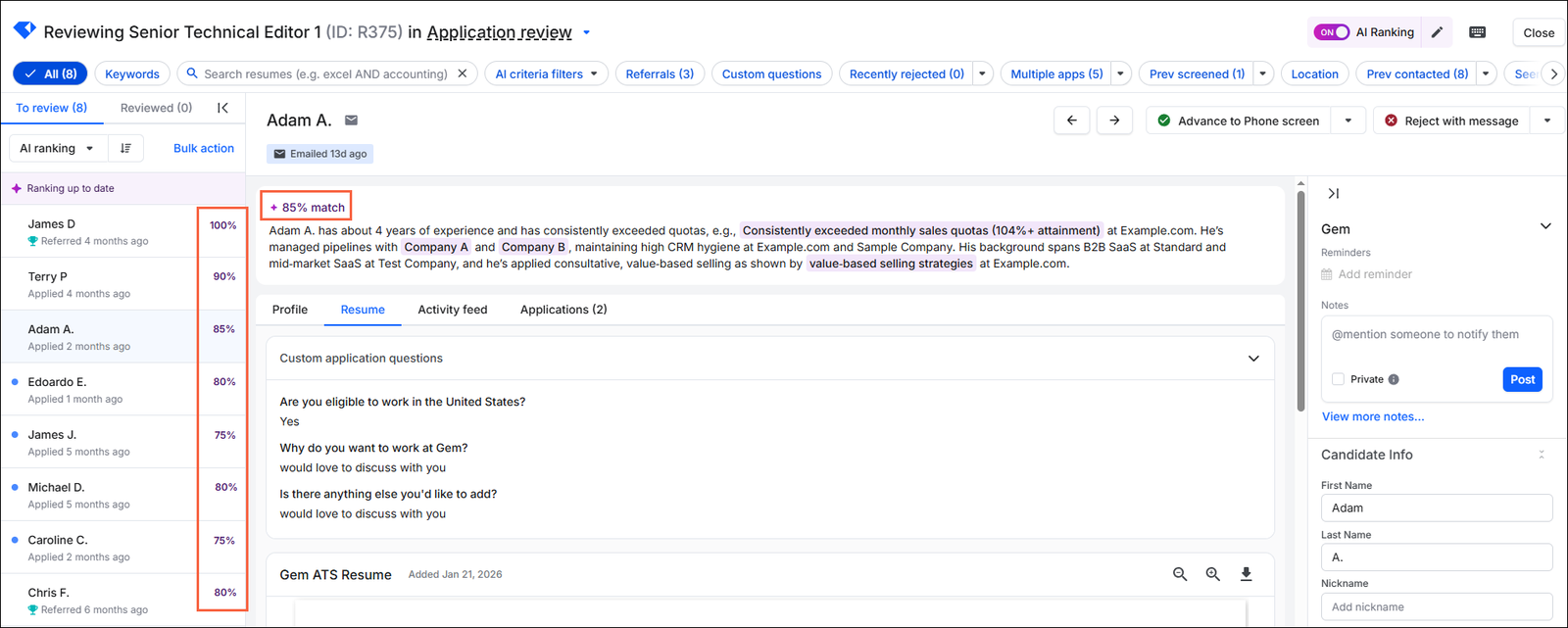
Gem’s AI App Review scores each resume against criteria you write for the job, with your priority criteria starred so they count for more. Applicants come back with a weighted match percentage and a plain-language summary, and you can sort them by “AI ranking.”
To use it, you need Gem’s candidate relationship management tool, along with Gem’s own ATS or Greenhouse, Workday, SuccessFactors, or iCIMS. You review applications and make every decision in Gem, and each action syncs back to the ATS.
Before scoring, Gem removes the candidate’s name, email, and LinkedIn profile from the resume. It also blocks prompt injection, which is hidden text in a resume written to steer the AI, and leaves those applications unscored for your team to review.
Key features
- Starred criteria: Priority criteria count for more in the match percentage.
- Imported criteria: Brought in from an AI sourcing search you’ve already run in Gem.
- Plain-language summaries: Why each applicant matched, with the evidence highlighted.
- Prompt-injection blocking: Resumes with hidden text held back from scoring.
- ATS sync: Advance and reject actions sync to your ATS.
Best for: Teams that already source and run outreach in Gem and want inbound review in the same place.
Pricing: Custom, based on company size. AI App Review comes with Gem’s AI-Powered seat.
10. Brainner: Best for pairing resume review with identity checks.
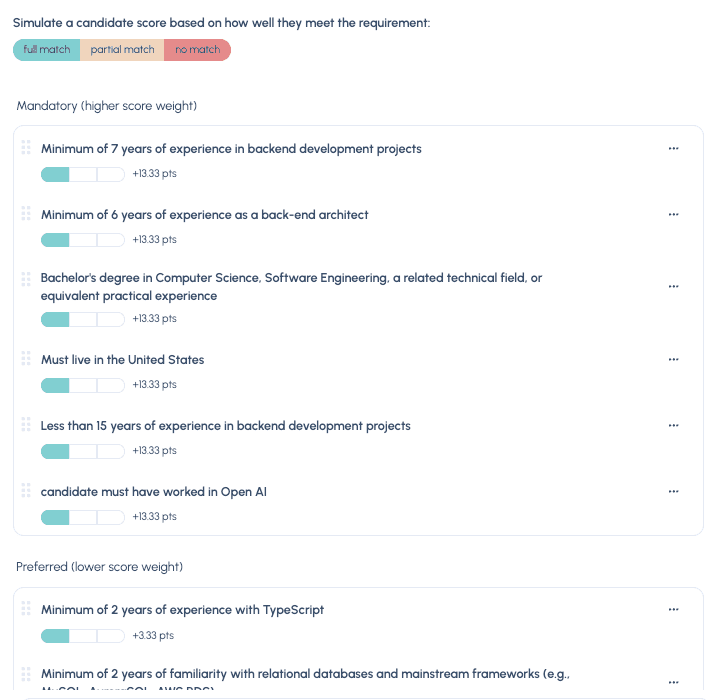
Brainner pulls the criteria from your job description and suggests which should be mandatory, preferred, or neutral, with mandatory criteria carrying most of the weight. From there, it ranks every applicant against them, reading both the resume and the answers to your application questions.
Each ranking comes with a justification for every criterion that points to its source, like a line in the resume or an application answer. Alongside the ranking, its identity check marks candidates “No Issues,” “Flagged,” or “High Risk.”
It connects to more than 30 ATSs, including Greenhouse, Lever, Workday, and Ashby. Advance and reject decisions sync back to the ATS.
Your recruiters decide by default. On the Business plan, you can add rules that archive high-risk candidates or advance others automatically, so agree on those rules before you switch them on.
Key features
- Criteria from your job description: Suggested as mandatory, preferred, or neutral.
- Resume and answers: Application answers, such as visa status or salary expectations, read with the resume.
- Cited justifications: Each criterion’s result points to the line behind it.
- Identity Check: A risk result for each candidate it checks, next to the ranking.
- Automation rules: Optional rules on the Business plan that archive or advance candidates.
Best for: Hiring teams that want resume ranking and identity checks in one place, next to the ATS they already use.
Pricing: Plans are set by a monthly number of analyses, with Professional covering up to 2,000 and Business up to 5,000. A free trial screens up to 25 candidates.
How should you choose an AI resume screening tool?
Pick the tool that fits your ATS and the step that slows your hiring team most, then test it on a role you’ve already filled. These are the six things we’d weigh most, in the order we’d check them.
Start with your ATS and your slowest step.
If your ATS has a built-in option on this list, start there, and compare its results with one of the tools that work alongside an ATS.
For some hiring teams, the slowest step is reading a pile of resumes after every job post. For others, it’s chasing candidates for missing details or sorting out applications that look fake. Put that step first when you compare tools, because that’s where the hours are.
Keep the must-haves apart from the sales pitch.
Every vendor will show you its strongest features, so list the role’s real requirements before the demo and judge each tool against them.
Vague criteria get you vague results. Keep each criterion to a single requirement a resume can show, like a license, a job title, or time in a similar role. Leave things like culture fit for the interview, where a person can test them.
Run a closed role through it first.
Use the vendor’s trial, demo, or free plan to run applications from a role you’ve recently filled and compare its results with the shortlist your team built. Where they disagree, open the reasoning. The criteria may need work, the tool may have misread a resume, or it may have found someone your team passed over.
Keep checking its work once it’s live.
Once the tool is live, open a few results each week and check the reasoning against the resume. Start with candidates near the line between two groups or grades. Some of these tools mark a requirement unclear, undecided, or unknown when the resume doesn’t show it either way, so check those candidates by hand.
Default criteria may not fit a role on the first try, so tune them as you learn. Give someone ownership of the applications a tool sets aside or can’t read, so those candidates still get a timely look.
If you want a routine for those checks, we’ve laid one out in a practical guide to AI resume screening. It covers reading the reasons on your first batch and sampling your lowest-rated applicants each week.
Decide what the tool can do without a person.
Some of these tools can advance, disqualify, or archive candidates once you allow it. Many ATSs can also reject applicants automatically on knockout answers, whichever screening tool you use. Before the first application arrives, settle which steps your hiring team keeps for itself.
We’d keep knockout rules for hard requirements you write, like work authorization, and keep AI-driven rejections off, even once you trust the results.
Siadhal makes the wider case in the video below: a recruiter’s daily tasks may change, but getting great people into the company quickly is still their job.
Look behind every fraud flag.
Some tools here flag applications using email, phone, IP address, and device data, and some add identity verification. A flag that names its trigger is quick to check, so favor tools that explain each one.
For the warning signs you can check yourself, we’ve also created a guide to spotting fake job applications.
Our top pick for high-volume hiring.
We might be biased, but when applicants outnumber your hours, Metaview Application Review is the tool we’d choose. It reads every application as it arrives, reads them all again when your criteria change, and checks each one for fraud with no setup. A recruiter still makes every accept and reject call. It fits best if you hire in Ashby, Greenhouse, Lever, or SmartRecruiters, where your decisions sync straight back.
If Application Review doesn’t fit your setup, here’s when we’d choose each of the others:
- Consider Greenhouse if you hire in Greenhouse and want weighted matching beside fraud and identity checks.
- Consider Workable if you hire in Workable and want one workflow to screen candidates and follow up on gaps.
- Consider Lever if you hire in Lever and want fit evidence without paying extra.
- Consider Workday HiredScore if you’re a large organization on Workday Recruiting.
- Consider Ashby if you hire in Ashby and want to check each criterion against cited resume lines.
- Consider Manatal if you’re a small team or an agency that wants a per-user ATS with AI ranking built in.
- Consider Pinpoint if you hire in Pinpoint and want suggested interview topics with every score.
- Consider Gem if your sourcing and outreach already run through Gem.
- Consider Brainner if fake applicants worry you and you want an identity result beside each ranking.
Watch AI resume screening that leaves every decision to your recruiters.
See how Metaview Application Review groups applicants from a supported ATS by fit, with the reasoning for each one in front of your recruiters before they decide.
Frequently asked.
What’s the difference between AI resume screening and AI interview screening?
AI resume screening reads what a candidate sends you, like the resume and any application answers. AI interview screening asks the candidate to talk or chat with AI, or to take an assessment, as a first step. If that’s what you’re after, we’ve ranked the best AI interview screening tools too.
What does AI resume screening cost at high volume?
Look past the headline price to what each extra applicant costs you. A paid Workable account starts with 3,000 complimentary AI credits before you buy bundles, and Brainner charges for every 100 candidates past a plan’s monthly limit. Count a busy role’s applicants for a month, then ask each vendor what one more applicant would cost.
Is AI resume screening fair to candidates?
It can be, but fairness doesn’t come automatically. A tool applies your criteria the same way to every application, yet a criterion can still shut out a group of people, and so can the way an AI model reads resumes. Keep protected characteristics out of your criteria, ask each vendor how it tests its matching for bias, and have a person review a sample of results.
Should you tell applicants that AI reads their resume?
We would. A line on the job post or the application form saying AI helps your team read applications, and that a person makes the decisions, sets the right expectation. Some tools also let candidates ask for a manual review instead, such as Greenhouse when you switch on its AI opt-out.
