
You can find a recruitment email template in minutes. Getting a candidate to answer it is harder, and that comes down to the line about the candidate: why you’re writing to them in particular.
Below you’ll find a template for every stage of outreach, from the first message to your reply when a candidate answers. Pick the one you need, fill in the parts in [brackets], and add an opt-out line to any first message.
Recruitment email templates for sourcing candidates.
Use these for a first message, whether you found the candidate yourself, got a referral, or want to reconnect with someone who’s interviewed with you before. Each one has a “Copy email” button, and the subject line has a “Copy subject” link of its own.
Sourcing email template.
Send this to someone you found yourself who hasn’t applied. If you can’t find one specific thing to say about their work, hold the email until you can.
Referral email template.
A name they recognize gives your email an extra layer of credibility. Ask the referrer’s permission before you use it.
Past candidate email template.
Reach out again to the strongest people who’ve interviewed with you before, especially anyone you nearly hired. Read their interview notes first, so your email is about them.
Follow-up email templates.
A candidate who hasn’t replied may still be deciding, and a follow-up gives them a reason to answer. Send yours in the same thread and stop after two follow-ups, because past that, more emails start to read as pressure.
First follow-up email template.
Send it a few days after your first message, with one detail you left out the first time.
Last follow-up email template.
Send this about a week after the first follow-up, and if they still don’t reply, move on to your next candidate.
Candidate reply email templates.
Pick the template below that matches the candidate’s answer, and reply the same day. The check-in template is the one exception: you send it later, to a candidate who wasn’t ready yet.
Interested candidate email template.
Put the pay range in your reply, so your first call can go straight to whether the role fits.
Not ready yet email template.
Suggest a month to check back, and set a reminder for it.
Check-in email template.
When that month comes around, use this to pick up where you left off. Reread their last reply first, so it’s clear you remembered.
Not interested email template.
A friendly reply keeps the door open for later. Note their answer where your hiring team keeps candidate notes, and if they ask not to hear from you at all, add them to your do-not-contact list.
Work email outreach templates.
Sometimes the only address you can find for a great candidate is the one at their current job. Their employer’s systems, and sometimes their manager, can read that inbox. A recruiter’s pitch for a specific job could hurt their standing at work before they’ve even decided to reply.
So keep these emails short and leave the role out, then give them an easy way to reply somewhere else.
Work email template.
Try another way to reach them first, like a LinkedIn message. If their work address is your only option, still end with the opt-out line and privacy notice link from the tip above. Your address and that link already show which company you’re from, and adding the pay or the team would show which job, so keep those out too.
If you send it as part of an automated email sequence and they answer from a personal address, your tool may not count that as a reply. Check that the sequence has stopped for them. We walk through a quick test for that in a guide to outreach sequences.
Work email follow-up template.
If you don’t hear back, send this about a week later, and then leave it there.
How should you use AI to write recruitment emails?
Use an AI assistant such as ChatGPT or Claude for drafts and variations, and give it a full prompt every time. It’s most useful for:
- A first draft from one of these templates
- A few subject lines to choose from
- A shorter version of a long email
- The same email for a different role
Write it yourself when the email depends on something only you know, like a past conversation. Do the same when it’s going to a work address, where one stray detail could reveal the role. And don’t paste a candidate’s details into an AI tool your company hasn’t approved.
A bare request like “write a recruiting email for a product designer” gets you an email that isn’t really worth sending. Tell the AI who it’s writing as, then give it the template and what you know about the candidate, and set clear limits on what it writes. Here’s a prompt you can adapt:
Test the prompt on a few candidates you know well, and read each draft before you send it.
Where Metaview fits in your outreach.
Templates make each email faster to write. We take on the work around them: getting the follow-ups out on time and remembering what past candidates told you.
Run your templates as a sequence in Metaview Outreach.
Metaview Outreach turns your first message and its follow-ups into one sequence, sent from your own Gmail or Outlook account. Each email becomes a step with the wait you set, and follow-ups go out automatically. You can send them as replies in the same thread as your first message.
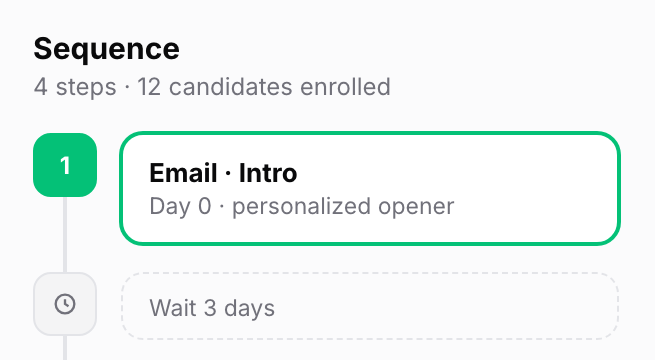
You create and review every sequence, and Outreach fills in the details for each candidate, like their first name. It can also write the line about them from their profile when each email goes out, so check what it writes for a few candidates before you rely on it.
For past candidates, our Notetaker captures every spoken word in the interviews it joins, so the line you write about each one can come straight from their own words.
When a candidate replies, the sequence stops for them, and we sort their reply as “Interested,” “Not Interested,” “Follow Up,” or “Unknown,” so you know which reply template to use.
Brief fillmore to write and send your outreach.
If you’d rather hand off the emails altogether, fillmore is our AI coworker that handles outbound recruiting. As our co-founder Shahriar Tajbakhsh puts it:
We’re at the point where AI is moving beyond helping people do their jobs faster to owning entire workflows, and recruiting is one of the domains we believe that shift can genuinely work”

You brief fillmore in Slack the way you’d brief a teammate, with a job description or a few notes. It researches candidates for the role, then writes each candidate their own message from scratch, on the channel it picks for them: email, LinkedIn, or WhatsApp.
It handles the follow-ups too. When a candidate wants to talk, you approve the meeting in Slack in one tap, and fillmore books the screening call. Your hiring team reviews the pipeline and makes every hiring decision.
Our chief executive officer, Siadhal Magos, talks below about what your job looks like once AI can email people for you: more checking its work, and more steering it.
How do you know your outreach emails are working?
They’re working when candidates reply, tell you when to check back, and book a time with you. Give your templates a few weeks on real roles, then check how candidates reply:
| What to check | It needs work if | Fix this first |
|---|---|---|
| Replies to your first messages | Hardly anyone answers the first message or the follow-ups | Rewrite the line about them, and check that each person’s work fits the role |
| “Not ready yet” replies | Most of the answers you get are “not ready yet,” and few say when they could move | Say more about timing in your first message, like when the role starts, so people can tell you when they could move |
| Requests to stop | Several stop requests come back on the same email | Find which email drew the request, and cut or soften that one |
| Yes replies | Candidates say yes but don’t book a time | Suggest two specific times in your reply, and send the invite yourself once they pick one |
For the next role you hire for, start from these templates and give most of your time to the line about each candidate.
Go from first email to booked screening call.
See how Metaview Outreach sends your sequences, and how fillmore writes each message and books screening calls with interested candidates.
Frequently asked.
How long should a recruitment email be?
Short enough to read on a phone without scrolling: a few short lines, one ask, and your name. Trim the first message hardest, because the candidate wasn’t expecting it.
Should a hiring manager send the first recruitment email?
For a senior or specialist role, it can help. A note from the person they’d work for can carry more weight than one from a recruiter. Agree on the wording together, and send it from their address only with their permission.
Can I send a recruitment email template as a LinkedIn message?
Yes. If you send it with a connection request, shorten it, because that note is short and has no subject line. Keep the line about them and the ask, and send the rest once they accept.
What’s a good subject line for a recruitment email?
A plain one that says what the email is about: the role at your company, the name of the person who referred them, or the work of theirs you’re writing about. Avoid anything that pretends to be a reply.
