
Hiring students and graduates can fill your hiring team’s calendar for months, from the first career fair to the last interview day. Good campus recruiting software takes some of that work off your hands. The hard part is knowing which tools you need.
You’re hiring across several schools, each with its own calendar and its own career system, such as Handshake or Symplicity Recruit. Students have to fit your interviews around their classes. Fairs and interview days at least have dates you can plan around. In our view, the applications are where your hiring team is most likely to fall behind, because they keep arriving between those dates.
We’ve compared the options for employers hiring on campus, and these are the five platforms and tools we think do the job best. Most cover a different part of the season, so you’ll likely use more than one.
Campus recruiting platforms side by side.
Here’s what each of the five tools handles and what it connects to.
| Platform | Best for | What it handles | Works with |
|---|---|---|---|
| Metaview | High-volume graduate hiring | Reads every application and groups applicants by how well they fit, with the reasons shown; holds screening conversations with the candidates you choose; finds candidates beyond your schools | A supported applicant tracking system (ATS), such as Greenhouse, Ashby, or Lever, for Application Review |
| Handshake | Reaching students at the schools that use it | Job posts the schools approve, campus and virtual events, career fair registration, and AI-suggested candidates | The schools you connect with, plus ATS integration on its Enterprise plan |
| Symplicity Recruit | Recruiting at schools that run Symplicity | Events, fairs, and interview schedules at each school you connect with, plus suggested students for each post | One synchronized login across its member schools’ career sites |
| Yello | Running a campus program across many schools | School profiles, event planning and check-in, campus results by school, and an agent that books your interview schedule | Workday, iCIMS, and other ATSs |
| GoodTime | Running campus interview days | Interview days with slots that candidates book themselves, with reminders by text message and WhatsApp | Workday, SuccessFactors, iCIMS, Greenhouse, Lever, and more |
What does campus recruiting software need to cover?
A campus season has three jobs in it, and your software needs to cover each one:
- Get your jobs and events in front of students at the schools you hire from.
- Run your career fairs and interview days.
- Keep up with the applications that come in between them.
Some of your software is chosen for you: schools pick their career systems, so you might work in Handshake at one school and Symplicity Recruit at another. Your hiring team chooses the rest.
Judge each tool you add by whether it saves you time, puts the right students in front of you, or both.
Why these five made our list.
We looked at the employer-side tools that come up when you search for campus recruiting software or put the same question to an AI assistant. We kept five, ours included, that do three things:
- It’s built for hiring students and recent graduates, or for the high-volume, entry-level hiring a campus season brings.
- It takes one stage of the season off your plate, such as reaching students or reading their applications.
- It connects to the systems around it, like your ATS or the schools’ own career sites, though some tools keep that connection for their higher plans.
After ours, the list follows the order of a campus season, from reaching students to running interview days, so the numbers aren’t a ranking.
The 5 best campus recruiting platforms and tools in detail.
Handshake and Symplicity Recruit come with the schools you hire from, and Metaview, Yello, and GoodTime each take on a part of the season around them.
1. Metaview: Best for high-volume graduate hiring.
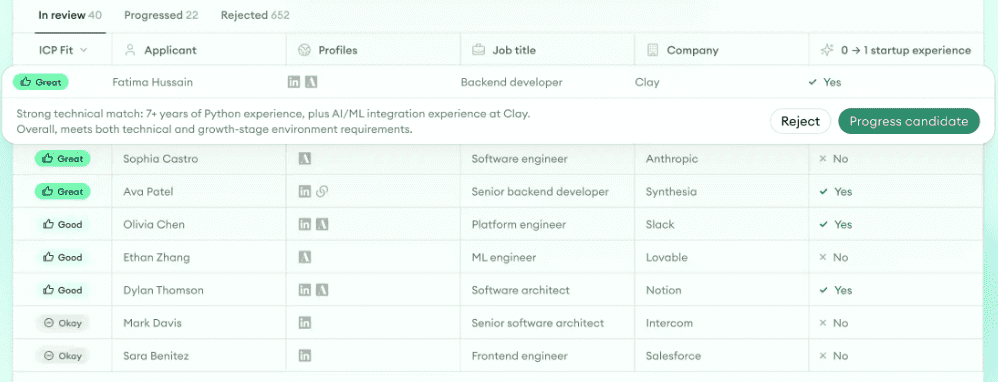
Application Review reads each graduate application and compares it with an ideal candidate profile that your hiring team approves, then groups applicants by fit and shows the reasoning for each. Your recruiters work from the closest fits down and decide on each applicant. If letting AI read applications is new to you, we’ve put together a guide to screening resumes with AI for high-volume hiring teams.
With a big graduate intake, Application Review also checks each application for identity deception and for automated applying. When one looks fraudulent, you get a flag and the reason, so you can look into it before you act.
Before your season starts, check that we support your ATS and that applications from your schools’ career systems reach it. On Handshake, ATS integration comes with the Enterprise plan.
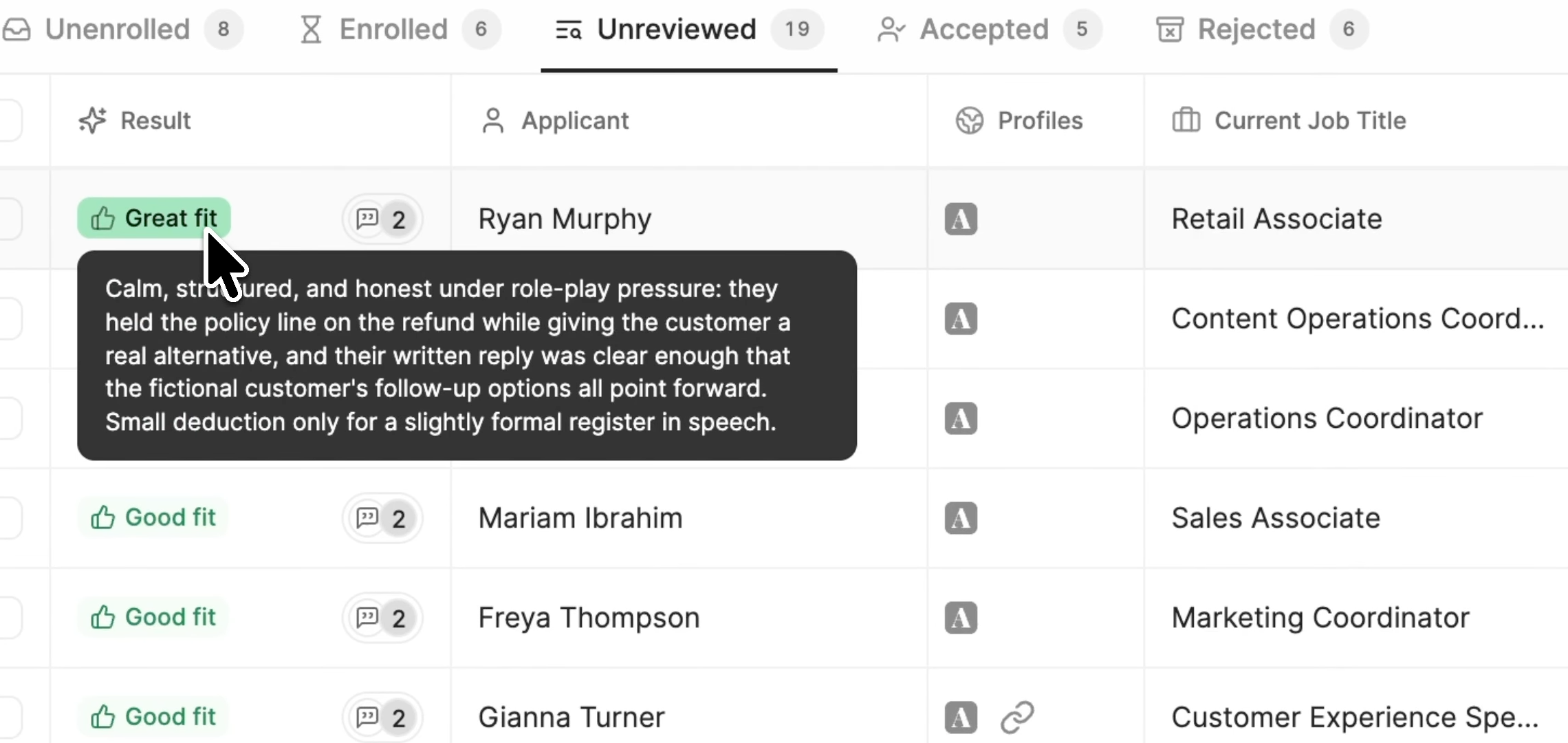
With Metaview Screening, each candidate you pick gets a voice-led screening conversation, and they can ask their own questions along the way. There’s no login to set up, and they can take the call on desktop or mobile whenever it suits them. It’s built for high-volume roles with standardized job descriptions, and entry-level roles are among them.
Each completed call comes back with a fit rating and its reasons, a recording, and a transcript, so your recruiters can hear for themselves anything the rating leaves out. Then your recruiter decides who goes to the next round.
You book interviews in whatever tools you use today, and your hiring team still runs them. We think the interviews are where your recruiters’ time is best spent. Shahriar Tajbakhsh, our co-founder, treats interviewing as a craft and has written about why it deserves that time:
To master this craft, I’ve been painstakingly reflective and systematic because interviews are the highest leverage activity any operator can undertake.”

If your target schools don’t give you enough of the right candidates, AI Sourcing looks beyond them. You give it a plain-language brief, and it searches the web, your connected ATS, and the interviews you’ve already recorded with the Metaview Notetaker, then returns candidates with the reason each one fits. It leaves the first message to you, and when you’re ready, you can send it through our Outreach sequences.
In the video below, Siadhal Magos, our chief executive officer, argues that conversations will increasingly set employers apart in recruiting top talent. He sees the recruiter as the person who spots what others miss or convinces a candidate to join.
When you interview over a video or phone call, the Notetaker records the call if consent is given, and it captures every spoken word. That means next season, when you look for candidates, AI Sourcing can search what candidates said in this season’s recorded calls.
Key features
- Applicants grouped by fit: Every applicant placed in a fit group, with the reasoning behind it.
- Fraud flags: A flag and its reason on any application that looks fraudulent.
- Recorded screening calls: Voice-led calls you can replay or read as a transcript.
- Sourcing beyond your schools: One search across your ATS, the web, and recorded conversations.
Best for: Graduate programs that get more applications than their recruiters can sort by hand.
Pricing: Application Review and AI Sourcing each have a free plan. Paid plans are charged per agent. For Screening, ask for a demo and we’ll walk you through pricing.
2. Handshake: Best for reaching students at the schools that use it.
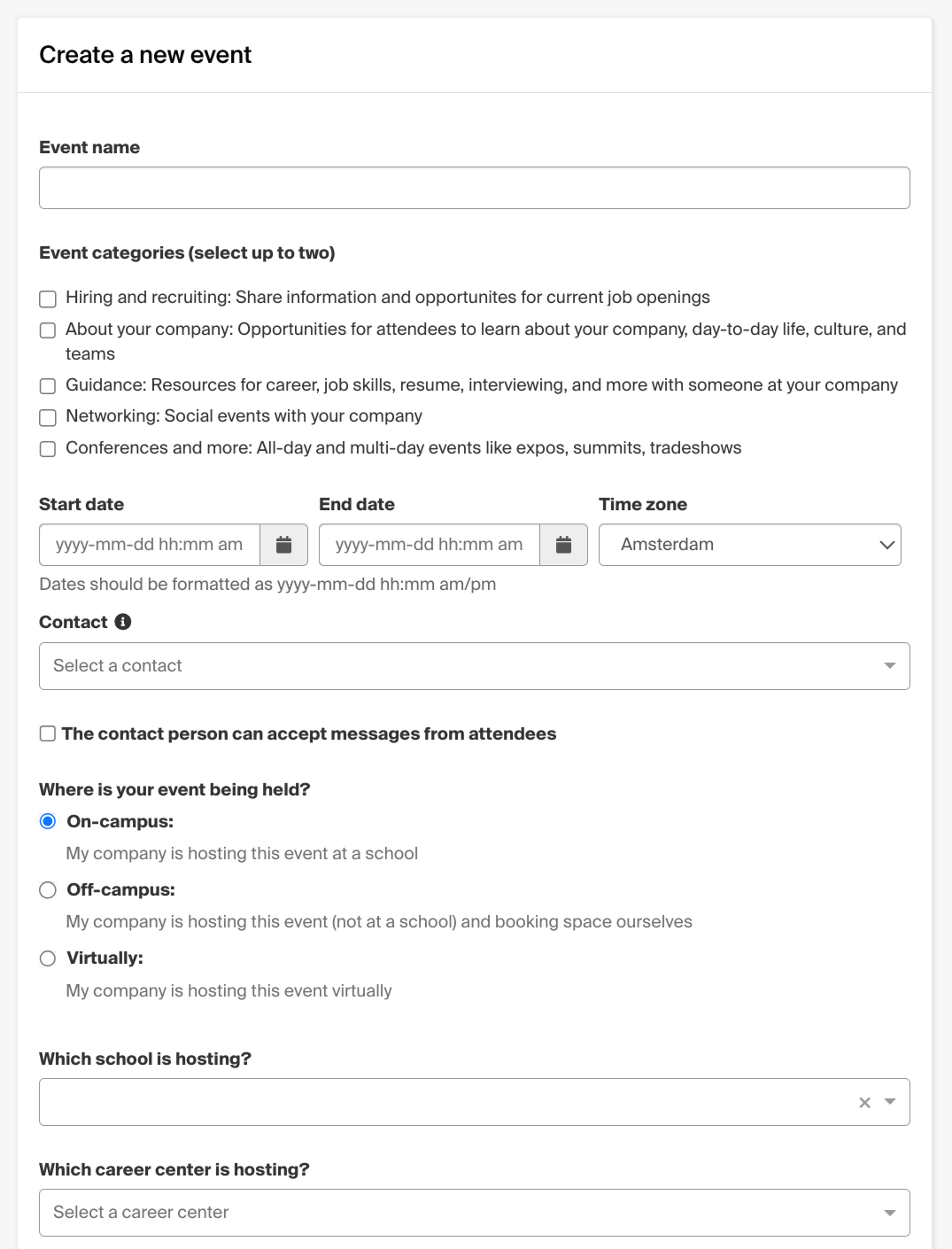
Handshake started in 2014, partnering with colleges to connect their students with employers. To recruit there, you connect with each school you want to hire from, and each school decides whether to approve you.
Once you’re connected, you can post jobs to the schools you choose and invite schools to your own events, whether on campus, off-site, or virtual. You can register for the schools’ career fairs without connecting first.
When you post a job, Handshake drafts hiring criteria from it and suggests candidates who fit, each with a short summary of why. The suggestions appear in the job’s “Source candidates” tab. Each suggestion’s reason is the useful part, because you see why a student fits before you message them.
On paid plans, Handshake’s AI also drafts messages for you to review and send. An automated outreach option can message matching candidates on your behalf. It’s still in open beta, and its availability varies by plan.
The free plan allows 10 outreach messages a month across your whole account. In an r/recruiting thread asking whether Handshake is worth it, a free-plan user found its candidate database “not that useful for sourcing and outreach,” because, they said, most candidates don’t post a resume.
One reply in the same thread called Handshake “Good for entry level or internship roles for College grads.” Another commenter used it to fill a career fair booth, but said most of the students it brought were “super disengaged.” They thought it “may be worth it” for employers that students don’t already recognize.
Key features
- School-approved job posts: One post can reach several schools, and each one reviews it.
- Your own events: Campus, off-site, or virtual events, each approved by the schools you invite.
- Suggested candidates: Candidates suggested from your job’s criteria, each with a reason they fit.
- Career fair registration: Sign up for the schools’ fairs, in person or virtual.
Best for: Employers hiring interns and new graduates from schools that use Handshake.
Pricing: A free plan for posting jobs, with paid plans for more messaging and sourcing.
3. Symplicity Recruit: Best for recruiting at schools that run Symplicity.
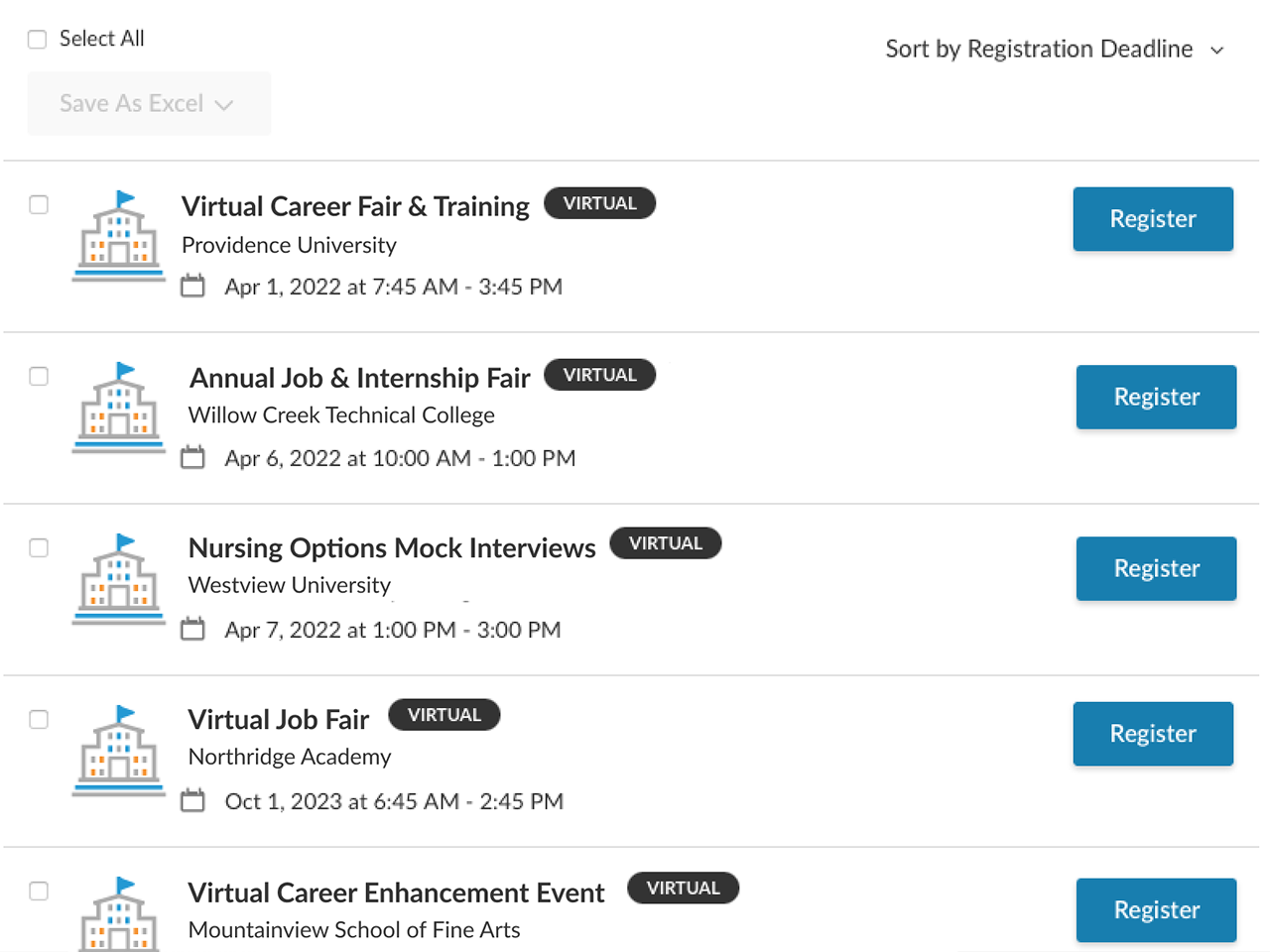
Many college career centers run on Symplicity, which was founded in 1997. Symplicity Recruit is its product for employers: a free account where you can see the schools in its network and manage events, career fairs, and interview schedules across them in one place.
As on Handshake, each school approves your account before you can use Recruit there. With a synchronized password, one login works across Recruit and its member schools’ own career sites.
You can post one job to a few schools or all of them, and within minutes, Recommended Candidates suggests students who fit. Posts to five or more schools also send Smart Invites to matching students. We like Smart Invites most, because matching students hear about your job without you searching for them.
With full Global Search on the Premium plan, you can look through students and recent graduates who opted in to hear from employers. You can then message up to 100 of them at a time. Premium also opens Recruit’s full analytics dashboards for your candidate pipeline, your sourcing, and each school.
You register for a school’s career fair in Recruit. You join a virtual fair, or change your registration for one, on the school’s own career site, so keep that login handy if you haven’t synchronized your password.
Recruit’s features can differ from school to school, so before you pay for a plan, ask other employers at your target schools how they use it.
Key features
- Multi-school management: Recruiting at several schools from one account.
- Recommended Candidates: Suggested students within minutes of posting a job.
- Smart Invites: Emails to matching students when you post to five or more schools.
- Global Search: Opted-in students and recent graduates you can message in batches, on Premium.
Best for: Employers that recruit at several schools running Symplicity’s career system.
Pricing: Job posts start at $55 per post per school when you target four schools or fewer, and cost less per school as you add more; Pro starts at $329 a month, and Premium is a custom plan.
4. Yello: Best for running a campus program across many schools.
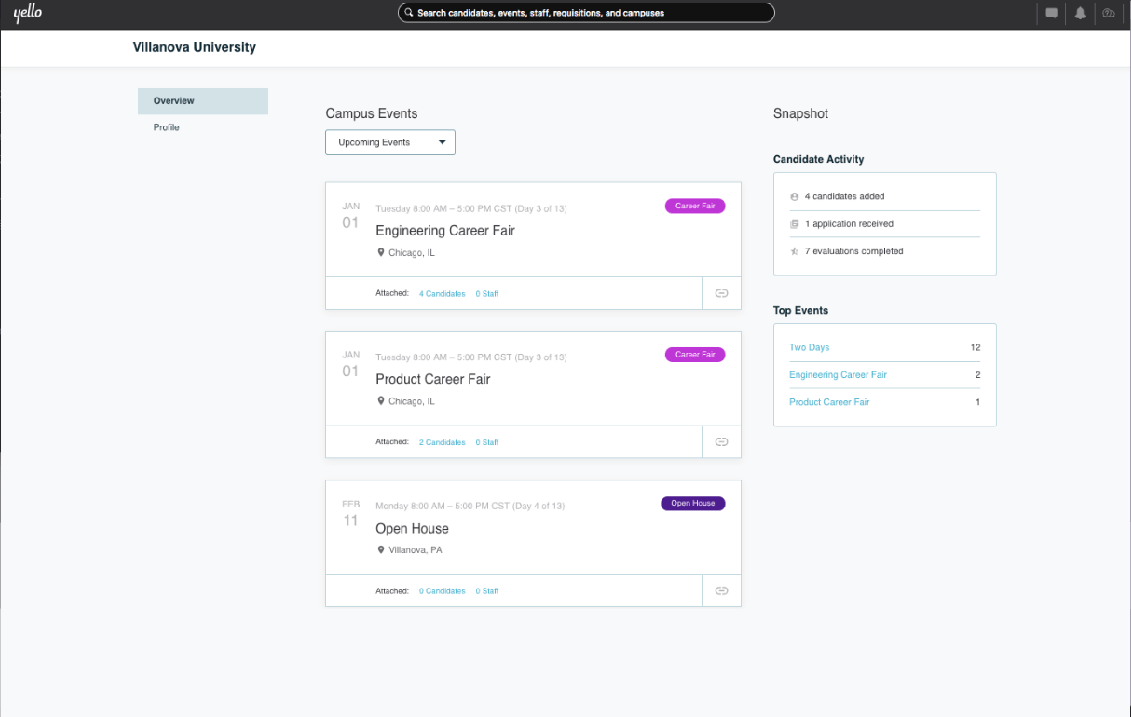
Yello has built campus recruiting software for large employers since 2008, when it started as Recsolu. In 2021 it merged with WayUp, adding WayUp’s student database. In 2025 it bought Symba, which keeps interns and new hires engaged between the signed offer and the start date.
In one system, Yello keeps a profile for each school, lets you plan events with their costs and registrations, and shows results by school and by event. Yello is at its best when you compare schools side by side, by what you spent and who you hired there.
Events can run in person, virtually, or as a hybrid. Students check in contactless, and recruiters evaluate them on Yello’s mobile apps.
Its Campus Recruiting Agent helps set up your events and books your interview schedule before you get to campus. It sources candidates from your ATS, your Yello database, WayUp, and other sources across the web. In June 2026, Yello and Symplicity announced a partnership that lets the agent match candidates from Symplicity’s database too.
The agent groups the candidates it finds by how well they match. Your recruiters review each group and approve outreach before any message goes out, and they decide who moves forward.
An employer on Reddit called Yello “a great tool for us to capture details of people who register and/or join us at an event,” but added, “I am getting pressure to find something more cost effective.”
Key features
- University profiles: One view of each school, its events, and its candidates.
- Event costs and results: What you spent at each school and event, and who you hired from each.
- Campus Recruiting Agent: Event setup, sourcing, outreach, and interview booking, with nothing sent until you approve it.
- Mobile check-in and evaluations: Contactless check-in for students, and on-the-spot evaluations in Yello’s mobile apps.
Best for: Large employers that run campus programs at many schools and need to compare schools by cost and hires.
Pricing: Quoted on request.
5. GoodTime: Best for running campus interview days.
GoodTime started with interview scheduling, back when a single interview could take days of back-and-forth email. Campus hiring events are one of the jobs it’s built for.
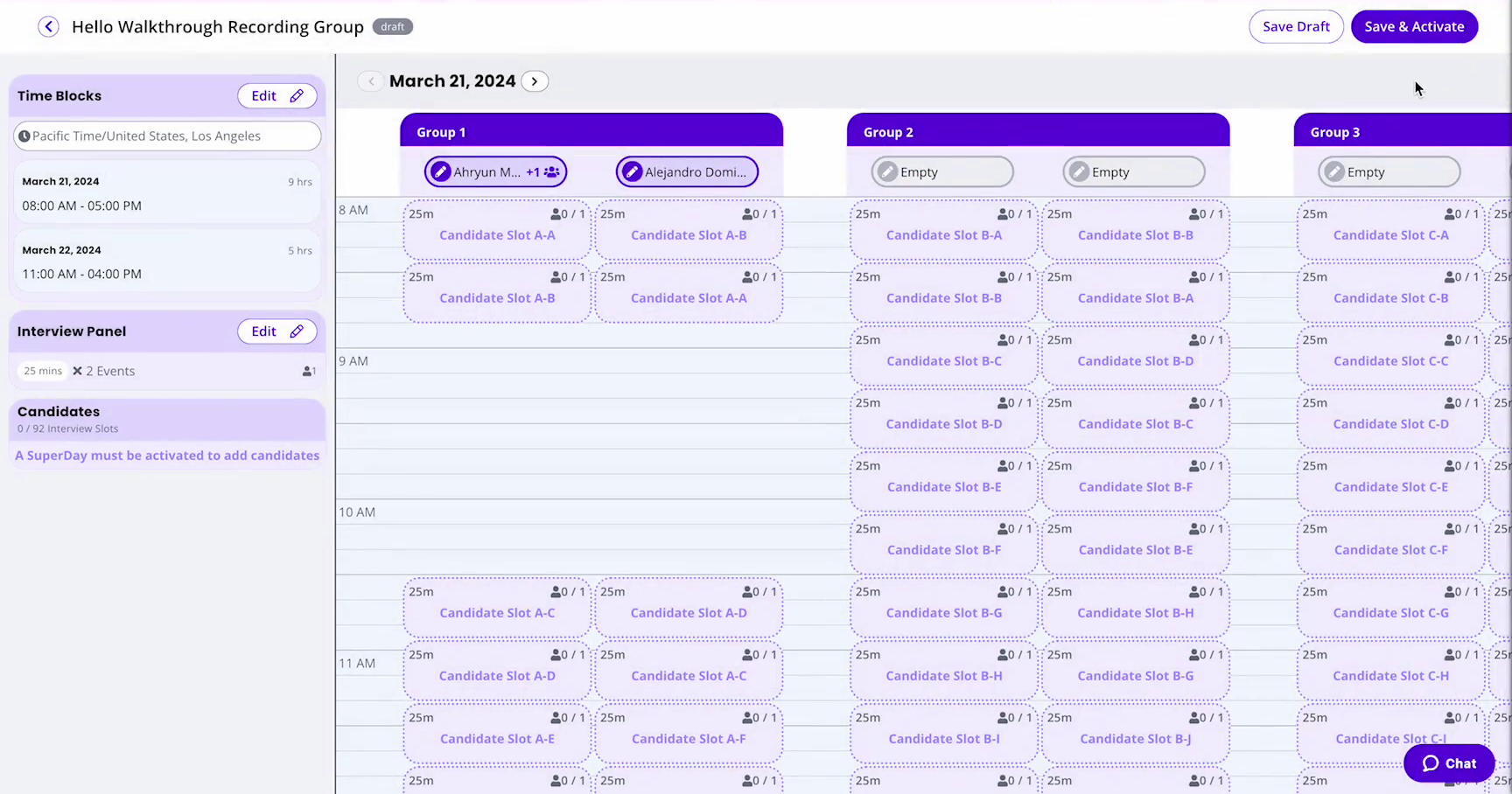
Its Superdays feature is made for on-site, campus, intern, and other high-volume interview events. You build the day once, with the dates, the interviewers, and the interview plan, and GoodTime turns it into a grid of slots and sends one request to every candidate. Candidates take the open slots on a first-come, first-served basis, and GoodTime sends the confirmations, calendar invites, and reminders, so you’re not booking each interview by hand.
For the rest of your campus interviews, interviewers set their own availability, and GoodTime shares the interview load across them.
Superday time blocks take priority over your interviewers’ calendars, so GoodTime can book a slot over an existing meeting. Each Superday runs one interview plan, and its events and times are fixed once it’s active. Ask your interviewers to keep their time blocks free, and build the whole day before you invite anyone.
Key features
- Superday slot grids: One setup turns into a grid of bookable slots.
- Self-scheduling: Candidates pick open slots within your availability.
- Text and WhatsApp reminders: Candidates get updates by text message or WhatsApp.
- Interviewer load balancing: Interviews shared fairly across your interviewers.
Best for: Campus hiring teams running Superdays and interview events for many candidates at once.
Pricing: Priced on how many candidates you have each year, not on how many users you have, with every integration included. Superdays comes with the Professional and Enterprise tiers of GoodTime’s Hire and Autopilot packages.
How do you choose campus recruiting software?
Work out which part of the season costs you the most time, and test any tool on hiring you’ve already done.
Allow for each school’s approval.
Once you know which career systems your target schools run, connect your employer accounts early, because schools approve employers on their own timelines.
Find your busiest stage.
For some campus teams, events and fairs take up the most hours. For others, it’s interview days or the pile of applications. Start with the tool built for whichever stage that is for you.
If you run events and fairs at a handful of schools, their own career systems may be all you need.
List your must-haves.
Note what you can’t do without, like the schools you hire from, the interview days you run, or a way for students to book around their classes. Rule out any tool that misses one of them.
Try AI tools on last season’s applicants.
For a tool that reads applications or suggests candidates, run a role you filled last season through it, on a free trial, a free plan, or a demo. You know which applicants you advanced. Check whether the tool puts those applicants among its closest fits. If it places one of them lower, read its reasons before you count that as a miss. Then look at anyone it suggests that your recruiters never reached.
Watch the first week before peak season.
Out-of-the-box settings may not fit a campus program, whichever tool you add. Give one person on your hiring team ownership of your campus tools, and have them check week one’s results and adjust the settings before your busiest weeks start.
The pair we’d pick for hiring graduates at volume.
We might be biased, but for high-volume graduate hiring, our pick is Application Review with Metaview Screening. Application Review sorts the season’s applications by fit, and Screening gives the candidates you pick a voice-led first conversation on their own time. Application Review works when your graduate applications land in a supported ATS.
You’d still reach students through the career systems your schools run.
Here’s when we’d reach for each of the others:
- Consider Handshake’s paid plans if your target schools use Handshake and you need more outreach than the free plan allows.
- Consider Symplicity Recruit Premium if your target schools run Symplicity and you want to message opted-in students in batches.
- Consider Yello if you run events at many schools and need one place to plan them and track the results.
- Consider GoodTime if you run interview days for many candidates at once and want each day built as one grid of slots that candidates claim first come, first served.
Get through every graduate application this campus season.
See how Application Review groups a season of applications by fit and flags the ones that look fraudulent.
Frequently asked.
How do on-campus interview requests work?
You request an interview schedule from each school through its career system, once your employer account there is approved. On Handshake, a school that has never created an interview season takes requests at any time of year.
Do employers need an account on every school’s career system?
You need an account on each career system your target schools use, but not one per school. On Handshake, one employer account covers every school you connect with. On Symplicity Recruit, your Recruit login also signs you in to each school’s career site once you synchronize your password, and you join virtual fairs there.
When should you start planning campus recruiting?
Work back from the first date one of your target schools sets, such as its first career fair or the day it starts taking interview requests. Leave enough time before it for every school to approve your account and for a first week of results from any new tool.
What’s the difference between campus recruiting software and an ATS?
Your ATS is where you track applicants and record hiring decisions. Campus recruiting software handles the season around it, from school approvals and job posts to fairs, interview days, and the applications they bring in. Our Application Review reads those applications once they sync into a supported ATS.
Is there free campus recruiting software?
Yes, for the basics. Handshake’s Basic plan is free and has no limit on job posts, and a Symplicity Recruit account costs nothing to open; their paid plans add more messaging, sourcing, and analytics. We have a free plan too.
