

94% of candidates who start a Metaview screening call finish it. That denominator leaves out every candidate who was invited and never began. You need the invitation-to-start rate to understand that part of the candidate experience, and we don’t publish ours.
Buyers evaluating AI candidate screening are being shown completion figures as proof that candidates accept the process. A high rate can mean the experience was good. It can also mean that leaving never felt like a real option because the candidate believed doing so would cost them the job.
What completion rate does tell you
Completion rate shows how often candidates reached the defined end after starting. Drop-off data, collected separately, shows whether exits cluster at a particular point in the call. Candidate feedback is still needed to understand why they left.
Ask for the count at each point between invitation and completion. The vendor should show how many candidates were recorded as invited, then how many started the call and reached the end. An invited count doesn’t tell you whether the message arrived or whether the candidate saw it.
When you divide completed calls by starts, you see what happened after candidates entered the call. Dividing by invitations covers more of the process, but it can’t explain why someone ignored or declined. The invitation may have arrived at a bad time, looked unfamiliar, or asked for a step the candidate didn’t want to take. Without candidate feedback, we can’t know which explanation applies.
When a vendor gives you a completion rate, ask for the event that counts as completion and the event that puts someone into the denominator. Then ask whether invited candidates who never started, candidates who opted out, and flagged attempts are included. The event and denominator tell you which candidates the percentage describes.
Where completion rate stops
Completion doesn’t record anything beyond the candidate reaching the end. You can’t learn whether the call felt useful or whether stopping felt risky without candidate feedback.
Completion rate doesn’t tell you anything about the experience of candidates a human later rejects. Read the figures by the decision a human made, and keep candidates with no recorded outcome as a separate group. If feedback comes mainly from candidates who moved forward, the result describes only part of the experience.
Scheduling adds another failure point, especially when candidates are at work when a recruiter calls. Metaview removes that step: candidates open the link when they’re ready instead of arranging a time or dealing with phone tag. A typical Screening call lasts 7 to 10 minutes. Removing the scheduling step reduces the burden, but doesn’t prove that candidates valued the experience.
During a Metaview screening call, the agent catches warning signs and flags responses that are likely AI-assisted or fraudulent. When a team requires video, it can also flag signs that a candidate is reading from a second screen or script, or using a chatbot. A completion rate may fall when a fraudulent attempt stops mid-call, and that can reflect the product working as intended. For a completed call, the flag doesn’t make the progress or reject decision; it becomes evidence for human review.
A figure that excludes flagged attempts measures a different group from one that includes them. That’s also true for opt-outs, access failures, abandoned calls, and candidates who never opened the invitation. Completion shows whether candidates reached the end. Drop-off data shows where exits occurred, and candidate feedback can help explain why.
Seven conditions for reading a completion figure
Seven conditions help you interpret a completion figure:
- The completion event is stated.
- The spread behind the headline figure is stated.
- The cohort is stated.
- The role type is stated.
- The invitation method is stated.
- Raw counts sit beside the percentage.
- The measures are split between candidates a human advances and candidates a human rejects, with candidates who have no recorded outcome shown separately.
Apply those seven conditions to our own figure first: the overview we give prospects says 94% of candidates who start a Metaview screening call finish it. Separately, we tell teams to expect completion rates between 50% and 90%, with the high 70s as the benchmark. That range describes completion across customer screens, but we don’t have a stated cohort, period, or completion event for it, and the overview figure also lacks a stated cohort and period. The two figures shouldn’t be ranked against each other: without a stated completion event for the range, that comparison would be arithmetic on unlike things. For planning, use the range and the high 70s benchmark because they draw on many customers’ screening processes, while the overview figure comes from one unspecified cohort. Then measure your team’s completion using a definition and cohort you’ve documented.
Ask us to produce the cohort and period behind both figures, along with the role type, invitation method, raw counts, and outcome split. Those details determine whether either figure describes a group and process comparable to yours.
Candidates can always opt out of AI Screening and are never forced into a call. We don’t document what follows an opt-out, so ask us about that part of the process. Put the same question to every vendor and check that opting out remains a free choice.
Why published figures are hard to compare
Sapia.ai’s published Starbucks Australia case study reports an "89.5% chat interview completion rate". HireVue’s Unilever case study lists a candidate completion rate of 96%, while a page on Willo’s own blog, updated in August 2026, says large-scale employers using Willo are "maintaining 89% candidate completion rates". Each figure applies to its own cohort and process and should not be generalized to another hiring process. The same HireVue case study also describes a graduate program with 800 places and a pool of 250,000 applicants.
The three published figures don’t state their denominators. Metaview’s figure does: it covers candidates who start the screening call. That definition doesn’t include invited candidates who never began, so it answers only one part of the comparison.
Cohort, role type, invitation method, and whether candidates felt free to opt out can all move the result. Ask how the invitation was delivered, who received it, what counted as a start, and which exits were excluded. Without those details, the percentages may describe different events.
Read completion against the other measures
Completion becomes more useful when you read it beside measures that cover the invitation, exits, and candidate response.
| Measure | What it tells you | What it cannot tell you | What the outcome split shows |
|---|---|---|---|
| Completion rate | Among candidates who began, how many reached the stated completion event | Why they finished or how the process felt; the measure omits invitees who did not begin | Whether completion differs between candidates a human advances and rejects |
| Invitation-to-start rate | How many invited candidates began | Why someone ignored or declined the invitation | Whether candidates a human later advances started at a different rate |
| Opt-out rate | How many candidates chose not to use the process | What happened after they opted out or why they chose it | Whether opted-out candidates appear in either human-decided outcome group |
| Drop-off point in the call | Where candidates left after starting | Why they left at that point | Whether exit points differ by later human outcome |
| Candidate feedback | How respondents describe the experience | What nonrespondents thought | Whether candidates a human advances and rejects describe it differently |
Ask for raw invited, started, completed, and opted-out counts beside these rates. Then request each measure by the decision a human made, with candidates who have no recorded outcome shown separately. An aggregate can hide a poor experience concentrated among people who didn’t move forward.
We publish candidate satisfaction of 4.7 out of 5, but we don’t publish the response count or outcome split. Ask us for both before treating the score as representative of every candidate. Adverse-impact testing belongs beside completion in the evaluation. Metaview states that Screening complies with existing regulations, including the EU AI Act and New York City Local Law 144. Local Law 144 still puts the bias audit and the candidate notice on the employer, so no vendor can take them off your list.
What to check in any vendor demo
Use the demo to test the candidate’s route and the reporting behind the headline percentage.
- Inspect invitation and access. Ask how invitations arrive, whether candidates need an account, and whether the call works on mobile. Check language support and any scheduling requirements.
- Test follow-up relevance. Run a live conversation and give an answer that should change the next question. Ask how the vendor measures whether follow-ups respond to what the candidate said.
- Follow the opt-out route. Ask to see where candidates can opt out and what happens afterward. Check whether opting out affects their ability to remain in the process.
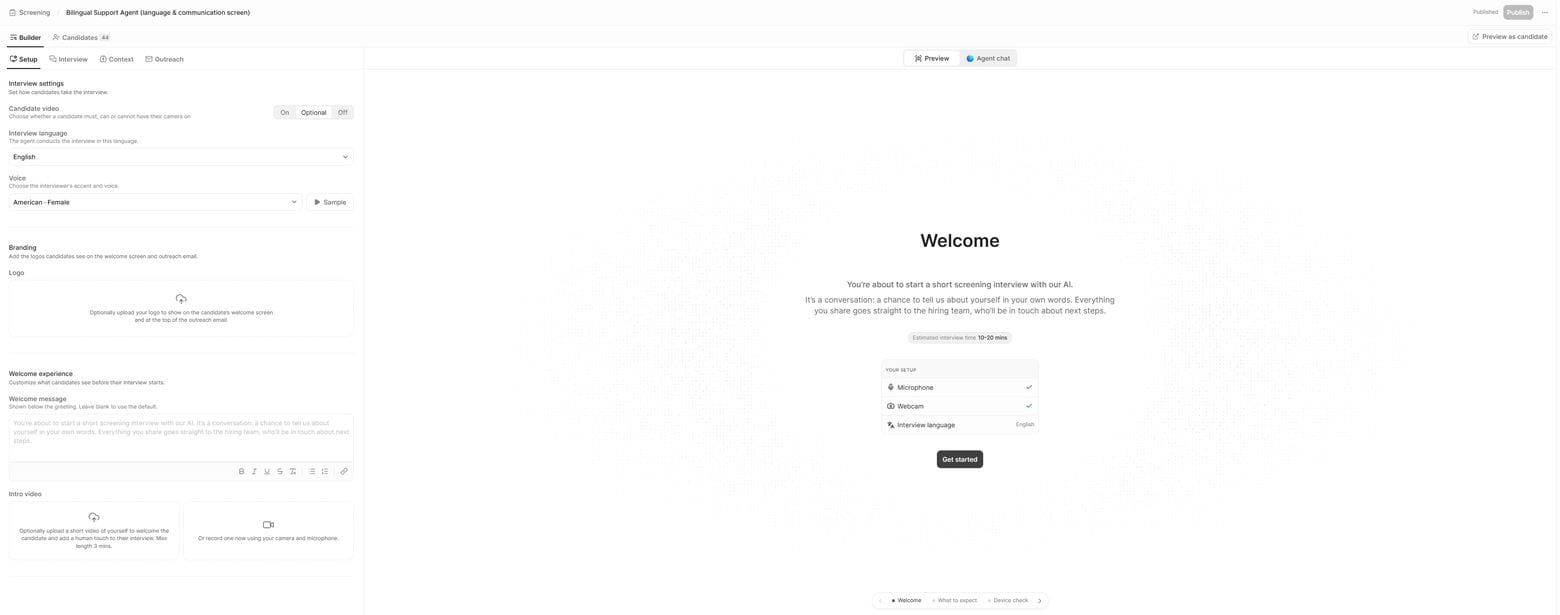
- Review candidate-facing setup. Inspect the invitation, welcome screen, branding, video settings, and company introduction. Test the experience as a candidate instead of relying on the recruiter’s view.
- Check rubric control and decision rights. Ask to see the version history and changelog, including who activated the live evaluation criteria. Check whether proposed edits are tracked separately from the live version and whether the system can rewrite them without approval. Confirm who makes every progress or reject decision after a completed call.
- Request the missing reporting. Ask for raw counts, cohort, role type, invitation method, and flagged attempts. Request results by the decision a human made, with candidates who have no recorded outcome shown separately. Ask for the response count behind any candidate satisfaction score.
Use these checks to find the conditions that can create a poor candidate experience before candidates encounter them.
Run the checklist in the Metaview preview
Metaview lets you test questions individually or run a full end-to-end preview of the call before sending it to candidates.
Candidates don’t need to create an account to open the link on desktop or mobile. The call supports 18 languages, and candidates can ask questions and get answers. The call adapts to what they say, and 76% of the agent’s questions are follow-ups to what the candidate said.
Teams decide screen by screen whether the invitation includes an opt-out link. Our documentation doesn’t explain what happens after a candidate opts out, so raise that gap in the demo and ask whether the link is switched on for your screens.
Companies can add their logo and branding, customize invitation emails, and record a welcome video introducing the company or role.
The agent watches how recruiters approve and reject candidates and recognizes patterns in the reasoning recorded in the feedback log. If a recruiter rejects several candidates with the note "remote only, we need in office," the agent treats that as a pattern and suggests a rubric refinement, such as adding an in-office requirement. The human accepts or dismisses the suggestion. The agent doesn’t rewrite the rubric without human approval.
Where consent has been given, the AI screening interview recording captures every spoken word and is available for your review. A completion figure tells you the call finished, while the audio recording and question-by-question transcript let the team check the quality of that conversation. For each completed Screening call, the recruiter receives a topline rating of Great, Good, Okay, or Poor Fit, with a documented reason grounded in the conversation. They also receive the background safety and candidate fraud checks.
After a candidate completes the call, a recruiter reviews the evidence and makes the progress or reject decision. For completed calls, recruiters can bulk advance or reject candidates based on the agent’s output. Ask what happens to candidates who never complete by the deadline, then decide deliberately how your process will treat them.
The reporting in the last checklist item is the part we don’t supply alongside our completion figure. Ask us for it in the demo.
Give completion rate a narrower job
Our 94% completion figure covers candidates who have started a Metaview screening call. We don’t publish the invitation-to-start rate for everyone who was invited and never began.
When you evaluate screening calls, ask us who the figure covers and when it was measured. Request the raw counts too, then put the same questions to every other vendor with a published completion rate. Record the answers in your demo notes before you compare the figures with your own process.
See Screening from both sides
Walk the candidate experience end to end, then inspect the recruiter view and the measures behind it.
Frequently asked
Do candidates have to appear on video?
It’s optional by default, although a team can require candidates to keep it on. We leave video avatars out by design because, in our view, they move toward replacing human connection without adding useful information to the call.
Where does Screening fit in the hiring process?
When a team builds a screen, it configures where Screening sits relative to application review in the hiring process. Metaview doesn’t reorder a team’s stages.
Which hiring workflows is Screening built for?
Screening has its strongest impact on high-volume roles with 50 or more candidates per opening. It’s built for roles receiving 100 to 300+ applications with standardized job descriptions, rather than executive search, bespoke assessment loops, or personality profiling.
Can a team customize the rubric for an individual question?
Yes. Each question has a scoring rubric written in prose, with named bands that describe the evidence expected at each level. Teams can customize any rubric.
