

In the US and the UK, peak hiring for the holidays kicks off in late September and October. That’s when the biggest retailers and delivery companies publish their seasonal hiring plans. Some summer jobs open even further ahead of the work: the US National Park Service starts taking summer applications in October.
And it all lands on top of your normal job. There are roles to post, applications to read, first calls to make, checks to book, and a start date that won’t move.
It doesn’t have to be a scramble. Plan early, and hand some first calls to AI where your recruiters can’t get to them all.
That way, you can reach applicants before they take another job, and you still get your lunch break. We’ll show you exactly how.
What is seasonal hiring?
Seasonal hiring is filling jobs for work that comes back at the same time every year, like the holiday rush, the summer tourist season, or a harvest. Hiring starts early, weeks or months before the work does. Here’s the timing for a few seasons:
| Season | When the work runs | When hiring opened or plans were published |
|---|---|---|
| US holiday retail and delivery | The holiday shopping season | Target opened seasonal applications on September 24, 2025. Macy’s, Inc. published its holiday hiring plans on September 24 in both 2025 and 2026. Amazon published its own in October in both years. UPS published its plans on October 7, 2026. |
| UK Christmas | Late October to early January for Royal Mail, busiest in December | Royal Mail published its Christmas hiring plans on September 24, 2026. Amazon UK published its own on October 20, 2025. |
| Australian Christmas | October to late December, Australia Post’s busy period | Australia Post opened its recruitment on August 25, 2025 |
| National Park Service jobs, summer | Generally March to September, varying by park | Applications between October and February |
| National Park Service jobs, winter | Generally October to February | Applications between July and August |
If you post your jobs after the largest employers in your area do, your applicants may already have offers to weigh.
How to plan seasonal hiring?
First, agree on your hiring deadline with your team and whoever signs off on hiring: the date your first seasonal worker needs to be on shift. Then list the steps in your process that can’t be cut or moved, like a set number of interview rounds, a background check, or a visa filing.
Measure how long your hiring takes now.
Pull last season’s numbers from your ATS, role by role: the days from application to first call, and from first call to an accepted offer. Together, they’re the baseline you’ll measure the peak against.
Then set this season’s targets. The target for the days to a first call is your response time, and you’ll set it from how long applicants will wait. For the time from first call to offer, look at the steps that held offers up last season, like an interview round that was slow to book, and decide which ones you can shorten.
Plan around the steps you can’t rush.
If you’re hiring workers who need a visa, start the visa filings first. They have the longest lead times, and for H-2B and H-2A workers the US Department of Labor sets fixed filing windows:
| US visa | When to file |
|---|---|
| H-2B, for non-farm work | The labor certification, between 90 and 75 calendar days before the first day you need workers. Most new H-2B petitions also count against a yearly cap, so check with US Citizenship and Immigration Services that the cap for your start date is still open. |
| H-2A, for farm work | The job order, between 75 and 60 calendar days before the first day you need workers |
In the UK, the Seasonal Worker visa covers only horticulture and poultry work. In Australia, working holiday visas usually limit someone to 6 months with one employer. Check how these visas apply to your workers with an immigration adviser before you plan around them.
Your US and UK hires also have checks to clear, wherever they come from: whether they’re allowed to work, and a background check if you run one. UK rules require the work check before someone starts, while US employers can finish it within 3 business days of the first day of paid work. Book the work check and any background check into onboarding for every start date.
Estimate applications per role from your last peak.
Your ATS also records how many applications each opening drew last season, week by week. Since the peak comes back each year, last season is the closest guide you have.
Start from those numbers, role by role, because one average across all your roles is unlikely to fit any of them. Multiply each role’s weekly applications per opening by its openings this season, and that’s your applications estimate.
Screen seasonal applicants at peak volume.
Two jobs pile up first in a peak: reading applications and holding first calls. AI can do both while your recruiters make the decisions.
Set your response time, your first-call questions, your call order, and your no-show plan ahead of time, since there’s little time to change how you screen once the peak is underway.
Set how fast applicants get a first call.
Ask your recruiters how long applicants in your area will wait before they take another job, then take off the days you need after the call for the decision and the offer. What’s left is your response time.
Don’t set it from the waits you measured last season, though. They leave out the applicants who took another job before you called, so they make applicants look more patient than they are.
Next, work out how much recruiter time one first call takes, counting the booking and the write-up as well as the call. Then build your capacity plan, week by week:
- Take your recruiters’ hours that week, minus the time their other work will take, like reading applications, later interviews, and offers.
- If AI holds some first calls for you, take off the time your recruiters will spend reviewing them.
- Divide the hours left by the recruiter time one first call takes. That’s how many first calls your recruiters can make that week.
- Compare it with the first calls your recruiters need to make that week. To count those, take the share of your applications estimate you plan to call, using last season’s share as a guide, and take off the calls AI holds. Any calls left over roll into the next week.
Wherever applicants would wait longer than your response time, add recruiter hours or hand some first calls to AI before the peak starts.
Stress-test it, too: rerun the plan as if every week drew as many applications per opening as last season’s busiest week. Note the weeks where waits would run past your response time, and add hours or AI calls for those weeks too.
Ask the questions a season adds.
Keep your usual first-call questions, and give AI the same core questions for the calls it holds, so every applicant is judged on the same things. Then add the ones that only come up in a seasonal role:
| Ask about | Why it counts in a seasonal role |
|---|---|
| The exact dates they can work, including their last day | You need someone who can stay until the peak ends |
| The shifts and days they can take | Applicants who work other jobs may only be free for some of your shifts |
| Whether they’re allowed to work in the country, and from what date | It tells you when they can start. Ask every applicant the same question, and save checking their documents for onboarding. |
| Whether they can get to the site for your shift times | If buses don’t run at your start or finish times, they may not be able to get there without a car |
| Whether they’ve worked for you before | Their last manager can tell you how that season went |
Put the roles in a call order.
When more applicants are waiting than your recruiters can call, someone has to decide who waits. Do it before the peak and write it down, because a call order that lives in one recruiter’s head goes home with them every evening.
| What moves a role up | Why | Where to check |
|---|---|---|
| It starts earliest | Its new hires have the least time to get through checks before their first shift | The start dates on this season’s requisitions |
| It was slowest to fill last season | It’s likely to need the longest run-up again | How long each role stayed open last season |
| It draws the fewest applications | Each applicant you lose is harder to replace | Your estimate of applications per role |
Rank the roles by start date. If two start together, put the one that was slower to fill last season first, and if that ties too, the one with fewer applications.
Prepare for first-day no-shows.
Some people you hire won’t show up on their first day, and in a peak there’s no time to run a new search for each one. Keep a standby list of applicants who cleared your screen but didn’t get an offer, and tell them they’re on it.
A few days before each start, tell each new hire when and where to come and who to ask for, then ask them to confirm. If someone doesn’t confirm, call them, and line up the next person on your standby list in case they don’t come.
What to look for in AI screening for seasonal hiring?
In a peak, an AI screening tool has to work for applicants who may be juggling other jobs, and for recruiters with no time for extra admin. Before you pick one, check that it:
- Lets applicants take the first call at any hour, on a phone, with no account to create.
- Asks your core questions and your seasonal ones, like dates and shifts, and follows up when an answer is too short to judge.
- Says why each applicant got their result, so a recruiter working through a long queue can see what to look at.
- Leaves the decisions to a person, and acts on its own only when you’ve set it to.
- Flags answers that may not be the applicant’s own, for a person to check.
- Handles the languages your applicants speak.
- Connects to your ATS, so applications reach it without anyone copying them across.
Test before the peak: run the tool on the season’s first applicants, and have a recruiter check its results against their own judgment of the same applicants. If its questions miss something your team needs to know, change them while volume is still low.
Decide as well whether the AI call comes before or after someone reads the application. A separate guide on when to run AI screening compares the two orders and helps you pick one.
Where Metaview fits in seasonal hiring.
We built an agent for each of the two jobs that pile up first.
Metaview Screening for first calls.
Metaview Screening holds a voice-led screening conversation with each candidate your hiring team chooses to assess. Someone coming off a shift elsewhere can take it that evening, on a phone or laptop with no login, and ask their own questions as they go.
Screening suits many seasonal roles, like store associates, warehouse pickers, and front-of-house staff, because they’re high-volume roles with a standard job description.
If an answer looks AI-assisted or fraudulent, Screening flags it for your recruiter to look into. Siadhal Magos, our co-founder and chief executive officer, describes what Screening gives the people applying:
And we can give more real candidates a fair shot at proving they're more than what’s written on paper.”

Once an applicant finishes the call, your recruiter gets the recording, the transcript, and a fit rating with the reasons behind it. Metaview captures every spoken word of the call, so they can check any result against what the applicant said. For every completed call, a recruiter decides who moves forward.
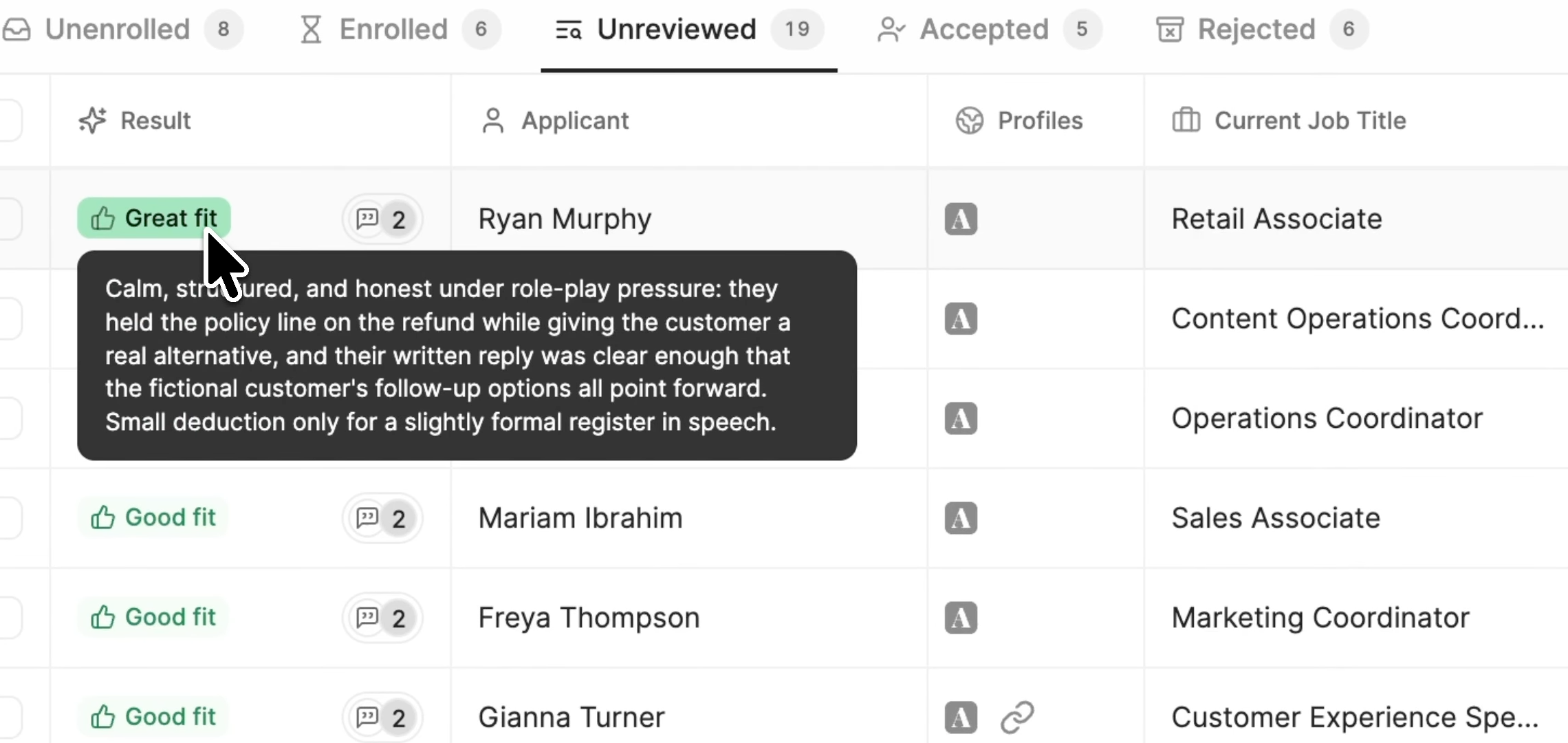
Application Review for reading applications.
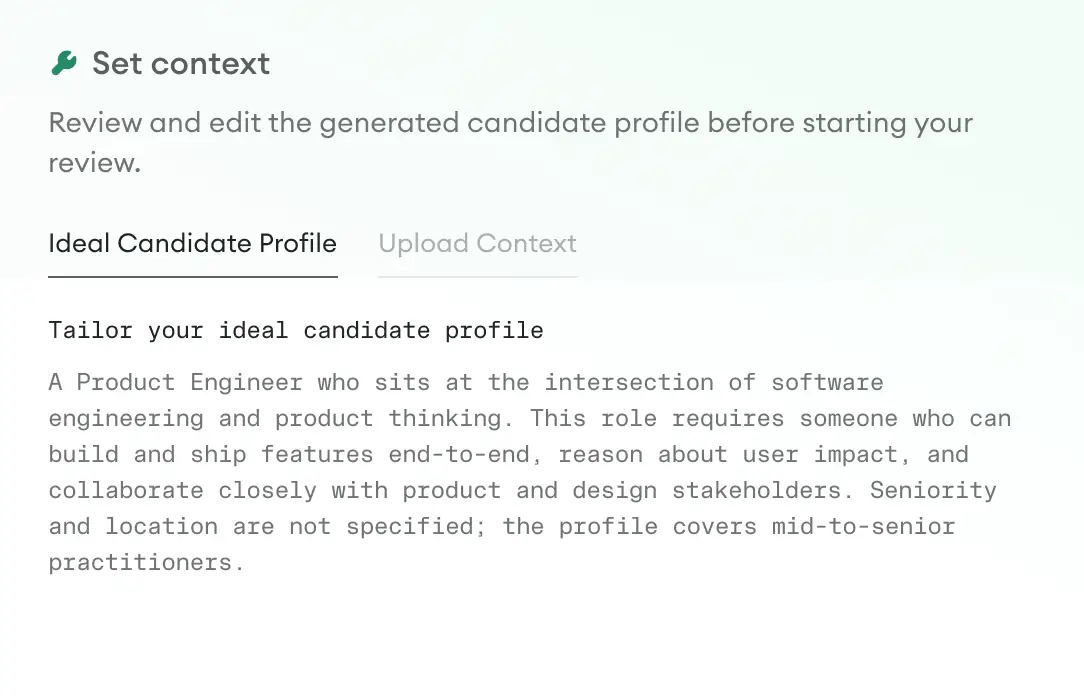
Application Review reads the applications synced from your ATS into Metaview and compares each one with an ideal candidate profile your hiring team approves. It drafts each role’s profile from that role’s job description, and your team edits it before approving it.
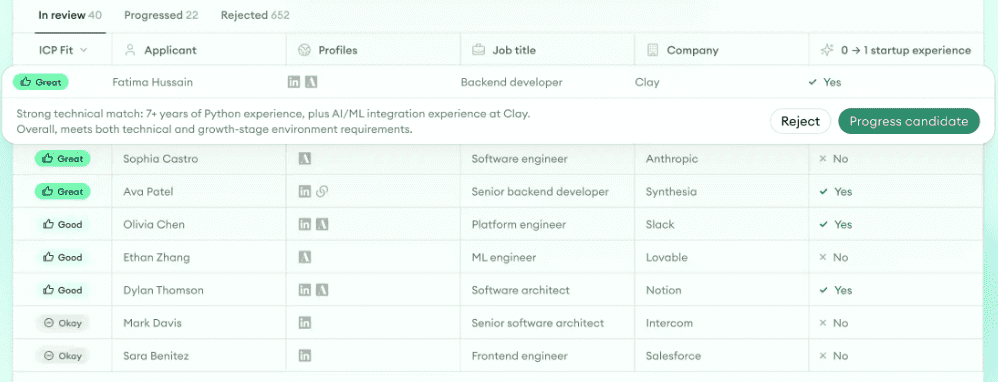
Application Review then sorts each role’s applicants into fit groups and gives its reasoning for each one. Your recruiters can then call the closest fits first, role by role in your call order. If you change a role’s profile partway through the peak, it re-evaluates that role’s applicants against the new profile. Only someone on your team can accept or reject an applicant.
As each application comes in, Application Review also looks for signs of identity fraud and explains any flag it raises. Check early that the Application Review page, linked above, lists your ATS.
Check that your seasonal hiring plan is working.
The first weeks of the peak show whether the plan holds. Run these checks every week, and when one fails, fix the cause first:
- Compare each role’s applications with its estimate. If a role is drawing more, update its estimate and rerun your capacity plan. If it’s drawing fewer, check where and how the job is posted before you change anything else.
- Check how long applicants are waiting for a first call, counting the applicants still waiting as well as those you’ve called. If any wait runs past your response time, rerun your capacity plan with this week’s numbers, and add recruiter hours or hand more first calls to AI where it falls short.
- Watch the queue of completed AI calls waiting for review. If it grows, give your recruiters more review time before you hand AI any more calls, since applicants wait on those decisions too.
- Make sure each new hire’s checks will be done in time. If a background check or a UK work check is running late, push back that hire’s first day now and tell them. If a visa filing is behind, talk to your immigration adviser first, because the start date is part of the filing.
- Count the first-day no-shows. If they’re running high, fill from your standby list and send start details earlier.
Write down what you changed before the season ends.
The end of the season is the time to plan next year’s peak, while the numbers are fresh. Before your seasonal workers leave, write down:
- Each role’s days from application to first call and to an accepted offer, against the targets you set. Where a role missed, note which step ran long, so you can start it earlier or shorten it next year.
- Each role’s applications by week and its first-day no-shows, so next year’s estimate starts from real numbers.
- What you changed this season, such as handing first calls to AI, and what happened to those numbers after you did.
- What your recruiters, managers, and seasonal workers say slowed them down, while they’re still there to ask.
In your ATS, tag your standby list and the applicants you didn’t reach, so you can invite them back for the same roles. Next season, they’re people you can contact before your new posts go up.
See how Metaview fits your next seasonal peak.
Watch Metaview Screening hold first calls and Application Review sort applicants by fit, in a demo before the season starts.
Frequently asked.
When does holiday hiring end?
For some of the biggest employers, it runs into November and December. Macy’s, Inc. scheduled its last 2026 hiring event for November 19. Amazon said it would post new US holiday roles weekly from October through December 2026. So applicants keep seeing new openings, and you need to call them back quickly until your last new hire starts.
Can store managers screen seasonal applicants?
Yes, if you plan around the hours they can spare for first calls, and they ask the same questions your recruiters ask.
How do you plan seasonal hiring without last season’s numbers?
Borrow the application counts and hiring times from your closest roles and locations, then revisit them once the first week’s applications are in.
What do you do when a seasonal worker quits mid-season?
Call your standby list first, though by mid-season some of the people on it may have found other work. If no one’s free, repost the role and move it to the front of your call order, since you need someone in it soonest. Either way, run the same checks as for any new hire.
