
Your phone screen interview usually reaches the hiring manager as whatever you wrote down afterward.
Across the scorecards captured on Metaview, in interviews of every kind, 47.4% of “Strong Yes” recommendations were followed by the candidate moving to a later round captured on Metaview. For “No” recommendations, it was 6.2%. It’s an association, since the person writing a scorecard is often part of the decision too.
So it helps if every recommendation on a role comes from the same kind of call. When two recruiters screen for the same role in two different ways, their recommendations can rest on different questions. The hiring manager then can’t tell which differences come from the candidates.
We think the answer is a screen that runs the same way every time: the same questions, in the same order, scored on the same rows. It feels stiff at first. In return, your fifth screen can be compared with your first.
This guide walks through the questions to ask, a 30-minute running order with the words to say, and the scorecard to fill in afterward. It also covers where Metaview can do the writing and, on high-volume roles, take the first call.
By the end of it, you’ll have a screen you can hand to any recruiter on your team, with a running order and a scorecard to match.
What is a phone screen interview for?
A phone screen interview is a short first call between a recruiter and a candidate, held before anyone else on the hiring team spends time on them. It has three jobs:
- Clear the dealbreakers: location, the right to work, notice period, and pay. If one rules the candidate out, you both want to know early.
- Test two competencies: the two the hiring manager named in the intake call as the ones they care about most. Later rounds can go deeper on the rest.
- Give the candidate a reason to keep going: you may be the first person from your company they’ve spoken to, and they’re deciding about you too.
Of the conversations captured on Metaview with a known platform, 28.54% were phone calls, second only to Google Meet in the interview channel mix. On a phone call, you can’t see a reaction or share your screen, so more has to be said out loud.
Which questions belong in a phone screen?
Twelve questions, in four blocks: the dealbreakers, evidence on two competencies, motivation, and timing. Ask them in the same order every time, and write the wording into a shared document your recruiters screen from, so whoever picks up the role asks the same thing.
Our guide to running a recruiter phone screen keeps the core topics fixed and leaves the wording to each recruiter. We’d go a step further and fix the wording too.
“Walk me through a recent project” and “What are you proudest of?” pull out different stories, which makes the answers harder to compare. Keep your follow-ups for digging into what the candidate just said.
A 2022 review of decades of hiring studies, by Paul Sackett and colleagues, ranked structured interviews as the strongest predictor of job performance among the methods examined. In a structured interview, everyone gets the same questions and the same scoring.
The team measured how closely interview ratings tracked later job performance. Their estimate was .42 for structured interviews and .19 for unstructured ones. The studies didn’t look at phone screens or question order, and the figures are still debated, so treat them as support for the habit in general.
Start with the dealbreakers.
Ask these first, and plainly. If someone’s outside your range, it’s kinder to find out in the first five minutes.
- Where are you based, and how does the role’s working pattern fit with that?
- Will you now or in the future need visa sponsorship to work in this role?
- What’s your notice period, or when could you start?
- Our range for this role is X to Y. Does that work for you?
Then get evidence on two competencies.
Pick one piece of work and stay on it. This is the evidence the hiring manager will look for.
- Tell me about a piece of work from the last year you’d put your name on. What was the situation when you picked it up?
- What was the hardest call you made on it, and what did you decide?
- What went wrong, and what did you do once you noticed?
- If you did it again with the same constraints, what would you change?
In five and six, listen for the constraint, the decision, and what it cost them. If every answer is about “we,” ask what they did themselves.
Seven and eight give you a sense of how they handle a miss, though a rehearsed answer can sound just as good. Where your hiring manager named different competencies, keep the shape and rewrite the questions to fit.
Ask what pulls them toward you.
- Why this role, and why now?
- What would need to be true a year from now for you to call this a good move?
Listen for a reason that’s about this role, beyond leaving the last one.
Finish on timing and doubts.
- What else are you interviewing for, and how far along are you?
- Is there anything about the role, as I’ve described it, that doesn’t fit what you’re looking for?
Question twelve is easy to drop when a call runs late. Ask it anyway, because it gives the candidate a chance to raise a doubt while you can still answer it.
How do you keep the call to 30 minutes?
Give each part of the call a set number of minutes, so you know what to shorten when you fall behind.
Recruiter screens captured on Metaview ran 37.3 minutes on average, in a small sample of 183 calls. If yours run that long, a 30-minute plan means deciding in advance what gets less time.
| Minutes | What you’re covering | What you might say |
|---|---|---|
| 0 to 2 | The plan for the call | “Thanks for making the time. This should take about half an hour: some practical questions first, then your recent work, then anything you’d like to ask me.” |
| 2 to 7 | The dealbreakers, questions one to four | “Before we get to your work, a few practical ones.” |
| 7 to 20 | Evidence on two competencies, questions five to eight | “Let’s stay with that project. What was the hardest call you made on it?” |
| 20 to 25 | Motivation and timing, questions nine to eleven | “Two more quick ones, and then it’s your turn.” |
| 25 to 30 | The role, their questions, question twelve, and the next step | “Let me tell you a bit more about the role, and then ask me anything you like.” |
When they ask about the role mid-call, answer it there and then. Close with a real date for the next step, like “You’ll hear from me by Thursday either way.”
When you fall behind, take the time out of your description of the role. The twelve questions stay, and so does time for the candidate’s own.
A phone call also needs a few habits that video doesn’t:
- Say where you are in the call. A signpost like “two more on logistics, then your recent work” stands in for the nods they can’t see.
- Send the job description ahead, since you can’t share your screen.
- Leave a short pause after each answer. Candidates sometimes fill it with the detail you were after.
Teams that record screens should say so at the start, in your own words and in line with your recording policy. Something like: “I record these calls so I can give you my full attention. Is that okay with you?”
Build the scorecard before the first call.
Draft it before your first screen, with each row tied to a question. If no question feeds a row, you may have little to write in it.
| What you’re scoring | The questions behind it | What a strong answer contains |
|---|---|---|
| The hard requirements | One to four | A start date, a clear answer on sponsorship, and a yes to your range |
| Your first competency, such as ownership | Five and six | A decision they made themselves, and the constraint that made it hard |
| Your second competency, such as self-awareness | Seven and eight | A named mistake and what changed afterward |
| Motivation | Nine and ten | A reason tied to this role itself |
| The risk of losing them | Eleven and twelve | Their other processes and timelines, and any objection said out loud |
Give each row one rating and a line or two of what the candidate said. “Great communicator” tells a hiring manager how the call felt. “Explained a price increase to three unhappy customers, and all three renewed” tells them what to ask about next.
Writing that line from memory, at the end of a day of back-to-back screens, is the hard part.
Let Metaview do the writing.
Shahriar Tajbakhsh, our co-founder and chief technology officer, sees interviewing as attracting talent as much as assessing it. That’s hard to do while you’re typing.
Good interviewers know that failing to close an excellent candidate is a silent company killer.”

Metaview’s Notetaker works with phone calls as well as video interviews, so you can keep your attention on the candidate.
Record the call so you can listen.
The Notetaker records and transcribes your screen and turns the conversation into structured notes. It captures every spoken word, so you can listen back to an answer when you sit down to score.
It records only if consent is given, and collecting that consent is your team’s job under your own policy and local law. Metaview’s integrations page says candidates are told about Metaview through touchpoints your team controls, and can opt out of recording at any time.
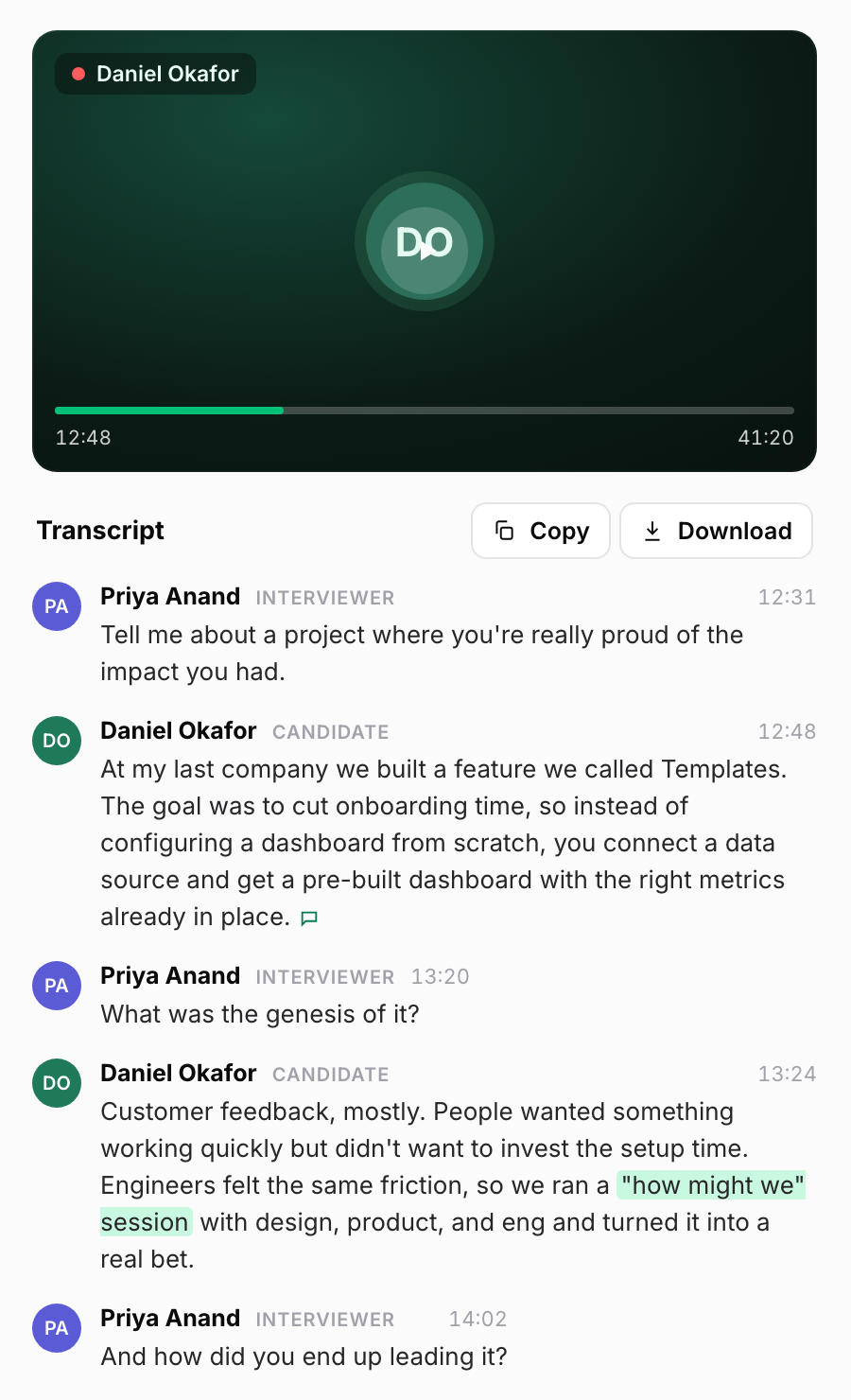
Recruiters at Elara Caring, an in-home health and hospice provider operating across 18 states, run their phone screens this way. “Most recruiters said that it saves them about 50% of the time on their phone screens,” says Katie Hill, Talent Acquisition Systems & Sourcing Specialist at Elara Caring.
Katie also points to a worry the recording eases. “Everybody has anxiety about whether or not they really asked that question… So it’s nice to have that peace of mind,” she says. With a recording, you can check that every candidate got all twelve.
Shape the notes around your screen.
Notes can come back as questions and answers, as topic highlights, or in a custom format you set for a specific stage or role. With twelve fixed questions, a question-and-answer layout follows your screen in order.
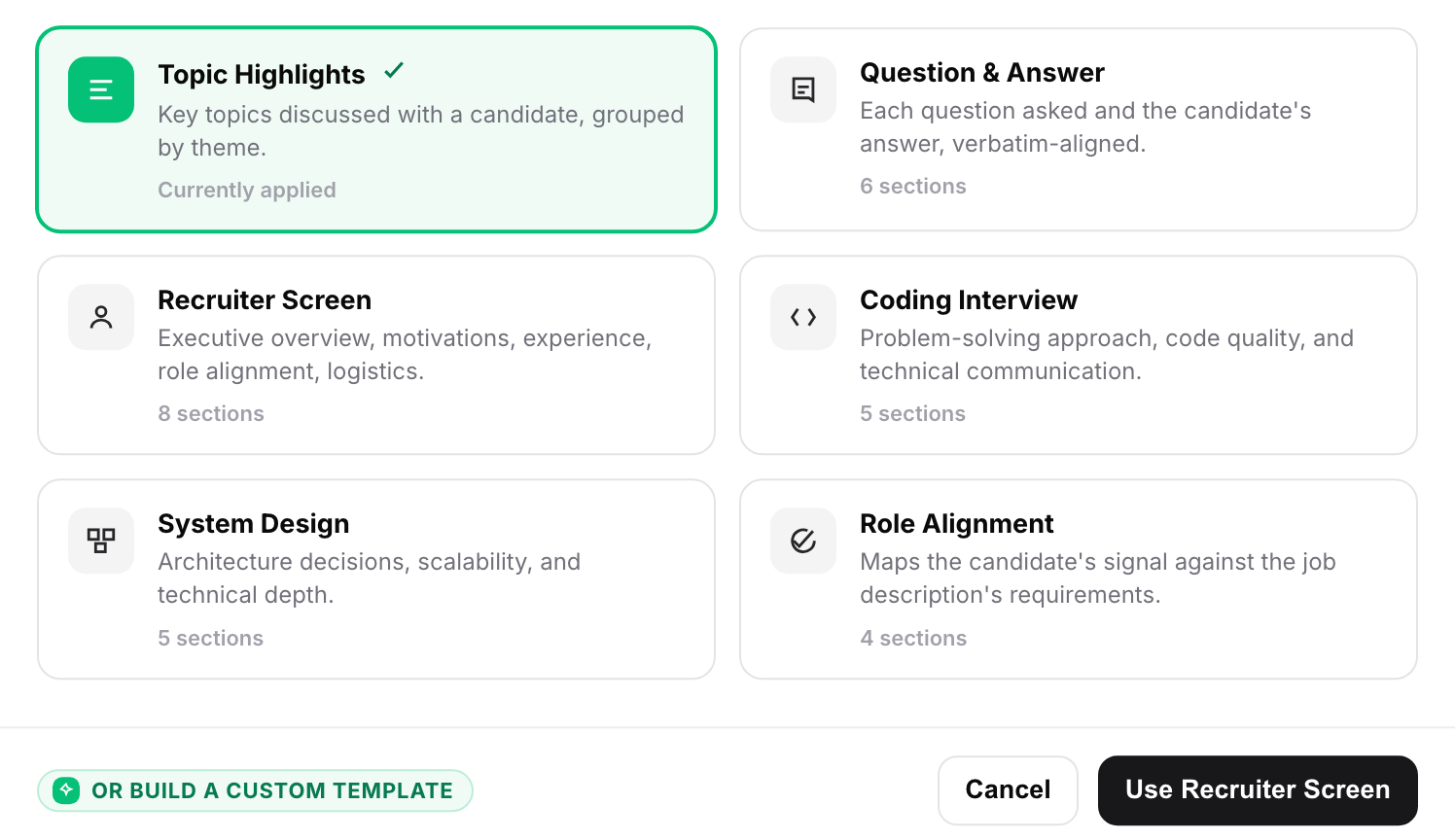
Every section of the notes links back to the part of the transcript it came from, so you can check a line against what the candidate said.
Start the scorecard from a draft.
Metaview then drafts your scorecard from the conversation. You check it, add your rating and recommendation, and submit it.
On Ashby and Lever, you can submit straight from Metaview. On Greenhouse, a Metaview browser extension fills in the objective sections, and you finish the rest there.
In a capped sample of 120,000 scorecards created on Metaview, interviewers submitted 50.3% of the ones Metaview generated, well above the rate for scorecards started by hand.
That’s an association, and it doesn’t show the draft caused the difference. Teams that use generated scorecards may work differently in other ways.
A submitted scorecard isn’t automatically a good one either, so the check before you submit is still yours.
When should Screening take the first call?
Screening fits when a role brings in more applicants than your team has time to call, and its job description is standardized. Metaview Screening is built for roles like that, in areas such as sales, support, healthcare, and retail.
It isn’t meant for executive search, or for bespoke assessment loops, such as engineering roles that need physical gear simulations.
Metaview Screening holds a voice-led screening conversation with each candidate you choose to assess. Candidates take the call on desktop or mobile whenever it suits them, and they don’t need a login or an account.
Screening asks your questions, probing where an answer is thin, and evaluates the responses against your criteria. It’s a two-way call, so candidates can ask about the role as they go.
Your twelve questions and five rows give you a head start. Share your job description, your scorecard, and any other context, and Metaview generates an assessment plan with questions and scoring rubrics for you to edit.
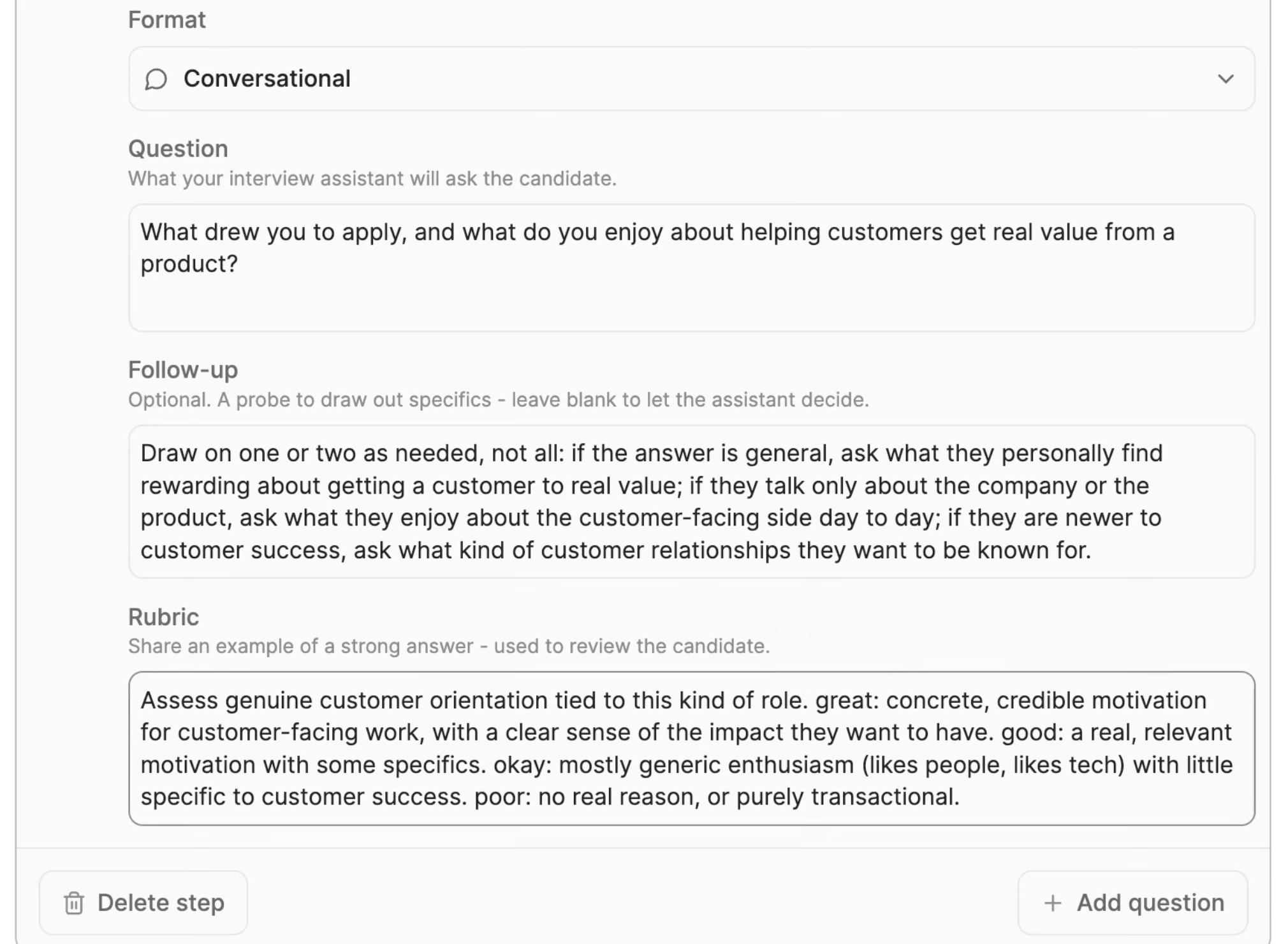
Each completed call comes back with an assessed fit and the reasoning behind it, along with its recording and transcript. For every completed call, a recruiter decides who moves forward, and Metaview does not make that decision.
Before you switch it on, try the questions on a few calls of your own and rewrite any that get vague answers. Our guide to where AI screening fits in your hiring process covers the rest of the setup.
In this episode of Shipped at Metaview, two of the engineers who built Screening show what candidates see and what recruiters get back.
Is your phone screen working?
After a few weeks of screens on a role, pull a handful and check that each screen ran as written. Where a check fails, fix that part first.
- Every candidate got all twelve questions, unless a dealbreaker ended the call early. Skim transcripts from two or three recruiters for questions that went missing or got reworded.
- Calls end on time. When screens keep running past half an hour, find the block that overruns and check whether it has drifted into a later round’s job.
- Each scorecard row has evidence in it. When a row keeps coming back empty, check the transcript: the question got skipped, the answer got left off the page, or the question draws vague answers and needs rewriting.
- Recruiters on the same role recommend at similar rates. A big gap is a reason to read their transcripts before deciding whether the candidates differed or the screens did.
- The hiring manager agrees with your yeses. If they don’t, go through one scorecard row at a time together, because either bar may need to move.
Metaview Reports can show the fourth check in one view, with your screens grouped by interviewer and broken down by the recommendation each one gave.
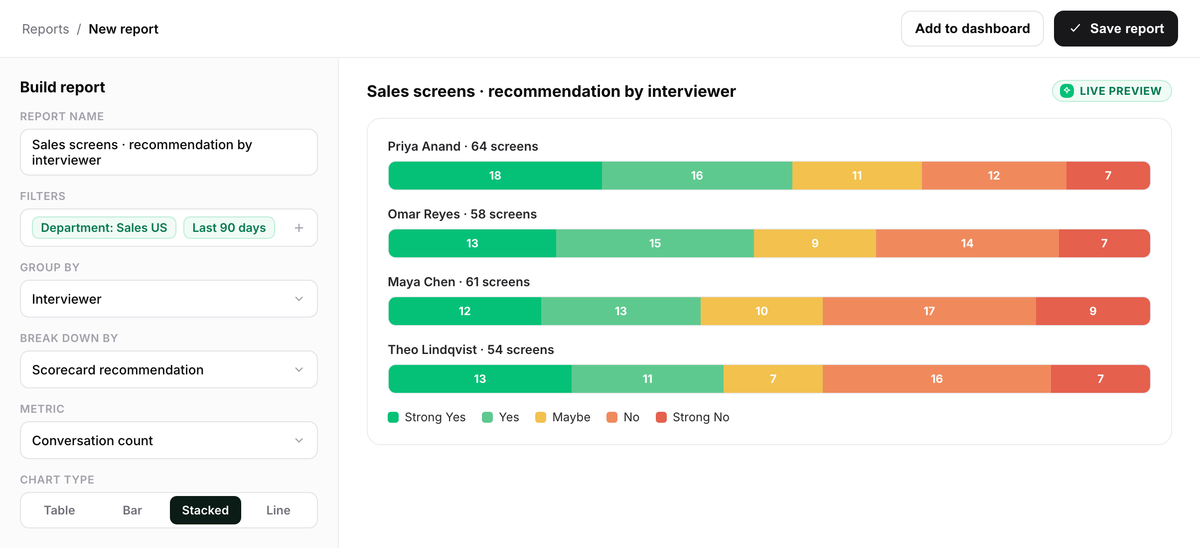
To start, pick one open role. Write the five scorecard rows first, then map the twelve questions onto them. Save both where your recruiters screen from, so the next recruiter on the role runs the call you designed.
Keep every phone screen on the record.
Metaview’s Notetaker records your screens and drafts each scorecard, and Screening can take the first call on high-volume roles.
Frequently asked.
Who should run the phone screen, the recruiter or the hiring manager?
Usually the recruiter. Clearing the dealbreakers and selling the role are recruiting work, and the hiring manager’s time goes further in a later round. Bring them in early for senior roles where the candidate expects it, or for a requirement too technical for a recruiter to judge.
What’s the difference between a phone screen and a first-round interview?
A phone screen checks the basics and gathers a little evidence on two competencies. A first-round interview tests skills in depth, usually with the hiring manager or someone on their team. The screen helps decide whether that deeper look is worth anyone’s time.
Should you send candidates the questions before a phone screen?
Send the job description and the plan for the call, so candidates can think about which piece of work they’d talk about. Exact questions sent ahead can come back as rehearsed answers, which are harder to follow up on.
Is it legal to record a phone screen interview?
It depends on where you and the candidate are. According to the Reporters Committee for Freedom of the Press, several states in the United States require everyone on a call to consent before it’s recorded, including California, Florida, and Illinois. Tell the candidate at the start, and check your recording policy with your legal team.
What if a candidate fails a dealbreaker in the first five minutes?
Tell them kindly and directly which requirement doesn’t fit, and end the call early so you don’t take more of their time. Then note the reason on the scorecard, so the decision is on record.
