
Taking notes during an interview means listening to one answer while you’re still writing down the last one.
So what should make it onto the page? When should you write it? And why have the best recruiters stopped doing it during the interview at all?
Most advice on how to take interview notes hands you a better template. A template helps you organize what you write. It can’t give you back the attention typing takes during the call, or fill in the blank scorecard waiting after it.
In a sample of 120,000 scorecards created on Metaview, interviewers submitted 50.3% of the ones Metaview generated from the conversation, against 28.6% of the ones they started from scratch. The data can’t say why, but our read is that the blank form is where a lot of scorecards stall.
We think the best recruiters have stopped taking notes during the interview, and that you should too. They take them on either side of the call, agreeing on the criteria before it and checking the evidence after it, and let an AI notetaker do the typing in between.
This guide walks through how to take interview notes that way, from the criteria you agree on with the hiring manager to the scorecard you submit.
By the end of it, you’ll know what belongs in your notes and on your scorecard, how to score every candidate on the same criteria, and why typing during the interview is the habit to drop first.
Why is it so hard to take notes and listen at once?
Because both jobs need your attention, and the candidate doesn’t stop talking while you finish typing.
While they talk, you’re already deciding things: whether the answer covered what you asked, and what to ask next. Typing adds one more decision to the pile, which is what to write down.
So your notes end up as a summary of whatever you caught, and what you already think of the candidate can shape what goes in. A hedge like “it mostly worked” can turn into “it worked” by the time it reaches the page.
Recruiters at Cockroach Labs ran into this on their phone screens. “When you’re doing recruiter phone screens and you’re taking notes at the same time, you can’t be quite as engaged with a candidate as you would like,” says Megan Mueller, a senior manager in global go-to-market recruiting there.
If you can’t write it all down, what should you be writing?
What should go into your interview notes?
Your notes should hold evidence: what the candidate said and did, filed under the criteria you’re scoring. Your scorecard then turns that evidence into a rating for each competency.
Both are for the people who weren’t on the call: the next interviewer, who needs to know what’s still untested, and the hiring manager, who has to weigh your view against everyone else’s. Here’s what to capture for them:
- The criteria you’re scoring: the two or three competencies this interview owns.
- What the candidate did: the specifics, like the project, the decision they made, the number they quoted, and who they had to convince.
- Their exact words when they surprise you: a hedge or a qualifier can be the most telling part of an answer, so keep the phrase itself rather than a summary of it.
- Follow-ups and what they turned up: so the next interviewer doesn’t ask the same question twice.
- What you didn’t get to test: the question you ran out of time for, or a hunch you couldn’t confirm, like how the candidate handles pushback, so the next interviewer knows where to dig.
On the scorecard itself, each competency gets your rating with a line or two of that evidence under it.
Adjectives are the quickest thing to write and the hardest for anyone else to check, so swap them for the example that made you think them.
| Competency | Instead of writing | Write what made you think it |
|---|---|---|
| Communication | “Strong communicator.” | “Explained the migration plan to the finance team in plain terms and got sign-off in one meeting.” |
| Ownership | “Very senior.” | “Has run the team’s quarterly planning on her own for the last two cycles.” |
| Technical depth | “Unsure about depth.” | “Couldn’t say why the team picked its database. Worth probing in the technical round.” |
If you want a format to hang this on, our interview notes template lays the fields out by competency.
How to take interview notes before, during, and after the call.
Most of the work happens before the candidate joins and after they leave. Here’s how we’d run it.
Agree on the criteria before the first interview.
Settle what you’re assessing in the intake call, before anyone talks to a candidate. Pick the competencies the role needs and write an interview rubric that says what a strong answer sounds like for each. Agree on it with the hiring manager, then split the competencies across your interviewers so each one owns two or three and every competency gets covered somewhere in the process.
Every candidate then gets scored on the same competencies, which is what lets you compare them later. When each interviewer listens for something different, you get notes no one can line up against each other.
Keep the interview for listening.
During the call, your attention belongs to the candidate. Ask the follow-up right away, while the context is clear, and push for an example whenever you hear a generality.
If nothing is capturing the conversation, jot a word or two that will bring the answer back to you, or the exact phrase if one surprises you, and nothing longer. Save sentences and judgments for after the call, because an early verdict can shape how you hear the answers that follow.
If an AI notetaker is capturing the conversation, you can stop typing altogether. Check that it has joined before the candidate starts talking.
Write the scorecard the same day.
Score each competency against the evidence while the conversation is fresh. Block time right after each interview to do it, so the scorecard isn’t competing with the next call.
Put the candidate’s own example under every rating. Without one, the debrief ends up with a number no one can check. If an interview gave you nothing to go on for a competency, write that down instead of guessing a score.
Bring the evidence to the debrief.
Of the candidates who moved forward with more than one scorecard in interviews captured on Metaview, 56.3% had at least one interviewer who said no.
Those calls get made in the debrief, and the notes are what the room has to go on. When every scorecard rates the same competencies with the evidence underneath, the room can see what each no rested on: which competency, and what the candidate said about it.
Open the interview debrief on the competency where the scores split.
The during-the-call step is where an AI notetaker changes the most.
Why have the best recruiters stopped taking notes during the interview?
Because what makes an interviewer good is the part typing gets in the way of. Our co-founder and chief technology officer, Shahriar Tajbakhsh, put the difference between a good interviewer and a bad one in two sentences.
A bad interviewer transacts. A good interviewer interacts.”

In his piece on interviewers, Shahriar ties the difference to follow-up questions: a good interviewer asks them because they want to learn more. That’s hard to do with your eyes on a keyboard.
Metaview’s Notetaker sits in on the call as a visible participant, recording and transcribing the conversation. Because it captures every spoken word, the notes and the scorecard draft start from everything the candidate said, including the parts you’d have missed while typing.
It only records when the people on the call have consented, and collecting that consent is your team’s job, under your own policy and local law. Metaview’s integrations page says candidates are told about it automatically, at points in the process your team sets up, and can opt out of recording at any time.
The notes come back in the format your team picks, such as topic highlights or question and answer. Each section links back to the moments in the transcript it came from, so you can check any line against what was said.
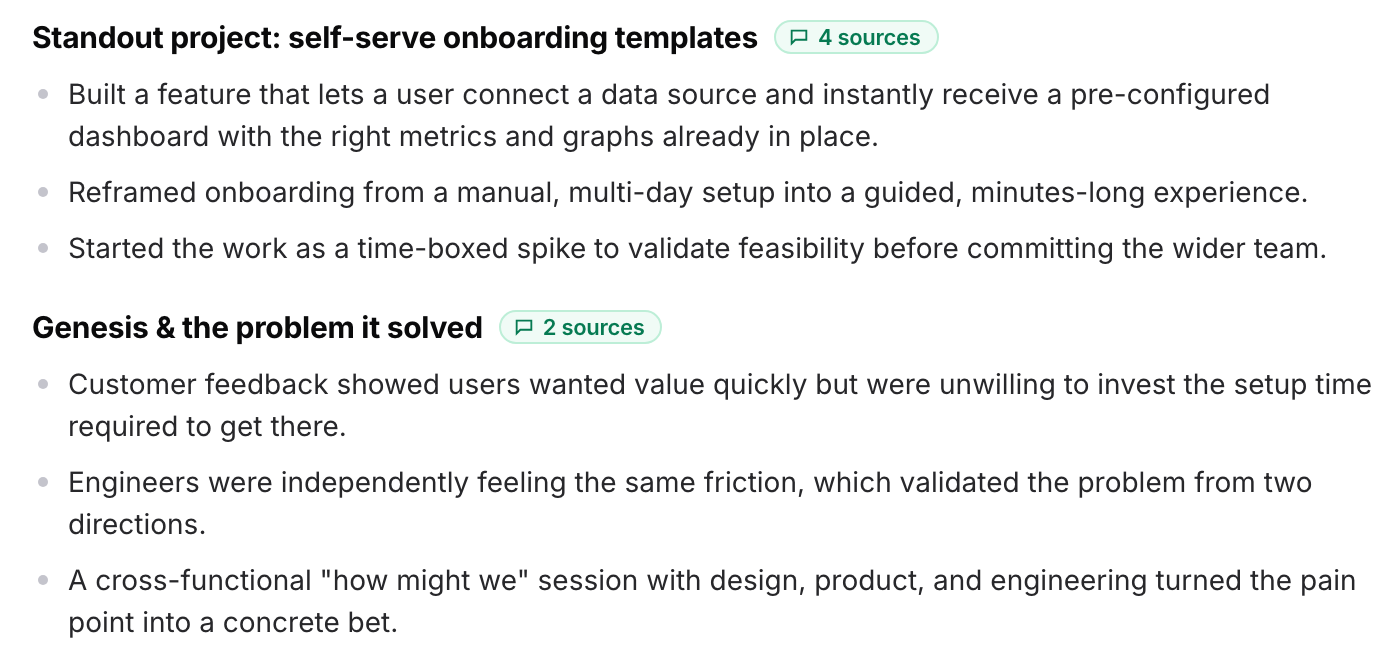
Then Metaview drafts the scorecard from the conversation, mapping what the candidate said to the competencies on it. Your scorecard asks the same questions of every candidate at that stage, so the drafts line up, and the hiring manager can read them side by side.
The judgment stays with you: you read the draft and fix anything it got wrong, then add your rating and recommendation before you submit.
Scorecards with a draft behind them get submitted more often, but not all of them do: almost half of the generated scorecards in that sample still went unsubmitted. The review is still a job with a person’s name on it, so keep the slot after each interview even with a notetaker running.
Where the scorecard goes next depends on your applicant tracking system. On Ashby and Lever, you submit the scorecard from Metaview and it goes straight in. On Greenhouse, Metaview’s browser extension fills in the objective sections. The interviewer completes the subjective fields and the hiring recommendation, then submits it there.
What did it save Cockroach Labs and Brex?
Cockroach Labs and Brex both moved their interview notes to Metaview, and both count the return in recruiter time.
At Cockroach Labs, as the company scaled, recruiters were spending “way too much time on administrative work and manual tasks like formatting scorecards,” according to Lynette Estrada, the company’s vice president of global recruiting. “With Metaview, our recruiting team has saved over 14 full work weeks,” she says.
Typing was part of it: “We’ve saved so much time not having to type up very detailed notes,” says Leslie Niiro, a recruiter there.
Brex’s case study, from December 2025, puts its saving at “over 1,000 hours for our interviewers and recruiting team” over the past year.
One of its recruiters points to what changed on the calls themselves. “We can be more present in conversations,” says Pooja Chand, a senior go-to-market recruiter at Brex.
Cockroach Labs’ recruiting team tells the rest of their story in this video.
Are your interview notes doing their job?
Pull a handful of recent scorecards for one role and run these checks. Where one fails, fix that step first.
- Someone else can follow your scorecard. If a hiring manager who wasn’t there can’t tell why you scored a competency the way you did, add the candidate’s example under that rating.
- Every rating has evidence under it. If one doesn’t, check whether the competency came up in the interview, then fix whichever step dropped it: the question or the write-up.
- Scorecards arrive the same day. If they’re missing or late, give interviewers a slot after each interview. Letting the Notetaker draft the scorecard means no one starts from a blank form.
- The debrief argues about evidence. If the room is trading impressions, ask each interviewer to read the evidence under their rating before anyone gives a verdict.
In your next interview, let the Notetaker take the notes and keep your eyes on the candidate. Then compare the scorecard you submit with the last one you wrote from your own notes.
Take the typing out of your interviews.
Metaview’s Notetaker captures the conversation, so your interviewers can stay with the candidate.
Frequently asked.
Is it rude to take notes during an interview?
Not if you tell the candidate up front and keep looking at them while they talk. What comes across badly is the pause while you finish typing a sentence, so save full sentences for after the call.
How do you take notes in a panel interview?
Give each panelist their own competencies to listen for, so no one is trying to cover the whole candidate, and decide in advance who asks what. If the panel is being recorded, everyone can check the same transcript afterward instead of comparing memories.
What if a candidate doesn’t want the interview recorded?
Then the Notetaker doesn’t record that call, and you take notes yourself. Keep them to the competencies you agreed on, so that candidate’s scorecard still lines up with everyone else’s.
How long should interview notes be?
Shorter than you might think. A sentence or a quote under each rating is usually enough for someone else to check it, and if the interview was recorded, the transcript holds the rest.
Can you use an AI notetaker for phone screens?
Yes. Metaview works with phone calls as well as video interviews, so your recruiter screens can follow the same note-taking process as later rounds.
