
For a lot of roles now, the first real look a hiring team gets at a candidate happens on video, before anyone's in a room together. Remote and hybrid work made that normal, and it's why video assessments have become a core part of how teams evaluate people.
Run well, they let a small team screen far more candidates without the process getting less fair. Handled badly, they feel arbitrary to candidates and tell you less than a phone screen would.
The difference is structure. The teams that get real value from video assessments ask every candidate the same questions, score against a rubric, and use a capture layer so the interviewer can pay attention to the candidate instead of typing notes.
What are video assessments?
A video assessment is a structured way to evaluate candidates using video interviews or recorded responses.
Instead of relying on resumes or phone screens alone, it gives recruiters and hiring managers a fuller view of a candidate's skills, communication style, and problem-solving.
There are two main types:
- Live video interviews: Real-time conversations between candidates and interviewers, run over Zoom or Microsoft Teams. These are close to a traditional interview, just virtual.
- Asynchronous video assessments: Pre-recorded responses, where candidates answer a set of structured questions on their own time. Recruiters review the recordings later, often with AI to structure or analyze the answers.
Both formats have caught on. Recruiters get more to go on than a resume can offer, and candidates get to take part from anywhere.
Why video assessments help, and where they don't.
For recruiters filling roles fast without dropping their standards, video assessments clear a few real bottlenecks. Beyond convenience, they change what you can actually see:
- More candidates, less time: You can screen and evaluate far more people, especially with async formats, where hundreds of applicants can submit responses without an interviewer on each call. That makes high-volume hiring more manageable.
- Consistency and fairness: Ask every candidate the same questions on video and you can compare answers side by side, against the same criteria, instead of on gut feel.
- Richer signal: You see communication style, body language, and how someone works through a problem. You get a fuller picture of a candidate's skills, personality, and potential than a resume gives you.
- Flexibility for candidates: Async formats let candidates respond when it suits them, which is more inclusive for different time zones and schedules.
- A record you can revisit: Recorded assessments can be re-watched, shared with other stakeholders, or used for calibration across teams, so decisions rest on evidence rather than memory.
None of that is automatic. A video assessment only compares candidates fairly if every candidate gets the same questions and the same scoring. Skip that and you've just added a camera to an inconsistent process.
How to run video assessments that compare fairly.
Running video assessments well takes more than a Zoom link and a list of questions. The best ones are structured and consistent, and they respect the candidate's time.
1. Define competencies upfront.
Before you launch anything, decide what you're actually evaluating: the specific skills and behaviors the role needs. A customer support role might lean on empathy and communication, while an engineering role focuses on problem-solving and technical depth.
Clear competencies keep every question and interview rubric pointed at the same hiring goal.
2. Use structured rubrics and questions.
Give every candidate the same questions, mapped to the competencies you defined, and pair them with a scoring rubric that spells out what an excellent, average, and poor answer looks like.
A clear interview scorecard makes evaluations more objective and far easier to compare.
3. Keep the process candidate-friendly.
Tell candidates what to expect: the technology, the time limits, and how many attempts they get on an async assessment. You also need to let them know you're recording, and give them a way to opt out.
A clear, transparent process lowers candidate stress and makes the whole thing feel fairer.
4. Get more from automation and AI.
Tools like Metaview can generate notes and summaries automatically from a live or recorded assessment, so interviewers aren't writing down everything a candidate says. That frees them to actually watch the interview.
The notes are structured against your rubric, so every candidate is scored on the same criteria across large volumes.
5. Follow up quickly.
After a candidate puts time into a video assessment, nothing sours the experience faster than weeks of silence. Set a clear SLA for feedback or next steps, and use automation to keep communication timely.
With these in place, video assessments become a genuinely useful way to evaluate candidates fairly and efficiently, while still feeling human and transparent.
Mistakes that quietly bias video assessments.
Video assessments still have pitfalls, and experienced recruiters fall into them too.
1. Getting stuck on first impressions.
It's easy to be swayed by how a candidate looks or comes across on camera. A tidy background, professional attire, or confident body language can create a strong first impression even when the skills don't match the role.
The same goes for their setup. A weak webcam or a bit of audio lag can make someone look less prepared than they are.
Overvaluing surface-level cues can lead to biased decisions, and you risk passing over strong but less camera-confident candidates. Scoring against a rubric, rather than a gut read, is what counteracts it.
2. Lacking structured evaluation criteria.
Treat a video interview like a casual chat and it becomes hard to compare candidates fairly. Without consistent questions or a rubric, two interviewers can score the same candidate very differently, and hiring decisions drift.
Structured evaluations make sure each candidate is assessed on the same criteria, and that personal bias plays a smaller role. Ask everyone the same situational questions, score against defined competencies, and the process gets fairer on its own.
3. Overemphasis on personality.
Charisma and verbal fluency are easy to notice on video, but they shouldn't outweigh experience, skills, and cultural fit. A candidate who reads as confident and charming in a 10-minute clip can still struggle in the actual role.
Leaning too hard on personality can mean hiring someone who looks good on video but underperforms on the job. Balance the subjective read with concrete evidence, like skill-based exercises or structured behavioral questions.
4. Not preparing candidates.
Candidates need clear instructions and guidance before a video assessment: the time limits, the kinds of questions to expect, and the technical requirements. Without that, they can seem unprepared, nervous, or confused, and it drags down their performance.
Someone who has never recorded themselves might stumble or leave answers half-finished. A short practice run lets candidates focus on their answers instead of fighting the software.
Most of these come back to the same fix: decide what good looks like before the interview, and score every candidate against it.
4 video assessment tools for smarter hiring.
Four tools come up most often for video assessment, and they solve different jobs. Here's how they compare at a glance, then a closer look at each.
| Tool | Best for | How it works | One limitation |
|---|---|---|---|
| Metaview | Capturing and structuring interviews you already run | Notes and analysis layer over live and recorded calls | Not an assessment engine, it rides on your interviews |
| Hireflix | One-way async screening at volume | Candidates record answers to preset questions | Async only, no live conversation |
| HireVue | Structured skill validation and tryouts | Live and on-demand interviews, games, and tests | Heavier setup, enterprise-oriented |
| Codility | Technical and coding assessments | Live coding with video proctoring | Engineering roles only |
1. Metaview: AI recruiting platform.
Metaview covers the live-interview half of video assessment. It captures, transcribes, and structures every conversation, so the evaluation runs on evidence instead of memory.
That makes it a notes and analysis layer across the interviews you already run, rather than an engine that administers or scores the assessment itself.
Best known for its automated interview notes and summaries, Metaview also handles sourcing, intake and debrief notes, and reporting, plus an AI assistant that searches past interviews and answers questions about them.
Teams can find and share video snippets from any interview in seconds, so there's always video evidence on hand to back a decision.
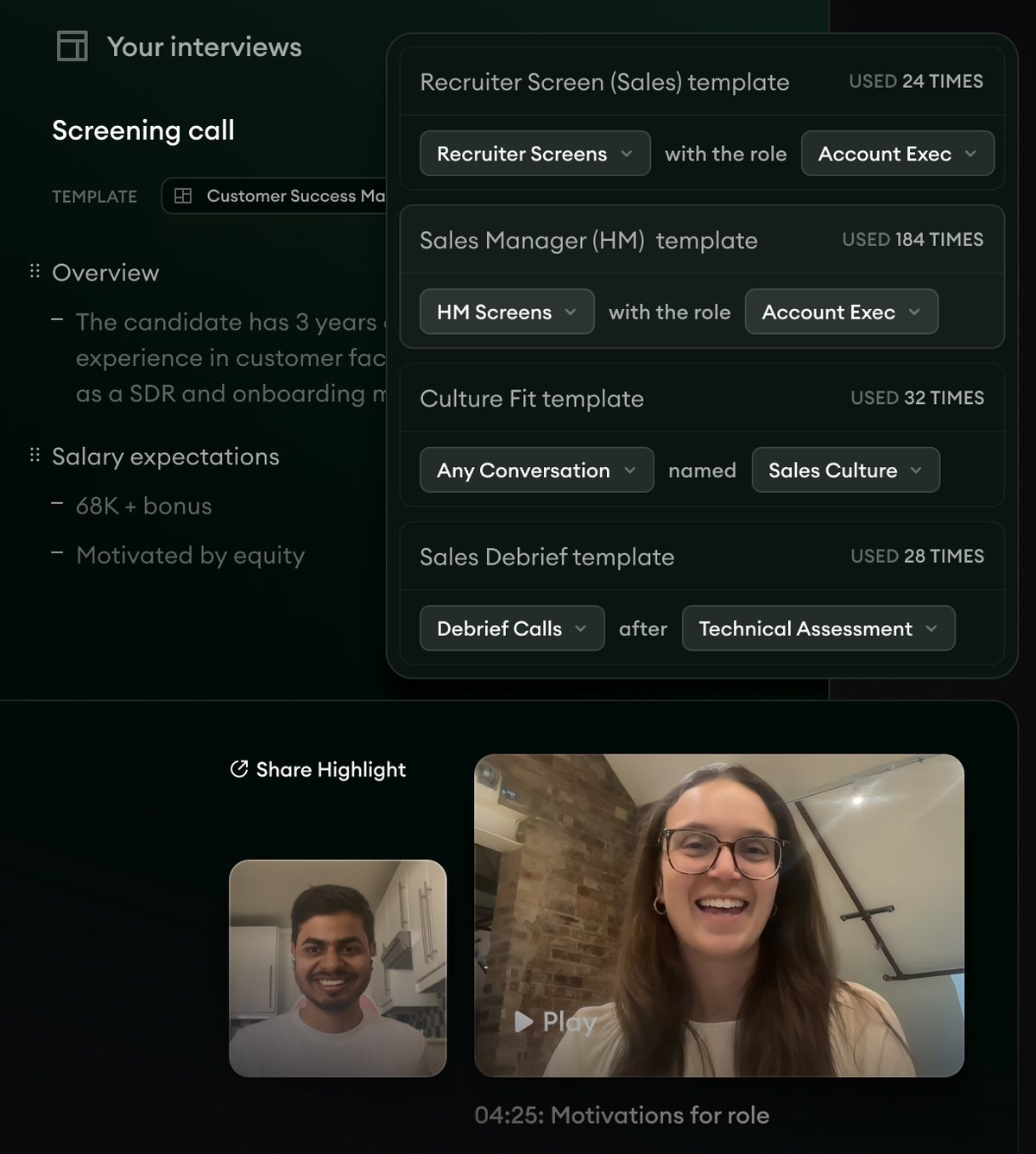
- 1Structured notes written automatically from the call, grouped under headings like Overview and Salary expectations.
- 2Reusable templates per interview type and role, so every screen captures the same things.
- 3A shareable video highlight clipped to a key moment, here the candidate's answer on motivations.
Metaview works with your existing video conferencing tools to capture and structure interview notes automatically, so recruiters can stop typing and give each candidate their full attention.
It pulls in context from your applicant tracking system (ATS) and flags the key moments and candidate responses.
The result is a consistent written record of every interview, which makes it easier for hiring teams to compare notes and decide together.
Key features
- AI-generated interview notes: Automatically transcribe and summarize interviews across Zoom, Google Meet, Teams, WebEx, and phone calls.
- Customizable note structures: Tailor notes to your preferred format, with custom templates so everyone follows the same structure and asks the right questions.
- Works with your ATS and CRM: Connects to the systems you already use, so notes and evidence land where your team works.
- Real-time transcription: Get live transcriptions during interviews to capture every detail.
- Highlight key moments: Automatically surface and mark the responses that matter.
- Compliant and secure: SOC 2 Type II, GDPR, and CCPA compliant, with 256-bit encryption, granular access controls, and candidate consent built in.
Best for: teams that want the interviews they already run captured and structured, without adding a separate assessment platform.
Pricing: Start with a free trial, then Pro at $100/month per user or Max at $300/month per user. Enterprise pricing is custom.
2. Hireflix: asynchronous video interviewing.
Hireflix is one-way video software for screening candidates and running video assessments. Candidates record and submit responses to preset questions whenever it suits them.
You set up the interview once, questions or tasks and all, then share it with as many candidates as you need. That saves time on both sides and removes scheduling back-and-forth.
It's a good fit for high-volume hiring and early screening, where one recruiter can review a lot of recorded answers in a sitting.
Key features
- No scheduling required: Skip the back-and-forth, so candidates record whenever it works for them.
- Customizable question sets: Build tailored question sets to assess specific skills.
- Time-limited responses: Set time limits to keep answers concise and focused.
- ATS integration: Integrates with ATS systems like Ashby, Greenhouse, Lever, Manatal, and more.
- Simple interface: An easy platform for both candidates and recruiters.
- Analytics and reporting: See candidate performance and interview trends.
Best for: async screening at volume. The tradeoff is that it's async only, so there's no live back-and-forth with the candidate.
Pricing: Small companies (under 50 FTEs) pay $75/month. Medium companies (50 to 250 FTEs) pay $150/month. Custom packages are available.
3. HireVue: skill validation and structured interviews.
HireVue is skill-validation software that uses virtual job tryouts, games, technical tests, and language checks to gauge whether candidates fit a role. Those exercises assess technical ability, problem-solving, and behavioral traits.
The platform supports both live and on-demand interviews, which you can clip and share with your team, and it connects to common ATS platforms. HireVue leans on structured assessments and scoring so recruiters compare candidates on demonstrated skills rather than gut feel.
Key features
- AI-powered assessments: Evaluate technical and soft skills with AI scoring.
- Structured interview guides: Standardized questions for consistency and fairness.
- Live and on-demand interviews: Flexible formats for different hiring needs.
- ATS integration: Connects with your existing systems for candidate management.
- Real-time feedback: Instant evaluations and insight into candidate performance.
- Bias mitigation tools: Features built to reduce contrast bias in hiring.
Best for: structured, high-volume skill validation. That also makes it heavier to set up than a simple notes or async tool.
Pricing: Available via demo request.
4. Codility: technical assessments with video proctoring.
Codility assesses technical talent through live coding tests and pair-programming sessions. Candidates work with interviewers over video chat, shared coding, and a whiteboard.
Its video proctoring watches for behavior that suggests dishonest practices, so even remote candidates sit under exam-like conditions. For hiring developers and engineers, it gives a clear read on coding proficiency and problem-solving through the interview itself.
Key features
- Live coding tests: Assess coding ability through interactive challenges.
- Pair programming sessions: See collaboration and problem-solving in a real coding scenario.
- Video proctoring: Monitor candidates during assessments to protect integrity.
- Customizable coding tasks: Build challenges around the specific skills you need.
- Detailed candidate reports: Get a breakdown of coding performance and approach.
Best for: technical hiring. Because it's built for engineering, it's overkill for non-technical roles.
Pricing: Starter from $1,200/year. Scale from $6,000/year. Custom plans available.
Make the most of video assessments and interviews.
Done well, video assessments make hiring faster and fairer, and they give you a clearer, more defensible read on candidates.
The value comes from getting the basics right: define what you're evaluating, ask every candidate the same questions, score against a rubric, and prep candidates so the tech doesn't get in the way.
Get first impressions and personality biases under control, and you're assessing the work rather than the webcam setup.
Then pick the tool that fits the job in front of you, live, async, or technical, and let a capture layer like Metaview carry the notes and evidence across all of them.
Bring Metaview into your hiring stack.
Live notes, structured scorecards, and ATS sync - set up in under 10 minutes.
Frequently asked.
Should I use live or asynchronous video interviews?
Use async for early, high-volume screening, where candidates record answers to the same questions and there's no scheduling. Move to live interviews for later rounds, where the back-and-forth and follow-up questions matter more than throughput.
Do video assessment tools reduce hiring bias?
Structure reduces bias, and the format alone does not. Asking every candidate the same questions and scoring against a rubric is what makes comparisons fairer. Video can even add bias if you score on presentation, so keep the focus on the answers.
Is it legal to record candidates in a video interview?
In most places, yes, as long as you tell candidates you're recording and give them a way to opt out. Put the notice and consent in the assessment invite, and check the specific rules for the regions you hire in, since consent laws vary.
How much do video assessment tools cost?
It depends on the job. Async screening tools start in the tens of dollars a month, technical assessment platforms run into the thousands a year, and notes layers price per user. Check each vendor's current pricing before you buy, since plans change.
