
Your job post has been live for a week. It has hundreds of applicants, and only a few of them meet the must-haves. When a role attracts too many unqualified applicants like this, the usual fix is a knockout question on the application form, or closing the post sooner.
Both fixes work on applications the post has already drawn, and neither tells you why it drew them. They have a cost, too. If the post mentions a requirement late, or only vaguely, a knockout question on it rejects people who had no way to know it was required. Closing early turns away the qualified people who would have applied on day five. And the next time the role opens, the same post draws the same unqualified applicants.
I’d start by reading the applications you’d reject. Unqualified applicants seldom fall short at random. Often they lack the same must-have, or they come from the wrong job family or level. Sometimes most of them arrive through one channel. Each pattern points at something you can change, in the post itself or in where it runs. That’s the part of the problem you control.
This guide shows you how to read a week of applications for those patterns, and how to fix what each one points at: the must-haves, the title, the application form, or the channel. It ends with how to tell, from the following week, whether the fix worked.
Find out why the post draws too many unqualified applicants.
Start with the applications you’d turn down. They’re the only record of who the post drew, so they show you what to fix. You’ll mark three things on each one.
Before you mark anything, read the must-haves back to the hiring manager and ask which ones they’d turn a candidate down for. A must-have they’d waive for the right person is a nice-to-have, and an application that lacks it hasn’t missed anything. The must-haves came from your intake meeting, so agree any change to them with the hiring manager before it goes into the post.
Then take a week of the applications you’d reject, or the bottom of the pile if you haven’t decided yet, and mark each one with these:
- The must-have it misses. If it misses more than one, mark the one the hiring manager would reject it for first.
- Whether the application shows it lacks that must-have, or doesn’t mention it at all.
- The channel it came from, read from the source field on the application.
An application that shows two years of experience against a five-year must-have has missed it. An application that lists job titles and no detail has said nothing either way, and the person behind it may meet every must-have you wrote. A silent application hasn’t failed, so keep it apart from the ones that show a gap. The gaps tell you who the post drew. The silences tell you what the form didn’t ask for.
The third mark, the channel, only works if your team records where each application came from. If your team doesn’t do that yet, set it up before you read anything else. Without it, you can’t tell a problem with the post from a problem with the channel, and the two need different fixes.
Match each pattern to the line of the post it points at.
Once you’ve marked a week of applications, the unqualified ones tend to fall into a handful of patterns. This table pairs each pattern with the part of the post it points at and the change I’d make.
| What the pile shows | What it points at | What to change |
|---|---|---|
| Most applicants miss the same must-have, whatever channel they came from | The line that states that must-have | Move it into the opening lines and write it so an applicant can check it against their own record. The next section covers how. |
| Applicants come from another job family, or a level above or below the role | The title | Use the title that people who do this job search for and put on their own profiles. The title section below covers how. |
| Applicants can’t work the location, the hours, or the pay | The lines on location, schedule, and pay | Say where the work happens and whether it’s on-site, give the hours or the shift pattern, and state the pay range where the law or your own policy calls for one. If applicants still expect more than the range, you have another call to make. Our guide to reviewing applicants whose salary expectations sit above the range covers that call. |
| Applications say nothing about a must-have | The application form | Ask a question that tests the fact the post states. A section below covers which questions. |
| Applicants miss a bit of every must-have, and most come from one channel | The way the post appears on that channel | Rework the post’s listing on that channel, as the channel section below sets out. |
| Applicants who look qualified drop out at the first call over the travel, the hours, or the pace | The line on who the role doesn’t suit | Add one plain sentence about the part of the job people turn it down for. A separate piece on how to build an employer brand that repels the wrong candidates explains why that line belongs in the post. |
A week seldom shows just one pattern. Fix the most common pattern first, and leave the rest for later weeks. That way, the next week’s applications can tell you whether that one fix worked.
For more on being candid about the role.
The table’s last row is about telling people, in the post, who the role doesn’t suit. You can make the same point on a call. In this episode of the 10x Recruiting podcast, host Nolan Church talks with executive recruiter Thach Nguyen about what recruiting can learn from sales. Part of that is being candid with candidates about where a role can go wrong.
State the must-haves first, in words an applicant can check.
When most of the unqualified applications fall short on one must-have, check two things about the line that states it: where it sits in the post, and whether an applicant can test it against their own record. This section covers both.
Put two or three must-haves in the opening lines, ahead of the company story and the benefits. An applicant decides whether to keep reading from the top of the post, so a requirement in the fifth paragraph reaches only the applicants who got that far.
Write each must-have as a fact applicants can check: “holds a current commercial driver’s license,” “has run payroll for a company with employees in more than one state,” or “has sold to hospital procurement teams.” A trait such as “strong communicator” or “self-starter” filters out no one, because every applicant believes it of themselves. It also gives the people reading the applications nothing to check.
Set the nice-to-haves apart under their own heading. When preferences sit in the same list as requirements, an applicant can’t tell which lines they’re allowed to skip, and a reasonable reading is that all of them are optional.
Use the title people already search for this job.
When the problem is the applicants’ level or job family rather than one must-have, look at the title first. Expect the fix to be a change of a few words.
Applicants search by title, and they decide from the title before they open the post. That makes the title the first filter. An internal title such as “Customer Champion,” a level code, or a title a step above the job draws people from another job family or level. Once they’ve applied, the must-haves further down can’t undo that. A title is the one line every applicant reads, which makes it an odd place to be creative.
In the post, write the title people use for this job on their own profiles, and keep the level in it when the level is real, such as “Senior” or “Lead.” If your team uses an internal title, put it in the body after the reader knows what the job is.
Ask application questions that test what the post states.
When applications say nothing about a must-have, check whether the form ever asked for it. If it didn’t, add a question. This section covers which questions to add, and where to stop.
Add one question for each must-have the applications leave out. Make each one ask for a fact, so the answer either shows the must-have or shows it’s missing:
- “Do you hold a current commercial driver’s license?”
- “Which payroll systems have you run in the last two years?”
- “Can you work the Saturday shift every week?”
Ask only about must-haves the post states. A question about a requirement the post never mentions tests whether the applicant guessed it.
Each question also makes the form longer for every applicant, the qualified ones included. What each extra field costs in finished applications is covered in a separate piece on application completion rate.
Whether a “no” should reject an application outright is a separate decision with its own trade-offs. Our guide to artificial intelligence (AI) resume screening for high-volume hiring teams covers it.
Change how the post appears on the channel sending most poor-fit applicants.
Sometimes the unqualified applications don’t share one missing must-have. They miss a bit of every must-have, and most of them come from one channel. That points at the channel’s listing, rather than at the post’s wording. This section covers what to change there, and then whether to keep using the channel at all.
Compare the channel each application came from with the must-have it missed. If one channel sends applications that miss every must-have about equally, the wording of the post isn’t what’s drawing those applicants. Rewriting it won’t change who applies there. Instead, change what the channel shows and how it lets people apply: the title and opening lines it displays, and whether its apply route asks your application questions.
Don’t drop the channel on this evidence alone. A channel can send most of your unqualified applicants and still send the person you hire, so judge channels on their hires. Our guide to ranking recruitment channels on the hires they send covers how to decide whether this one stays.
Re-read the next week of applications against the same must-haves.
A fix is only useful if you can see that it worked. The next week’s applications will show you, as long as you read them exactly as you read the first week’s.
Use the same must-haves, the same three marks, and the same channels. Then compare the two weeks:
- If the must-have you targeted is missed less often and the others look as they did, the line you changed was probably what drew those applicants.
- If every must-have is missed a little less often, look at what else changed that week before you credit the rewrite, such as a job board that stopped showing the post.
- If nothing moved, you may have read the pattern right and changed the wrong line, or the problem may be the channel. Go back to the table.
You’ll also need to decide how long the post stays open while you test changes. Our guide to closing a job post sets out a stopping rule based on qualified applicants.
Where Metaview fits.
You can run all of the above with a spreadsheet and a week of applications. Metaview is the Agentic Recruiting Platform, and two of its agents take on the slow parts: Application Review reads the applications, and Job Posts checks the post.
Application Review works from an ideal candidate profile for the role. The profile starts as a draft generated from the job post and any context you add, such as the hiring manager’s intake notes. You edit it and approve it before any application is read against it, so it carries the must-haves you agreed with the hiring manager.
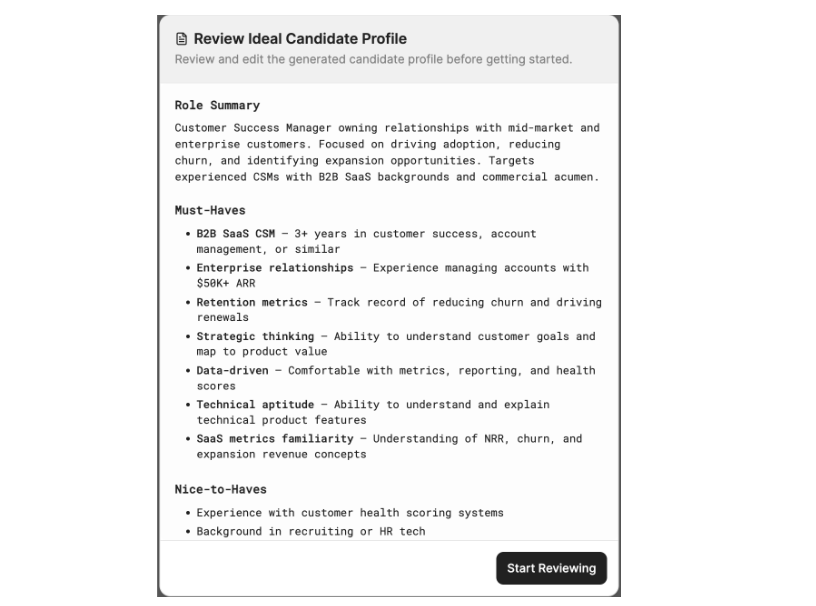
Application Review reads every application against that profile and puts each one in a fit category, with written reasoning for each criterion. Each core competency in the profile also gets its own column. So you can sort or filter the applications by the must-have your own marks pointed at, then read the reasoning on the ones that miss it. For a criterion the profile doesn’t carry, such as location fit, you can add a column of your own. Application Review then evaluates every applicant on it and shows its reasoning.
A fit category reflects what the application shows against the profile. A strong candidate with a thin resume can land in a lower category when the application gives too little evidence. That’s the silent application from the first step, and it’s why the application questions are worth adding. Siadhal Magos, Metaview’s co-founder and chief executive officer, wrote in September about how much a resume leaves out.
A resume was never a complete representation of a person.”

When the hiring manager changes a must-have and you update the profile, Application Review re-evaluates the applications against the new version. A person makes every accept and reject call, and Application Review never auto-rejects.
When most poor-fit applications come from one channel, also read Application Review’s flags for signs of a fake job application, such as identity deception or an auto-apply service, each explained in plain language for you to weigh.
Job Posts works on the post itself. It checks a live or draft post and suggests updates, and a recruiter accepts or edits each one before anything changes. A team can also write its own checks for formatting rules. So the rule from this guide, must-haves in the opening lines, can become a check of its own, and when a post breaks it, Job Posts gives the reason.
The Metaview Notetaker captures every spoken word of the kick-off meeting and the interviews. So when the post leaves out a must-have the hiring manager named, Job Posts has the hiring manager’s own words to suggest the update from. It also suggests an update when interviewers keep raising a skill, a responsibility, or a challenge the post doesn’t mention. Recording happens only if consent is given, under a consent process your team runs.
Keep or reverse each fix to a post that draws too many unqualified applicants.
The re-read tells you what moved, and a short record turns that into a decision. For every edit, write down the five things in this table, so you can keep or reverse the edit based on what the two weeks showed.
| The entry | What to write down |
|---|---|
| The edit you tested | The line you changed, with its old and new wording and the day the new version went live. |
| Qualified applicants | How many applications met every must-have in the week before the edit and in the week after. |
| The must-have you targeted | The share of each week’s poor-fit applications that missed the must-have the edit was meant to fix. |
| Exposure that week | Anything that changed how many people saw the post, such as a board that started or stopped showing it, or a sponsored listing on one channel. |
| The call | Keep the edit or reverse it, with the reason and the name of whoever agreed it. |
Then make the call:
- Keep the edit when the must-have it targeted is missed less often, and the number of qualified applicants held or rose in a week when exposure stayed the same.
- Reverse it when the number of qualified applicants fell and nothing else changed. The new wording turned away people who meet the must-haves.
- When exposure changed in the same week, run the edit for another week before you decide.
Once the record shows your edits holding, the first lines of your post tell the people the role doesn’t suit before they apply. The applicants who still fall short after that are the ones a knockout question or a closer read is for. By then, you know which must-have the knockout should test.
See which must-have each applicant misses.
Book a demo to see Application Review read every application with its reasoning, and Job Posts check the post that drew them.
Frequently asked.
Should I add a knockout question instead of rewriting the post?
Rewrite the line first, then add the knockout if you still want one. A knockout is only fair on a must-have the post states up front. Until that must-have sits in the opening lines, a knockout turns away people who were never told about it.
Will stating the must-haves this plainly put off good applicants?
Plain must-haves put off the applicants who don’t meet them, which is the reason to state them. Keep the must-haves to what the hiring manager would turn someone down for, and put everything else under nice-to-haves, so a strong applicant who lacks one preference still applies.
What if the hiring manager changes the must-haves after the first interviews?
Change the post the same week, and read the next applications against the new must-haves. A post that falls behind what interviewers ask about is easy to miss. Our guide to spotting job description drift once interviews begin covers the signs.
What if the number of applications is the problem, rather than who’s applying?
Then the post may be fine, and the work is reading a large pile fairly. That’s covered in a separate piece on handling inbound application overload. The first step in this guide tells you which problem you have: if most of the pile meets the must-haves, the post is doing its job.
How many applications should I read before the pattern is clear?
Read until the same missing must-have keeps coming up. For a busy role that may be a single day’s applications, and for a slower role the full week. Stop when more reading stops changing which pattern leads.
