
Many talent communities start as a box on the careers page that says “Join our talent community” and end as a list that hears from the company only when a job alert goes out. The day a role opens, the recruiter writes to people who signed up a year ago, and few of them reply, because the last thing they received was an automated alert for a job they never wanted.
The people on that list asked to hear from you, and that is the whole asset. I’d treat each send as something that either earns the next open or uses up some of the permission they gave you.
So I’d run it like a newsletter with a hiring team behind it. Write for the few role families you hire for most, and send each family a useful update on a set schedule. Then, as each role opens, have its recruiter write to the members who have been reading.
How a talent community differs from a hiring pool.
A talent community gets confused with two other lists your team keeps, and the difference decides how you run it. Each list holds different people and asks something different of your team:
| The list | Who is on it | What you owe them |
|---|---|---|
| The pipeline for an open role | Candidates in process for that role right now | A decision, and updates until it arrives |
| The hiring pool | Everyone your team holds a record on, including past applicants and sourced prospects | Outreach that fits them, when you choose to send it |
| The talent community | People who asked to hear from you about a kind of work, before any role was open | An update worth their time, at the pace you promised when they joined |
The opt-in is what separates the community from the pool. Someone in the pool hears from you when you have a reason to write, while someone in the community signed up to hear from you regularly. So treat the opt-in as a promise about what you’ll send and how often.
Building the wider pool of past applicants and sourced prospects is covered in this guide on how to build a hiring pool.
Pick the role families you hire for again and again.
Write every update for someone in particular, which means deciding first who the community is for.
Look at the roles you opened in the last year and pick two or three families that came up most often. Those are the hires a community can help with, because a role you fill once every three years leaves its members waiting with nothing to apply for.
Name each family narrowly. A family of engineers is too broad to write for. Platform engineers with payments experience is a family you can write for, because you know which of your engineers they’d want to hear from and which events they go to.
I’d add a family only once the first ones have members who reply, because each new family needs its own updates.
Ask people to join when their interest is high.
People join when they’re already interested in your company. Put the invitation where that interest peaks:
- On the careers page and at the end of every job post, for people who like the company but not this role.
- In a recruiter’s follow-up after a first conversation that didn’t turn into an open role.
- At events and meetups, with a QR code on the printed flyers that opens the sign-up form.
- In the note to a finalist you turned down, offering to keep them posted about the next role in their family.
A finalist you didn’t hire is the strongest invitation you have, because they already know your team and your interview process. Ask finalists personally, from the recruiter they met, so they have a reason to hear from you again after a no.
Keep the form short. Ask for an email address and the role family they want to hear about, and nothing else, because the rest can come later from what they open and reply to. Check the form on a phone, because anyone who scans the code at an event opens it there.
Tell people what they’re signing up for, and promise a pace you’ll keep. Then send at that pace and no faster, and make leaving the community one click.
Segment members by role family and recent activity.
Send each update only to the people it was written for. A marketing leader doesn’t want engineering updates, and a senior engineer doesn’t want entry-level alerts.
So segment by family and activity: the role family each member joined for, and how recently they did something with what you sent. Most candidate relationship management (CRM) tools can hold both as tags or fields, and so can many applicant tracking systems.
Within each family, start with two groups: members who answered an update or attended one of your events lately, and everyone else. Leave anything richer until you have more members than one person can keep track of, because two groups per family keep each send specific without turning the list into a project of its own.
Write updates about the work, at a steady pace.
Members open an update when it tells them something about the work that your job posts don’t. These formats do that:
- A story from someone in the role family about a problem their team worked through.
- A written question-and-answer session with a hiring manager, built from questions members sent in.
- What the interviews for that role family cover, and how to prepare for them.
- A talk someone on your team gave at a conference, with a line on why it’s relevant to this family.
Leave job alerts out of the regular update. I think a member who receives only alerts starts to read the community as a job board, and a job board is easy to unsubscribe from.
Write each update for one family. Open the same employee story differently for each one: lead on the platform work for engineers, and on the collaboration with engineering for designers.
Pace is the other half of the promise you made at sign-up:
Reach the members who act when a role opens.
The community earns its keep the day a role opens in a family it covers. Write first to the members whose recent activity shows they’re reading.
Rank activity by effort, because a reply or a sign-up for an event says more than a click, and a click says more than an open. Opens are the weakest sign, because some mail apps load every image automatically and record an open that no one made.
I’d start the list with anyone who replied or came to an event in the last two months, then add members who clicked through to something in that time.
Then write to each one personally from the recruiter who owns the role, and say why you thought of them. Give them an easy way to say not now, because a member who passes on this role can still be the hire for the next one. Mention the role to the rest of the family in the next regular update, written about the team.
Where Metaview fits in a talent community.
Two parts of this method depend on your team’s interview notes. One is knowing what people in a role family care about. The other is knowing what a former finalist said before you write to them about a new role.
If the people on the call consent to recording, the Metaview Notetaker joins the interview as a visible participant and records and transcribes the conversation. It then turns the conversation into structured notes, in the sections of the template your team uses for that kind of call. Collecting that consent is your team’s process, under your own policy.
Metaview captures every spoken word of those interviews. So when a finalist you turned down joins the community, the recruiter who writes to them about the next role can read the finalist’s own words first. Keep that use within your team’s own retention policy for candidate data.
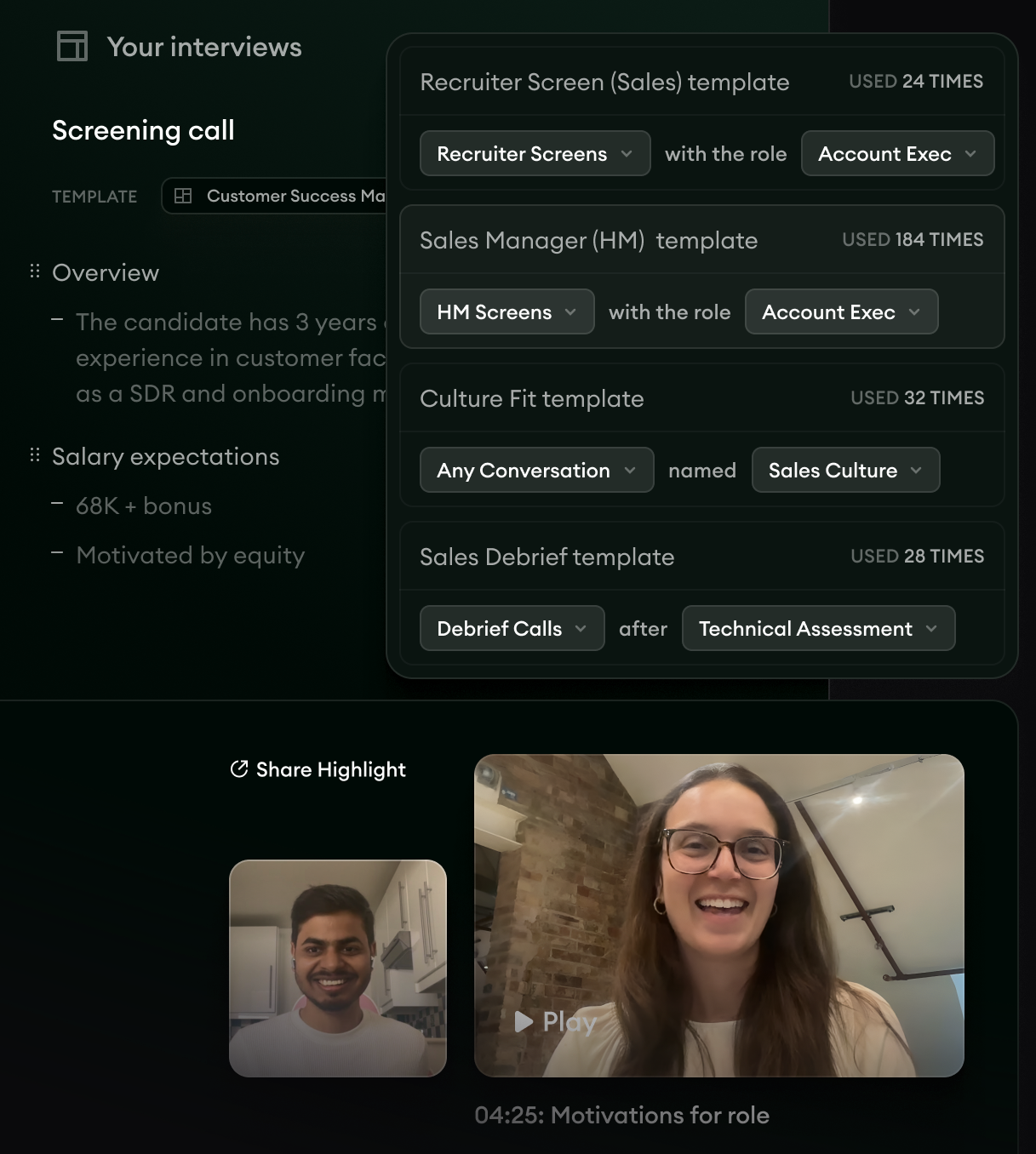
- 1Notes from a screening call, sorted into sections such as the candidate’s overview and their salary expectations.
- 2Note templates matched to the kind of call and the role, so every screening call’s notes come out in the same sections.
- 3A clip from the call marked “Motivations for role,” which a recruiter can go back to before writing to that candidate again.
Shahriar Tajbakhsh, one of Metaview’s co-founders, wrote this about where a recruiter’s time counts most:
The highest-leverage work in recruiting happens when people are talking to people.”

A talent community gives your team more of those conversations, with people who already chose to hear from you.
Your interviews can also tell you what to write about. Reports runs over your own interview data. Use it to compare question coverage across interviewers and roles for a role family, then tell members which competencies those interviews cover and how to prepare.
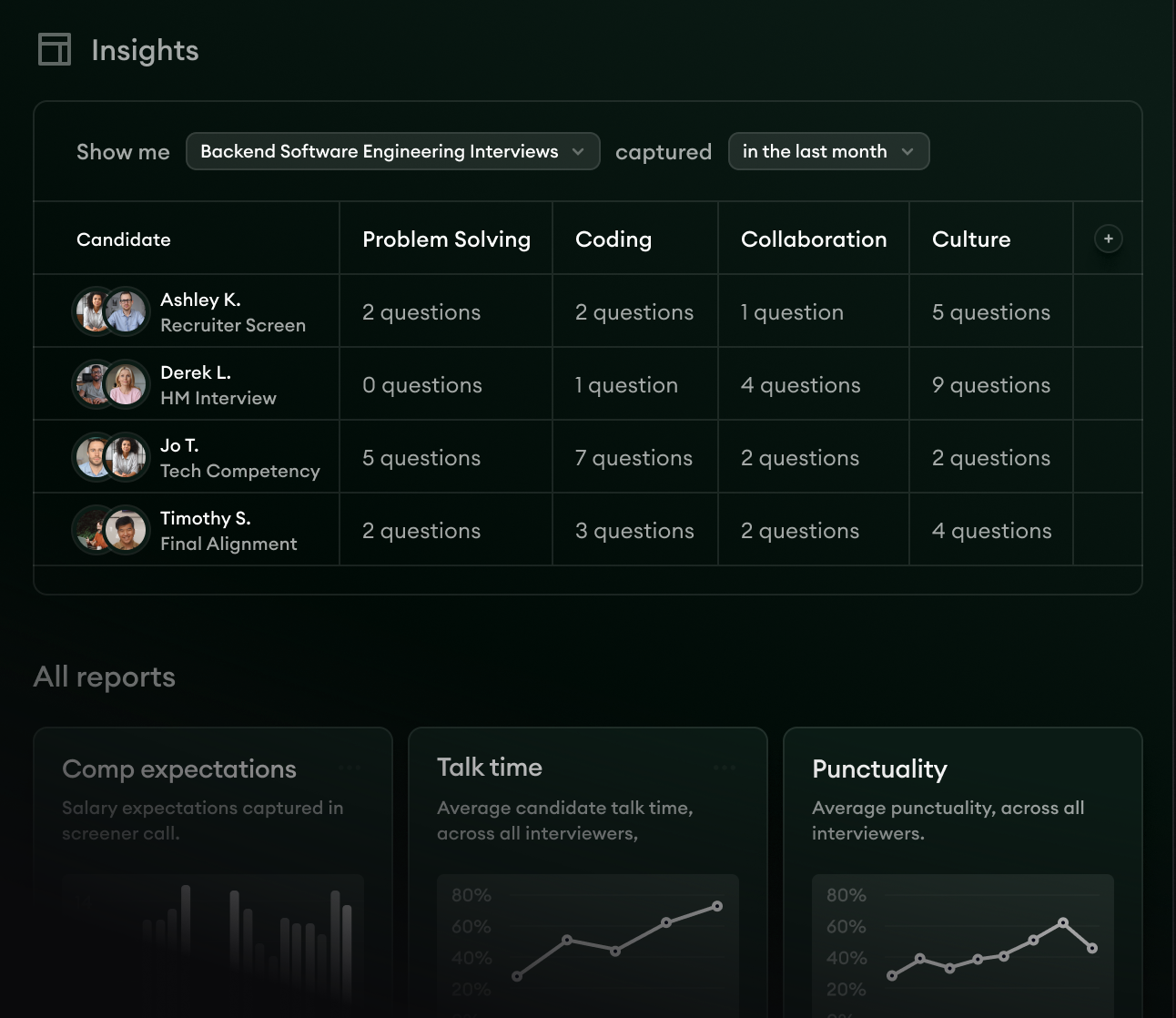
- 1The filter that picks one kind of interview and a time window, here backend software engineering interviews captured in the last month.
- 2Question coverage across the competencies in each interview, with the candidate and the interview stage on each row.
- 3The “All reports” list below the table, with reports such as “Talk time” and “Punctuality.”
Some members will apply through a job post instead of replying to a recruiter. Tag the candidate record in your applicant tracking system as a community member, so the recruiter sees it before deciding.
Metaview’s customers think about what a community hears, too. On episode 13 of Metaview’s 10x Recruiting podcast, Andy Pittman, vice president of talent at ShipBob, argues that recruiting should sell candidates a better life rather than a job.
Use his test on each update before it goes out. Ask what it tells a member about that better life, and if all it says is that you’re hiring, rewrite it until it says something about the work and the people doing it.
Check the community on the next role you open.
Once updates are going out and roles are opening, watch for four signs that the community isn’t doing its job yet. Each one points at a different fix:
| The sign | What to fix first |
|---|---|
| Few members reply when a role opens in their family | Whether the message came from the recruiter who owns the role and said why you thought of them |
| Unsubscribes rise after a send | Whether that send was a job alert or company news written for every family at once |
| Sign-ups come in, but no former finalists join | Whether the note to finalists you didn’t hire invites them, and comes from the recruiter they met |
| A member applies and the recruiter doesn’t know they’re in the community | Whether membership is a tag your recruiters can see on the candidate record |
The first check I’d run is the next role that opens in a family you write for. If the recruiter can name members to write to that morning, and one of them replies, you can hire from your talent community.
Build a talent community your team can hire from.
See how Metaview Reports sits beside your interview notes, so the updates you send a role family start from what its interviews cover.
Frequently asked.
Should you invite rejected candidates into a talent community?
Invite candidates turned down late in the process personally, in the note that closes their process. For candidates turned down at the application stage, a line in the rejection email linking to the sign-up is enough, and only for the role families the community covers.
Do you need a CRM to run a talent community?
No. An email tool and a tag on each record in your applicant tracking system can run one or two role families. Move to a CRM when you’re writing to several families and want each member’s history in one place.
Who should write talent community content, recruiting or marketing?
Recruiting owns the list, because a recruiter is the one who writes to members about each new role. Ask your marketing team to help edit the updates and keep them on brand, and get the substance from hiring managers and the people doing the work.
How do you keep a talent community within privacy rules?
Say what members will receive when they sign up, and keep a record of when and where each one joined. Then ask whoever owns privacy at your company how long you can keep members who never open anything, and remove them when that time is up.
How long does a talent community take to produce a hire?
It depends on how often you hire in the families it covers. A family you hire for every quarter tests the community within months, while one you hire for once a year takes longer, which is one reason to start with the families you hire for most.
