
Ask an artificial intelligence (AI) tool to personalize the opening line for a few hundred candidates, and each email can look fine on its own. Read the openers one after another, though, and one sentence shape can turn up on name after name with only the employer swapped in, while a few lines describe jobs people have already left. AI recruiting email personalization mostly goes wrong in the batch as a whole, which is the part no one reads before it sends.
A candidate only sees their own email, but they read it beside everything else in their inbox. A sentence built the same way for everyone reads as a template, and a job they left a year ago tells them no one checked. Both go out under your company’s name once for every name on the list.
I’d give the AI less room than the tools invite. For each role it gets one detail to write about and a named source for it, and a person reads every line it wrote together before the first email goes. Checked that way, a long send takes one recruiter the time it takes to read a list.
Choose one detail for the AI to write about in each role.
This first decision sets what every personal line in the send will be about. Hand the AI a whole profile and ask it to find something personal, and it tends to pick whatever is most prominent there, usually the employer and the job title. The sentence it writes from those is the one any other recruiter’s tool would write from the same profile.
I’d make that choice for it. Before the send, settle with the hiring manager which single fact about a candidate bears on why this role could suit them, and have the AI write about that fact and nothing else on the profile. With one detail behind every line, the lines can be compared with each other, so hundreds of them are quick to check later.
| Role | The detail each line turns on | Why it bears on the role |
|---|---|---|
| Backend engineer on a payments team | The systems they keep running in production now, and what those systems handle | The job is keeping a payments system up while it takes real money |
| Enterprise account executive | The kind of buyer they sell to, by company size and by who signs | The role sells to the same buyers, and the cycle length follows from them |
| Data analyst in a finance team | The tools they model in, and which part of the business their work is for | The role builds the forecasts the finance team reads each month |
The subject line follows the same rule. Either it names that detail in a few words, or it stays identical for every candidate. A subject that pretends to an earlier conversation, such as a fake reply marker, earns an open and then loses the reader at the first sentence.
Give each name the strongest source you have.
How personal a line can be depends on what you know about the person, and across a long list that changes from name to name. I’d split the list by the best source each name has, and give each part an email of its own:
- People someone on your team has interviewed, screened, or met on a referral call. The source is the notes from that conversation, and the line refers to something they said. A recruiter should write or rewrite each of these by hand, because the candidate remembers the call and will notice an email that doesn’t.
- People whose work is public, such as a conference talk or an open-source project with their name on it. Here the line draws on that piece of work, named clearly enough that the candidate knows which one you mean.
- People known only from a profile. For them the line draws on the profile’s current entries and ties one of them to the detail you chose for the role. When the profile doesn’t show that detail, the name moves to the version of the email written for the role alone.
Do the split before anything is generated, and put each name’s group in the same sheet the lines will land in later. A line written for the wrong group then shows up when you read them, instead of in a candidate’s inbox.
The split also shows where a recruiter’s hours belong. The first group is usually short and gets a person’s attention line by line, and the long tail of profile-only names is where the AI does most of the writing.
Write the instruction the way you would brief a new sourcer.
The instruction is everything the AI knows about the role and about what you want from a line, so write it as you would brief someone in their first week on the team. Which sentences the AI writes at all, and which stay word for word for everyone, is a decision that comes first.
If that split isn’t settled yet, start with what to let the AI write in an outreach sequence, because the instruction only governs the generated part.
Write one instruction per group, and I’d put five things in it:
- The detail for this role, in one sentence, and the only source the AI may take it from.
- The group it is writing for, so a line to a past candidate mentions the conversation and a profile-only line never sounds as if you have met.
- One line you would send and one you wouldn’t, both written for a profile from this list.
- What the line may never contain: anything older than the candidate’s current role, and anything from their personal life.
- Where the line goes, either a field of its own or the email’s first sentence, so it can be pulled out for reading later.
The pair of example lines teaches the AI more than the bans do. For the payments role, the line to copy might read: “You run the card authorization service at your current company, and this team owns the system that approves every card payment the business takes.” The line to avoid: “Your years building checkout flows at your last company are a close match for this team.” The first can only be about a few people on the list. The second rests on a job the candidate has already left, which is what the rule on older roles exists to stop.
Read every personal line in one list before the send.
A sample of whole emails answers whether each sampled email is good. At scale the harder question is whether four hundred lines differ from each other, and only reading them side by side answers it. So take the personal sentence out of every email in the batch and read them as one list.
If the instruction put the line in a field of its own, export that field. If it sits in the first sentence, copy the first sentence of each email into a spreadsheet column with the candidate’s name and group beside it. Then sort the column A to Z, so lines that open the same way land next to each other. Read it top to bottom, looking for five faults:
- One sentence shape with the noun swapped, “Your work on X at Y caught my eye” forty times over.
- An adjective about the person, such as impressive or inspiring, where a fact about their work belongs.
- A line from the wrong group, such as a past candidate’s email that never mentions the conversation, or a profile-only email written as though you had met.
- A stale fact, where the line talks in the present tense about a job the profile shows as ended.
- A true detail with no bearing on the role, such as a university, when the role doesn’t care where anyone studied.
Then take a handful of rows from the middle of the list and read each line against the name on the row below it. A line that would be just as true of the next person on the list says nothing about either of them.
Last, pick a few rows at random and open the source behind each one: the profile, the published work, or the call notes. The line should say what the source says, in the tense the source supports.
Change the instruction when a fault repeats.
The read turns up two kinds of fault, and they need different fixes. A fault that appears on many rows came from the instruction, because the AI followed it and the instruction allowed the line. Editing those emails one at a time fixes this batch and leaves the next one broken, so the fix goes into the instruction. Add the bad line as a second example of what to avoid, regenerate that group’s emails, and read the list again.
A fault on a single row usually came from its source: a profile that hasn’t been updated, a talk given by someone with the same name, or notes from a different candidate’s call. Fix that email by hand, and correct or drop the source before the AI uses it again.
I’d stop after two rounds. If the second read still shows one sentence shape on row after row, the detail you chose doesn’t vary enough across that group, and those names get the role-only version.
Where Metaview fits in AI recruiting email personalization.
The best-sourced group on the list is everyone a teammate has already interviewed or screened, and their conversations are where Metaview comes in. Joining interviews and screens as a visible participant, the Notetaker records and transcribes each one and writes it up as structured notes. On a recorded screen, Metaview captures every spoken word. A recruiter writing to that candidate months later can quote the reason they gave for taking the call, word for word.
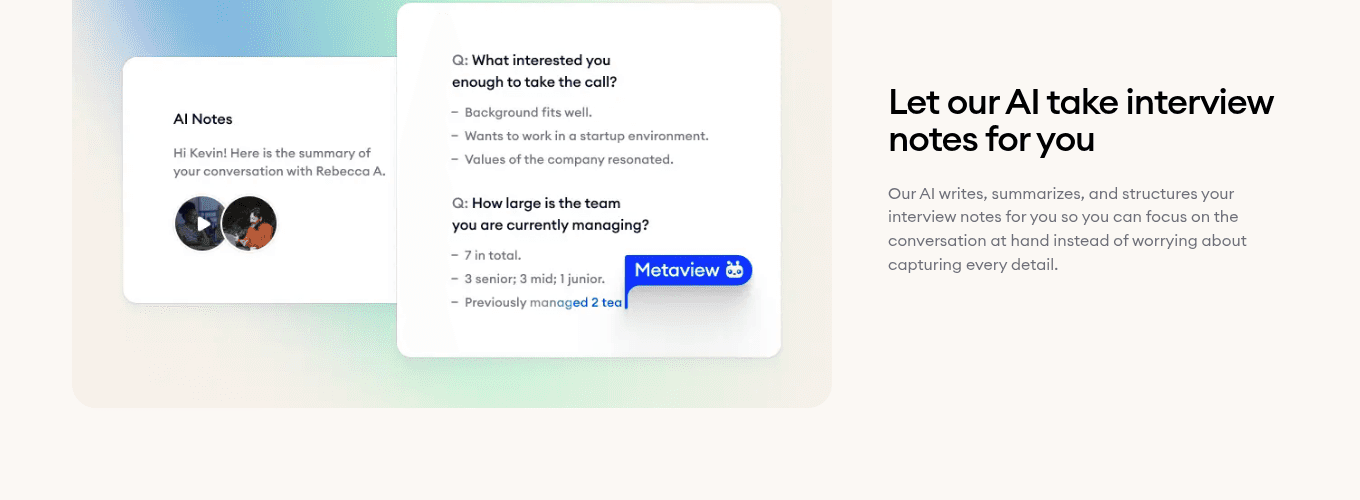
- 1“Wants to work in a startup environment,” noted among the candidate’s reasons for the call, is a detail a recruiter could open a later email on.
Metaview Outreach runs the send as sequences of automated email, which a recruiter builds and checks before they go. Inside a sequence, the recruiter writes the prompt the AI uses to tailor every message to its candidate and the role, which is where the instruction goes, and the follow-ups go out automatically. I’d build one sequence per group, so each group gets its own wording and its own instruction.
Outreach also reports on sequence performance, showing what is driving replies at each step, so you can set one group’s email beside another’s.
Some lists start in AI Sourcing. From one plain-language prompt, the agent looks through your connected applicant tracking system as well as the web and past Metaview conversations, and returns candidates with its reasoning for each. The recruiter reads that reasoning before anyone joins a sequence.
Contacting the people the agent found, or judging whether they fit, stays with the recruiter.
Metaview’s chief executive, Siadhal Magos, has argued that when software takes over the drafting, a person’s judgment counts for more, because they set the context and review the work.
Engineers have moved from writing every line of code to orchestrating agents that handle implementation. Their judgment became more important, not less: defining what to build, giving the agent context, reviewing its work, making the calls that matter.”

In an AI-personalized send, that context is the instruction written for each group, and the review is the read of every line before the batch goes.
Keep the source attached to every line you send.
Once the batch has gone, keep each line’s source in the same sheet as the line: the profile entry, the link to the talk, or the call notes. Replies often pick up the personal sentence, and the recruiter answering one can then see what that sentence rested on.
If a reply corrects a fact, check the sources behind the rest of that group’s lines before its next batch goes, oldest first.
If a line’s source can’t be found from the sheet, fix how you export the lines before the next send, because rebuilding sources after the fact takes longer than the send did.
If your hand edits on the list grow from one send to the next, the instruction has drifted from the role. Rewrite it alongside the hiring manager before anyone regenerates a batch.
The AI will write a line for every name you give it. Those lines stay personal across a list of several hundred when each one turns on the detail chosen for the role, and someone has read them all, together, before any of them goes.
Compare each group’s email by the replies it draws.
Metaview Outreach reports on every sequence by role and by step, so the version written for past candidates can sit beside the one for profile-only names.
Frequently asked.
Does each follow-up step need its own read of the personal lines?
Only if the step carries a personal line of its own. When it does, pull that step’s lines into a second list and read it the same way, because a follow-up written from the same instruction can repeat the first email’s detail word for word.
Can you personalize recruiting emails at scale without AI?
Yes, with a mail merge on the same detail: a spreadsheet column holding each candidate’s detail, dropped into a sentence you wrote once. It reads stiffer, since one sentence frame carries every detail, but each line is easy to check. The AI earns its place in the clause that connects the detail to the role, which a merge field can’t vary.
How many candidates should one AI personalization instruction cover?
One role and one group at a time, however long that list is. An instruction stretched across two roles has to name two details, and the lines it writes can no longer be compared in a single sorted list.
Is AI personalization worth it for hourly roles hired in bulk?
It can, with a detail hourly candidates’ profiles tend to show, such as the kind of site they work at now. Where profiles are thin across the whole list, most names will get the role-only email, and the time is better spent making that version good.
Do candidates notice when a recruiting email was personalized by AI?
I think some do, and the giveaway is usually the shape of the line: a sentence built like every other one in their inbox. A line resting on a specific, checkable detail about their work reads the same whoever drafted it, which is why that is the line worth letting the AI write.
