
Phone accounts for 28.54% of the conversations captured on Metaview that carry a platform label, second only to Google Meet at 30.64% and ahead of Zoom at 21.64%.
The result points to a practical question about whether every channel has an equivalent route.
If your interview instructions only cover video links and visual cues, they won’t give candidates or interviewers an equivalent phone route. The measured phone share makes that route worth checking in your own process.
The split in full
No platform holds a majority of the 5,251,499 platform-labeled conversations captured on Metaview; the largest is under a third. Within the same set, phone exceeds Zoom by 362,140 conversations.
Together, Google Meet, Zoom, Microsoft Teams, Whereby, and Webex account for 71.42% of the conversations captured on Metaview that carry a platform label. Those labels identify the service used, not whether participants used video.
Taken together, the four leading platforms make up 99.36% of the conversations captured on Metaview that carry a platform label. The remaining rows are small, but leaving them out would make the picture incomplete. Whereby, Webex, and Other form a small but visible tail.
| Platform | Captured conversations | Share of 5,251,499 |
|---|---|---|
| Google Meet | 1,608,980 | 30.64% |
| Phone | 1,498,676 | 28.54% |
| Zoom | 1,136,536 | 21.64% |
| Microsoft Teams | 973,557 | 18.54% |
| Whereby | 24,407 | 0.46% |
| Webex | 6,898 | 0.13% |
| Other | 2,445 | 0.05% |
About the data. Adding the Google Meet, Zoom, Microsoft Teams, Whereby, and Webex counts produces 3,750,378 conversations in the video group, or 71.42% of the conversations captured on Metaview that carry a platform label.¹ The counts sum to that base, and their shares sum to 100.00%. A captured conversation is one present in the aggregated, anonymized product data with a platform recorded against it. Together, the video group and Phone cover everything except the 0.05% Other row. Other has no stated modality, so it isn’t assigned to video or phone.
What the number does not say
A phone label describes the connection used; it can’t identify a recruiter phone screen or distinguish recruiter screens from other interview rounds.
The table stops at platform classification. It contains no recording, screen-sharing, notes, or instruction data. Its all-time distribution also can’t show a trend or stand in for an industry census. Those questions belong in the team’s own records and process documents.
Give video and phone their own route
The video group can follow one joining route because switching among its services usually leaves the instructions largely unchanged. Moving to phone requires different instructions and materials.
A phone conversation doesn’t have a meeting link or shared screen. It also lacks a visual turn-taking cue. Any material the candidate needs must reach them before the call. If your interview instructions focus on video meetings, don’t assume they cover the phone route.
The call route should name who dials whom and the action after a missed call. If a candidate declines recording and the conversation proceeds, the process should state that the call won’t be recorded and explain how the interviewer takes manual notes under the team’s consent policy. Any screen-share requirement should move the conversation to video or be replaced by material sent in advance.
Sourcing and scheduling messages should set expectations for a phone call before the candidate receives the invite. Interviewer training should cover the phone route, including any scripts or software steps that assume a meeting link or shared screen.
The process should define phone once, whether direct dials, mobile calls, and dial-in bridges are grouped together or recorded separately, and apply that definition consistently. Whereby is an observed platform label in the dataset, but it isn’t a current Metaview product integration. Metaview’s current video conferencing integrations are Google Meet, Microsoft Teams, Zoom, and Webex.
Write the phone and video routes into your process, then update them whenever scheduling instructions or interview software changes.
Getting this number for your own process
Start with the records you already have. Choose a recent period and calculate the channel split for your first-round conversations. Use the total number of conversations in that set as the denominator, and keep each channel count clearly visible beside its share. That gives you a local distribution instead of treating this snapshot as your own.
Then repeat the calculation by interview stage. If different stages use different channels, the stage-level view can show where your process instructions need closer review.
Compare the records created after phone conversations with those created after video conversations. Check when each record was added and whether the same fields were completed. Use your own data for this comparison; the Metaview channel table contains no result on documentation by channel.
Review the joining instructions and the recording notice used for each channel. Check whether both documents cover a phone call explicitly and whether candidates are told what will happen. The goal is to record exactly what the current process says, including every channel the process leaves unaddressed.
Finally, rerun the split by team or role family wherever your processes differ. If you only look at the company-wide average, you may miss a team that uses phone heavily or a role family that relies mainly on one video service. Apply the same denominator and stage rules to each comparison.
Where Metaview fits
Metaview is the Agentic Recruiting Platform. Its four video conferencing integrations are Google Meet, Microsoft Teams, Zoom, and Webex. Metaview works alongside phone and mobile calls already in use.
For interviews on one of Metaview’s four current video integrations, the Notetaker joins as a visible participant. Metaview’s candidate-facing copy says, "If both you and the interviewer consent, you will see a ‘Metaview Notetaker’ appear as a participant during the interview." Where consent is given, the Notetaker captures every spoken word. That record gives teams a consistent basis for comparing documentation across phone and video conversations. The Notetaker also transcribes the conversation and turns it into structured notes. The customer owns consent under its policy and local law.
Reports lets teams examine their own interview data in the product and through the Metaview MCP. Reports doesn’t include a post-hire dimension, and Metaview doesn’t make hiring decisions or auto-reject candidates. Metaview captures the evidence; recruiters and hiring managers add the judgment.
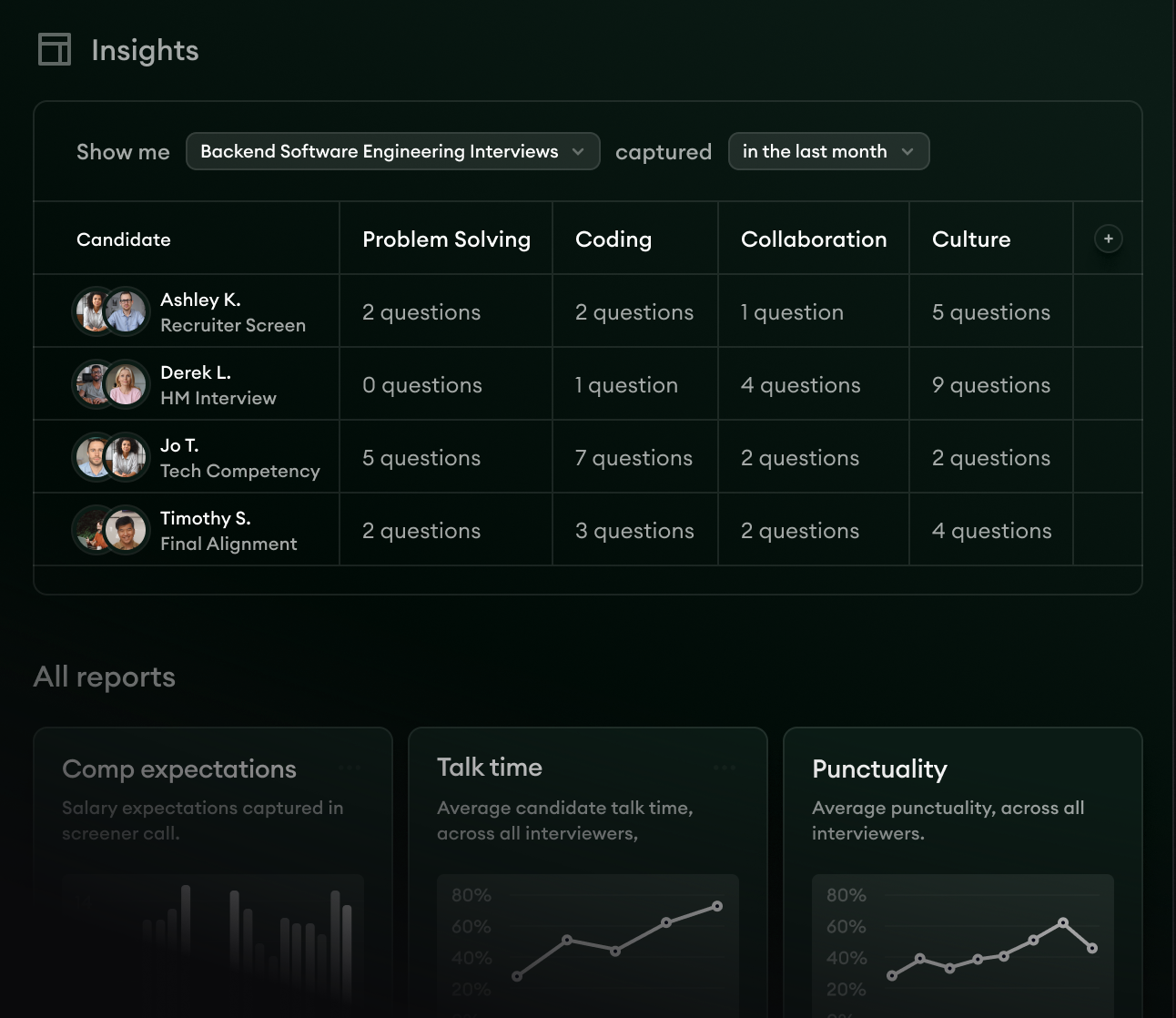
- 1The query selects which captured conversations to examine, here by role and time period.
- 2The table shows how many questions covered each competency, conversation by conversation.
- 3Saved reports cover topics including compensation expectations, talk time, and punctuality.
A team’s own channel split gives the process document a simple concrete test. If the joining, screen-sharing, recording, or note-taking instructions work for only one channel, the document covers only part of the interviews that team runs.
Measure the split, then check every instruction against each channel in use. Add an explicit equivalent wherever a phone or video route is missing. Interviewers and candidates should be able to see what changes when a conversation moves between channels without having to fill in the process themselves.
Explore your own interview data in Metaview Reports.
Use Metaview Reports to explore your organization’s own interview data in the product or through the Metaview MCP.
Frequently asked questions
Does a dial-in participant on a video link count under that platform or under Phone?
The data provided here doesn’t establish whether a dial-in participant on a video link appears in that platform’s row or in Phone.
What is included in the Other row?
The source doesn’t define the Other row beyond the label, and it doesn’t state a modality. It shouldn’t be assigned to video or phone.
What happens to a comparison over time if a team changes its default meeting tool?
The comparison needs to account for the change in default. This dataset doesn’t provide a time series, so it can’t show an effect or support a trend claim. Use the same platform definitions across periods and record when the default changed.
Does the channel an interview runs on affect the quality of the hire?
This dataset can’t answer that question. Metaview holds no post-hire outcome data, so it can’t show whether channel choice predicts, correlates with, or causes differences in hire quality, retention, or performance.
¹ Source: aggregated, anonymized Metaview product data, 2026. No individual, company, or candidate is identifiable. Percentages are rounded to two decimal places.
