
The median time from the end of an intake call to a first shortlist on Metaview is 17.6 minutes. Then the shortlist lands: twelve people who can do the job, eleven of them with no email address attached.
Sourcing got faster at the hard part, and the errand at the end is now the bottleneck. Search for the best email finder tools and you get a ranked list written by someone who has not met your team, your stack, or your budget. What recruiters need is narrower than a ranking: a way to work out which of these things belongs in the place where the work already happens.
Every tool below answers the same question: what is this person’s email address, and sometimes their phone number. They differ in where the lookup happens: at the profile in a browser extension, against a list, or inside the flow that also sends the sequence. Accuracy does not separate them, because none of them publish a figure you could check.
I would buy contact data as its own product far less often than the number of vendors here suggests. The list is sorted by where the lookup sits, with no ranking and no verdict on anyone, and each entry carries the vendor’s own wording for what it costs in that vendor’s own unit and whether personal addresses come back. Those units do not convert into one another.
All ten tools at a glance.
The right-hand column is the vendor’s own published unit, copied as printed. Read down it rather than across it: an export cap and a price per credit are not the same kind of thing, and there is no exchange rate between them.
| Tool | Where the lookup happens | What it meters, in the vendor’s own unit |
|---|---|---|
| Metaview | Inside the flow that also sends the sequence | Credits for new contact data, at 3 for an email and 10 for a phone number, with sequences free to send |
| ContactOut | At the profile, in a browser extension | Exports per month, under a fair-use ceiling of “2,000 email credits per account per month and 1,000 phone credits per account per month” |
| Kaspr | At the profile, in a browser extension | Three separate pools: “Phone Credits”, “Direct Email Credits”, and “Export Credits”, each per license |
| SalesQL | At the profile, in a browser extension | “One credit = one contact with at least one email retrieved. That’s it.” |
| Anymail Finder | Against a list, in bulk | A published price per credit, from “$0.073 / credit” down to “$0.008 / credit” on monthly plans |
| Wiza | Against a list, in bulk | On monthly plans, a per-extra-unit price: “$0.15 per extra” email and “$0.35 per extra” phone number |
| RocketReach | Against a list, in bulk | Exports per year, at “1,200 exports per year” through “20,000 exports per year” on annual plans |
| Juicebox | Inside the flow that also sends the sequence | “500 contact credits (email + phone)” per seat per month on its Starter plan |
| Apollo.io | Inside the flow that also sends the sequence | “Accessing a contact’s emails uses 1 credit. Accessing a contact’s phone number uses 8 credits.” |
| SyncGTM | Against a list, in bulk | “1 email = 1 credit”; on its Solo plan, “12,000 credits / year” |
The three places a lookup can happen.
The numbering above and below is an order of appearance rather than a ranking. Metaview goes first because we build it, and you should know that before you read its entry.
At the profile, in a browser extension. You are already looking at the person, and the extension puts a button on that page. Shortest path when sourcing means reading profiles one at a time, worst fit when the list is four hundred long.
Against a list, in bulk. You have names and companies in a spreadsheet, or a set of profile URLs, and you want the addresses back in one pass. This is where per-unit prices live, because a vendor selling a bulk run has to publish a rate.
Inside the flow that also sends the sequence. The lookup is a step in the thing you were already doing, so there is no export and no reconciliation afterwards. What you give up is the ability to shop that part of the stack separately.
That third option deserves more thought than it gets, because a finder is a layer rather than a destination. Every layer is another login, another invoice, and another place for a list to go stale.
Interview volume on Metaview grew 118% year on year, and every one of those conversations started with somebody being reachable. Metaview captures every spoken word of the interviews it joins, and recording only happens if consent is given, so a team can search what was asked and what was said without writing it up first.
Every interview a team runs on Metaview adds to its own record of who it has already spoken to, and across the platform that record now runs to 5.5 million conversations.
Metaview is used by more than 12,000 organizations, and contact data is rarely the first thing any of them shops for. It becomes urgent the same week outbound does, which is the week with no room for a procurement exercise. That is how teams end up running three finders and no idea which one produced the last bounce.
Accuracy scores, deliverability percentages, and bounce rates are left out of this piece on purpose. Several vendors publish figures like that without publishing the method behind them, and a number you cannot check is decoration rather than evidence. To find out how a finder performs on the roles you hire for, the honest instrument is your own data, and candidate sourcing metrics is the place to start.
1. Metaview.
We build Metaview, so treat this entry as the one written by an interested party. Metaview Outreach enriches contact data inside the product, so the lookup happens on the candidate you already have rather than on a list you export first. Its own page describes the output as “verified emails and phone numbers without manual enrichment or list uploads needed.”
On cost, sequences are free to send, and new contact data is what uses credits. An email costs 3 credits and a phone number costs 10 credits, and every workspace gets 500 free credits a month, shared across the team and resetting with no rollover.
Those are credits rather than currency, and this piece does not convert them into a per-contact figure, because the conversion would be ours rather than a published rate. The allowance is on the pricing page.
On personal versus work addresses, Metaview’s pages say verified emails and phone numbers without saying which of the two comes back. That is an empty cell rather than a hidden one. Metaview is one of three tools here that leave it blank, against six that answer the question on their own pages.
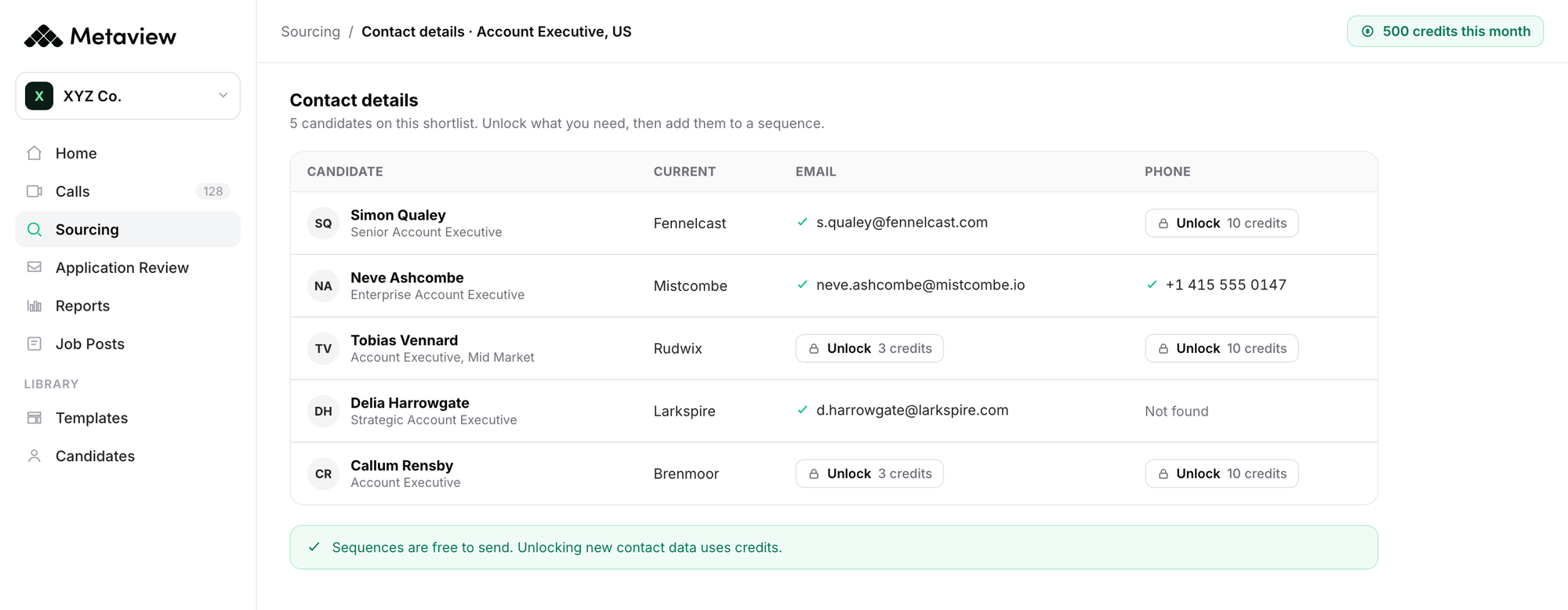
There is no Outreach tab on Metaview’s pricing page, and the pricing questions name the paid agents as “the sourcing agent, notetaker, or application review”. Where the records land afterwards depends on your ATS integration.
Worth testing: take a shortlist where some of the candidates already sit in your connected ATS, and check what contact detail is on the record before you spend a credit.
2. ContactOut.
ContactOut describes its own product plainly: “ContactOut email finder locates a person’s verified email from limited information, like their name and company or their profile.” It is the entry most explicit about personal addresses: its data page counts personal emails, work emails, and direct dials as three separate pools, at 150 million, 200 million, and 100 million.
Where it sits: at the profile, through the extension, with a search portal for working away from it. Its recruiter page offers to “Access personal emails and mobile numbers; Add candidates to email campaigns. Directly on LinkedIn Standard, Recruiter Lite and Pro.”
On cost, ContactOut publishes no price per email and no price per phone number anywhere on its site. Its plan cards count exports, and the ceiling behind the word “unlimited” lives in its terms, which state a “credit limit is 2,000 email credits per account per month and 1,000 phone credits per account per month”.
Worth testing: if personal addresses are the reason you are shopping, check what proportion of a real shortlist returns one rather than a work address.
3. Kaspr.
Kaspr puts the extension first: “Access verified phone numbers and emails directly from LinkedIn profiles, groups, and events with our Chrome extension.” It sits at the profile, and explicitly on top of LinkedIn Recruiter Lite, which its pricing card names.
What it publishes: three separate credit pools rather than one. On the Business plan billed monthly, its help center lists “200 Phone Credits per month per license”, “200 Direct Email Credits per month per license”, and “2,500 Export Credits per month per license”. Business-to-business (B2B) email credits are unlimited.
Seat prices, in United States dollars billed monthly, are $65 for Starter and $99 for Business, per user. Extra credits are sold per unit in euro, from €0.35 for a phone credit and €0.16 for a direct email credit.
Kaspr never defines “Direct Email” in words, anywhere on the site or in its help center, and that is the pool the whole design turns on. The closest thing to a definition is a compliance control labeled “Hide Direct Emails”, with the tooltip “Option to hide direct emails for compliance reasons”.
Worth testing: spend a handful of direct email credits first and see what kind of address they return, since that pool is the smallest on every tier and the least documented.
4. SalesQL.
SalesQL publishes the cleanest credit rule in this roundup, stated in the terms a recruiter thinks in: “One credit = one contact with at least one email retrieved. That’s it.” It adds that “Unmatched lookups never spend credits.”
What it publishes: on the default monthly view, Basic is “$39/ month” with “2,000 credits / month”, Professional “$79/ month” with “5,000 credits / month”, and Organization “$119/ month” with “12,000 credits / month”. Phone numbers are not metered at all: “One credit equals one contact with one or more emails (phones are not charged)”.
Where it sits: at the LinkedIn profile, with bulk export from search pages. On personal addresses it answers directly. Asked whether results can be filtered to personal emails only, SalesQL says: “Yes. You can configure calls to return only personal email addresses instead of a mix of personal and business.”
Worth testing: because the credit buys a profile rather than a data point, the useful comparison is how many lookups return a phone number you would otherwise pay for elsewhere.
5. Anymail Finder.
Anymail Finder is the only tool here that prints a dollar figure per credit on every tier, which makes it the easiest to reason about and the narrowest in what it does.
What it publishes: on the default monthly view, the smallest plan is “400 credits / mo” at “$0.073 / credit” for “$29 / mo”, and the rate falls to “$0.008 / credit” on the largest.
Its own description sets the boundary: it is “a B2B email finder built for teams that need safe-to-send addresses, not just guesses.” You only pay for what verifies: “Every email is verified live. If we can’t verify it, you don’t pay.”
Where it sits: against a list, and without the extension route. “Paste a public LinkedIn profile URL, get the verified work email, and you’re done. Nothing to install and no LinkedIn account required.” Anymail Finder has no phone product and no personal-address product, and business email is the whole offer.
Worth testing: run a batch of candidates who are not currently at an obvious company domain, since a name-plus-domain finder has nothing to work from when the domain is the unknown.
6. Wiza.
Wiza publishes an overage price on the plan card itself, which is unusual and useful if your volume is spiky.
What it publishes: on the monthly view, Starter is “$49” with “100 valid emails per month” and “$0.15 per extra”, plus “100 phone numbers per month” and “$0.35 per extra”.
Its credit rule reads “1 email credit is used for each valid email found. Risky emails are free!” Annual is the page’s default view and publishes a different structure entirely, so the figures above are the monthly ones and comparable only to themselves.
Where it sits: both places. The homepage says the tool “Finds work emails, personal emails, direct dials, and cell numbers”, which answers the personal-address question in writing, and the extension works alongside browsing: “Our extension does the work while you surf LinkedIn as usual.”
Worth testing: price a realistic month on the monthly plan including overage, then price the same month on the annual plan, because the two are structured differently rather than discounted differently.
7. RocketReach.
RocketReach answers the personal-address question outright, and it is the only tool here that lets the buyer switch the other type off: “You can select to lookup only personal or only professional emails by updating your email type preferences. Once you make that selection, you will never see emails of the filtered type.”
What it publishes: on annual plans, “$33/ month” at “$399 billed annually” with “1,200 exports per year”, rising to “$142/ month” at “$1,699 billed annually” with “20,000 exports per year”. Tiers are named “Email Only” and “Email + Phone”, and phone data is a tier gate.
The meter is the export rather than the lookup: “The following features all use your export credits: API lookups, bulk lookups, downloading your data in a CSV file, uploading a list, and exporting your data to a CRM”. On failures, “A lookup is used if we find and verify email or phone, otherwise it is refunded.”
Where it sits: against a list, with an extension available. Bullhorn is the one applicant tracking system named in its integration line.
Worth testing: because exports rather than lookups are metered, work out how many times a single candidate record would leave the platform in your process before you size a plan.
8. Juicebox.
Juicebox is recruiting-native and says so: “Juicebox is built for recruiters. If you are searching for hard-to-find talent, Juicebox is a fit for you.”
What it publishes: on the default annual view, Starter is “$99” per seat per month and Growth “$179”, moving to “$119” and “$199” on the monthly toggle. Starter carries “500 contact credits (email + phone)” and “500 export credits”. Email and phone are deliberately not separable, and the pricing tooltip says why: “Contact credits are used only for email and phone contact info. When you use a credit, you get all emails and phone numbers associated with a profile.”
Where it sits: inside the sequence flow, and its docs are precise about when a credit is spent. Adding contacts to an email sequence “reveals the contact information of these profiles, and you will be charged one Contact Credit for every new contact information revealed.”
Worth testing: since one credit returns every address and number on a profile, compare it against a per-data-point vendor on a batch where you want both.
9. Apollo.io.
Apollo publishes the most legible ratio in the set, and it is the entry where being straight about the audience counts most. Its own homepage headline is “Grow revenue with one connected GTM system” and its recruiting material is filed under Sales, dated 2022: this is a sales platform that recruiters use rather than a recruiting product.
What it publishes: “Accessing a contact’s emails uses 1 credit. Accessing a contact’s phone number uses 8 credits.” Its credits page answers the personal-address question in the same breath as the price: “Access a contact’s personal email, business email, or both. Apollo never charges more than 1 credit per contact.”
On the default annual view, Basic is “$49” “Per seat per month, billed annually” with “30,000 credits per seat per year, granted upfront”, and Professional “$79” with “48,000”. Credits expire rather than accumulate: “Credits do not roll over into the following billing cycle or upon renewal.”
Where it sits: inside the sequence flow, with sequences in the same plan as the credits.
Worth testing: at an eight-to-one ratio, phone numbers are the whole budget question, so decide which roles need one before sizing a plan.
10. SyncGTM.
SyncGTM describes itself as a “Verified B2B data and signals engine for AI-native GTM.” This is a go-to-market data tool recruiters can use rather than a recruiting product. Its waterfall enrichment can try providers in sequence until a result is found.
What it publishes: on the default yearly view, Solo is “$529” “Billed yearly” for “12,000 credits / year”, including “12,000 work + personal emails”. The credit rule is “1 email = 1 credit”. Every plan card says “Only charged when valid” and “Credit roll-over”.
Where it sits: against a list, in bulk. Every plan lists “Sequencer integrations like Instantly, Smartlead” and “CRM sync”, so found addresses can move on to the tool that sends. The plan cards count “work + personal emails” in one credit pool.
Worth testing: run a shortlist of candidates who changed jobs recently and compare the credits spent with the usable addresses returned.
Running through all ten, the thing that keeps surfacing is what a wrong address costs after you have bought it, which lands as recruiter time rather than as a line on an invoice.
If results aren’t reliable, AI doesn’t reduce work. It just moves it, and recruiters end up validating, correcting, and second-guessing the output.”

That is the argument for verifying a sample before you commit a sequence to a list, and the argument against treating the cheapest per-credit rate as the cheapest option. A bounced send costs a recruiter an afternoon of tidying up and costs the candidate nothing. The gap where replies get lost after outbound outreach starts earlier than most teams think.
How recruiters can choose the best email finder tools.
Do not start from the list. Start from where a lookup would sit in the work your team already does, then read only that group and ask the one question that group turns on: whether you need personal addresses badly enough to pay for a separate pool, whether your meter should be a credit or an export, or whether the contact layer deserves a hard look as a separate purchase at all.
Volume is what makes the decision expensive to get wrong. At Deel, about 55% of hires come from inbound applications and 25% from sourcing, against 1.5 million applications received in 2025 and 3,000 hires a year, with 70 recruiters. A quarter of that hiring depends on somebody being reachable.

The full account is in Alan Price’s scale playbook. The point here is narrower: at that volume, contact data belongs in one system, next to the sequences it feeds.
Whichever group you land in, the sequence that follows the address is where the work gets done, so read how to personalize each message before spending anything on lookups. If you are upstream of this and still building the list, candidate sourcing tools and top sourcing tools for recruiters cover the layer above, while outbound recruiting tools and AI candidate discovery platforms carry both jobs at once. Earlier still: talent mapping and candidate outreach at scale.
Put the lookup where the sequence already lives.
Enrich a shortlist, then send to it, without moving the list between two tools.
Frequently asked.
What is an email finder tool?
An email finder tool returns a contact’s email address, and often a phone number, from something you already know, such as a name and company or a public profile URL. For recruiters it sits between sourcing, which finds the person, and outreach, which contacts them.
Does the General Data Protection Regulation (GDPR) apply when you buy a candidate’s personal email address?
A bought address is still personal data, so that is a question for whoever owns data protection where you work rather than one a vendor settles for you. Before you spend anything, settle your lawful basis for contacting someone who never applied, and what you tell them about where the address came from. Ask any vendor how it handles a removal request, and read the answer before the first send.
How much does it cost to find a candidate’s email address?
The rate a vendor quotes covers a lookup that succeeded. What you spend per usable address is that rate divided by your hit rate on the candidates you are chasing. Run one paid month against a live shortlist and measure the cost per contact you could reach, because no vendor can publish that figure for you.
Why do phone numbers cost more than email addresses?
Because the two are different products behind the meter. A work email can often be built from a name and a company domain and then tested against a mail server, which is cheap to repeat at volume. A phone number has to have been collected somewhere and matched to the right person, and that matching is what the price covers.
Can I use an email finder instead of a sourcing tool?
No. A finder starts from a person you have already identified, so it needs something upstream to identify them. If you do not yet have the shortlist, that is a sourcing job rather than a contact-data one.
