

When a recruiting agency works on mandates for several clients at once, its outreach to candidates can go wrong in two ways. A message can still carry another client’s description, because the sequence was copied from another mandate. Or two of the agency’s consultants can write to the same candidate in the same week about two different clients.
Both are agency candidate outreach failures, and both come down to coordination. This guide shows how to keep client context straight in every message your agency sends.
I’d run the desk on two rules. First, write every message only from one mandate’s context card, a short note of what that client lets you say. Second, let each candidate hear about one client at a time, from the consultant who first added them to a sequence. Wait a week before anyone at your agency approaches them cold about a second client.
You’ll learn how to set up a sequence for each mandate, check whether a colleague has already approached a candidate before anyone writes to them, test every step of a sequence for another client’s details, and keep each candidate with one consultant. The guide ends with four checks to run on last week’s outreach.
What agency candidate outreach has to get right across mandates.
Start with what agency candidate outreach is, and why several open mandates make it harder to get right.
Agency candidate outreach covers the first messages a recruiting agency or search firm sends to candidates on a client’s behalf. With several mandates open, each message speaks for one client, but the candidate reads it as your agency speaking.
Across many mandates, one candidate can appear on several shortlists before accepting a role. That overlap is normal. It goes wrong when two mandates act alone, each writing to that candidate as if the other weren’t open.
Your agreement with a client can put that client’s own staff off limits. So before anyone at your agency writes to a candidate, check each client’s off-limits list.
A separate guide to building a do-not-contact list covers how to record each of these restrictions next to the agreement it comes from.
Give each mandate its own sequence and its own context card.
Set up every mandate on its own before anyone writes to a candidate. You’ll see what goes wrong when you copy a sequence, and what to put on each mandate’s context card.
When you copy a sequence from another mandate, any line you don’t edit still speaks for the client you copied it from. That client’s description and selling points can turn up in a follow-up three steps down.
So give each mandate its own sequence, and write each one from a short context card for that client. A context card is a short note that lists what a message for that client may say. Put these five things on it:
- How the client may be named, or the description it approved for a confidential search.
- The role, and the selling points the client agreed you can use.
- What the client asked you not to say.
- The companies whose staff are off limits for this mandate.
- The consultant who leads the mandate.
Check the agency record before anyone is enrolled.
Before anyone adds a candidate to a sequence, find out whether someone else at your agency has already approached them. This section covers that check and the seven-day rule behind it.
Enrolling a candidate means adding them to a sequence, which is what schedules their first message. So before you enroll anyone, check your agency’s record: the shared place where your team logs each first approach to a candidate and the client it was for. Look up whether a colleague has enrolled them for another client in the last seven days.
The check only works if every first approach is on your agency’s record, whatever the channel. That includes every sequence your team sends, whichever tool it goes out from.
My rule: each candidate hears about one client in any seven-day period, counted from the moment your agency first enrolls them. The consultant who enrolled them first is their contact for that week. If a colleague has a strong match for another client, have them take it to that consultant.
Count the seven days from enrollment rather than from the first send. When you enroll a candidate on Monday in a sequence whose first step goes out on Thursday, the candidate is claimed from Monday. A colleague who checks on Tuesday should see that.
When two consultants approach one candidate for two clients a few days apart, the candidate learns more about how your desk is organized than about either role.
Write every step for one mandate.
Even a personalized message can mention the wrong client. Run two checks on every step of a sequence, follow-ups included, before it goes live.
First, read each step against the mandate’s context card. Anything in a step that the card doesn’t hold came from some other mandate, so take it out.
Then run the swap test: read the step as if it sat in another open mandate’s sequence. If it would still make sense there, it isn’t tied to this client yet, and the candidate can’t tell which client you mean. Check each part of the message on its own:
| Part of the message | Could go to any mandate | Belongs to this one |
|---|---|---|
| Who the client is | “A fast-growing company in your space” | The client’s name, or the description it approved, which fits none of your other clients in this market |
| The role | “A senior role on the engineering team” | The title, and the part of the scope the client agreed you can mention |
| Why this candidate | “Your background looks like a great fit” | The part of their background that matches this client’s brief, and no other brief you hold |
| The ask | “Open to hearing about opportunities?” | A call about this role, with the consultant writing to them |
Take the most care on a confidential search. You can’t name the client there, so a description has to do the job of the name. It has to tell your current clients apart in that market. Get the client to approve that description, because one specific enough to tell your clients apart may also tell the candidate who the client is.
Keep each candidate with one consultant.
Once a candidate is in a sequence, decide who they hear from. Here you’ll settle who sends each message, how follow-ups stay in one thread, and when to bring up a second client’s role.
Every message a candidate gets from your agency should come from the consultant who enrolled them. Think of that consultant as the candidate’s owner. They’re the person the candidate will reply to, so it makes sense for them to bring the candidate any future roles.
If a researcher or a colleague covering the desk runs the sequence, have them send in the owner’s name.
Keep follow-ups for one client in that client’s thread, as replies with the subject unchanged.
Give a second client’s role its own message. Send it from the same consultant, in a new thread with its own subject. Wait until the seven days are up, and until the first client’s sequence has finished or the candidate has replied to it. If the candidate is already talking to the consultant, raise the second role in that conversation instead, ideally on a call.
When the owner is away, have a colleague keep their sequences running on their behalf, with each mandate’s context card open.
Where Metaview fits.
You can run these rules with any outreach tool. Here’s how two parts of Metaview support them: Outreach for the sequences, and the Notetaker for the context cards.
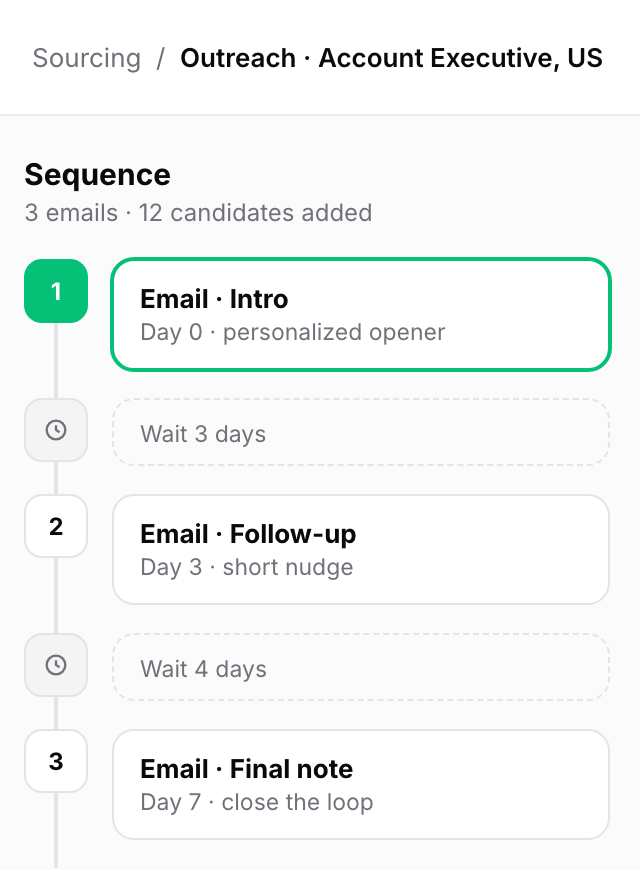
In Metaview Outreach, a recruiter creates and reviews every automated email sequence, so you can give every mandate its own sequence when you set it up.
Outreach’s mailbox delegation lets a recruiter send on behalf of a teammate, so a covering colleague’s messages still go out under the owner’s name.
If you record your intake calls with clients in Metaview, the Metaview Notetaker captures every spoken word and turns each call into structured notes. A mandate’s context card can then quote what the client said about the role on that intake call.
Run four checks on the outreach you sent last week.
Here are four checks to run on what your agency sent or set up last week. Each one comes with the fix I’d make before the next send:
- Pick a sample of last week’s messages from different mandates, follow-ups included. Start with mandates whose clients work in the same market, since that’s where one client’s description is likeliest to fit another. Read each one against its context card and run the swap test. If a step fails, rewrite the whole sequence it belongs to.
- List every candidate enrolled for two clients within seven days. For each one, make the first consultant to enroll them their contact, and route the later approach through that consultant.
- For every sequence sent last week, check that a colleague covering it could find its context card. Write any missing cards before anyone covers a desk.
- For messages sent on a colleague’s behalf, check that each reply reached the consultant whose name was on the message. Fix any that didn’t before the next sequence starts.
By the end of this week, I’d want every step of every sequence written from one client’s card, and every candidate hearing about one client at a time, from the consultant whose name they’ll see again when they reply.
Keep each mandate’s messages in a sequence of its own.
See how Metaview Outreach runs automated email sequences, one for each mandate on your desk.
Frequently asked.
How do you tie a message to one client on a confidential search?
Use the description the client approved, and name the client only once the candidate has agreed to a call and the client has agreed you can. Until then, the description has to fit no other client you’re recruiting for in that market.
When does the seven-day window between two clients start?
It starts when your agency first enrolls the candidate in a sequence, whichever consultant does it. Counting from the first send would leave a gap: a colleague could approach the candidate before the scheduled first step goes out.
Who owns a candidate two consultants found on the same day?
Whoever enrolled them first, by the time on your record. That rule only decides who contacts the candidate inside your agency. Putting them forward to a client is a separate question, settled by your terms with that client.
Does the seven-day rule apply to candidates who apply or ask about a role on their own?
The rule covers approaches your agency starts. A candidate who applies for a second role, or asks about one, has chosen to hear about it, so answer them. Reply from the consultant who’s already talking to them.
What if another agency reaches the candidate while you wait out the seven days?
Some will. The candidate still has your consultant’s first message, and I’d take that risk over two cold messages from one agency in the same week.
What if a reply needs an answer while the candidate’s owner is away?
Have the colleague covering the desk answer in the same thread and say who they are and why they’re writing. Then have them leave a note on the candidate’s record for the owner, so the next message picks up from what the candidate said.
