
The recruiting hours your team can't get back are the ones spent on work the software should already be doing.
Scheduling tetris, scorecard chasing, copy-paste between ATS and email, manually retyping interview notes that the AI already captured: this is the tax that makes recruiting feel like operations work instead of talent work.
Recruitment process automation pulls the tax out of the workflow. Here are the 11 highest-impact places to apply it in 2026, ranked by leverage and ordered by where to start.
All 11 ways at a glance.
| # | Automation | Where it helps | Leverage |
|---|---|---|---|
| 1 | AI sourcing from the brief | Pipeline build time | High |
| 2 | Automated application review | High-volume screening | High |
| 3 | AI-drafted outreach | Per-candidate message effort | Medium-high |
| 4 | Self-serve scheduling | Calendar coordination | Medium |
| 5 | AI notetaking | Interview capture quality | Highest |
| 6 | Structured scorecards + write-back | Time-to-feedback | Highest |
| 7 | Feedback reminders | Chasing interviewers | Medium |
| 8 | Candidate status comms | Candidate experience | Medium |
| 9 | Offer + onboarding handoff | Recruiter-to-people-ops time | Medium |
| 10 | Pipeline reporting | Bottleneck visibility | Medium-high |
| 11 | Interview intelligence flagging | Hiring consistency | High |
1. AI sourcing from the brief.
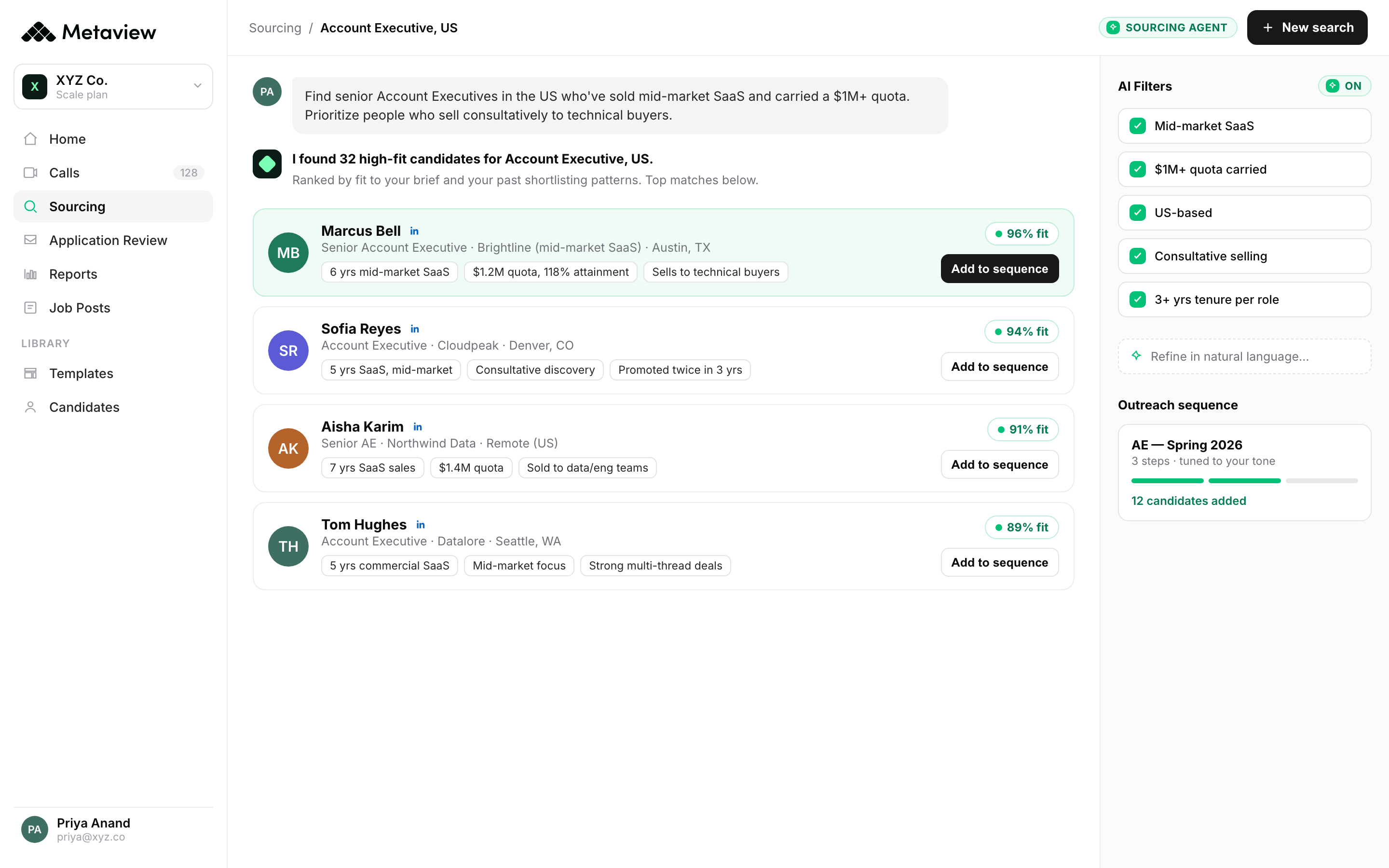
Manual sourcing is the largest single time tax in recruiting. The Boolean string that takes three hours produces what an AI sourcing agent produces in 20 minutes.
The 2026 default: feed the JD, intake call, or a lookalike candidate into the agent. Get back a ranked shortlist weighted against your past successful hires.
What to automate first: sourcing on one role family. Measure recruiter time-to-shortlist before and after.
In Metaview, the brief becomes a ranked shortlist with a fit reason on every candidate:
2. Automated application review.
200-300 applications per high-volume role at 30-45 seconds of manual review each equals two days of recruiter time per req.
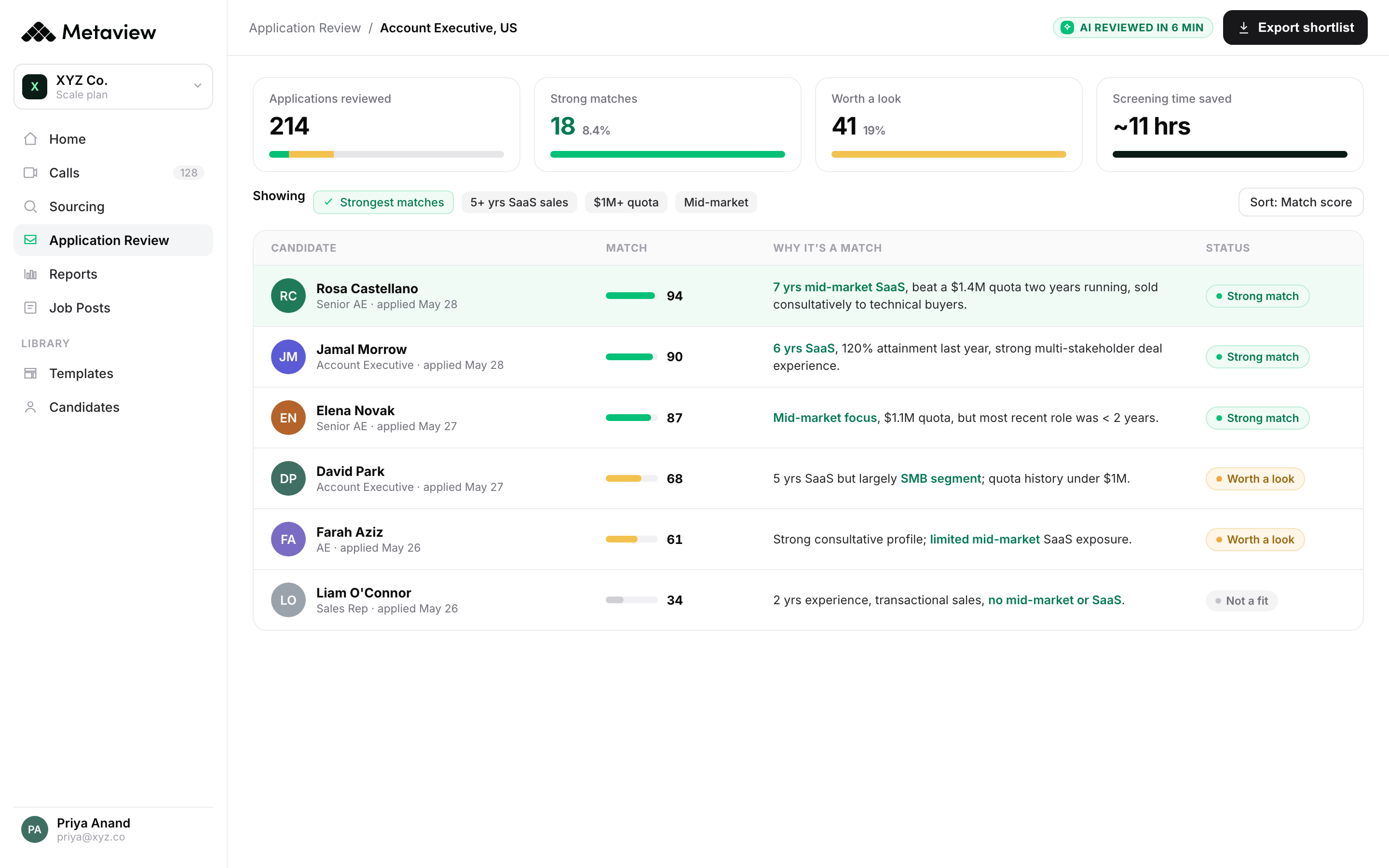
AI application review doesn't just keyword-match. The good versions explain why a candidate is a fit, which makes the recommendation usable instead of opaque.
What to automate first: the highest-volume role in your funnel. Track recruiter screening time and overall pipeline quality after four weeks.
This is the part Metaview automates: every inbound application ranked, with the reason it matches spelled out:
3. AI-drafted outreach.
Per-candidate personalization at volume is the recruiting craft most teams can't sustain manually.
AI-drafted outreach reads each candidate's public signal and bakes one specific reference into the first 12 words. The recruiter reviews and sends; they don't write from scratch.
What to automate first: outreach for one senior-role campaign where reply rate is the leading metric. Measure reply rate against your last templated campaign.
4. Self-serve scheduling.
Coordinator hours lost to calendar tetris are the unglamorous productivity drain that compounds across every active role.
Self-serve scheduling tools (Calendly, GoodTime, Prelude, Modernloop) let candidates pick slots, coordinate across multiple interviewers, and handle reschedules without a human in the loop.
What to automate first: single-stage screen scheduling. Measure coordinator hours before and after.
5. AI notetaking on every interview.
It has the biggest knock-on effect of any automation here.
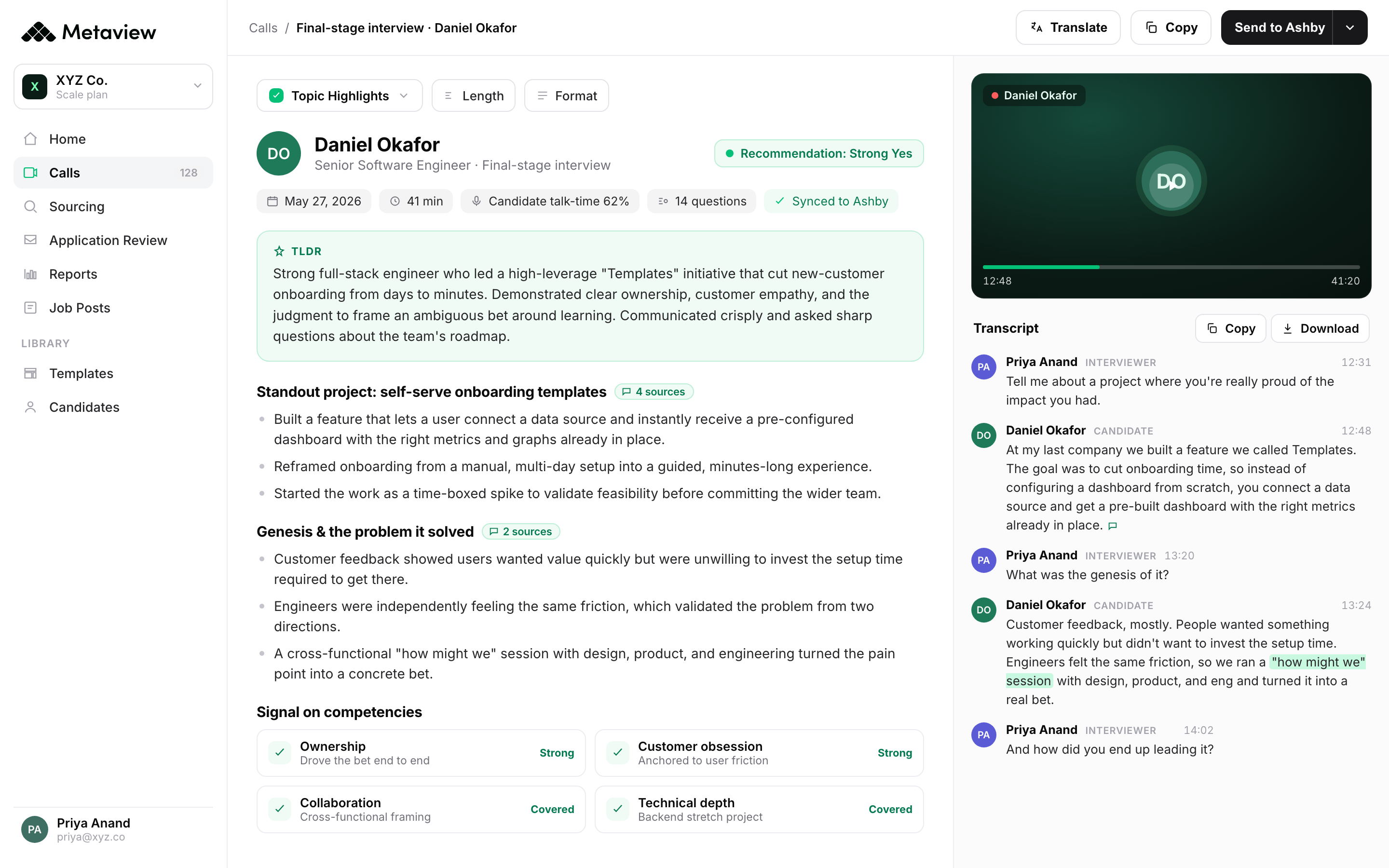
AI notetaking captures every interview across Zoom, Google Meet, Microsoft Teams, and phone. The interviewer focuses on the conversation. The structured notes show up automatically.
The compounding benefits: better candidate experience, consistent documentation per candidate, and a real corpus of interview data the team can analyze across hundreds of hires.
Recruiters really feel the difference if they forget to add Metaview to a call. They notice immediately that they have to take notes themselves.”
6. Structured scorecards and ATS write-back.
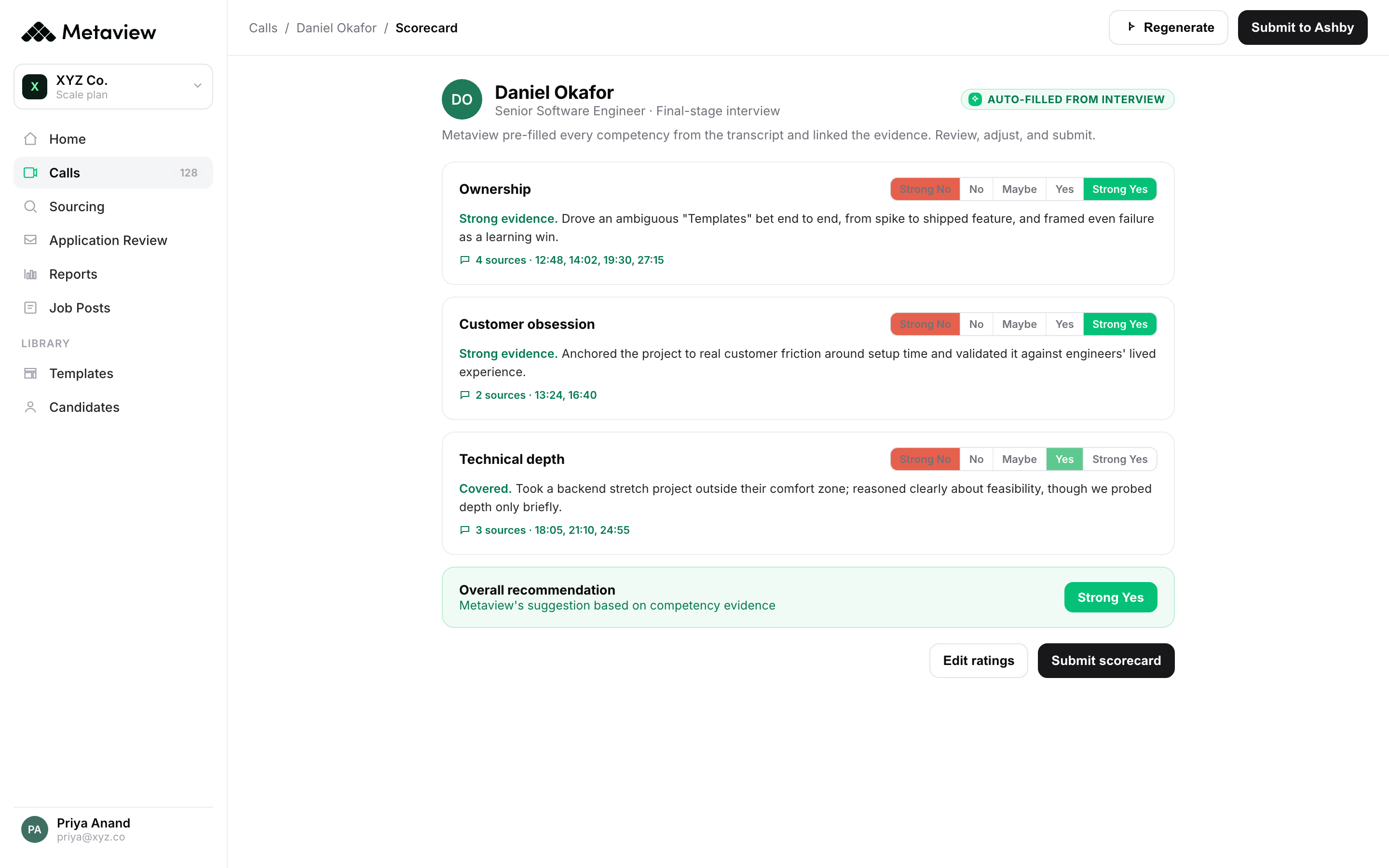
Free-form feedback stalls hiring decisions. Structured scorecards force a rating per competency plus a short evidence note, which the hiring manager fills in faster than a blank box.
The automation that matters: the scorecard writes back to your ATS automatically. No copy-paste, no re-entry, no fallback to email.
What to automate first: a single scorecard template tied to your competency rubric for one role family. Roll out across all stages in that family first.
Metaview pre-fills the scorecard from the interview, with evidence and timestamps behind every rating, then writes it back to your ATS:
7. Automated feedback reminders.
Feedback chase is what fills 30% of recruiter inboxes.
The automation: ATS-triggered reminders sent to interviewers at 1, 4, and 24 hours after the interview ends. Escalate to the hiring manager at 48 hours. Stop the cycle when the scorecard lands.
What to automate first: the post-interview reminder sequence. Most ATSs ship this out of the box; teams just don't turn it on.
8. Candidate status communications.
Candidates ghost when they're left in silence. Most of the silence isn't intentional; it's the gap between "we should update them" and the recruiter remembering to do it.
Status comms automation triggers candidate emails at predictable stage transitions: thanks for applying, you're moving forward, here's what's next, here's the timeline. The recruiter approves the trigger logic once; the system runs.
What to automate first: the stage-transition email after a candidate clears the recruiter screen. Most teams have this off and don't realize it.
9. Offer and onboarding handoff.
The handoff from recruiting to people ops is the place most candidate experience breaks at the finish line.
Automation closes the loop: offer accepted in the ATS triggers the people ops checklist (background check, equipment order, day-one welcome) without a recruiter sending a hand-typed email.
What to automate first: the offer-accepted → onboarding-kickoff trigger. The candidate experiences the transition as continuous instead of dropped.
10. Pipeline reporting automation.
The pipeline report that takes a recruiting ops person three hours to assemble manually is the one that doesn't get built weekly. Which means the bottleneck doesn't get caught.
Automated dashboards in Ashby, Greenhouse, Lever, or a BI layer give the leadership team a live view. The recruiting team reviews monthly with the data already up to date.
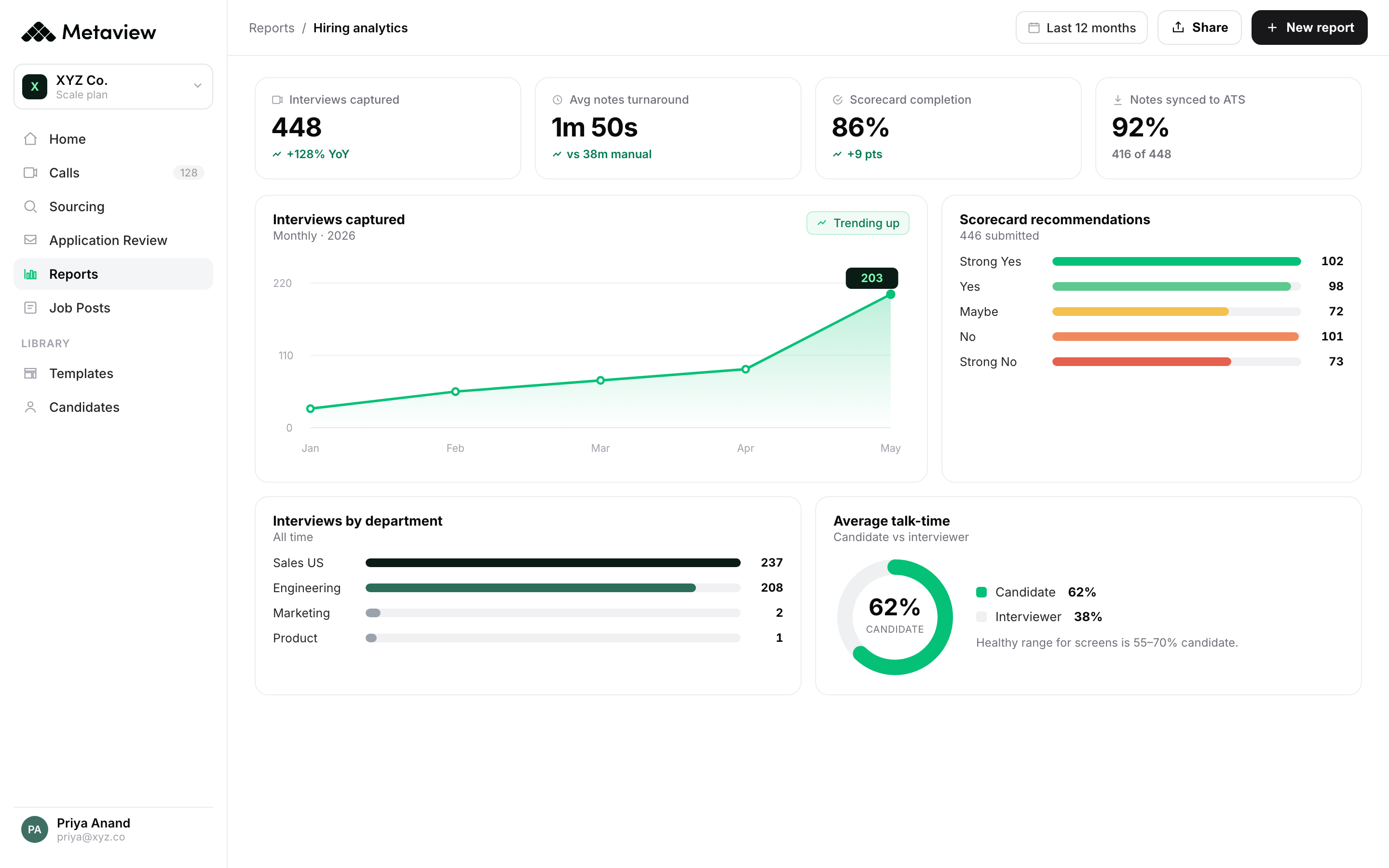
What to automate first: the five metrics worth tracking (time to launch, time between stages, time-to-feedback, interview-to-offer ratio, offer acceptance) as a single dashboard.
Metaview keeps that dashboard live off the interview data it already captures:
11. Interview intelligence flagging.
A newer layer of automation, and the one that does the most for quality of hire.
Interview intelligence reads the captured interview against the rubric and flags inconsistency before the hiring manager sees the scorecard.
Did the interviewer skip a required question? Did the candidate's answer reveal a gap nobody else caught? The system surfaces it instead of waiting for the debrief.
What to automate first: intelligence flagging on hiring-manager interviews for one role family. The signal compounds quickly because it improves both the immediate decision and the interviewer's calibration over time.
Where to start.
Where you start matters more than how much you automate at once.
The two automations that compound across every other workflow are AI notetaking and structured scorecards with ATS write-back. Together they collapse time-to-feedback from days to minutes and give the team a real interview data layer to analyze.
Add sourcing and application review next. They free the recruiter hours that go into candidate engagement.
Scheduling, candidate comms, and reporting automation are the lower-leverage tier. Worth doing, but they don't move the rest of the funnel the way interview capture does.
Metaview captures the interview, structures the scorecard, writes back to your ATS, and surfaces the pattern data across every hire. 4,000+ organizations now run recruiting on Metaview, including Lightspeed, Brex, emnify, Quora, Workleap, Catawiki, Robinhood, and Automattic.
Bring Metaview into your hiring stack.
Live notes, structured scorecards, and ATS sync, set up in under 10 minutes.
Frequently asked.
What is recruitment process automation?
Recruitment process automation is the use of AI and software to replace manual, repetitive parts of the hiring workflow: sourcing, screening, notetaking, scheduling, feedback collection, and reporting. The goal is to free recruiter time for the work that requires judgment.
Does automation replace recruiters?
No. It absorbs the admin work that takes 40-60% of a recruiter's day, freeing the same headcount to handle more reqs or spend more time on candidate conversations. The strategic and relationship work is still the recruiter's job.
Which automation should I start with?
AI notetaking with ATS write-back. The capture layer compounds across every other automation downstream. Start there, then add sourcing and application review.
How long does automation take to pay back?
Per-tactic, six weeks is the usual window for measurable signal. Capture automation usually pays back inside the first month because the time saved per interview compounds across the whole team immediately.
Are there risks to automating too much?
Yes, if the automation isn't integrated with your ATS. A workflow that produces data the recruiter has to re-enter elsewhere is worse than the manual version. Audit each automation for the write-back path before adopting it.
How do small teams approach automation?
More aggressively than large teams. A 2-recruiter team losing 5 hours a week to manual notetaking is losing a quarter of its capacity. The leverage on automation is highest at the team sizes that can least afford to waste it.
