
An interview scorecard exists to make hiring decisions comparable. Score every candidate against the same competencies and you can lay their scores side by side. Here's the catch, and it's the reason most scorecards disappoint: a shared scorecard makes judgments readable side by side without making any of them correct.
Two things break it in practice. First, most scorecards get filled from memory, hours late, between other calls, when they get filled at all. The specific answers fade first, so a score written later leans on general impression. Second, and less comfortable to admit, a scorecard everyone fills the same way still only measures what its rubric measures. Consistency does nothing for a rubric that asks the wrong questions.
So the scorecard has to clear three different bars, and clearing one does nothing for the others. The rubric has to be worth filling in, with job-relevant competencies and ratings anchored so a 3 means the same thing to everyone. The panel has to be calibrated, or those ratings aren't really comparable. And the form has to get filled at all, with evidence behind every score.
Below is a free template for the structure, plus how teams handle completion without leaning on interviewer memory. The job-relevant part is yours to supply, and the sections below show where. Our guide to fair scorecards goes deeper on what makes scoring fair in the first place.
What a fair interview scorecard needs.
A scorecard is only as good as the rubric behind it, and only as useful as the evidence in it. The good ones share a simple backbone: the competencies the role actually needs, a rating scale anchored so each score means the same thing to everyone, and room to paste the evidence that justifies the score. Miss the anchors and a 3 means something different to every interviewer. Skip the evidence and there's nothing holding the score to anything.
The evidence field is the part people skip and the part that carries the most weight. A 3 out of 4 with nothing behind it is an opinion. A 3 with two lines of what the candidate actually said is something a hiring manager can act on. Debriefs move fast when nobody's relitigating from memory.
That backbone is what separates a real scorecard from an interview quality form somebody box-ticks at the last minute.
Here's that backbone as a template you can lift straight into your ATS or a doc.
The free interview scorecard template.
Copy this into your notes or your ATS scorecard. The five competencies below are illustrative. Swap them for the ones your role actually hires against, keep the anchored 1 to 4 scale, and never let a score ship without a line of evidence next to it.
| Competency | What each rating means (1 to 4) | Evidence |
|---|---|---|
| Role craft | 1: no hands-on evidence in the core skill, or a claim that falls apart on the first follow-up. 2: some hands-on work, but dated or shallow, with gaps in the fundamentals. 3: recent, hands-on work that clearly clears the bar the role needs. 4: deep, current expertise that goes past the bar and could teach it. | The example or answer that set the rating |
| Problem-solving | 1: jumps to an answer with no reasoning, or stalls on an unfamiliar problem. 2: reaches an answer but skips steps or leans on assumptions instead of evidence. 3: breaks the problem down, names assumptions, and reasons from evidence to a workable answer. 4: structures the problem, tests their own assumptions, and holds up under a harder follow-up. | The problem posed and how they worked it |
| Collaboration | 1: talks only about solo work, or blames teammates when a project went wrong. 2: describes teamwork in general terms with no concrete example. 3: gives a concrete example of working across a team and handling a disagreement well. 4: shows how they moved a team through real conflict and shared the credit for the result. | The example of teamwork or disagreement |
| Communication | 1: rambling or unclear, or talks over the question. 2: gets there in the end, but answers are long or hard to follow. 3: clear, structured answers, and checks for understanding before moving on. 4: explains a hard idea simply, adapts to the listener, and listens before answering. | A moment that showed how they explain or listen |
| Motivation for the role | 1: a generic pitch that would fit any company, with no specific reason for this role. 2: some interest, but reasons are vague or mostly about title and pay. 3: specific, credible reasons for this role and this team. 4: reasons tied to the actual work, plus evidence they have researched the team. | Their stated reason for this role |
Anchors keep the scale honest. A generic 1 to 4 lets every interviewer score against their own private bar. That's how two people watch the same interview and file a 2 and a 4. Spell out what each number means for each competency and the guesswork goes.
The competencies still have to come from the job. This list is a starting structure. The rubric is what you build on top of it. A backend hire might swap role craft for designs and runs production services, with a level 4 that names the systems the team actually operates, so the anchor tests the real job.
How to use it in the interview.
The template is the easy part. Using it well is a set of habits. Agree the rubric at intake, before the first interview. Skip that and the scorecard just records everyone's private definition of the job, which is exactly what a real interviewing culture is supposed to prevent.
Assign each competency to the interview and the interviewer who will test it. Every row becomes someone's job, and nothing gets waved through because everyone thought a colleague had it. An interview kit is where that coverage gets written down. Capture the evidence while the conversation is fresh, then set each rating promptly and independently, before the debrief. That way the panel compares real scores and nobody anchors on the first person to speak. Calibrate before you run it live. Have two interviewers rate the same recorded answer, find where a 2 and a 4 came off the same evidence, and tighten the wording of the anchor until they land together.
Every rating needs a line from the candidate behind it, or it doesn't count. The one-line recommendation at the end (strong yes, yes, no, strong no) has to fall out of the ratings. Name which competencies are must-pass, so a low score on a core one is a no even when the average looks fine.
Draft the first pass from the interview.
How do you get what your strongest interviewer listens for out of their head and into a rubric the whole panel can apply? This 10x Recruiting conversation works through it.
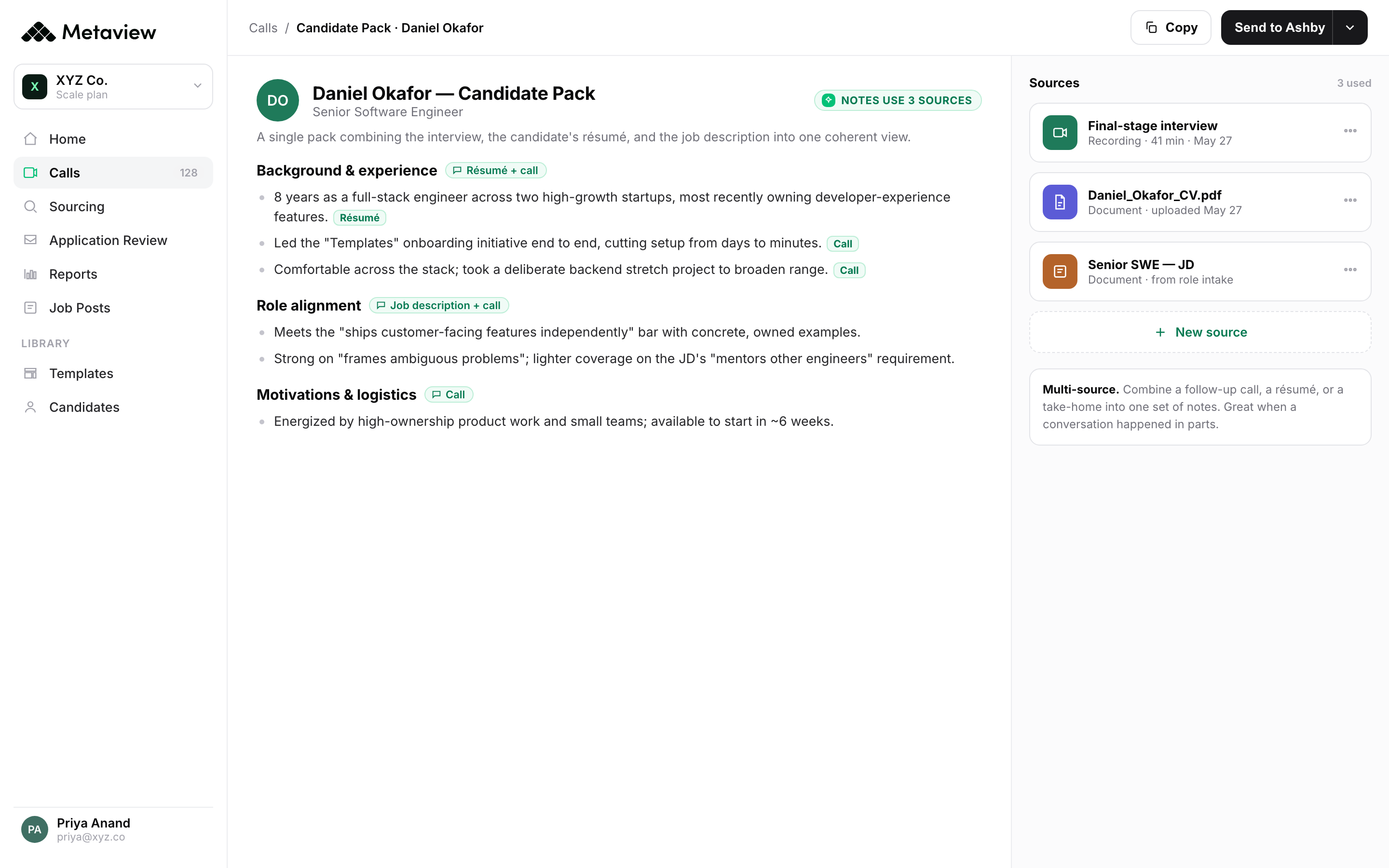
A generated draft removes one administrative step once the rubric is in your template: writing the scorecard up from an empty form. Metaview captures the conversation as structured interview notes and drafts each field against your template. The competencies and descriptions you wrote become the structure, and the draft is built from what the candidate actually said, so it doesn't hang on whoever's memory lasted longest. The interviewer checks the evidence and the rating, fixes what's off, and submits. The rating stays a human judgment and the rubric is still yours to get right. The draft removes the typing. The decision stays yours.
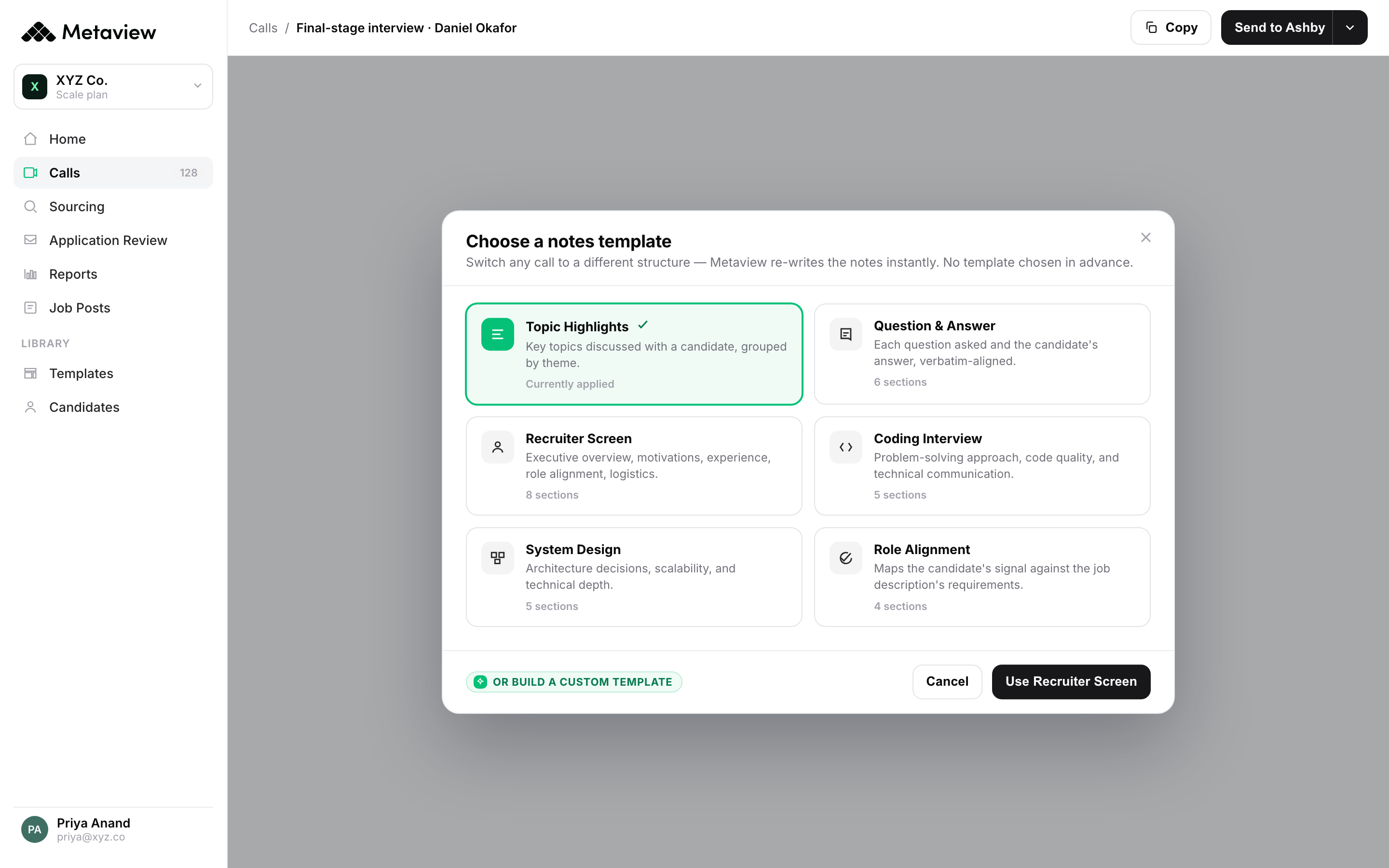
- 1Pick a template that matches the interview, like a recruiter screen, a coding interview, or a final round.
- 2A template like Role Alignment lays out the fields; you decide which competencies and anchors go in them.
- 3Or build a custom template from the competencies your role hires against, and Metaview drafts the scorecard for every call against it.
The reviewed scorecard lands in your system of record: into Ashby and Lever directly, and in Greenhouse the browser extension fills the objective sections while you paste the rest. There's no second tool to keep in sync. Reports then flags any interview from the past week still missing a scorecard, so the gaps surface while you can still fix them.
What consistency does, and doesn't, buy you.
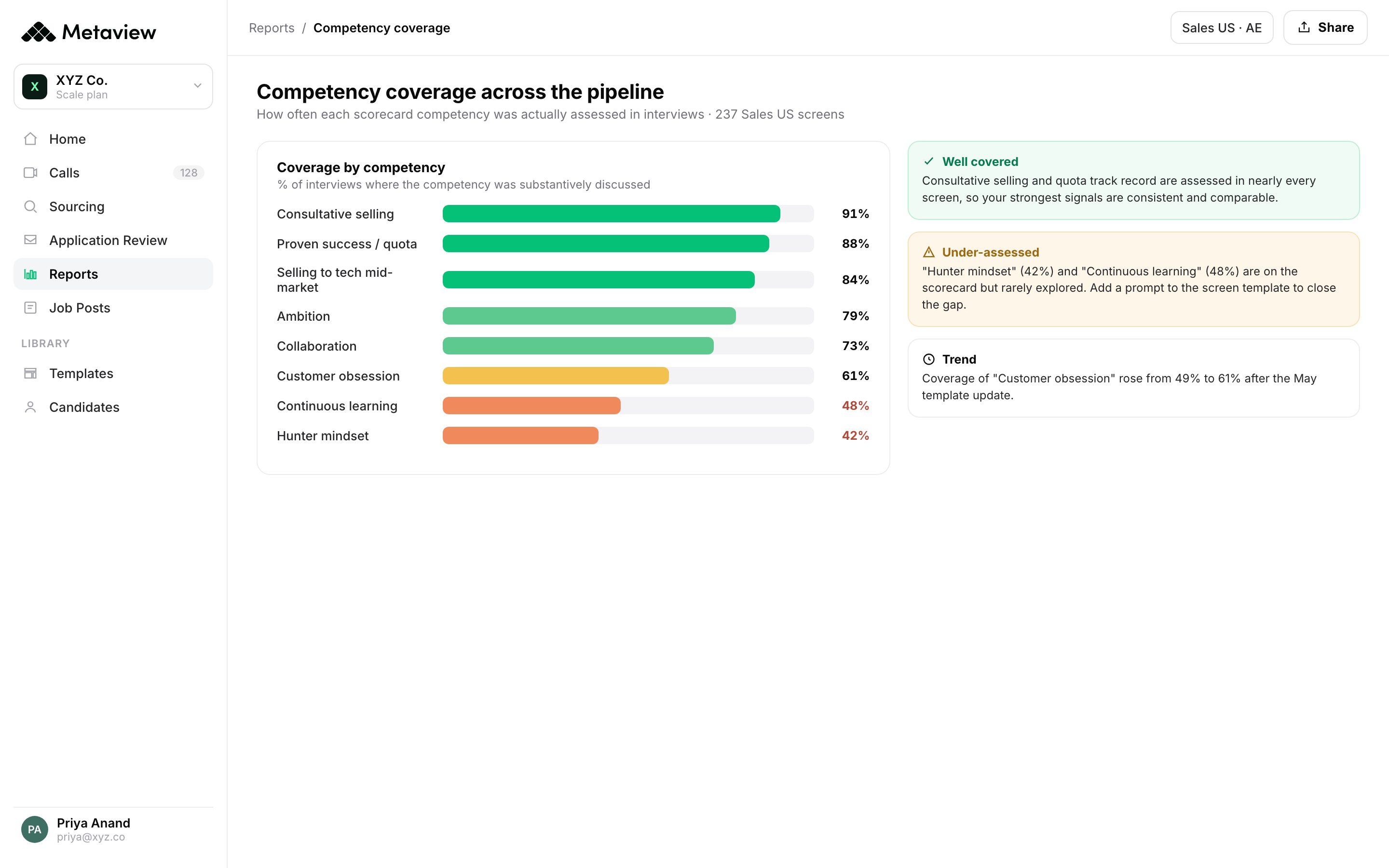
Repeated use of one scorecard makes scores comparable, because every candidate is measured against the same competencies. Whether that comparison deserves any trust is a separate question, and the rubric decides it. A rubric that rewards confidence over evidence, used fifty times, gives you fifty confident-looking scores that measure the wrong thing just as consistently. Repetition buys comparability. Validity comes from somewhere else: job-relevant competencies, anchored ratings, and a panel calibrated to the same bar. Coverage sits alongside them, and a competency only counts when someone in the loop actually assesses it. Everyone assuming a colleague did is how a competency goes untested.
Completion is a third thing again, separate from both, and it's where scorecards most often fail. The form never gets filled, so there's no evidence to compare in the first place. Metaview's analysis of scorecard completion is worth reading with that in mind. Scorecards that started from a generated draft were submitted 50.3% of the time, against 28.6% for those written from scratch, a 1.76x difference between an AI-generated sample and a manual one. That's an association, and the analysis wasn't a controlled experiment. The two samples can differ in who adopts drafting and in how those teams already work, so the difference is consistent with drafting helping completion, though the comparison can't establish why the two groups differed. A completed scorecard is only the raw material either way. Whether it's any good still rests on the rubric inside it.
Customers tend to mention the write-up first: consistent and backed by evidence, whoever prepared it, which makes a debrief quicker to run.
We elevated from gut-feel recommendations to evidence-based insights, creating a faster, clearer, and more data-driven experience for everyone involved. Every scorecard and report looks and sounds consistent, regardless of who prepared it.”

Start small. Take one role this week, put its real competencies and anchors into the template above, and run the next interview against it. Get the rubric right first. Then let the draft come from the interview if completion is where it keeps slipping, so the scorecard you designed is the one that actually gets filled.
See the scorecard start from the interview.
Bring your own template, and watch Metaview draft the scorecard from a real interview for your team to review and submit.
Frequently asked questions.
What is an interview scorecard?
A structured form that scores a candidate against the specific competencies a role needs, using a consistent rating scale and evidence from the interview. It exists so a hiring decision rests on the same criteria for everyone, instead of gut feel.
What should an interview scorecard template include?
Three columns you can copy: the competencies the role requires, a 1 to 4 rating scale with each level spelled out per competency, and an evidence field for the candidate's actual words. The free template above has all three.
How do you score candidates fairly?
Agree the rubric before the first interview, give each competency an anchored 1 to 4 scale, and back every rating with a line of evidence from the conversation. Have interviewers rate promptly and independently before the debrief, and make the final recommendation follow from the ratings, with the must-pass competencies named in advance.
Can you auto-fill an interview scorecard?
Yes. Metaview drafts the scorecard from the interview using your own template as the rubric, then your team reviews and edits it before it goes to the ATS. It submits straight into Ashby and Lever, and in Greenhouse the browser extension auto-fills the objective sections while you paste the rest.
How is a scorecard different from interview notes?
Notes capture what was said; the scorecard turns that into a judgment against the rubric. Metaview writes structured notes from the interview and uses them to draft the scorecard, so the two stay connected instead of living in separate tabs.
