
A candidate who doesn’t answer a follow-up in your sequence may have read it and passed. They may also never have seen it, and from the sending side the two look identical. (A sequence is the set of scheduled emails a recruiter sends one candidate: a first message, then follow-ups until a reply.) When recruiting emails are going to spam, every step can go out on time and still sit where the candidate may never look, and the silence looks like a no.
The tempting response to a sequence with no replies is a rewrite. If the emails are landing in spam, though, the rewrite goes out from the same sender to the same filters, and a better email in a spam folder is still in a spam folder.
This guide covers five checks to run before a candidate sequence starts, four drawn from the sender rules Google and Yahoo publish between them and one you run yourself, and what to watch once it’s running. None of them can promise a candidate’s inbox, and passing them doesn’t prove the copy works.
My rule is to check the sender first: the domain, the mailbox, the addresses, and how each email shows who sent it and how to opt out. I’d want all five checks done before anyone rewrites the pitch, because a follow-up the candidate never saw can’t tell you anything about its words.
To the sender, recruiting emails going to spam look like a candidate who said no.
A reply tells you something, and no reply tells you very little. A follow-up sitting unseen in a spam folder and a candidate who read it and passed can leave you with the same thing: an empty inbox.
The guide to candidate outreach sequences makes the same point about a different failure, a follow-up that was never sent: “from the sender’s side its silence looks the same as a candidate who wasn’t interested.” By analogy, a follow-up in spam is the same problem one step later: it was sent, and the candidate may still never see it.
Gmail and Yahoo both publish the rules they hold senders to, and each page has its own scope:
- Google’s Email sender guidelines apply to mail sent to personal Gmail accounts, the addresses ending in @gmail.com or @googlemail.com. Among other things, they cover authentication, spam rates (how often recipients report a sender’s mail as spam), sudden jumps in volume, bounces, misleading sender information, and hidden content.
- Yahoo’s Sender Best Practices page, written for mail to Yahoo domains, covers much of the same ground: authentication, spam complaints, invalid recipients, and misleading sender information.
Neither page explains how its spam filters decide about a particular email, and neither promises the inbox. Google’s page puts the stakes as possibilities: if you miss its requirements, “your email might not be delivered as expected, or might be marked as spam.” Mail to other providers, and to a candidate’s work address, is outside both pages, and this guide reaches it only by testing, in check five.
So start from a line in that sequences guide: “Silence doesn’t identify a single cause.” The spam folder is one cause among several, and the checks below look for risks on the sending side before anyone blames the words.
What’s at stake depends on how much of your hiring starts with your team reaching out, and Deel is a fair test because inbound does most of the work there. Metaview’s case study of Deel describes “a recruiting operation that ships 3,000+ hires a year against 1.5 million applications with just 70 recruiters,” and gives the split by channel: “About 55% of Deel's hires come from inbound applications, 25% from sourcing, 20% from referrals, and only 5% from agencies.”

The case study says nothing about email or spam folders, and I’m not suggesting Deel had a problem with either. I’m using it for the split. In sourcing, the team makes the first contact, so the channel only works if that contact arrives, and even where inbound dominates, it accounts for about one hire in four.
Check one: the domain proves the email is really from you.
Authentication is how a receiving mail server checks that an email claiming to come from your company’s domain really came from it. It runs on three records published for the domain:
- Sender Policy Framework (SPF) lists the servers allowed to send email for the domain. In Google’s words, it “prevents spammers from sending unauthorized messages that appear to be from your domain.”
- DomainKeys Identified Mail (DKIM) signs each message, so the receiving server can check that the domain’s owner sent it and, as Yahoo puts it, “that the content of the email has not been changed during transmission.”
- Domain-based Message Authentication, Reporting, and Conformance (DMARC) “tells receiving servers what to do with your messages that don’t pass SPF or DKIM,” according to Google, and it can be set up to send you reports on mail sent in your domain’s name.
Google requires every sender to personal Gmail accounts to set up SPF or DKIM, and requires all three of its bulk senders, a category it defines by how much a sender mails to personal Gmail accounts in a day. It also recommends “that you always set up SPF, DKIM, and DMARC for your domains.” Yahoo’s floor for every sender is “SPF or DKIM at a minimum,” and its bulk senders must have both, plus a published DMARC policy.
A recruiting team may never come near Google’s bulk category, and it’s tempting to stop at the minimum. I wouldn’t: Google recommends all three for every domain, so confirm the setup with whoever manages yours.
The record most worth a question is SPF. Google’s guidelines say the SPF record “should include all email senders for your domain,” and that messages from third-party senders left out of it are “more likely to be marked as spam.” A sequencing tool that sends as your company’s domain may be one of those third-party senders, depending on how it sends, so ask about the tool by name.
Check two: the mailbox ramps up slowly and sends at a steady rate.
Google’s advice for senders of large amounts of email is to ramp up slowly and keep the pace even. Its guidelines say to “Start with a low sending volume to engaged users, and slowly increase the volume over time,” to “Send email at a consistent rate,” and to avoid sending in bursts. A sudden spike in volume, Google adds, “could result in rate limiting or reputation drops.” Rate limiting means Gmail caps how many of your messages it accepts within a set period.
Recruiting volume can do the opposite. A new recruiter’s mailbox goes from nothing to a full set of sequences overnight, or a batch of new shortlists gets enrolled on the same Monday morning.
Note who Google says to start with: engaged users. A candidate who has never heard of you isn’t one, so a cold sequence starts outside the group Google recommends. My own practice follows from that, and it’s a habit rather than a measured rule. A new hire’s mailbox starts with a small daily batch that grows week by week, and a Monday with several new shortlists gets spread across the week instead of enrolled in one go.
Google’s guidelines don’t put a number on how fast to increase, so any warm-up schedule (a plan for how many emails a new mailbox sends each day) is someone’s practice, whoever hands it to you.
Check three: every address is real before it enters the sequence.
Every address should be real before a single email goes to it. An address that doesn’t exist produces a bounce, an email that comes back undelivered. A deferred message is one the receiving server has turned away for now, to be tried again later. Both providers want senders to act on them. Google tells senders whose messages “start bouncing or start being deferred” to reduce their sending volume until the errors fall, and to “Automatically unsubscribe recipients who have multiple bounced messages.” Yahoo’s page says to “Remove invalid recipients from your list promptly.”
Both describe cleaning up a list after the fact. I’d move the check earlier, to before the candidate is enrolled, and keep any address you can’t confirm out of the sequence until you can. A bounced first email doesn’t reach the candidate at all, and I’d stop the rest of the sequence for that address until it’s fixed.
Where the addresses come from is a separate decision, covered in the roundup of email finder tools.
Check four: the email is honest about who sent it and easy to opt out of.
Both providers ask the email itself to be straight about who sent it and what it is. Google’s guidelines say sender information “should be clear and visible,” that web links “should be visible and easy to understand,” and that a subject line shouldn’t start with “Re:” or “Fwd:” unless the message is a real reply or forward. They also warn that hiding content in a message “might cause messages to be marked as spam.” Yahoo’s page rules out “false or misleading header information or deceptive subject lines.”
In a recruiting sequence I read that as a real sender, plainly named on every step, links that show where they go, and no “Re:” on a first email to fake an ongoing conversation.
The other half of this check is the way out. Google’s guidelines say to “Always give recipients an easy way to unsubscribe from your messages.” Both providers also publish a ceiling for the spam rate and tell senders to stay below it. The pages don’t state a shared way of calculating it, and Yahoo says it calculates its own “based on mail delivered to the inbox.”
One-click unsubscribe is required too, but narrowly. It’s an unsubscribe built into the email that works with a single click, and both providers require it only of bulk senders and only for marketing and subscribed messages. I wouldn’t read it as a rule for every recruiting email. What I’d put in every step is simpler: one plain line telling the candidate how to stop hearing from you, and someone on the team who acts on it.
None of this makes cold outreach welcome. Google’s guidelines are blunt about it: “Don't send messages to people who didn't sign up to get messages from you. These recipients might mark your messages as spam, and future messages to these recipients will be marked as spam.” A cold recruiting email goes to someone who didn’t sign up, and no setting changes that.
Once the setup is right, the levers a cold sender has left over complaints are relevance and an easy opt-out. That’s my position, and neither provider measures it. For the writing itself, see the guide to personalizing recruiting outreach emails.
Some of the people a cold sequence reaches don’t need a new job at all. Annie Wenzel, a senior partner at the search firm Swing Search, places go-to-market executives, and in episode 21 of the 10x Recruiting podcast she talks about why the best operators say no and what gets them to yes. The episode is billed for anyone who has had to “close someone who doesn’t need the job.”
Check five: seed every step into inboxes you control.
A seed test is a dry run: the whole sequence goes to inboxes you own before any candidate gets it, and you look at where each email landed. The method comes from the sequences guide linked above, which uses it to test the thread: “Send the sequence to an address you control. Open it in the email client your candidates use, and inspect where the follow-up appears.” Here the same test is aimed at the folder.
Set up test addresses on Gmail, Outlook, and Yahoo. Send them every step of the sequence, the follow-ups as well as the first email, and note which folder each test message lands in. Google’s own troubleshooting advice also uses a test message: when bounces and deferrals persist at a low volume, it suggests “sending a blank test message” to see whether it runs into problems.
Run the test again whenever something changes. Google’s guidelines ask senders who change the format of their bulk emails to “gradually increase the sending volume of messages with the new format.” My practice is to re-run the seed test after any change to the domain, the sending tool, or the template.
Know what the test can’t tell you. A test inbox has its own history, and a candidate’s work address sits behind filters you can only seed if you have an account there, so the seed test shows where your test messages landed and nothing more. That’s still more than a silent sequence tells you.
Once the sequence runs, watch complaints and replies across every sequence.
Some evidence only exists once the sequence is running. For mail sent to Gmail users, Google’s Postmaster Tools reports “When recipients mark your messages as spam,” along with your domain’s reputation and its effect on delivery. It covers Gmail and nothing else.
When a sequence gets no replies, the convenient reading is that low opens mean the spam folder. Google’s guidelines warn against exactly that: “Low open rates aren't necessarily an accurate indicator of deliverability or spam classification issues.” Google says it doesn’t track open rates, and the sequences guide explains a second reason an open proves little, so I’d leave opens out of this check.
Replies are a better guide, read across every sequence at once. One silent sequence can have many causes, from the role to the subject line. When replies fall across every live sequence in the same week, and nothing else changed across all of them (the copy, the targeting, the timing), I’d check the sender before anyone rewrites a single sequence. A shared drop doesn’t prove a sender problem, but the sender is one thing every sequence has in common, so it’s the first place I’d look.
Metaview Outreach sends candidate sequences as automated email and reports sequence performance across roles, teams, and steps.
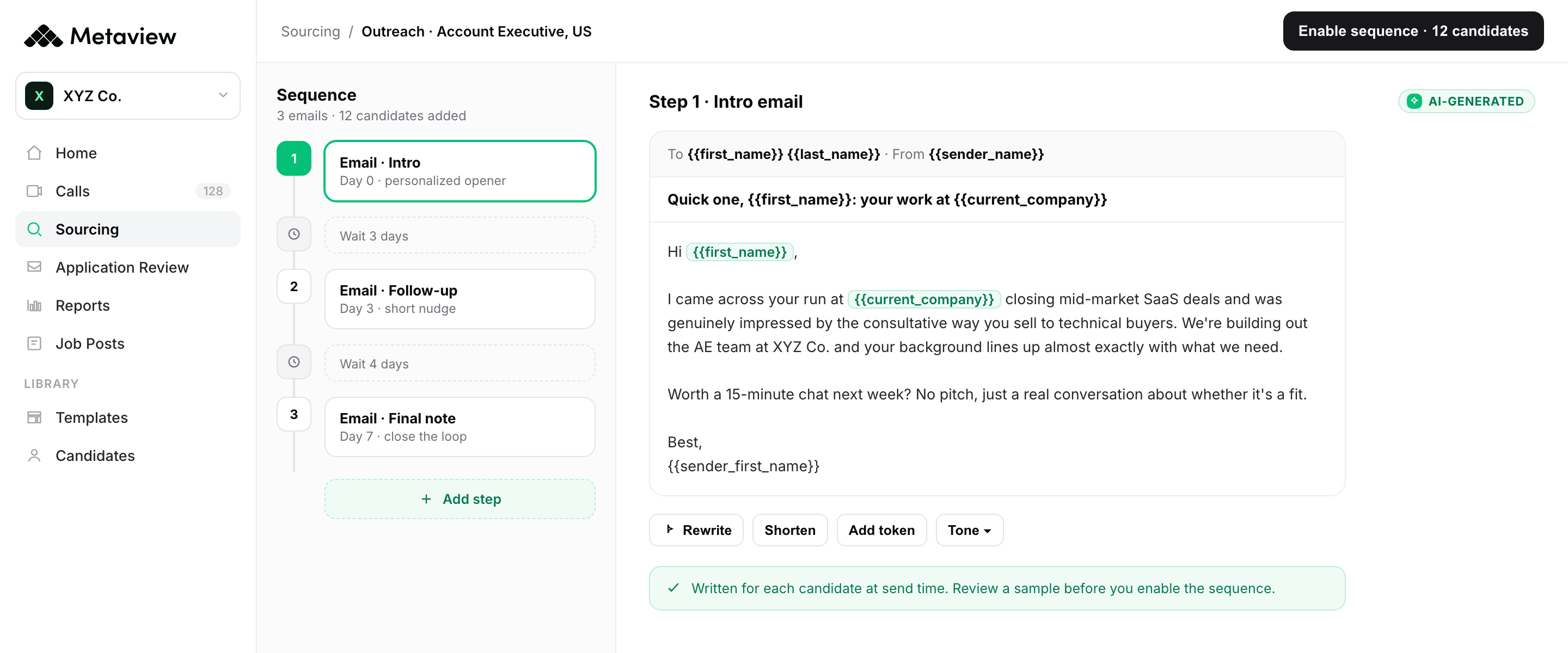
Whatever sends your sequences, read their replies side by side, so a drop that hits all of them shows up as one pattern instead of several copy problems.
Check the sender before you rewrite the copy.
Every check in this guide exists for one moment: a candidate reading the email and writing back. Shahriar Tajbakhsh, Metaview’s co-founder and chief technology officer, has written that outreach and follow-ups create the conditions for hiring but aren’t where recruiters create the most value:
The highest-leverage work in recruiting happens when people are talking to people.”

So before the sequence starts, check the sender, and once it runs, read the replies across every sequence. An email no one saw can’t tell you whether the words worked.
Bring your candidate sequences to a Metaview demo.
See Metaview Outreach with the Metaview team.
Frequently asked.
What should I check when recruiting emails are going to spam?
Five things: the domain’s authentication, how fast the mailbox ramps up, whether every address is real, whether each email is honest and easy to opt out of, and where each step lands in test inboxes. The first four draw on the sender rules Google and Yahoo publish, and the volume ramp comes from Google’s alone. None of them explains why one particular email was filtered.
Do recruiters need SPF, DKIM, and DMARC?
If you email candidates at personal Gmail addresses, Google requires at least SPF or DKIM, and Yahoo sets the same floor for mail sent to its own domains. Both ask more of bulk senders, including a DMARC policy. Google recommends all three for every domain, so I’d confirm yours has them whatever your volume.
Should recruiting emails include a way to opt out?
I’d put one in every step. Google’s guidelines tell senders to make unsubscribing easy, and both providers publish a ceiling for spam reports. Their one-click unsubscribe requirement covers bulk senders’ marketing and subscribed messages, so a plain opt-out line is a standard you set yourself.
How can I tell if candidate emails are landing in spam?
Before the sequence starts, send every step to test inboxes you control on Gmail, Outlook, and Yahoo, and check which folder each lands in. Once it runs, Google’s Postmaster Tools shows spam reports and domain reputation for mail to Gmail users. Google says low open rates aren’t necessarily an accurate sign of a spam problem.
How fast can a new recruiting mailbox start sending sequences?
Google’s sender guidelines don’t give a number. For large senders, they say to start with a low volume to engaged users, increase it slowly, and avoid sudden spikes. I’d start a new mailbox on small daily batches that grow week by week.
