
HR teams lose hours every week to manual work that has nothing to do with people and everything to do with paperwork. Time-off requests still get approved by email. Performance reviews still live in a spreadsheet. New hires get a welcome PDF and a list of links. The pattern is the same in every org: the work is repetitive, the signal it produces is structured, and the team doing it is busy.
HR workflow automation collapses that work. The hard part is not picking the tool. The hard part is knowing which six workflows actually pay back automation, where each one lives in your stack, and where the interview-intelligence layer sits underneath all of them.
This post is for the HR leader who is past the “why automate” question and ready to stand up the stack that runs the people side of the business without re-typing everything between systems. We map the six workflows worth automating in order, the tool category that owns each one, and the integration layer that makes the rest of the stack smarter.
What HR workflow automation actually is (and what it isn't).
HR workflow automation means three things, in order: capture the signal a process produces, structure it into a format another system can use, and push it where the next step in the workflow lives. If any of those three layers is missing, the “automation” is just a faster spreadsheet.
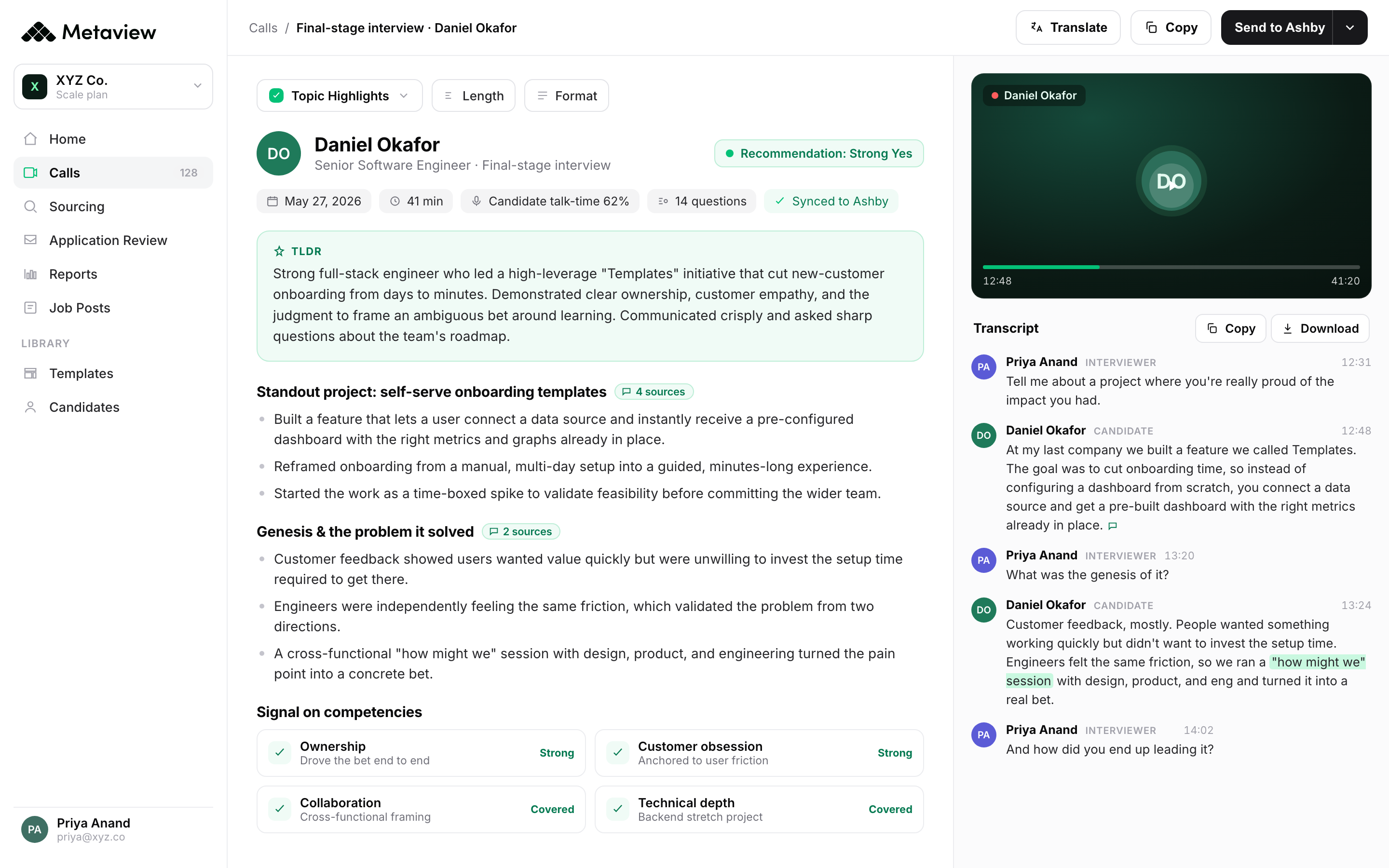
Most HR teams get the second and third layers covered by their HRIS and their ATS. The HRIS captures employee records, structures them, and pushes to payroll. The ATS captures applicants, structures them, and pushes to scheduling. The capture layer that is almost always missing in the stack is the one that turns interview conversations into structured signal. That is the layer the rest of the HR stack cannot operate on, because no other system captures what gets said in the room.
According to Metaview’s 2026 AI & Hiring Alignment Report (surveying 505 recruiting leaders and hiring managers across North America and EMEA), 67% of teams lose qualified candidates to competitors who move faster every month. The fix is not faster scheduling; it is fewer days lost to manual signal-capture between the interview and every downstream HR system that needs the output.
The six HR workflows worth automating.
In priority order, ranked by the time-cost of doing each one manually and by how many downstream systems consume the output. Start at the top.
1. Sourcing, screening, and interview capture.
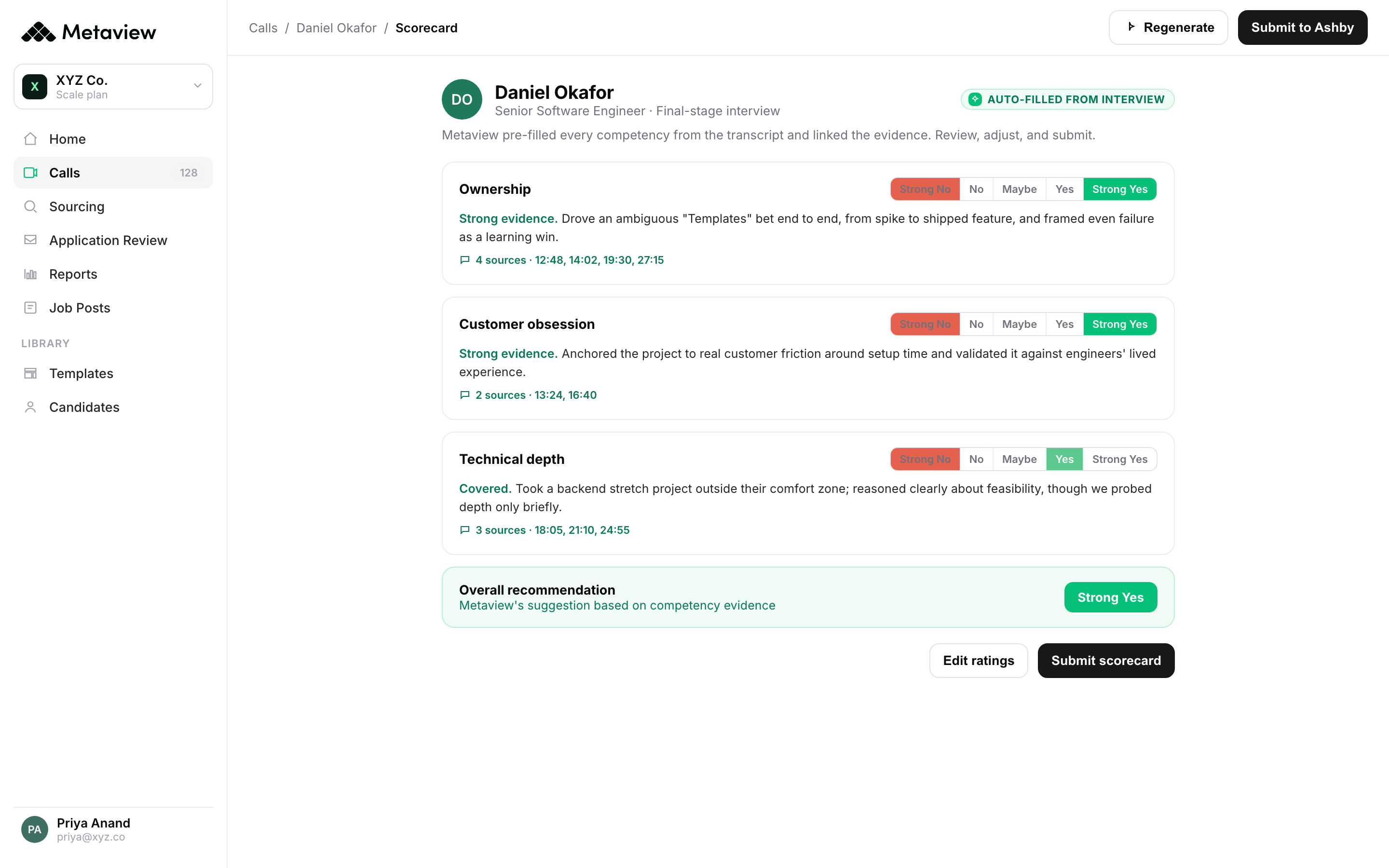
The workflow that produces the most data and gets automated the least. Every recruiter screening call and every panel interview is a source of structured signal about a candidate’s scope, motivation, and fit. Without an automation layer, that signal lives in the recruiter’s head and in scratch notes. Notetaker captures the conversation, structures it per-competency, and pushes the AI notes to the ATS and the scorecard automatically.
2. Onboarding.
New-hire onboarding is the workflow where most teams over-engineer the front end (welcome packs, IT requests) and under-engineer the signal capture (manager 1:1s, 30-60-90 reviews). A modern onboarding stack pairs a learning-management layer for the structured content with a capture layer for the conversations. The recruiter’s intake brief from the interview loop should land in the hiring manager’s 1:1 prep on day one.
3. PTO requests and tracking.
The lowest-judgment HR workflow and the highest-volume one. Most HRIS platforms handle this natively. The lift is in connecting PTO data to performance and team coverage planning, not in the request flow itself. If your HR system is not auto-flagging coverage conflicts across teams, that is the gap to close.
4. Payroll and benefits.
Payroll runs on time-tracking, role data, and comp bands. Each of those three inputs comes from a different system. The automation lift is data flow: the HRIS pushes role and salary to payroll; the time-tracking system pushes hours; the benefits broker pulls enrollment from the HRIS. If your team is still copying numbers between any two of those, that is the next workflow to fix.
5. Performance reviews and feedback.
Performance reviews are the workflow where signal capture matters most and is automated least. A modern review platform handles the rating template and the calibration session, but the substance of the review (specific examples, manager observations, peer feedback) still lives in conversations no system captures. The same interview-intelligence layer that captures candidate conversations works for performance 1:1s. The structured notes feed the review template instead of getting written from memory two weeks later.
6. Compensation reviews.
Compensation reviews depend on three signals: market data, performance data, and the manager’s read of the person. The first two are increasingly automated by compensation platforms. The third is the gap. The manager’s read is built in 1:1s and skip-levels across the year; if those conversations are not captured, the comp review runs on the manager’s recent memory, not on the year of evidence.
How Metaview makes the rest of your HR stack smarter.
Most automation tools speed up a single workflow. The interview-intelligence layer is different: it captures a signal no other HR system can produce, structures it, and pushes the output downstream into the systems your team already runs. The HRIS gets cleaner candidate records; the ATS gets structured per-competency notes; the performance system gets the year of manager 1:1 capture instead of two weeks of recall.
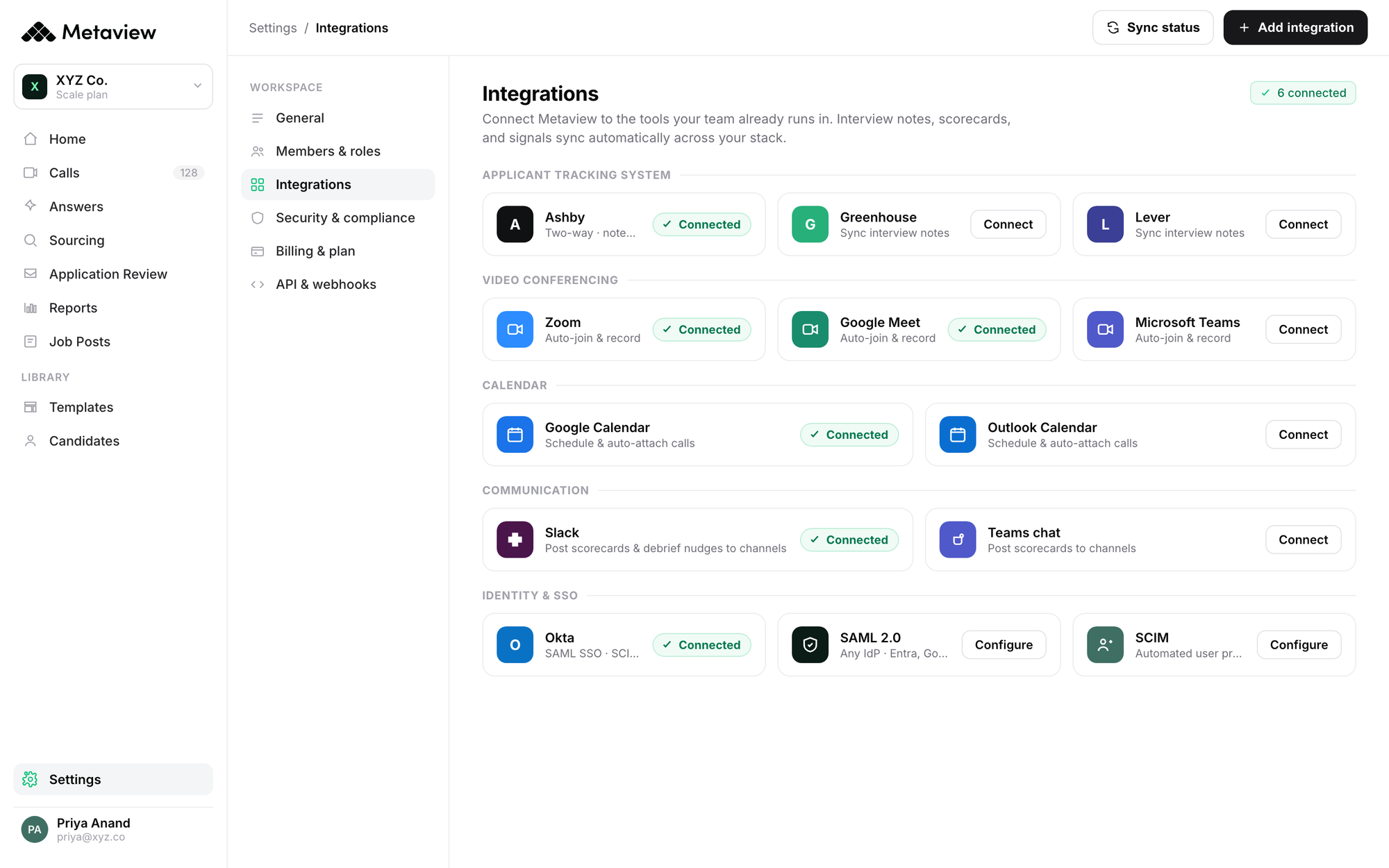
In practice, the integration layer matters as much as the capture layer. Metaview connects directly to BambooHR, Personio, Workday, and Sage, plus every major ATS. The structured AI notes land in the candidate record, the hiring manager debrief, and the performance review surface without anyone re-typing the same observation in three different places.
It was more work, it wasn’t as accurate, and it didn’t integrate as well with our ATS. So Metaview came out way above the rest, and particularly in its accuracy.”

See the full SoSafe case study for the operational detail on how the ATS integration removed manual translation work from their screening loop.
Manual vs. HRIS-only vs. Metaview-augmented.
The same six workflows, broken down by the level of automation your stack supports today. The Metaview-augmented column is the state where the interview-intelligence layer is wired in.
| Workflow | Manual | HRIS-only | Metaview-augmented |
|---|---|---|---|
| Sourcing & interview capture | Recruiter takes notes in real time. 20-30 min per interview to translate into ATS fields. | ATS holds the candidate record but not the conversation signal. | Notetaker captures per-competency signal in the room. AI Notes auto-populate the ATS scorecard. |
| Onboarding | Manager runs 30-60-90 reviews from memory. Hiring brief is forgotten by week 4. | LMS handles content; signal capture is still manual. | Intake brief from the interview loop carries forward. Manager 1:1s captured and structured. |
| PTO & tracking | Email approval threads. Manager checks calendars manually for coverage. | HRIS handles requests and balances. Coverage planning is still ad-hoc. | Same HRIS layer, plus interview-derived team-coverage signal flagged at planning time. |
| Payroll & benefits | Numbers copied between time-tracking, HRIS, and payroll systems. | HRIS pushes role and salary to payroll. Time-tracking and benefits stay separate. | HRIS and payroll integration, plus offer-prep data (from the interview loop) lands cleanly in the new-hire record. |
| Performance reviews | Manager writes the review from two weeks of recent memory. | Review platform handles the template; substance comes from manager recall. | Year of structured 1:1 notes feeds the review template. Specific examples are searchable, not remembered. |
| Compensation reviews | Manager’s read built from recent observations. Market data lives in a spreadsheet. | Compensation platform handles bands and market data. Manager read is still gut-feel. | Structured 1:1 capture across the year backs the manager’s read with evidence, not impression. |
What customers are seeing.
The numbers that come out of teams running the interview-intelligence layer alongside their existing HR stack tend to cluster. The pattern: 10 hours per recruiter per week back on documentation, 30 percent fewer interviews per hire on senior IC searches, and a debrief synthesis time that drops from days to minutes.
We elevated from gut-feel recommendations to evidence-based insights, creating a faster, clearer, and more data-driven experience for everyone involved. Every scorecard and report looks and sounds consistent, regardless of who prepared it.”

The lift is rarely from one workflow getting faster in isolation. It is from the capture layer turning conversations into signal that the rest of the HR stack can finally operate on. Every system downstream of the interview becomes more accurate because the input is structured instead of remembered.
How to start: the 30-day plan.
A practical sequence for HR leaders adding the interview-intelligence layer to an existing stack. Same six workflows, different sequence depending on where your team is today.
- Week 1. Audit the six workflows. For each one, write down where the signal is captured today, where it lives, and which downstream systems consume it. The workflows where the answer is “in someone’s head” are the lift candidates.
- Week 2. Pick the workflow with the highest manual cost. For most HR teams it is sourcing and interview capture. Set up the capture layer first, integrate it with the ATS, and let the per-competency signal start landing in candidate records.
- Week 3. Extend the same capture layer to internal conversations: hiring manager intake meetings, panel debriefs, and 1:1s where the substance matters. The same tool that captures candidate calls captures internal calls; the integrations are the same.
- Week 4. Wire the structured output downstream. Push AI notes to the HRIS so the new-hire record carries the interview context. Push intake briefs to the manager’s onboarding 1:1 prep. Push 1:1 capture into the performance review template. The downstream lift is bigger than the upstream one.
Bring Metaview into your hiring stack.
Live notes, structured scorecards, and ATS sync - set up in under 10 minutes.
Frequently asked.
Which HR workflows should be automated first?
Start with sourcing and interview capture. It produces the most data, gets used by the most downstream systems (ATS, HRIS, onboarding, performance), and is the workflow most often left manual. Automate the highest-fan-out workflow first.
Does HR automation replace HR jobs?
No. The work HR teams do at the highest leverage is judgment work: deciding what gets prioritized, mediating between business needs and people needs, making the call on a borderline hire or a complicated performance situation. Automation removes the repetitive capture and routing work that crowds out judgment time, not the judgment work itself.
How does AI improve HR workflow automation?
By making capture cheaper. The fundamental limit on HR automation has always been that the most valuable HR signal lives in conversations, and conversations are expensive to capture and structure. AI changes that economics. Notes from interviews, 1:1s, and debriefs become structured data that the rest of the stack can consume.
Where does Metaview fit in the HR stack?
Metaview is the interview-intelligence layer. It captures every spoken word in the recruiting and people-management workflow, structures it per-competency or per-topic, and integrates with the rest of the stack (BambooHR, Personio, Workday, Sage, and every major ATS) so the signal lands where the next workflow can use it.
What integrations does Metaview support for HR teams?
Native integrations with BambooHR, Personio, Workday, Sage, and the major ATS platforms. The structured AI notes push to the candidate record, the hiring manager debrief surface, and the performance review template without manual translation.
How long does it take to set up Metaview alongside an existing HR stack?
Under 10 minutes for the core capture layer (calendar integration plus ATS connection). Full deployment with HRIS integration and downstream automation typically runs 2 to 4 weeks depending on the number of internal systems in scope.
