

The Boolean search string you paste into LinkedIn, your applicant tracking system (ATS), or a resume database determines which candidates you see for a role. A good one starts from a brief: a short description of who the role needs.
That’s why a string copied from someone else’s search can let you down. It was written from their brief, so it finds the people their role needed. The people your role needs may not be among them, and nothing on the results page tells you who’s missing. So a copied string can look as if it works while it misses them.
I’d start from the brief instead. Write down who your role needs. Then change any string you copy to match it. Before you trust what a string returns, check who it will miss.
This article gives you 15 Boolean search strings, by role, from Java developer to chief financial officer. Each one comes with the sample brief it was written from, so you can rewrite that brief for your role first. It also names where to run the string, the titles and terms it catches, and the people it will still miss.
How to read a Boolean search string before you paste it.
Each string below is built from four pieces of Boolean syntax. Here’s what each one does, so you can read a string before you paste it:
- AND: every term must appear, so each AND narrows the search.
- OR: any of the terms may appear, so an OR group widens it. Use it for the titles and spellings that name the same thing.
- Quotation marks: find an exact phrase, so
"site reliability engineer"stays one phrase. - Parentheses: group terms. LinkedIn applies AND before OR, so without parentheses an AND attaches only to the term right next to it. That’s why every OR group gets parentheses.
Type AND, OR, and NOT (exclude a term) in capitals. LinkedIn needs its operators in uppercase “for the search to work correctly.” LinkedIn Recruiter’s “Keywords” field also treats “and,” “or,” and “not” as stop words and ignores them.
I left NOT out of all 15. LinkedIn Recruiter’s help page advises being “specific and inclusive rather than vague and exclusive,” and favors related titles and essential skills over “a long list of exclusions.” Without NOT, the entries below handle a word that means two things another way: they pair it with a second word or leave it out. One example is the short form for physical therapist (PT), which also means part-time.
Each OR term widens the net, which tempts you to keep adding them. A longer OR group still finds only the words someone thought to type. Many of the people a string misses do the same work under a short form of the title, or under the title a neighboring company uses. Others have profiles that say too little to match any term. Every entry below names the ones its string will miss.
Each string searches only for the must-haves a profile is likely to state in words, such as a title or a tool. For seniority, and for anything else in a brief that no one writes on a profile, read the profiles the string returns.
The briefs are one-line samples written for this article. Rewrite each one for your role before you use its string.
The 15 strings at a glance.
The table maps each string to its role family and where to run it, so you can go straight to your role. “LinkedIn search” in the table means the main search bar on a free LinkedIn account.
| # | Role | Role family | Run it in |
|---|---|---|---|
| 1 | Java developer | Engineering | LinkedIn Recruiter |
| 2 | Site reliability engineer | Engineering | LinkedIn search |
| 3 | iOS engineer | Engineering | LinkedIn search |
| 4 | Data engineer | Data | Greenhouse candidate search |
| 5 | Machine learning engineer | Data | LinkedIn Recruiter |
| 6 | Sales development representative | Sales | LinkedIn search |
| 7 | Sales engineer | Sales | LinkedIn Recruiter |
| 8 | Physical therapist | Healthcare | LinkedIn search |
| 9 | Medical coder | Healthcare | LinkedIn Recruiter |
| 10 | Financial planning and analysis manager | Finance | LinkedIn Recruiter |
| 11 | Controller | Finance | LinkedIn search |
| 12 | Warehouse supervisor | Operations | LinkedIn search |
| 13 | Demand planner | Operations | LinkedIn Recruiter |
| 14 | Vice president of engineering | Executive | LinkedIn Recruiter |
| 15 | Chief financial officer | Executive | LinkedIn Recruiter |
Engineering: Java, site reliability, and iOS.
Engineering briefs name tools, so each engineering string pairs a title group with the tools its brief can’t do without.
1. Java developer.
The brief: “Senior Java engineer for a payments team who works in Spring every day and has built services on Kafka.”
("java developer" OR "java engineer" OR "software engineer" OR "software developer" OR "backend engineer" OR "back end engineer" OR "back-end engineer") AND Java AND Spring AND Kafka
Run it in LinkedIn Recruiter’s “Keywords” filter. It matches Java developers by title, and software and backend engineers whose profiles name Java, as long as Spring and Kafka appear too. The title group carries all three spellings of backend.
I left seniority and payments out of the string. A title word like senior drops strong engineers whose titles don’t carry it, and payments work is something to read for on the profile.
Spring can also mean the season, so a profile that mentions a spring internship meets the Spring requirement too. The string misses engineers who describe their messaging work as event streaming and never name Kafka.
Greenhouse reads an asterisk as a wildcard. Its own help page says Java* also returns JavaScript. If you run this string in Greenhouse, leave Java without an asterisk.
2. Site reliability engineer.
The brief: “Site reliability engineer (SRE) who runs Kubernetes in production and manages infrastructure as code in Terraform.”
("site reliability engineer" OR SRE OR "platform engineer" OR "DevOps engineer") AND Kubernetes AND Terraform
The title group holds the job’s name, its short form, and two neighboring titles the brief would accept. It has five operators, the most a free LinkedIn search took when these strings were run in November 2026.
It misses engineers who write only the short form of Kubernetes (K8s), and titles outside the group, such as production engineer or cloud engineer. Infrastructure engineer is left out to keep the string at five operators. Recruiter has no limit, so add it back there. If the brief allows a tool other than Terraform, put it in an OR group with Terraform.
3. iOS engineer.
The brief: “iOS engineer for a consumer app who writes Swift and has shipped apps to the App Store; SwiftUI is a plus.”
("iOS engineer" OR "iOS developer" OR "mobile engineer" OR "mobile developer") AND Swift AND "App Store"
The string matches the four mobile titles when the profile names Swift and the App Store. I left SwiftUI out because the brief calls it a plus, and an AND on it would drop every strong candidate who didn’t list it.
Engineers on a mobile team whose title is plain software engineer don’t match. Add "software engineer" to the title group if the first page looks thin, and let Swift and the App Store do the narrowing.
Data roles: pipelines and machine learning.
The two data strings, for a data engineer and a machine learning engineer, search for what the person built as well as their title. That’s because the same work can sit under different titles. A data engineer and an analytics engineer, for example, can do the same pipeline work.
4. Data engineer.
The brief: “Data engineer who builds pipelines in dbt or Airflow on Snowflake or BigQuery.”
("data engineer" OR "analytics engineer" OR "data platform engineer") AND (dbt OR Airflow) AND (Snowflake OR BigQuery)
This one is written for Greenhouse’s candidate search, to look through past applicants before you search outside. In Greenhouse’s own example, its search matches terms in resumes, notes, and scorecards. So the search can reach what your interviewers wrote, as well as what candidates sent.
Read every match before you reach out, because a scorecard noting that a candidate has never used dbt contains the word dbt too.
The string misses data engineers who work on another warehouse, such as Redshift or Databricks. Add them to the Snowflake and BigQuery group if the brief allows it.
5. Machine learning engineer.
The brief: “Machine learning (ML) engineer who has put recommendation or ranking models into production in PyTorch.”
("machine learning engineer" OR "ML engineer" OR "applied scientist" OR "research engineer") AND (recommendation OR recommender OR ranking OR personalization) AND PyTorch
Use LinkedIn Recruiter’s “Keywords” filter. Applied scientist and research engineer are in the title group because people with those titles can do the same production work. The string doesn’t search for production itself, so check each profile for models that reached production.
It misses titles written in reverse order, such as “Software Engineer, Machine Learning.” People who write recsys, or the British spelling of personalization, match only if they also use another word in the recommendation group. Add recsys to that group, and add the British spelling too if you search outside the United States.
Sales: development reps and sales engineers.
Sales titles come in several versions. A development rep may use a short form, such as business development representative (BDR). A sales engineer’s title may or may not carry a hyphen, as in pre-sales and presales. Each string below carries the versions its sample brief would accept.
6. Sales development representative.
The brief: “Outbound sales development representative (SDR) who has sold software and booked meetings by cold calling and email, ready to move up within a year.”
(SDR OR BDR) AND (SaaS OR software) AND (outbound OR "cold calling")
It searches the two common titles by their short forms, which keeps it at five operators for a free account. It misses anyone who wrote out sales development representative and never used the letters, and reps who describe the work only as prospecting. Neighboring titles such as inside sales representative fall outside it too. A Recruiter search can take the full titles too, in quotation marks in the first group.
The brief’s last clause, ready to move up within a year, is something no string can search for. Ask about it on the first call.
7. Sales engineer.
The brief: “Sales engineer who runs technical demos of an application programming interface (API) product and scopes integrations with the buyer’s engineers.”
("sales engineer" OR "solutions engineer" OR "solutions consultant" OR "presales engineer" OR "pre-sales engineer" OR "pre sales engineer") AND (API OR APIs) AND (demo OR demos OR "proof of concept")
Use LinkedIn Recruiter’s “Keywords” filter. The title group holds six versions of the title, with pre-sales written three ways.
I left architect titles out, because an architect at one company can work before the sale and an architect at the next can work after it. Read a few profiles first, and add an architect title once you know which kind you’re getting. The string also misses customer engineer, a title that can cover the same work.
Healthcare: physical therapy and medical coding.
Both healthcare strings search for the letters people write on a profile. For a physical therapist, that’s a degree, such as the Doctor of Physical Therapy (DPT). For a medical coder, it’s a credential and the code set coders work in: the International Classification of Diseases (ICD), Tenth Revision. Profiles write it as ICD-10, or without the hyphen (ICD10).
8. Physical therapist.
The brief: “Licensed physical therapist for an outpatient orthopedic clinic.”
("physical therapist" OR physiotherapist OR DPT) AND (outpatient OR orthopedic OR "sports medicine")
The DPT degree sits in the title group, since a therapist may list it in place of a job title. The short form PT stays out, because PT also means part-time, and PT AND outpatient would also bring back part-time staff in outpatient departments.
The phrase physical therapist also sits inside physical therapist assistant, a different license, so read every match for the title itself. Therapists who use the British spelling of orthopedic can still match, as long as their profiles also say outpatient or sports medicine. The ones the string misses are therapists whose profiles list a title and an employer and nothing else.
9. Medical coder.
The brief: “Medical coder for outpatient visits who holds the Certified Professional Coder (CPC) or Certified Coding Specialist (CCS) credential and codes in ICD-10.”
("medical coder" OR "coding specialist" OR "coding analyst") AND (CPC OR CCS) AND ("ICD-10" OR ICD10)
Use LinkedIn Recruiter’s “Keywords” filter. It matches coders who list either credential by its letters, with ICD-10 written with or without the hyphen.
It misses coders who wrote the credential out in full. If the first page looks short, add "Certified Professional Coder" and "Certified Coding Specialist" to the CPC and CCS group. It also matches people who mention a credential they’re still working toward, so read for the certification itself.
Finance: planning and the month-end close.
Both finance strings turn on a small detail in the words. The financial planning and analysis manager’s title contains “and,” a stop word that Recruiter’s “Keywords” field ignores. The controller’s main task is the month-end close, which profiles write both with and without a hyphen.
10. Financial planning and analysis manager.
The brief: “Financial planning and analysis (FP&A) manager with subscription software experience who has owned an annual budget and a monthly forecast.”
("FP&A manager" OR "FP&A lead" OR "financial planning and analysis manager" OR "finance manager") AND (SaaS OR subscription) AND (forecasting OR budgeting)
Run it in LinkedIn Recruiter, and split it across two filters: the title group in “Job titles” and the rest in “Keywords.” The “Keywords” field ignores stop words such as “and,” and LinkedIn says job titles “may be better parsed” in their own field.
Paste this title group into “Job titles”:
("FP&A manager" OR "FP&A lead" OR "financial planning and analysis manager" OR "finance manager")
Then paste the two remaining groups into “Keywords”:
(SaaS OR subscription) AND (forecasting OR budgeting)
It misses titles in reverse order, such as “Manager, FP&A.” Finance manager is the broadest title in the group, so it’s the first one to cut if the results drift away from planning work.
11. Controller.
The brief: “Controller who is a certified public accountant (CPA) and runs the month-end close.”
(controller OR comptroller OR "accounting manager") AND CPA AND ("month-end close" OR "month end close")
Controller has no quotation marks around it, so it also matches financial controllers and assistant controllers. Comptroller covers the other spelling of the title. The string carries the close with and without its hyphen, so it finds both spellings, however the search treats a hyphen.
It misses CPAs who wrote out certified public accountant and never used the letters. It also misses controllers who call it the monthly close or the financial close. Add financial close to the last group when you search in Recruiter.
Operations: the warehouse floor and demand planning.
The two operations strings handle software in opposite ways. The warehouse supervisor string searches only for the kind of system, a warehouse management system, because one vendor’s name is also a place. The demand planner string names the planning software itself, from SAP (the enterprise software company) or Kinaxis.
12. Warehouse supervisor.
The brief: “Second-shift supervisor for a distribution center who has led a team of hourly associates and works in a warehouse management system (WMS).”
("warehouse supervisor" OR "warehouse operations supervisor" OR "distribution center supervisor" OR "fulfillment supervisor") AND (WMS OR "warehouse management system")
With five operators it’s one of the shortest strings here. A supervisor comes up when the title is one of the four and the profile names a warehouse management system, by its short form or in full.
If you add a vendor’s system, quote the company’s full name, such as "Manhattan Associates". Manhattan on its own is also a New York borough, and a profile that lists it as a location contains the word.
The string misses shift supervisors and leads whose titles don’t name the warehouse, and supervisors whose profiles list a title and nothing about the system.
No string can search for the brief’s second shift, so ask about it on the first call.
13. Demand planner.
The brief: “Demand planner with consumer packaged goods (CPG) experience who forecasts in SAP or Kinaxis.”
("demand planner" OR "supply planner" OR "supply chain planner" OR "inventory planner") AND (SAP OR Kinaxis) AND ("consumer goods" OR "consumer packaged goods" OR CPG)
Use LinkedIn Recruiter’s “Keywords” filter. It matches when one of the four planner titles appears with SAP or Kinaxis and with the industry.
Profiles that write fast-moving consumer goods (FMCG) in full still match, because the phrase contains consumer goods. The string misses the ones that write only FMCG, and planners on other planning software.
Executive search: engineering and finance leaders.
The two executive strings, for a vice president (VP) of engineering and a chief financial officer (CFO), lean mostly on their title groups. The requirement that decides each search, such as whether someone has managed managers or led a fundraise, is hard to search for. So read for it on the profile, and ask about it in the conversation. I’d use both strings to build a longlist.
14. Vice president of engineering.
The brief: “VP of engineering who has led engineering at a software company and has managed engineering managers.”
("VP Engineering" OR "VP of Engineering" OR "Vice President of Engineering" OR "Head of Engineering" OR "Director of Engineering") AND (SaaS OR "enterprise software")
In Recruiter, split it the same way, with the title group in “Job titles” and the rest in “Keywords.” The “Keywords” field ignores stop words, “of” and “after” among them. In LinkedIn’s own example, “after sales” typed there returns profiles with only “sales” in them. So a title such as Head of Engineering belongs in “Job titles.”
The five titles go into “Job titles”:
("VP Engineering" OR "VP of Engineering" OR "Vice President of Engineering" OR "Head of Engineering" OR "Director of Engineering")
The software group goes into “Keywords”:
(SaaS OR "enterprise software")
It misses chief technology officers who run engineering at smaller companies. It leaves out the brief’s deciding requirement, whether the person has managed managers, so read the experience section for it.
15. Chief financial officer.
The brief: “CFO with software company experience who has led a venture fundraise, for a company heading toward its Series C.”
("chief financial officer" OR CFO OR "VP Finance" OR "VP of Finance" OR "Head of Finance") AND (SaaS OR software) AND (fundraising OR "Series B" OR "Series C")
The title group goes in Recruiter’s “Job titles” filter, because “VP of Finance” and “Head of Finance” carry the stop word “of.” The last group matches finance leaders who mention fundraising or name a Series B or C.
In Recruiter, “Job titles” takes this group:
("chief financial officer" OR CFO OR "VP Finance" OR "VP of Finance" OR "Head of Finance")
“Keywords” takes the other two groups:
(SaaS OR software) AND (fundraising OR "Series B" OR "Series C")
That last group is noisy. “Series B” also matches anyone who joined a company after its Series B, and fundraising also describes nonprofit work, so read for who led the raise. The string misses CFOs who wrote down the amount they raised without naming a round.
Pasting the strings into LinkedIn and your ATS.
LinkedIn’s free search, LinkedIn Recruiter, and Greenhouse each take a string in a different place, and they read it in different ways.
On a free LinkedIn account, paste the string into the main search bar at the top of the page. That’s where a Boolean search runs. LinkedIn limits the number of operators in a free search and doesn’t say what the limit is. Recruiter and Recruiter Lite have no limit. On a free account in November 2026, strings of up to five operators returned people. Strings of six or more returned “No results found,” with no error to say why. So count the operators before you paste. Each free-search string here has five. A longer one goes in Recruiter, or gets cut to five.
In Recruiter, three filters take a typed string: “Job titles,” “Companies,” and “Keywords.” Move a title group into “Job titles” when a title carries a stop word such as “of” or “and.” Keep the skills groups in “Keywords,” because “Job titles” searches titles only. Recruiter’s help page also warns that “too many facets in a Boolean query can cause a search result issue,” and recommends moving parts of a long string into the search’s own filters.
In Greenhouse, Boolean search works in candidate search once you turn on “Full Text Search”: open “All Candidates” and switch it on in the left panel. Greenhouse reads the same operators, quotation marks, and parentheses. It also reads the asterisk as a wildcard, which LinkedIn doesn’t support. If a saved string carries an asterisk, take the asterisk out before you paste it into LinkedIn.
Resume databases and other applicant tracking systems each publish their own search rules, so read the tool’s help page before your first paste.
Where Metaview fits.
Every string above started as a one-line brief. With artificial intelligence (AI) sourcing, the brief becomes the search.
Metaview’s AI Sourcing agent takes that brief in plain language, typed or spoken. It searches the web, your connected ATS, and your team’s past conversations in Metaview. It returns candidates with the reasoning for each, and you read that reasoning before you decide who to contact.
The requirements a string has to leave out can stay in the brief, in your own words. The VP of engineering brief above, for example, asks for someone who has managed engineering managers in the same sentence as the title.
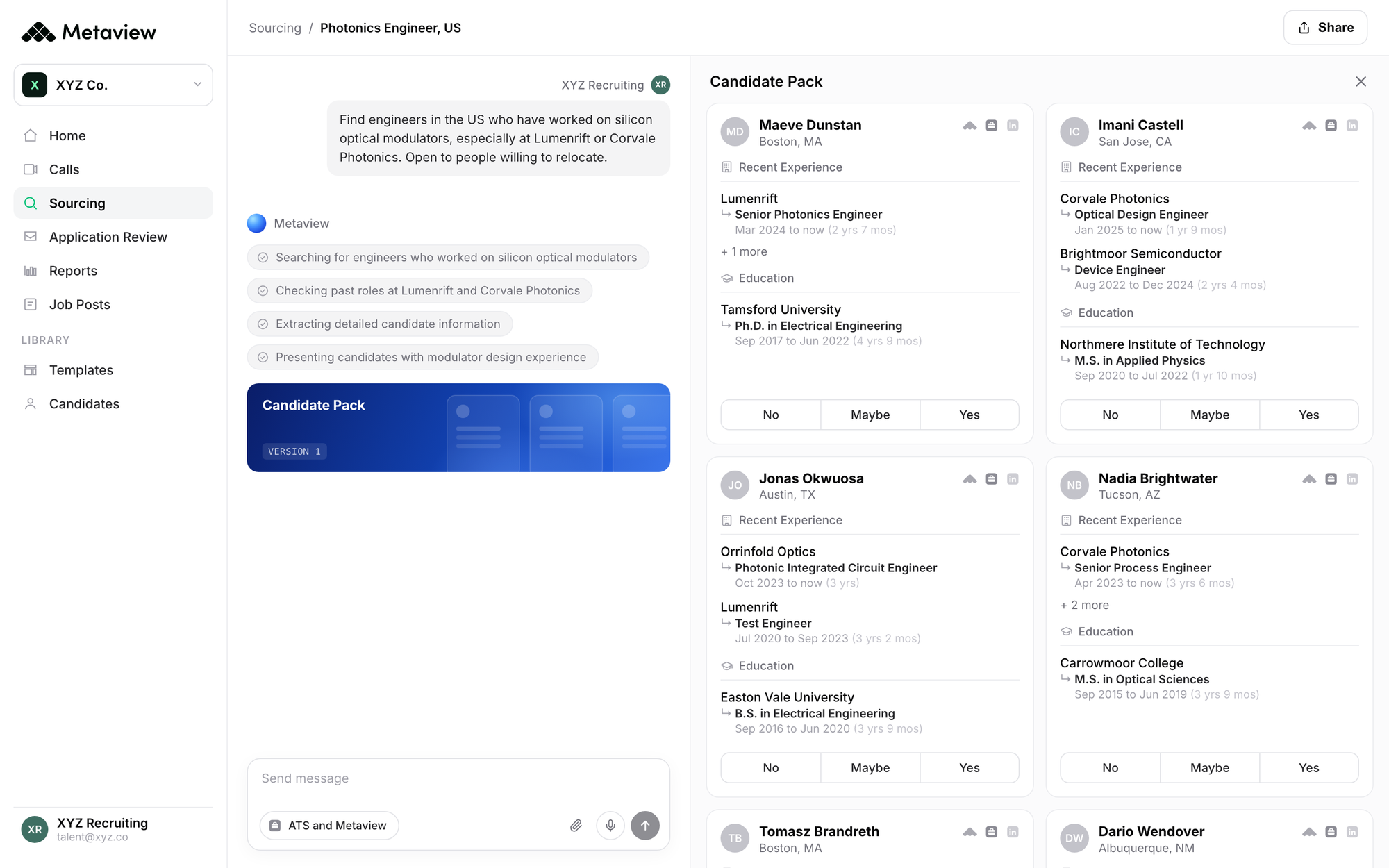
The brief can also come straight from the hiring manager, because AI Sourcing can start from an intake call recorded with Metaview. Metaview’s Notetaker captures every spoken word of that call. So the search begins from how the hiring manager described the role. Recording only happens if consent is given, and the consent process belongs to your team.
Starting from the hiring manager’s own words helps, because the people involved in one role can each have a different hire in mind. Siadhal Magos, Metaview’s co-founder and chief executive officer, wrote it this way when Metaview announced its Series B.
Ask ten people what makes a “great hire,” and you’ll get ten different answers.”

Lorenzo Casanova, Metaview’s own technical recruiter, starts a step before the brief. In this webinar on Metaview’s channel, he shows how he maps a talent market first, from the competitors in it to how dense the talent is. Then he starts a search built on that map.
Whether a team should keep writing strings at all is a separate question. Our comparison of AI sourcing and Boolean search takes it up.
Which Boolean search string to copy first, and what to change in it.
Your starting point depends on the seat you search from and the role you’re filling.
With a free LinkedIn account, I’d start from the site reliability or warehouse string. The two are among the shortest here, and each shows the habit worth copying: a title group wide enough for the names the job goes by.
With a Recruiter seat, start from the string for your role family, and move any title with a small word such as “of” into “Job titles.”
If the role has been open before, search Greenhouse or your own ATS first, the way the data engineer string does, because past applicants are already there.
For an executive search, build the longlist with the string and expect to do the real filtering by reading profiles and talking to people.
Whichever of the 15 you start from, rewrite its brief first, in your own words. Then edit the string, starting with the title group. Read the entry’s misses last, because those are the people the string will never put in front of you.
Bring the brief behind your next search string.
Book a demo to see AI Sourcing work from a plain-language brief and show the reasoning for each candidate.
Frequently asked.
How many terms should go in one OR group?
Include every term the people you’d hire use for the same title or tool. To find those terms, read three or four of their profiles and copy the words they used. A word that means two things, such as PT or Spring, brings back the wrong people. Pair it with a second word, or leave it out.
Should I use NOT in a recruiting search?
Use it rarely, and only for a word you’d never want on a candidate’s profile. A NOT term removes every profile that carries the word, including people who mention it in passing. A NOT on interns, for example, also removes an engineer whose profile says they mentored interns. Before you add one, swap the NOT for AND and run the string. The people who come back are the ones the NOT would remove.
How often should I rewrite a saved string?
Rewrite it each time the brief changes, and each time a hiring manager turns down profiles for a reason the string didn’t cover. Save the brief line beside the string, so whoever reuses it next can see which role it was written for.
Why does my string return no one?
Check the punctuation first. Every quotation mark and every parenthesis needs its partner, and every operator needs capitals. Then run each AND group on its own. If a group returns no one on its own, widen that group. If every group returns people on its own, the combination is too narrow for this market. Then drop the AND group the brief can most easily live without.
