
A stage report shows where candidates fall out of your hiring process and never why. A conversion rate can hold steady while the same leak runs every month, in the days a candidate waits on a decision or in the interview where a hiring manager asks what the recruiter already asked.
For candidate journey optimization, I’d map the journey by hand-off instead, and give each move from one person to the next a single owner and a limit on how long the candidate waits there.
The rest of this guide sets out the four hand-offs I’d map first, then the checks that show which one is losing candidates.
Why a healthy stage report can still lose candidates.
Each move from one stage to the next is also a move from one person to another. The recruiter who ran the screen passes the candidate to a hiring manager, and later the panel passes its write-ups to whoever runs the debrief.
Two things go wrong at a hand-off, and the conversion rate counts the candidates you lose without saying which one it was. The candidate waits, because each person on either side assumes the other has the next step. Or the next person starts cold, and the candidate answers the same questions again for someone who could have read the answers.
When candidates start turning down offers, the convenient reading is that the offer is the problem, so the team benchmarks pay and rewrites the offer letter. I’d look at the hand-offs leading up to the offer first. A candidate who waited a week for the debrief, or who told the recruiter what they were weighing and then heard none of it in the offer, may have decided before the offer arrived.
The four hand-offs to map first.
These four run from the application to the offer. For each one, the table names what has to reach the next person and what the candidate sees when it doesn’t.
| Hand-off | What has to reach the next person | What the candidate sees when it doesn’t |
|---|---|---|
| Application to first conversation | Why this applicant stood out from the rest of the pile | A screen that re-asks what the application already said, or a reply that takes a week |
| Recruiter screen to hiring manager | Why the candidate is moving, and what they expect to be paid | The same questions again in the next interview |
| Interview loop to debrief | Every interviewer’s written evidence, in before the room meets | Silence while the decision waits on a missing write-up |
| Decision to offer | What the candidate said they were weighing, from pay to start date | An offer that answers questions they never asked |
Each hand-off needs one named owner. I’d make the hiring manager the owner of the debrief and the recruiter the owner of the other three, because the recruiter is the one person who meets the candidate at every hand-off.
The journey runs past the signed offer to the first day, with one more hand-off, from the recruiter to the new hire’s manager. I’d add it to the map once the first four have owners, and pass on what the candidate wanted from the role, in their own words.
How to map the hand-offs for a role you hire often.
A first map needs one role and a handful of recent candidates, and the steps below run in the order you’ll do them.
- Pick a role you hire for again and again. A repeat role gives you enough recent candidates to compare, and the map you draw gets used again the next time the role opens.
- Walk five recent candidates through it. From your applicant tracking system, pull the date each candidate entered every stage and the date the next interview or message happened. A stage where candidates sat for more than a few days with nothing booked is your first suspect.
- Write down what has to cross each hand-off. For each stage where a candidate sat, note what the next person needed to know and whether it reached them. If the recruiter left the screen without what the hiring manager wanted to hear, the gap starts at the intake meeting. This recruiter intake meeting template sets out the questions to agree there.
- Write the owner’s name against each hand-off. With two names on one, each person can assume the other sent the update.
- Set the longest wait you’ll accept at each one. Write it beside the owner’s name, so the person who owns the hand-off also owns the clock.
I’d skip candidate personas on the first pass. A persona describes who the candidate is, and the losses on this map come from what never gets passed along.
Where Metaview fits in candidate journey optimization.
Of the two things that go wrong at a hand-off, the cold start is the one about notes reaching the next person, and that’s the part Metaview takes on. The wait, and every call along the way, stays with your recruiters and hiring managers.
Start the first conversation from Application Review.
Application Review sorts every applicant into a fit bucket against the ideal candidate profile (ICP) set for the role and writes its reasoning beside each one. The recruiter opens the first conversation knowing the reasoning behind this applicant’s bucket, and makes every progress or reject call.
Carry the screen to the hiring manager with the Notetaker.
Metaview’s Notetaker comes into each interview as a visible participant, records it, and turns the transcript into structured notes. Because it captures every spoken word of the screen, the hiring manager gets the candidate’s own words on pay and motivation to read before the next interview, instead of asking again.
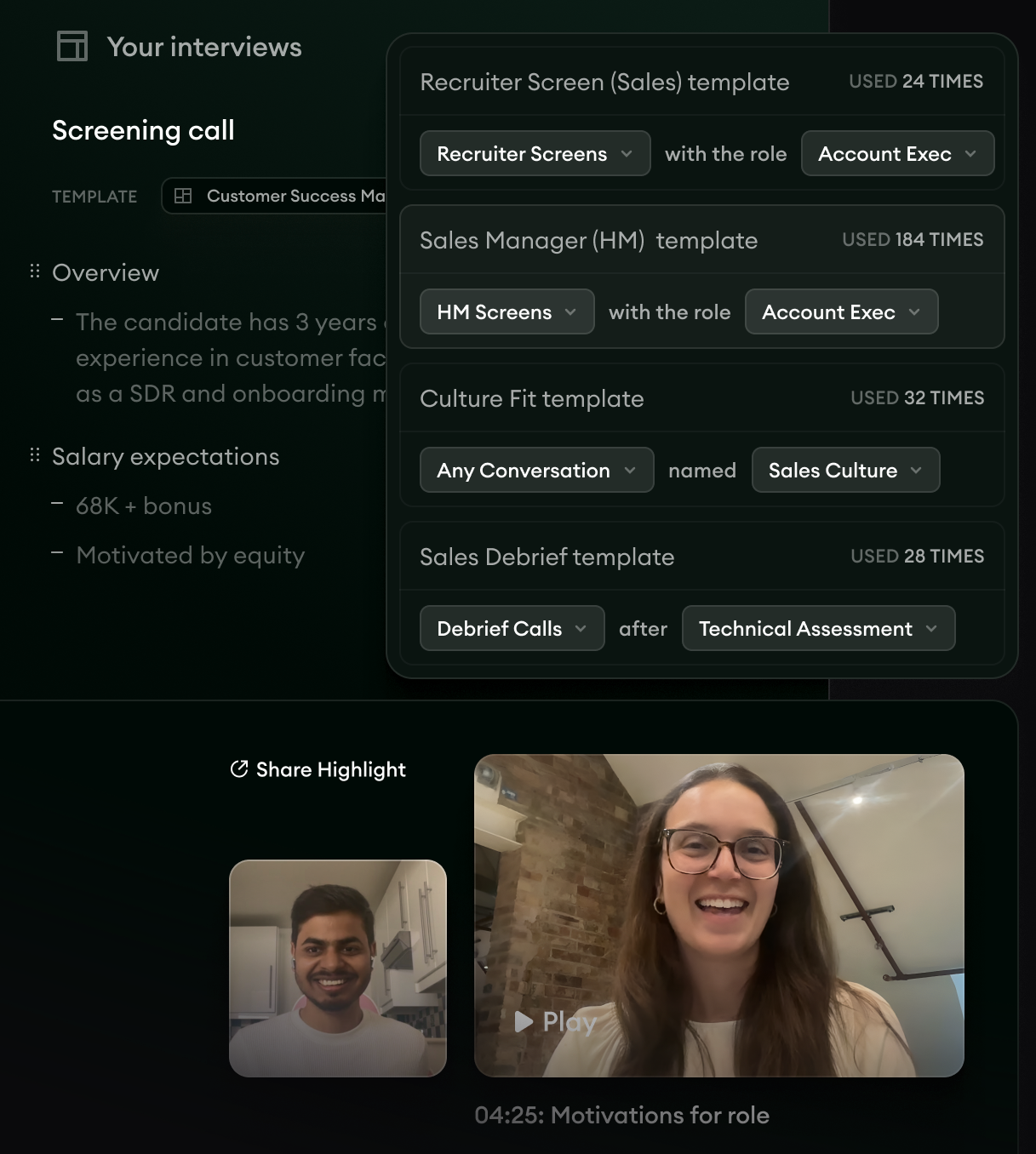
- 1Each template is matched to a kind of conversation and a role, here recruiter screens for an account executive.
- 2The debrief gets a template of its own, for debriefs held after a technical assessment.
- 3Notes from a screening call, with what the candidate expects to be paid under a “Salary expectations” heading.
Each kind of conversation can take its own notes template, so you can shape the notes from the recruiter screen for the hiring manager who reads them next.
The Notetaker also records the intake meeting, where it captures the key details of what the hiring manager needs from the role, and the debrief, where it summarizes the key details discussed. The recruiter can then advise in both rooms instead of transcribing them.
This short clip from Metaview introduces those intake and debrief notes.
I’d watch the debrief closest of the two, because it’s the only hand-off where every interviewer has to deliver at once.
an efficient, well-run interview process is nothing without a world-class debrief meeting to close it out.”

See which stage covers which competency in Reports.
Metaview Reports counts the questions asked about each competency in the interviews your team has captured, and shows that coverage across interviewers and roles. In the table below, each row is one interview, labeled with the candidate’s name and the interview’s stage, and each column is one competency.
Filter it to one role’s recent loops and read down a column. A competency every stage spends questions on is worth checking for repeats, and one that no stage covers leaves the debrief arguing over a gap.
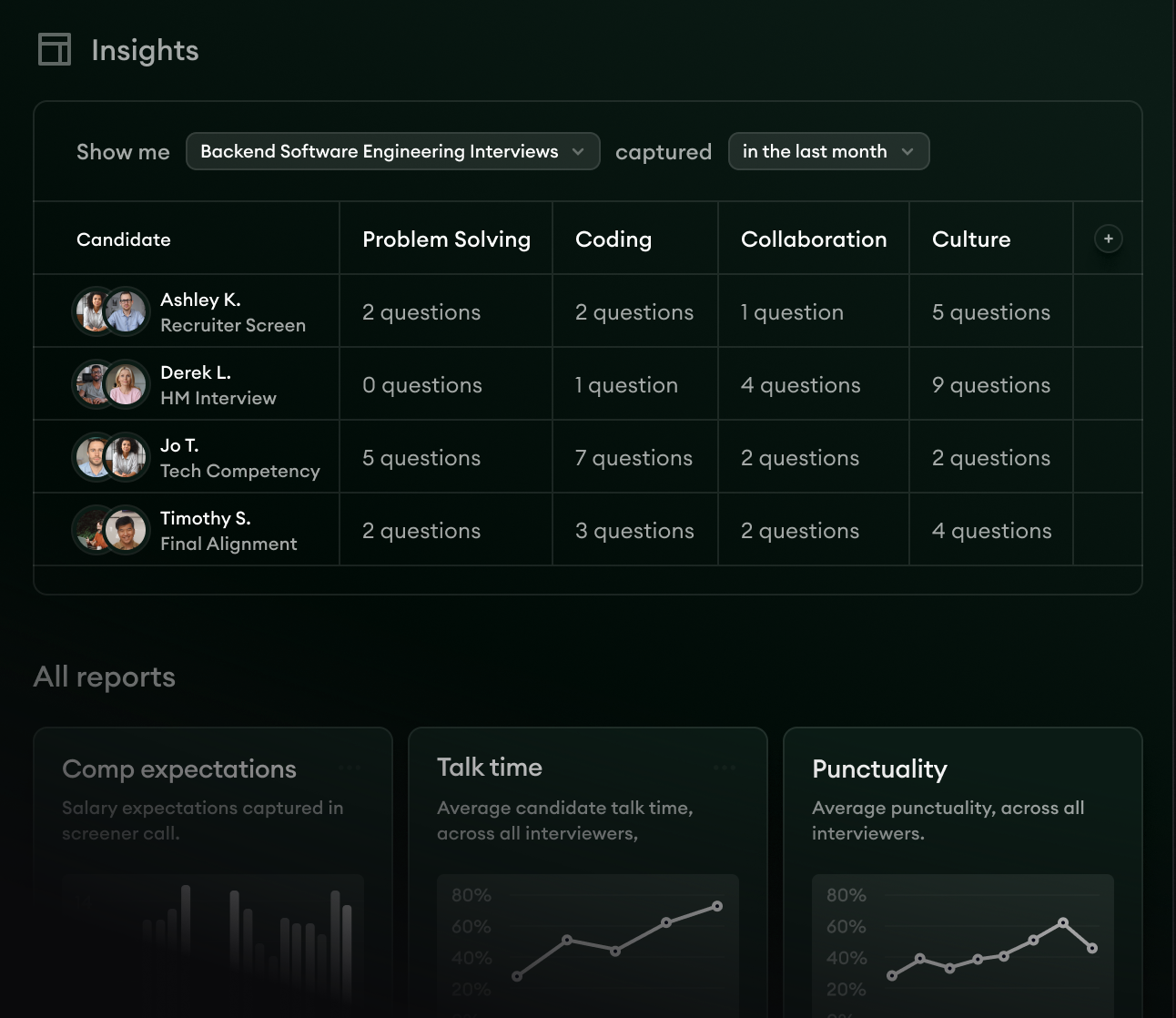
- 1The filter picks which captured interviews the table counts.
- 2Under each candidate’s name sits the stage of the loop the interview came from.
- 3Each column counts the questions asked about one competency in that interview.
How to find the hand-off that loses candidates.
Run these checks every month on the role you mapped, and when a check comes back badly, make the fix written beside it.
- Count the days your last five candidates sat between the recruiter screen and a booked hiring manager interview. If it runs past a few days, give that hand-off an owner who books the next interview before the screen ends.
- Read the screen notes and the next interview’s notes side by side for three candidates. If the hiring manager covered the same ground, write down what the recruiter should hand over from the screen, and send it ahead of the next interview.
- Count the debriefs that opened with a write-up still missing. Each one left a candidate waiting on a decision, so book the write-up time when you book the interview.
- Measure the days from the last interview to the message the candidate receives. If this is the longest wait on the map, give the decision message its own owner and a date the candidate hears by.
- Read back the screen notes for every declined offer. If the offer never touched the priorities the candidate gave the recruiter, have the recruiter read those notes to whoever drafts the next offer.
Next quarter, I’d track one number per hand-off: the longest wait, by role. The hand-off holding that wait is where I’d look first for the candidates you’re losing. Fix it with one owner and a written list of what the next person needs, and leave the stages on either side alone while you do.
Fix the hand-off from recruiter screen to hiring manager.
The Notetaker records each screen and turns it into structured notes for the hiring manager, and Metaview Reports shows which competencies each stage covered.
Frequently asked.
What’s the difference between the candidate journey and candidate experience?
The candidate journey is the route a candidate takes through your hiring process, including every hand-off between the people running it. Candidate experience is how that route feels from the candidate’s side. I’d fix the route first, because a wait no one owns feels the same however warm the emails around it are. For the experience side, ten ways to improve candidate experience covers how to personalize it at scale.
How is a candidate journey map different from a recruitment funnel?
A recruitment funnel counts how many candidates reach each stage. A journey map follows each candidate between those stages, through the waits and the hand-offs. Keep both, because the funnel shows where the numbers fall and the map shows which hand-off to look at.
Who should own the candidate journey map?
Recruiting, with one person accountable for keeping it current. Hiring managers own the hand-offs that are theirs, usually the debrief, and their names go on the map beside those rows so the ownership is written down.
Should the map include rejected candidates?
Yes. A rejected candidate passes through the same hand-offs, and the last one, from the decision to the message they receive, is easy to leave unowned once the team has moved on to the next candidate. Give it an owner and a wait limit like the rest.
How often should you redraw the map?
Check the waits every month, and redraw the map when the loop itself changes, such as a new interview stage or a new hiring manager on the role. A map that still shows last year’s loop sends you looking for waits in places the candidate no longer passes through.
