
Almost every recruiting tool now says it automates something, so the label won’t tell you what changes for your team.
A more useful way to sort these tools is by how much of a hiring step they take over. Some remove a task inside a step your recruiter still runs, like sending the interview invite or writing up the notes. Others run a whole step once you’ve set it up, like reading every application that comes in, and hand your recruiter a decision at the end. Even then, the judgment stays with people: of the candidates recruiters rated yes or no after a search by Metaview’s sourcing agent, 41.5% got a yes and the rest got a no.¹
Which parts of hiring should move from people to artificial intelligence (AI) agents is a separate argument, so this list stays practical. For each tool you get what its maker says the product automates and what its maker says stays with your team, quoted from the maker’s own website or help center as captured on September 16, 2026. Metaview makes the first tool on the list, so it comes first. The other eight are among the tools named most often in 2026 recruitment automation roundups, picked so the list covers:
- The applicant tracking system (ATS)
- Sourcing
- Scheduling
- High-volume screening
They follow Metaview in alphabetical order, so the order isn’t a ranking.
Most of these makers say a person keeps the final decision, so that line won’t separate them. The settings that act on a candidate before anyone clicks will. I’d read a maker’s settings documentation before its feature list, and each rival’s entry below ends on the thing I’d test first.
All 9 tools at a glance.
The competitor rows quote each maker’s own website or help center, captured on September 16, 2026.
| Tool | What runs automatically | What stays with your team |
|---|---|---|
| Metaview | Application Review reads every application. The sourcing agent searches the web and your ATS. Screening conducts screening conversations, and Outreach sends sequences with automatic follow-up. | The profile and screening plan, plus who to contact and who progresses |
| Ashby | “automating the initial resume screening process” | “a human must always be involved in decision-making” |
| Gem | “scores every applicant against your job criteria and ranks them automatically” | “Recruiters set the criteria, review every result, and make every call.” |
| GoodTime | “handling coordination end-to-end” | “you can step in, adjust, or override at any time” |
| Greenhouse | “Voice AI runs a first two-way voice interview on the candidate’s schedule.” | “Your team decides who moves forward.” |
| Juicebox | “monitor the market and surface new, relevant candidates as they appear” | “a sequence that has been created and reviewed by you” |
| Lever | “Candidates are evaluated automatically upon application.” | “so you can make the right call with confidence” |
| Paradox | Interview scheduling, “an AI-powered scheduling tool that automates every step of the interview process” | “define when to hand off to a human” |
| Workable | “runs the top of your hiring funnel” | “Recruiters still own the relationship and the final call.” |
Task automation and stage automation.
With task automation, a rule moves a candidate when a form comes in, or an invite goes out once someone picks a time slot. Your recruiter still runs the step, with less clicking, and plenty of hiring problems need nothing more.
Stage automation starts from a setup your team approves, such as a candidate profile or a screening plan. After that, the tool works through every candidate in the step without anyone operating each action, and the output lands back with a person. Usually that output is a decision about who moves forward.
If only part of a stage is slowing you down, automating that part may be enough, and deciding what to screen for first usually shows which part that is. So for every tool below, look at two things: which step it runs, and what it hands back to your team.
Metaview.
Metaview describes itself as “the Agentic Recruiting Platform built for radically efficient hiring, end to end.” Its agents each handle the work inside a different hiring step, and the interview Notetaker removes a task inside the interview itself.
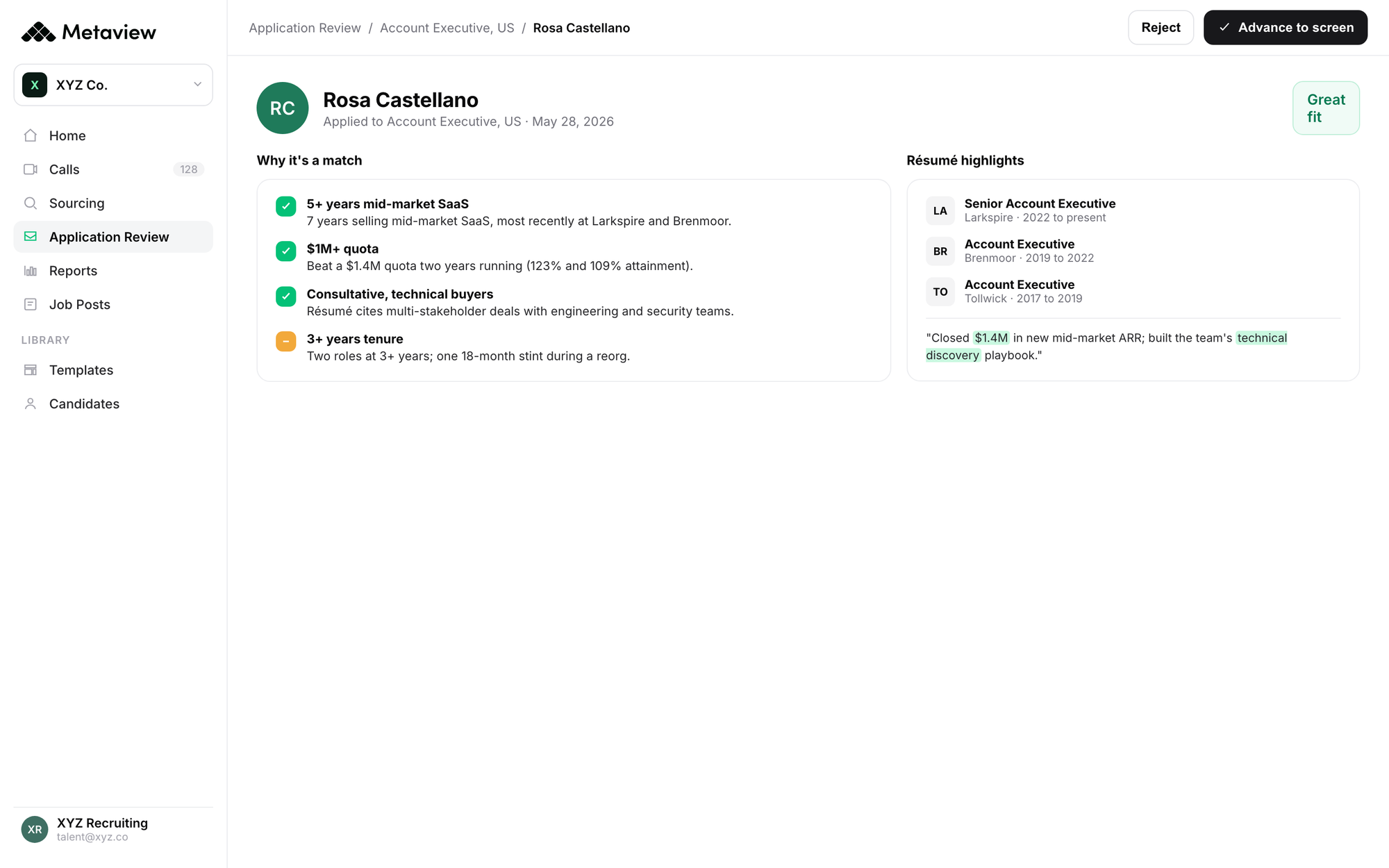
The first read of applications. Application Review reads every application against the role’s Ideal Candidate Profile and sorts candidates by fit, with the reasoning behind each call. It drafts that profile from your job description and any context you add, and your team reviews and approves it before any evaluation runs. New applications from your ATS are evaluated as they arrive, and the list re-evaluates whenever you update the profile. Metaview says that once the profile is generated, “every applicant is evaluated in roughly 1 second.”
What stays with your team: approving the profile and making every progress or reject decision. Metaview’s help center puts it plainly: “Nothing happens automatically. Application Review does not progress or reject candidates.”
Among applications with a recorded decision, recruiters advanced those Application Review rated a great fit at about three times the rate of those it rated a poor fit, 17.2% against 5.6%.² The rating tracks the decision, and the recruiter still makes it.
The sourcing search. The sourcing agent searches the web and your connected ATS from one plain-language prompt, and it can also draw on your organization’s past Metaview conversations. Each candidate comes back with the reasoning for why they surfaced. A search can start from an intake call recorded with Metaview, so the agent begins working from the conversation you just had. Where a search started that way, the median time from the end of the call to the first shortlist was 17.6 minutes.³
What stays with your team: the agent surfaces and explains candidates, and it doesn’t contact or assess them on its own. Your recruiters rate what comes back and decide who to reach out to.
The first screening conversation. With Screening, an AI agent holds a two-way screening conversation with the candidates your team chooses to assess. It works through the questions in your assessment plan and probes where it needs to. Afterward, it evaluates the answers against your rubrics. Your team gets an assessed-fit rating with an explanation grounded in the call, plus the notes and transcript. The call can be linked to a stage in your ATS, and candidates join on desktop or mobile with no login.
What stays with your team: customizing the rubrics in the assessment plan Metaview generates and picking who to screen. A person makes the progress or reject decision on each result, and Metaview then syncs that decision to your ATS with a summary of the call.
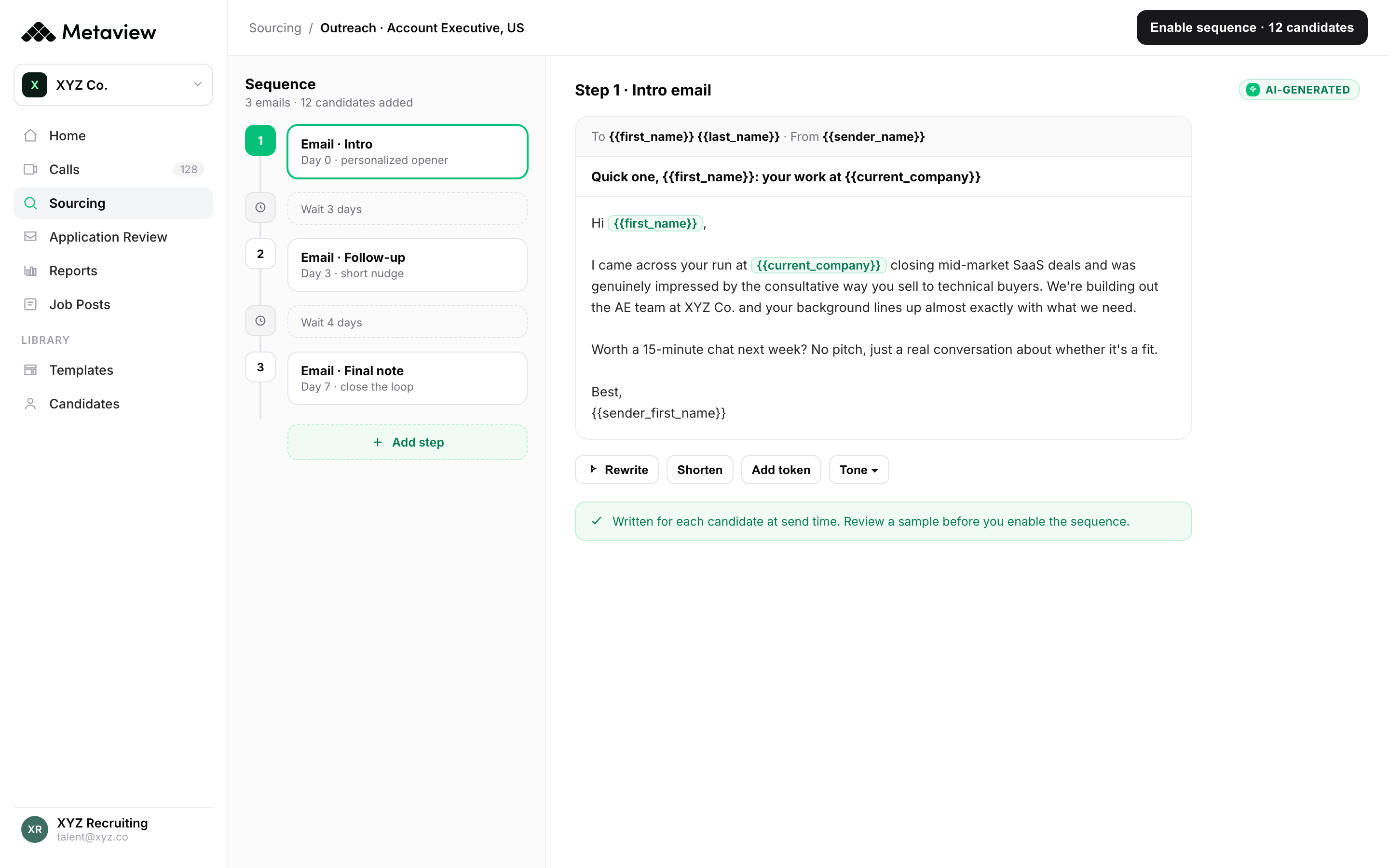
The outreach sequence. Outreach builds and schedules automated email sequences with AI personalization for each candidate and automatic follow-up, and candidates can go into a sequence straight from a sourcing search.
What stays with your team: choosing who goes into a sequence, and creating and reviewing the sequence itself.
The interview write-up. The Notetaker joins interviews as a visible participant and records and transcribes the conversation. It captures every spoken word, so the structured notes and the draft scorecard it produces start from what the candidate said. The interviewer still runs the interview, then reviews and submits the scorecard.
Jessica DeOliveira, Managing Director, Strategic Initiatives & Client Delivery at Raines International, described where her team’s time went before the firm brought in Metaview: “very manual tasks like notetaking, transcription, formatting, and updates.”
Metaview’s co-founder and chief technology officer draws the same line between a task and a whole workflow:
We’re at the point where AI is moving beyond helping people do their jobs faster to owning entire workflows”

My pick for: teams that want more than one hiring step handled in the same platform as their interview notes, with each decision about a candidate left to a person.
Ashby.
Ashby describes its product as “All-in-one recruiting software with AI embedded in every layer.”
What runs automatically: Ashby’s help center says its AI-assisted application review works “by automating the initial resume screening process directly within Ashby,” and that “Ashby’s AI assesses candidate resumes against each specific criterion and returns an evaluation status.” On scheduling, “The Auto Schedule feature automatically generates schedules based on your team’s calendars.”
What stays with your team: “As a guiding principle, AI is used to augment, and not replace human decision-making within Ashby.” For Ashby’s agents, “If any action is to be taken (for example, adding a candidate), you are asked to approve the action before it is taken.”
Worth testing: the evaluation status it returns for each criterion on a role you’ve already filled, so you can compare it with what your team decided.
Gem.
Gem calls itself “the AI-first recruiting platform built for better outcomes, not more tools.”
What runs automatically: for inbound applications, “Gem scores every applicant against your job criteria and ranks them automatically, so your best fits rise to the top before you open a single resume.” For interviews, “The candidate picks a time, Gem confirms the booking, adds it to all calendars, and sends automated reminders leading up to the interview.”
What stays with your team: “Gem AI does not make hiring decisions. Recruiters set the criteria, review every result, and make every call.”
Worth testing: the ranked list for a role you’ve already filled, set beside the candidates your team advanced.
GoodTime.
GoodTime says “Cori is GoodTime’s AI agent for hiring coordination.”
What runs automatically: GoodTime’s help center says “Cori works continuously to keep your hiring process moving, engaging with candidates, supporting your team, and handling coordination end-to-end.” It also says candidates can schedule and reschedule their own interviews, multi-day ones included, “without any human intervention.”
What stays with your team: “Every action is visible, and you can step in, adjust, or override at any time,” and “When decisions need input or something falls outside your defined workflows, Cori brings your team in.”
Worth testing: a multi-day interview loop with a reschedule partway through, and the point at which your coordinators get pulled back in.
Greenhouse.
A Greenhouse support article says “Greenhouse Recruiting uses AI to make your hiring process more efficient and effective so you can save time, make informed decisions, and spend more time with candidates.”
What runs automatically: “Voice AI runs a first two-way voice interview on the candidate’s schedule.” Greenhouse’s help center says the Voice AI integration lets you “automate invitations with stage transitions,” and its prospect response review “uses AI to scan incoming prospect emails and automatically mark prospects as interested based on their response.”
What stays with your team: “Your team decides who moves forward. Every score is overridable.” Greenhouse also puts it as “AI does the heavy lifting, people make the call.”
Worth testing: the questions and scoring criteria your team would give Voice AI, and which stage transition should send the invitation.
Juicebox.
Juicebox describes its agents as “your 24/7 sourcing partner, built to take manual sourcing off your plate and instantly scale your recruiting team’s capacity.”
What runs automatically: “Instead of running the same search manually every day, Agents work in the background to monitor the market and surface new, relevant candidates as they appear.” Juicebox says you can choose: “Run Agents fully hands-off, or set manual checkpoints at shortlist or sequencing.”
What stays with your team: “Agents will only contact candidates using a sequence that has been created and reviewed by you.” In its setup guide, Juicebox suggests recruiters “Own the strategy and decision making for each role.”
Worth testing: where you set the manual checkpoints, decided before the first sequence goes live.
Lever.
Lever’s homepage calls it an ATS “that helps companies attract, nurture, and hire top talent faster.”
What runs automatically: Lever’s automation workflows are built for “automating repetitive work performed by recruiters in Lever,” and its help center says a rule’s action can be that “The opportunity will be moved to either the next stage in the pipeline or a specified stage.” With its Talent Fit feature, “Candidates are evaluated automatically upon application,” and Lever says Talent Fit provides “a binary decision on whether the candidate is a suitable fit, along with an explanation that includes the candidate’s strengths, key considerations, and areas for clarification.”
What stays with your team: “Every AI-powered recommendation comes with context, so you can make the right call with confidence.”
Worth testing: the automation workflow rules for one role, including what happens to a candidate when a rule archives them.
Paradox.
Paradox introduces itself with “Meet the AI assistant for all things hiring.”
What runs automatically: “Paradox interview scheduling is an AI-powered scheduling tool that automates every step of the interview process.” For screening, “Olivia gives you hours back by initially screening for role requirements and fast-tracking qualified candidates to the next step.”
What stays with your team: for its Candidate Experience Agent, Paradox says “Recruiters decide what the agent can say and do, set the tone and workflows, and define when to hand off to a human.” Paradox’s help center adds a setup tip, saying it often recommends “setting this criteria to a candidate review status so candidates are not mistakenly moved to a qualified or disqualified status.”
Worth testing: the screening questions for one high-volume role, and which status each possible answer sends a candidate to.
Workable.
Workable describes itself as agentic software for recruiting and human resources.
What runs automatically: “The agent searches the talent market, evaluates profiles against your job needs, sends personalized outreach, follows up to gather missing details, and advances candidates through your pipeline.”
What stays with your team: “Recruiters still own the relationship and the final call.” Workable’s help center says “Any manual user activity on a candidate immediately stops the Agent from taking further action,” and “The candidate will be disqualified only if this action is enabled in the Agent actions settings.”
Worth testing: the “Agent actions” settings, including whether automatic advancing and disqualifying are switched on for your account.
How to choose.
Start with the step that eats the most recruiter time this quarter, and pick the tool that takes over that step before you add anything else.
- Inbound volume is the problem. Look at tools that read every application against criteria you approve and explain each result. Then decide where a screening conversation fits after that first read.
- You can’t find enough people. Look at sourcing agents that run a search from a role description, and treat outreach as a separate decision.
- Coordination is the problem. Task automation inside your ATS or a scheduling tool may be all you need, and Metaview’s earlier roundup of recruiting automation tools covers several of them.
- Interviews take the time. A notetaker that writes up the conversation and drafts the scorecard removes the task without changing who runs the interview.
On an episode of Metaview’s 10x Recruiting podcast about 2026 predictions, one host predicts that most sourcing will be automated and that automating outreach will go badly, because finding someone and getting them on a call are different jobs. That’s why the outreach settings are the ones I’d check first.
Whatever you buy, write down two things before the trial starts: what the tool hands back to your team at the end of its step, and which of its settings act on a candidate before anyone clicks. The second list is the one that tells these tools apart.
Bring Metaview into your hiring stack.
Live notes, structured scorecards, and ATS sync, with every hiring decision left to your team.
Frequently asked.
Is recruitment automation the same as an AI agent?
Makers use both words loosely. A practical test is whether the tool works through every candidate in a step once your team has set it up, or waits for a person to start each action, and the settings page usually answers that faster than the product name.
Can recruitment automation reject candidates without a person?
Some can, where a maker offers the setting and your team switches it on, and the responsibility stays with the employer either way. Workable’s help center says employers remain responsible for reviewing candidates and for making sure their hiring complies with employment and anti-discrimination law, and Lever’s says customers are responsible for telling candidates that AI is evaluating their applications.
What should I ask in a recruitment automation demo?
Ask how the automation is billed and what one live role would cost to run. Workable’s help center, for one, says its agents run on AI credits and that the credits an action uses can vary.
How does recruitment automation work with an ATS?
Ask each maker how candidates get into the tool and how decisions get back to your ATS. Metaview runs as a separate platform: candidates sync from your ATS into Metaview, and for some ATSs your progress and reject decisions sync back. Check the integration list for your ATS before you buy.
How should I trial a recruitment automation tool?
Run one open role through it and compare what comes back with how your team would have handled the same step. Read the reasoning it gives for candidates you would pass on, as well as for the ones you would advance.
Sources.
¹ Aggregated and anonymized Metaview AI Sourcing data: recruiter ratings of 1,228,405 candidates the sourcing agent surfaced, maybe ratings included. The share counts yes against yes plus no.
² Application Review data, aggregated and anonymized in the same way: the share of applications recruiters advanced, among applications with a recorded decision, by the fit Application Review gave them.
³ Timing from the same AI Sourcing data: the median time from the end of an intake call to the first shortlist, for searches started from a call recorded with Metaview.
