Recruiters used to scroll for the right candidate. Now they query.

Metaview AI Filters is the natural-language query layer over the interview data you’ve already captured. Type a plain-English query, get back the candidates who actually match against the structured signal from their interviews, not against the keywords in their resume. The shortlist arrives in seconds, scoped to your reqs, your panels, your data.

The shift this launch makes is the one customers have been asking for since Notetaker rolled out: turn the captured interview corpus into something you can ask questions of. The intake and debrief layers shipped earlier this year made the capture continuous. AI Filters is the surface that lets a recruiter actually use what’s captured, in the workflow, the moment they need it.

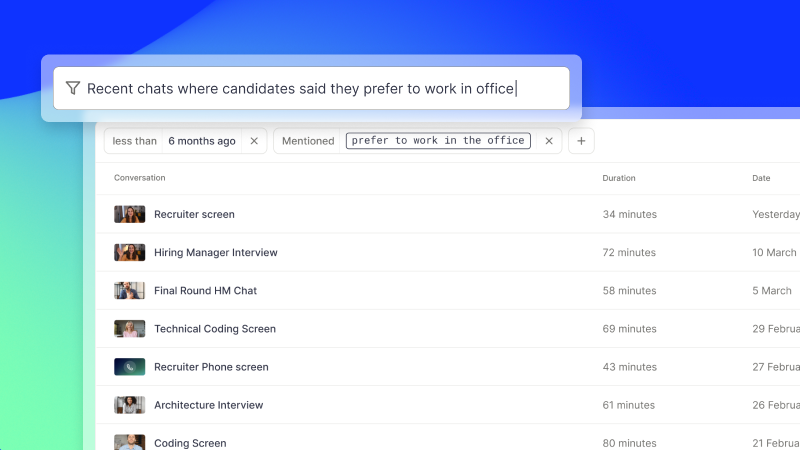
Metaview Sourcing: AI Filters parsing a natural-language brief into structured candidate filters
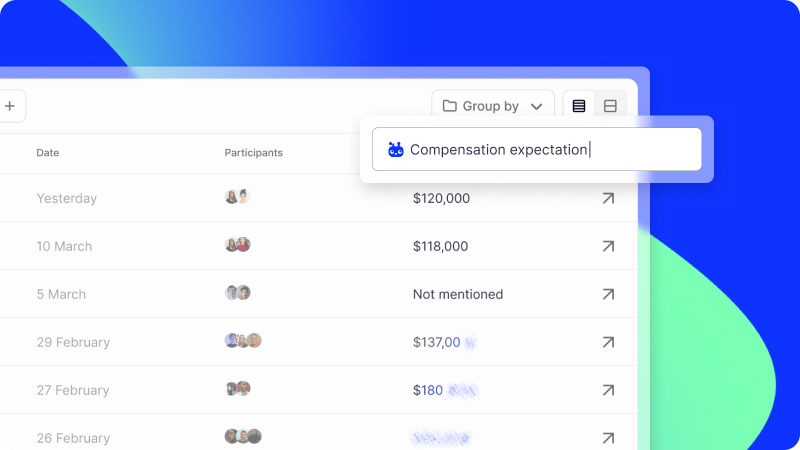
AI Filters: type a plain-English query and get the candidates the panel actually flagged on a competency, with the source quote attached.
67%
of teams lose qualified candidates monthly (2026 Alignment Report)
10 hrs
saved per recruiter per week on documentation
10 min
to a finished debrief at Quora, down from 2 days
All of our hiring team said that Metaview saves them hours. The feedback was awesome really quickly. We’re now getting feedback from hiring managers in 10 to 20 minutes, which is just ideal for a recruiting team that works with time-to-hire targets.”
/MV Hannah Wardle Global Head of Recruiting · Quora

What we shipped

AI Filters is a natural-language query layer that runs on top of Metaview’s interview-data context layer. Three things make it work:

  • Every panel you’ve captured is structured into per-competency signal, with speaker attribution and quote-level granularity
  • The query layer reads the structured signal, not just the raw transcript, so the result is the candidates the panel actually flagged on a competency, not just the candidates whose transcripts contain a keyword
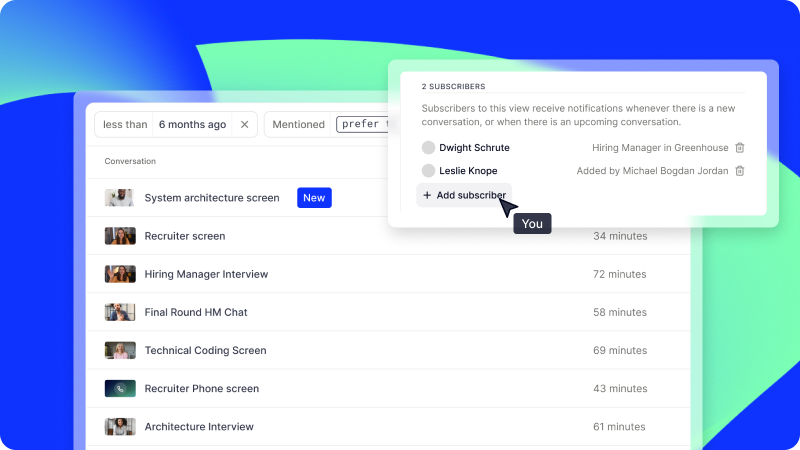
  • The query is scoped to the recruiter’s permissions in the platform, so the answer respects the same role-based access that protects the rest of the data layer

In practice, a recruiter types a question into the same workflow they were already in. The result lands inside seconds, mapped against the role’s must-haves and the panel’s per-competency notes.

A few of the queries customers are running on day one:

  • “Show me candidates from the last six weeks who talked about distributed-systems trade-offs in their architecture round.”
  • “Where in Candidate A’s panel did the team flag the seniority concern?”
  • “Which finalists in the senior PM search mentioned willingness to flex on salary?”

The queries are natural language, not a query builder. The recruiter doesn’t have to know the schema.

The use-cases recruiters are running this on

Mid-search, when the must-have keeps moving

The hiring manager said “experience with multi-region deployments is non-negotiable” in the intake. Three weeks in they’ve quietly softened to “well, distributed systems instinct is fine.” Both versions are real. Both got captured.

With AI Filters running, the recruiter can ask the data which candidates from the last six weeks talked about either signal, and the answer comes back with the per-panel quotes attached. The screening sort updates to match the new calibration, without the recruiter having to retype the brief.

In the debrief, when the panel is mid-decision

Five panelists, one finalist, two threads of disagreement on whether the systems-design round went well. With AI Filters running, anyone in the room can pull the moment from the transcript: “Show me where Candidate B talked about the cache-invalidation problem.” The debrief moves from recollection to evidence in the room, while the room is still there.

Metaview Candidate Pack: the interview, resume, and job description combined into one set of notes
Multi-Source Summaries pulls the per-candidate signal across every round into one view, so a covering recruiter inherits the calibration without reading four weeks of notes.

The lead recruiter goes on PTO with three reqs in flight. The covering recruiter inherits the searches mid-panel. AI Filters means the covering recruiter doesn’t have to read four weeks of notes to get up to speed. The query layer surfaces the calibration commitments, the panel disagreements, and the candidate quotes that mattered, on demand.

How AI Filters compares with the generic alternatives

The recruiter category is full of search tools. The thing AI Filters does that none of them do is run the search against structured interview signal, not against keywords in a transcript.

Capability Legacy ATS keyword search Generic transcript search Metaview AI Filters
Searches across Resume fields Raw transcript text Structured per-competency signal with speaker attribution
Result granularity Candidate record Transcript snippet The exact moment, the per-competency note, and the panelist who flagged it
Scope One req One transcript at a time Across every panel the recruiter has access to
Respects permissions ATS role model Limited Role-based access from Metaview’s SOC 2 Type II control framework
Want this set up on your interviews?
Connect Metaview to your ATS in under 10 minutes.
See it live

The category-level point: generic AI search returns text. AI Filters returns the panel’s actual conclusion, with the quote that supports it.

How this fits with the rest of the platform

AI Filters is the third surface that runs on the same context layer behind Notetaker and intake-and-debrief notes. Each agent reads from and writes to the same data, which means the calibration committed in the intake survives into the screening sort, the panel kit, the debrief artifact, and now the query layer.

Metaview captures every spoken word in your interviews, and AI Filters is what turns that capture into a queryable layer the recruiter can use the same way an analyst uses a dashboard. Without the capture, no query. Without the query, the capture sits unused.

How to turn it on

Existing customers: AI Filters is on by default. To run your first query, open any search or candidate view and use the query input at the top. The first query a team usually runs is “show me the candidates this panel flagged on culture fit in the last 30 days.” That’s a useful proof-of-concept, and it returns in seconds.

Metaview Settings: the Integrations grid with connected ATS, video, calendar, Slack, and SSO providers
AI Filters runs inside Metaview's role-based access framework. The Integrations panel shows the connected systems the query layer reads from.

New customers: book a 15-minute walkthrough. We’ll run AI Filters on a sample interview corpus from your team and show you the structured output before the call ends.

Frequently asked

What queries does AI Filters handle best?

Queries that involve per-competency signal, speaker attribution, or cross-candidate comparison inside a search. “Which finalists mentioned willingness to relocate?” is a strong query. “Find me the resume from last Thursday” is the wrong layer; that’s an ATS search.

Does AI Filters search across every interview ever captured?

It searches across every interview the recruiter has permission to access. The role-based access model from the rest of the platform applies. A recruiter can query across their reqs, their panels, and their candidate corpus. They cannot query across reqs they aren’t on.

Is there a query budget or a rate limit?

Queries are unmetered for existing customers under the Notetaker tier. No per-query pricing; no usage caps in normal recruiter workflow.

How is this different from searching the raw transcript?

The raw transcript is text. AI Filters runs against the structured signal, which means it knows which competency the panel was assessing, which speaker said what, and how the panel scored. The result is the answer the panel converged on, not just the keyword match.

Can recruiters save queries?

Yes. Saved queries persist per recruiter and per req. The most common pattern is one saved query per active search, which becomes the recruiter’s working sort across the candidate corpus.

AI Filters closes the loop the intake and debrief launch opened: the calibration committed in the intake is now queryable across the search. The data layer that powers AI Filters also powers the MCP integration, which extends the same context layer to Claude and other AI tools. For the data behind the 67% statistic above, see the 2026 Alignment Report.

See it in action

Bring Metaview into your hiring stack.

Live notes, structured scorecards, and ATS sync - set up in under 10 minutes.