
A senior recruiter at a Series B company runs her seventh phone screen of the day. The candidate is mid-sentence about a database rewrite that broke production for a week, the kind of war story that lands a hire. She's looking at her keyboard. Hands flying.
By the time he finishes, she's typed the facts and missed the moment that mattered. The hiring manager opens her notes the next morning and finds a transcript. Accurate, complete, useless. He can't tell whether she thinks the candidate can do the job.
Her actual value, the read on signal, didn't make it onto the page. This is the failure mode every recruiter knows and few name out loud.
The screen forces you into transcription mode, and the synthesis you're paid for never happens. Here's the cognitive shift that fixes it, and the workflow that makes it stick.
Why recruiters get paid for synthesis, not transcription
Read the job description for any senior recruiter and the verbs that show up are "assess," "advise," "advocate," "calibrate." Not one of them is "transcribe."
The synthesis a recruiter does between the candidate's words and the hiring manager's decision is the entire reason the role exists. Everything else is overhead.
The screen, run the wrong way, inverts that. You spend forty-five minutes in transcription mode, end up with a wall of bullet points nobody reads in full, and the synthesis happens in a hurried debrief after the next call already started.
By then the voice is gone, the read is half-remembered, and the recommendation that lands on the hiring manager's desk is a paraphrase of a paraphrase.
So the work isn't the typing. The work isn't the typing. The work is the read, the judgment, and the recommendation you give the hiring team. Everything else is the friction stealing it.
The hidden cost of typing during interviews
The cost of transcription-mode interviewing doesn't show up as missed hires. It shows up as documentation hours that crowd out the read, and a recruiter-hiring-manager relationship that runs on opinions instead of evidence.
According to Metaview's 2026 AI Hiring Alignment Report, surveying 505 recruiting leaders and hiring managers across North America and EMEA, 41% say documentation on each interview takes more than 30 minutes.
Thirty minutes per interview, across a typical week of 12 to 20 screens, is a working day spent on writeup.
That working day is what gets cut when the calendar gets tight. The notes the hiring manager receives are the rough ones you typed in the call, plus a paragraph of justification you wrote in the last five minutes before the next conversation started.
The synthesis cost compounds through the loop. The HM reads thin notes, asks for verbal context in the debrief, the calibration drifts, the offer takes a round longer to converge.
The fix isn't more hours. It's reclaiming the ones already burned on the keyboard.
The 4-step synthesis-first playbook
This is the playbook a recruiter at her desk can run on the next screen. Four steps, in order. The first two are about the call. The second two are about what comes out of it.
Step 1: Pre-load the signals before the call
Open the role's scorecard rubric the morning of the screen. Pick the 3-4 signals you're trying to read in 45 minutes.
Skill depth, motivation, communication, and risk are the default four if the rubric is thin. The real four come from the calibration call with the hiring manager.
Write them on a sticky note. Not in a doc, not in your head, on a sticky note next to your monitor. The point is the constraint.
When you're in the call and the candidate goes off on an architecture tangent, the sticky note brings you back to whether the tangent maps to one of the four signals or is decoration.
This step is what makes the rest possible. Without the frame, every interesting thing the candidate says feels worth capturing, and you're back in transcription mode by the third question.
With the frame, the call has a shape. Decide the 4 signals first, then run the questions.
Step 2: Run the call hands-off
Capture is delegated to Notetaker. The recording starts when the meeting starts, the structured summary lands in your inbox before the next call, and the transcript is searchable in seconds.
Your hands and eyes stay on the candidate, not on the keyboard.
The consent line at the top of the call is one sentence: "I'm recording this conversation so I can focus on what you're saying instead of typing, okay with you?"
Almost every candidate says yes. The few who hesitate get a real-time alternative ("I'll take light notes by hand instead and capture the rest after"). The friction is the question, not the recording.
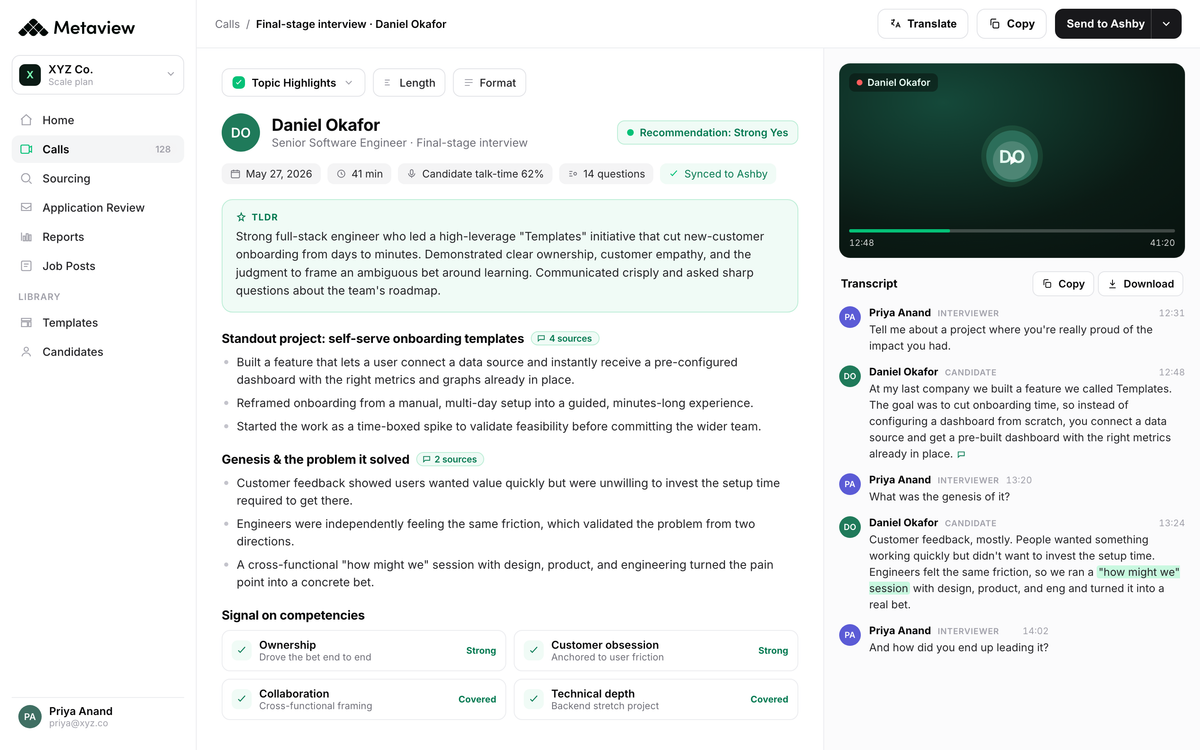
What's on the screen in the post-meeting view is what makes Step 4 work later. A structured summary on the right, organized by signal bucket. A searchable transcript on the left if you want to verify a specific exchange.
Your eyes stay up during the call. The keyboard sits.
Step 3: Score the signal in the call, not after
After every signal-bearing question, take a 15-second judgment beat before moving on. Not "what did he say." That's transcription.
The beat is "what did that tell me about Signal 2, and on a 1-3 scale where am I right now." The score lives in your head, not on the keyboard.
The reason this works: the human voice carries signal that a transcript flattens. Confidence, hedging, the specific verb the candidate picked, the question they bounced back.
You can't score that later. You score it while the voice is fresh, or you score it from text and miss the read.
Step 4: Curate, don't create, the recommendation
The screen ends. Notetaker's structured summary lands in your inbox a few minutes later, organized by topic and signal bucket. Open it.
For each of the 4 signals from Step 1, pull one evidence line from the summary that supports the score you gave in the call. That's it. One line per signal, four lines total.
Then write the recommendation. Three sentences. The first sentence is the call: advance, advance with concerns, or pass.
The second sentence is the strongest signal. The third sentence is the most important caveat or risk for the next interviewer to probe. Send it to the hiring manager and to the ATS where it syncs into the candidate's record automatically.
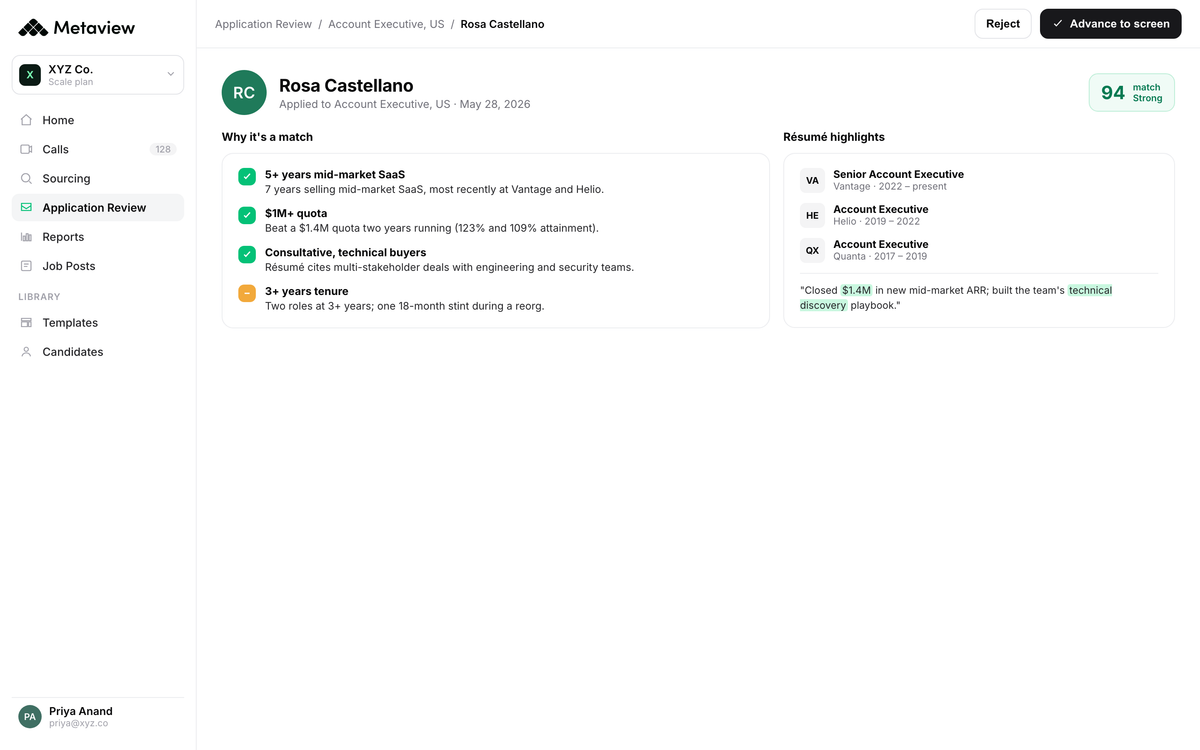
The total post-call time is 4 to 6 minutes. Not 30. The recommendation that lands on the hiring manager's desk is short, scoreable, and traceable back to evidence lines they can verify if they push back.
The recruiter curated the record, didn't create it.
What customers see when they switch
The payoff of running this playbook isn't a faster writeup. It's a different relationship with the hiring manager.
The recruiter who shows up with scoreable evidence becomes the recruiter who gets brought into calibration earlier, trusted on harder roles, and listened to in debriefs. The cognitive shift compounds outward.
Within 20 minutes of an intake call, I can present multiple candidate profiles to hiring managers on Slack and get immediate feedback. This isn't just about efficiency, it's about transforming the relationship between recruiters and hiring managers.”

The team-level view is where the loop closes. When every recruiter on the team runs this pattern, the structured signal compounds into a queryable record across roles, panels, and quarters.
Patterns surface that no individual debrief could catch. Which signal predicts offer acceptance. Which interviewer's read is most calibrated to the bar. Which candidate objection shows up in the loop you keep losing.
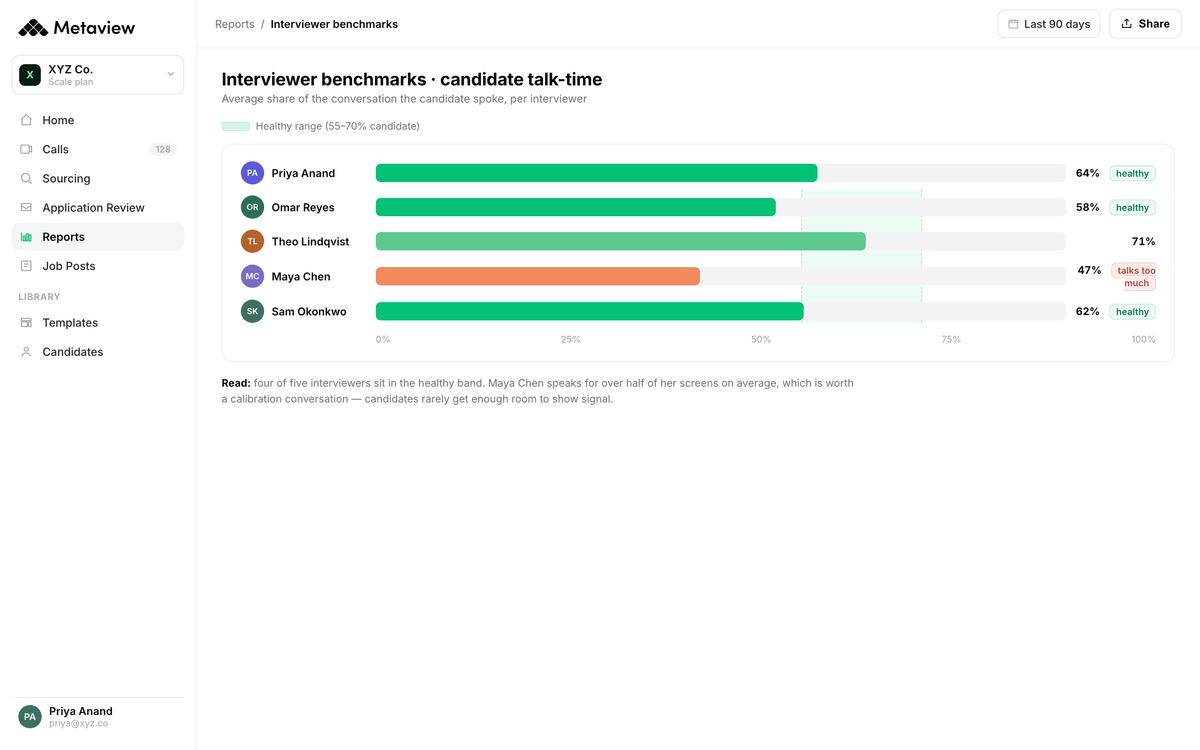
That's the seat at the calibration table. The recruiter who has the evidence in hand, organized by signal, traceable to the moment, walks into the debrief differently.
Not as a scribe reporting back what was said, but as a partner reading the team's signal against the bar the team agreed on. The calibration seat is earned, not asked for.
The playbook gives you the seat. The cognitive shift is what keeps it.
Run this on your next screen. Open the rubric the morning of, write the 4 signals on a sticky note, turn on the recording with the one-sentence consent line, and resist the keyboard.
The first few interviews feel weird. By the fifth, you'll wonder how you ever did it the other way, and your hiring managers will notice before you do.
Stop being the scribe. Start being the synthesizer.
Bring Metaview into your hiring stack.
Live notes, structured scorecards, and ATS sync - set up in under 10 minutes.
Frequently asked
Won't candidates feel uncomfortable if I'm not visibly taking notes?
Use the one-sentence consent line at the top of the call: "I'm recording this so I can focus on what you're saying instead of typing, okay with you?" Most candidates say yes immediately because eye contact and active listening feel respectful, not surveillance. The few who hesitate get a real-time alternative: light notes by hand, full capture after. The friction is the question, not the recording.
What about phone screens or calls where I can't run Notetaker?
Run the synthesis-first frame anyway, then use a 90-second post-call voice memo on your phone to capture the 4 signal scores plus the 3-sentence recommendation. Transcribe later if you need to. The cognitive habit is what carries; the capture tool is the support, not the prerequisite.
How do structured interview notes work when the hiring manager wants a long-form writeup?
Use the two-layer pattern: 3-sentence recommendation on top, 4 evidence lines underneath, link to the full Notetaker summary at the bottom. The HM who wants depth scrolls. The HM who wants the decision reads the first three sentences. Long-form preferences are usually about trust, not about wanting to read more, and when the recommendation is scoreable and the evidence is traceable, the request for length quietly drops away.
What about interviews where the rubric isn't agreed yet?
Use the fallback 4 signal buckets: skill depth, motivation, communication, and risk. Every screen carries something on each. The fallback isn't a substitute for a real scorecard rubric; it's a bridge for the first screen on a role where the rubric is still in flight. Bring the scores to the next calibration call and let them inform the formal version.
How long does it take to change the cognitive habit?
Most recruiters cross the threshold around interview 5 to 7. The first two feel deliberate, like you're forcing yourself not to type. By interview 5 the synthesis frame is automatic and the screen feels lighter, not harder. The fastest way to accelerate the shift is to commit to the sticky-note step for a full week: it externalizes the constraint enough that the keyboard stops calling.
