
Every recruiting team in 2026 has a screening question bank. Most have a screening template. Many have a 30-minute call structure their hiring managers actually agree to. And yet, three rounds later, hiring managers still re-screen advanced candidates on the first interview, the ATS still fills up with paragraphs nobody reads twice, and the funnel data still cannot answer the question your VP keeps asking: which signals predict the offer?
That is not a question problem. The questions on most screening templates are fine. It is a documentation problem. The 30 minutes of conversation that happen on the call are getting compressed into a paragraph in the ATS, a paragraph the hiring manager skims, and a paragraph that loses fidelity at every handoff. The signal is captured. The signal is then thrown away.
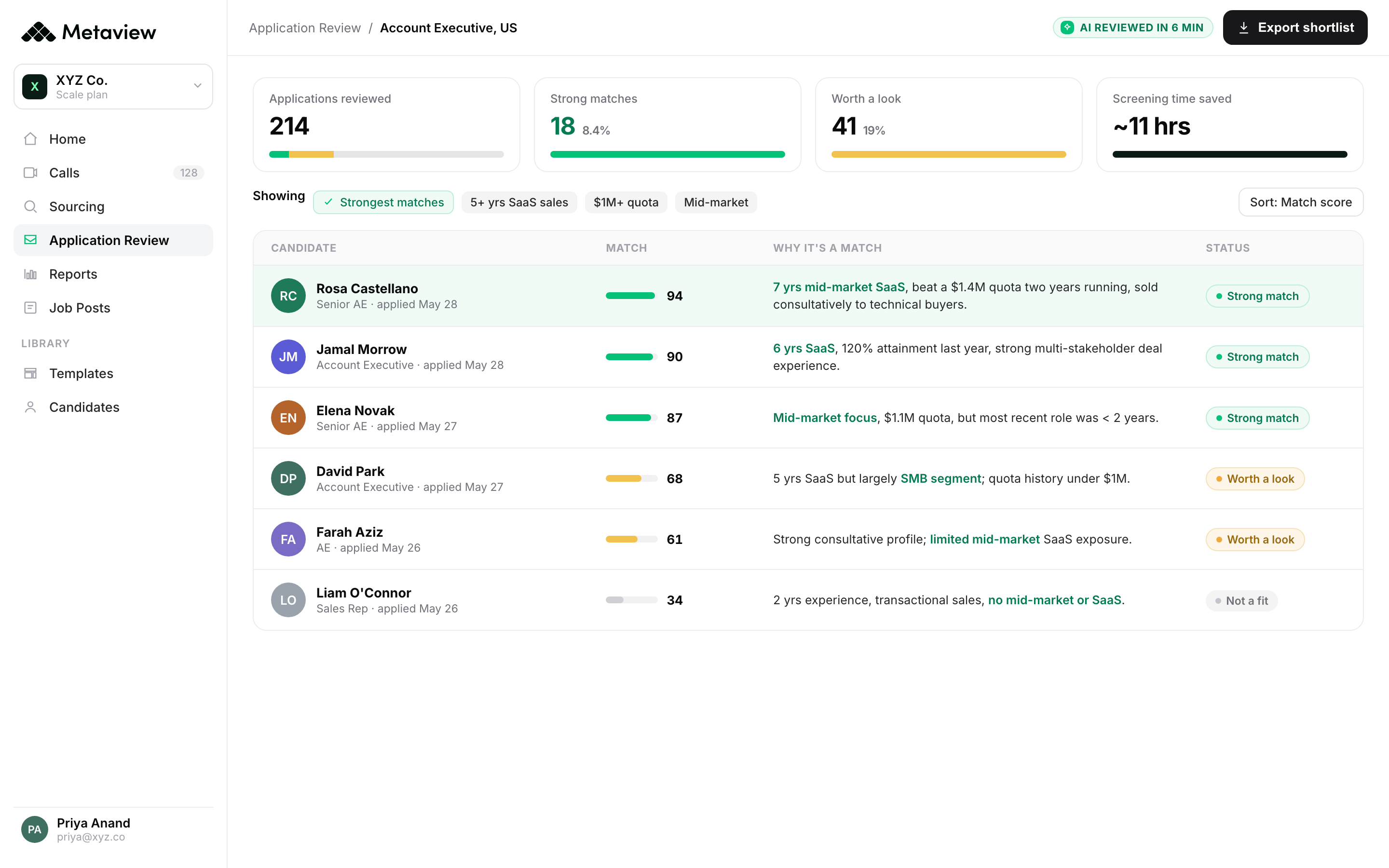
This piece is about the fix. Not new questions, not a new template, not a longer call. The fix is upstream of all three: how the call gets captured, structured, and pushed to the next stage. Get the capture layer right and the screening call stops being a throwaway. It becomes the first reliable signal on every candidate in your funnel.
Why screening calls still matter in 2026.
Two things have changed about the top of the funnel since 2022, and they have changed in ways that compound each other. The first is volume. Applications per role are up across most industries Metaview customers track, and the median requisition now sees a heavier inbound load than the same role did three years ago. The second is composition. A non-trivial share of those applications are AI-assisted: cover letters generated wholesale, resumes rewritten by a prompt, screening answers drafted in another tab while the candidate is on a Zoom call.
Neither change makes screening calls less important. Both make them more so. The screening call is the first synchronous, unscripted touchpoint where a recruiter can hear how a candidate actually thinks, hear them explain a project they actually worked on, and hear how they respond to a question they did not have time to prep. It is the cheapest test of authenticity the funnel has, and in 2026 that test matters more, not less.
What has changed is the cost of not structuring the call. When 50 applications per role become 500, the top-of-funnel layers in front of the screen do more triage work: Application Review surfaces ICP fit, fraud flags get raised on AI-generated submissions, daily great-fit digests land in recruiters' inboxes. By the time a candidate reaches the screening call, the pre-screen layer has already done most of the volume filtering. The screen itself has to be the signal layer. And signal does not survive a paragraph.
This matters because the cost of misaligned screening compounds. According to Metaview's 2026 AI & Hiring Alignment Report - surveying 505 recruiting leaders and hiring managers across North America and EMEA - 90% of teams rate their working relationship as good or excellent on the surface, but the funnel data tells a different story. When recruiters and hiring managers cannot scan a structured screen summary in 30 seconds, the consequences show up two or three stages downstream, where they are most expensive to fix.
The documentation problem hiding inside every screening call.
Most recruiters reading this have already invested in the question side. They have a four-pillar screening framework, a calibrated set of probing follow-ups, and a clear sense of what good looks like for each role. The question side is solved. The capture side is not.
Here is the failure pattern. A recruiter runs a clean 30-minute screen. They get strong signal on all four pillars. They wrap up, switch tabs, and type a four-line paragraph into the ATS: Candidate has solid experience in X, motivated for Y, comp expectations in band, communicates clearly. The hiring manager reads the paragraph in eight seconds, decides they cannot tell if the candidate is genuinely strong or just adequately presented, and books a 30-minute call to re-screen what the recruiter already screened. The hiring manager is right to do that, given what they have to work with.
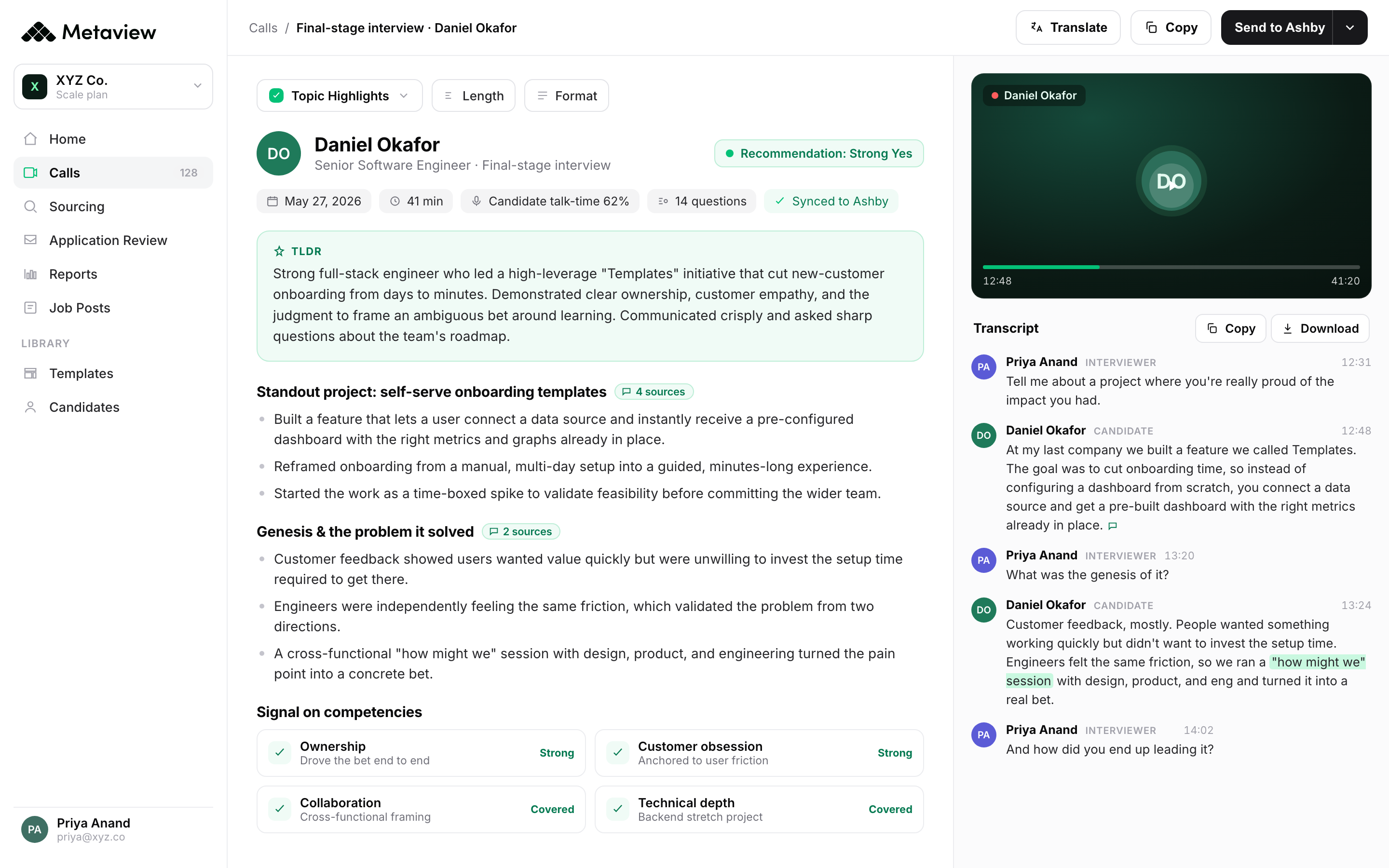
The fix is not a longer paragraph. A longer paragraph just buries the signal in more prose. The fix is structure. Each of the four signals needs to land as a discrete, scannable, queryable field, attached to the candidate record, surfaced inside the scorecard the hiring manager uses to make a decision. When the capture layer is structured, the screening call stops being something hiring managers feel they have to redo. It becomes the foundation they build on.
I took my first two candidate calls today with the tool and it allowed for stronger presence and engagement on my calls vs focusing on my notes, more freedom in my day since I am not as tied to my computer, and more time back for high-value activity vs updating tools and internal teams. One of the first AI tools I have adopted and will never look back.”
The four signals a 30-minute screen has to capture.
Different teams structure these differently, but most recruiting leaders Metaview customers work with converge on a four-signal frame. Treat each one as a discrete field, not a paragraph. The fields are what travel cleanly through the rest of the funnel.
Each of these four landing as a structured field, attached to the candidate record, is the difference between a screening call that compounds and a screening call that has to be redone.
Manual notes vs live capture: the without/with contrast.
The simplest way to see the documentation problem is to put the two states side by side. The left column is the world most recruiters still operate in. The right column is what the call looks like when the capture layer is doing the work.
- The recruiter splits attention between asking the next question and typing the last answer.
- Notes ship to the ATS as a paragraph the hiring manager re-screens because they cannot scan it.
- Signals get rephrased every handoff (recruiter, hiring manager, peer interviewer, debrief), losing fidelity each time.
- Funnel data is stuck inside prose nobody can query, so the “which signals predict the offer” question never gets answered.
- The recruiter focuses on the conversation while the call captures itself.
- Notes autofill the scorecard the moment the call ends, in the fields the hiring manager already uses.
- Signals stay as structured fields hiring managers can scan and trust, with the timestamped transcript one click away.
- Funnel data is queryable across every screen, so the team can see which screening signals actually correlate with offer acceptance.
From conversation to scorecard: structuring the call as it happens.
The live-capture pattern has three pieces. The first is presence. The recruiter is not typing during the call, so they are looking at the candidate, hearing the answer behind the answer, and following up on the moment that matters instead of the moment they finished transcribing. Every customer Metaview has surveyed about adoption mentions this first.
The second piece is structure. As the call happens, the screening template autofills field by field. Role-relevant experience populates from the project anecdotes the candidate gives. Motivation populates from the ‘why this role’ section. Practical alignment populates the moment compensation, location, and start date come up. Communication populates from the call's overall pattern: tone, pacing, follow-up density.
The third piece is push. The moment the call ends, the structured scorecard is in the candidate's ATS record. For Greenhouse and Ashby customers, custom ATS field values get auto-extracted from the conversation and posted automatically. The hiring manager sees the structured fields, not a paragraph. The recruiter does not have to remember to switch tabs and type a summary. The handoff is the call.
 Olesya Rudavska
A practitioner's first-hand take on live capture during screening (technical HR) calls.
The screening-stage metrics that actually predict downstream quality.
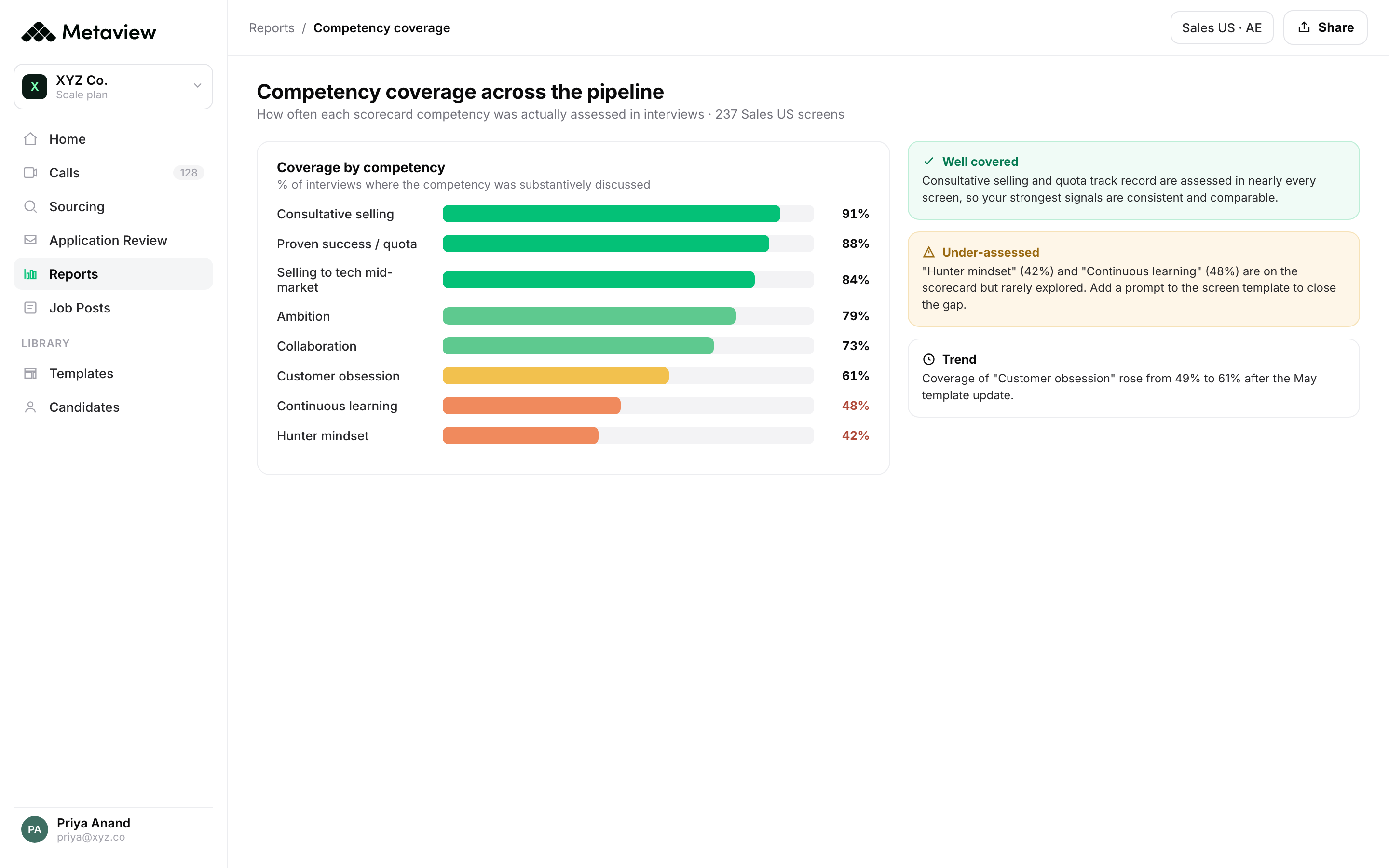
If the screening call is now a documented, structured layer, the question becomes which metrics on it predict downstream quality. Most teams default to volume: calls per recruiter, time-to-screen, screens-per-week. These are operational metrics. They tell you whether the screening team is busy. They do not tell you whether the screening team is producing signal.
Better metrics live one layer deeper. Screen-to-onsite conversion (split by recruiter and by role) tells you whether the bar is calibrated. Screen-quality consistency tells you whether your recruiters are evaluating the same signals the same way across reqs. Post-screen feedback latency (the gap between call end and structured note in ATS) tells you whether the documentation layer is actually working. These are the metrics that move with the capture layer, not in front of it.
The case study below shows what happens when the capture layer is right. Trainline's TA team captures 300 to 500 interviews a month with structured live notes. The time-per-interview saving compounds into 50 to 80 hours per month back across the business, and the candidate-facing experience improves because recruiters are present on the call instead of head-down on the keyboard.
That is a real number, captured from a real customer with a real volume profile, and it scales linearly with screening cadence. The harder a team is screening, the bigger the structural saving from getting the capture layer right.
Having a tool that captures every little moment and nuance removes so much hassle and complexity. My notes are far more accurate, and I can really focus on the conversation with the candidate.”
A 30-minute screening playbook you can run tomorrow.
This is the call structure most Metaview customers converge on after a few months of running the live-capture pattern. It assumes the capture layer is doing the documentation work, so the recruiter can spend the 30 minutes on the conversation.
- Pre-call (5 min): Open the candidate's profile in the ATS, restate the role's screening criteria from your last intake call out loud (yes, out loud), and open the screening template that maps to those criteria.
- Minutes 1 to 5: Set the agenda in one sentence, restate the role in one sentence, and ask one open question to get the candidate talking. The first three minutes are for them to start telling their own story, not for you to start asking yours.
- Minutes 5 to 15: Probe the four signals - role-relevant experience, motivation, dealbreakers, communication - with one or two follow-up probes per signal. The follow-ups are the signal. The headline answers are the setup.
- Minutes 15 to 25: Surface practical alignment in declarative language, not interrogation language. ‘Our band for this role is X to Y, here is what that maps to, where are you on that?’ lands very differently from ‘what are your salary expectations?’ and gives you cleaner signal.
- Minutes 25 to 28: Reverse the call. Invite the candidate's questions, and pay attention to which question they ask first. The first question is one of the highest-signal moments in the screen, and almost nobody documents it.
- Minutes 28 to 30: Set expectations on next steps and timing in one sentence. Tell them what good looks like in the next stage so they can opt out if it is not for them.
- Post-call (2 min): Verify the autofilled scorecard, confirm the auto-posted ATS note, and tag the candidate's three strongest signals before they leave your short-term memory. If you are still on the post-meeting screen 90 seconds after the call ended, your documentation layer is doing its job.
Bring Metaview into your hiring stack.
Live notes, structured scorecards, and ATS sync, set up in under 10 minutes.
