
Before a sales org hires, revenue operations (RevOps), the team that runs its systems and numbers, works out how many sellers to hire, often with one of the five sales capacity planning tools below. Recruiting then receives that decision as a list of roles with start dates already set, such as three new sellers for the Northeast who start in March.
All five do the same core math. Where they differ is what they connect the plan to, such as pay, budgets, or Salesforce, and how easily the plan changes once the year starts. How easily it changes decides whether a new hiring number reaches recruiting in time.
We compared the tools on how they size a sales team, how they handle ramp and departures, and what they plan alongside capacity. This guide is for RevOps teams choosing a tool and for the recruiters who hire from the plan. I’d test how each one handles a mid-year change, because that’s when the hiring number moves.
The 5 sales capacity planning tools at a glance.
Here’s how the five compare on who each one suits, how it sets team size, and what it does best:
| Tool | Best for | How it sizes the team | Standout strength |
|---|---|---|---|
| Varicent Sales Planning | Pay planned alongside territories and quotas | Revenue targets tested against seller capacity | One model that links every planning decision |
| Xactly Plan | Companies already paying reps through Xactly Incent | Headcount and ramp modeled on past results | Benchmarks from other companies, and saved plan versions |
| Anaplan Go-to-Market Capacity Planning | Large sales orgs with many teams and approvals | Headcount by role and month, cascaded to teams | Budget and sales margin planned with headcount |
| Pigment | Companies whose finance and human resources (HR) teams plan in Pigment | Targets set both top-down and bottom-up | Sales, finance, and HR on one platform |
| Fullcast Plan | Plans revised during the year | Workload, budget, and other scenario types | Changes pushed straight into Salesforce |
There’s no single right choice. The deciding question is what the plan connects to, and how often it will change.
What is a sales capacity planning tool?
A sales capacity planning tool works out how many sellers a revenue target needs, by role, territory, and month, and when each one has to start.
Some of them, including Varicent, Anaplan, and Pigment, plan in two directions. Top-down planning starts from the revenue target and asks how many sellers it takes to reach it. Bottom-up planning adds up what each seller can sell and checks the total against the target.
The top-down math runs in four steps:
- Divide the revenue target by what one seller is expected to sell in a year. That gives a starting team size.
- Take away the sellers already on the team. What’s left is the gap the plan has to hire for.
- Allow for attrition. If some sellers will leave during the year, the plan adds replacement hires.
- Allow for ramp, the time a new seller takes to reach quota (their sales target). New sellers sell less while they get up to speed, so they start sooner, or the plan adds more of them.
The result is the hiring number recruiting receives, split into roles, territories, and months.
These tools are different from three kinds of software they’re often grouped with:
- Territory planning tools decide which accounts each seller covers.
- Project-staffing tools plan people’s hours on projects rather than the size of a sales team.
- Incentive compensation software works out what each seller is paid.
Several of the five below also plan territories or pay, which is a large part of how they differ.
A spreadsheet can do the same math. These tools keep it connected to the rest of the plan, so the hiring number updates when RevOps changes an input.
A sales capacity plan is one part of a company’s wider hiring plan. If you’re building that wider plan, there’s a guide on our blog to “creating a hiring plan.” It walks through the inputs a hiring plan needs and includes a planning template.
How we chose these five.
We didn’t rank them, and we left out tools that only plan territories or project hours. We judged each one on these five questions:
- Team sizing: Does it turn a revenue target into a seller count by role and period?
- Ramp and attrition: Can RevOps set how long new sellers take to reach quota, and plan for the sellers who leave?
- Mid-year change: Can the plan change during the year without a rebuild?
- Connected planning: Does capacity sit in the same plan as territories, quotas, pay, or finance?
- Shared view: Can finance, sales leaders, and recruiting see the plan and what changed in it?
For hiring, ramp and mid-year change are the two that set when each role opens.
The 5 best sales capacity planning tools.
Each heading says where the tool fits best.
1. Varicent Sales Planning: Best for one connected plan.
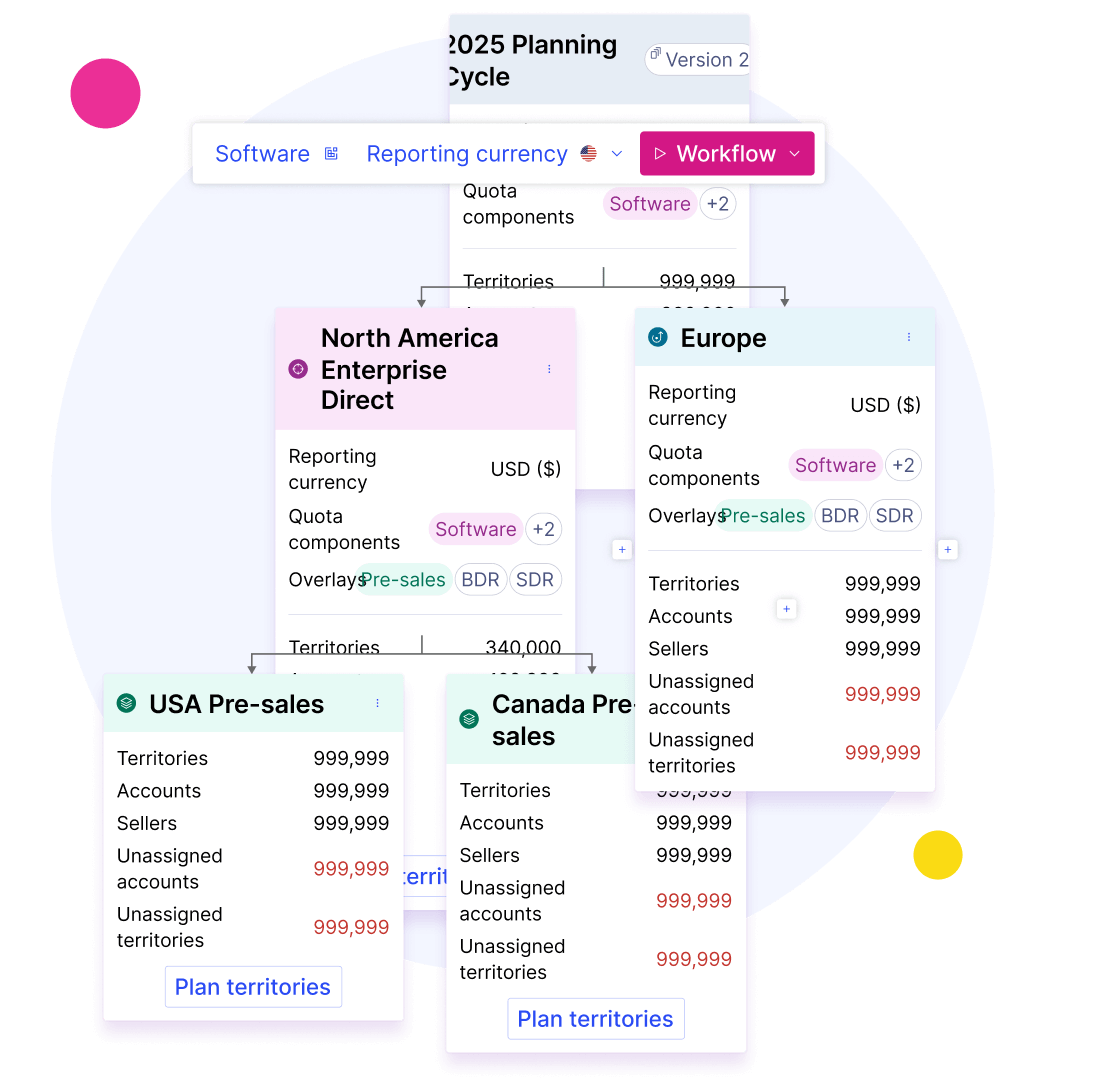
Varicent Sales Planning puts territories, quotas, capacity, and pay in one connected planning model.
For capacity, it tests the revenue target against what sellers can sell, then turns the result into a hiring plan with the coverage gaps by period and segment. Change a territory or a quota, and the effect on coverage and capacity shows up across the plan.
Its strength is that compensation planning uses the same territory and quota data, so pay stays in step when the plan moves.
That connected model is also the trade-off. It pays off when territory, quota, and pay planning all move to Varicent. A team that only needs a headcount number will set up far more than it uses.
Key features:
- Linked decisions: model roles, incentives, and capacity together, and trace one change through the rest.
- Quota testing: check targets against seller capacity, with ramp and seasonality, before quotas are final.
- Gap view: spot the periods and segments that are short of sellers.
- Scenario comparison: try several territory, quota, and capacity options before committing.
- In-year changes: update the plan as market conditions change.
- Account scoring: score and segment accounts in the same place you plan territories.
Best for: Sales orgs that want compensation tied to territory and quota planning.
Pricing: Varicent doesn’t publish prices (you have to request a demo).
2. Xactly Plan: Best for teams already on Xactly Incent.
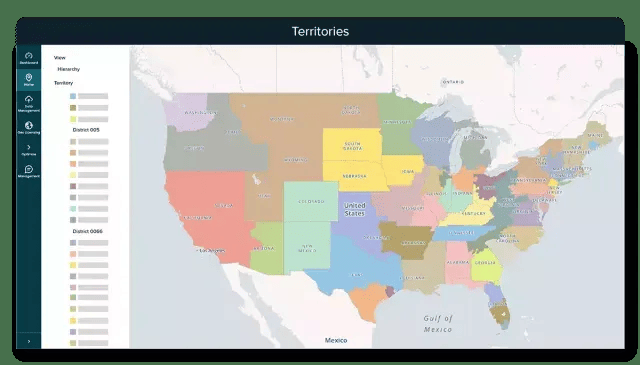
Xactly Plan models headcount, ramp, and coverage against how sellers have performed in the past, then tracks results against the plan during the year.
It also brings in years of pay and performance data from other companies, so RevOps can check a headcount or capacity assumption against what similar companies delivered. A planning agent answers “what-if” questions in plain language, such as what happens if you add sellers in one region next quarter.
Its main appeal is how it links with Xactly’s other products. It shares its territory and quota numbers with Xactly Incent for pay and Xactly Forecast for forecasting, so a mid-year change carries through to both. Every plan version is saved, so sales, finance, and RevOps can see what changed and when.
The connections are also the trade-off. They do most for companies that pay reps through Incent, and a team on another pay system gets the planning and benchmarks without the link to payouts.
Key features:
- Capacity modeling: test headcount and ramp against past attainment.
- Benchmarks: compare assumptions with results from similar companies.
- Scenario agent: get a projection from a plain-language “what-if” question.
- Plan snapshots: track every version of the plan.
- Territory maps: draw territories by geography or account on a map.
- System connections: link to sales, HR, and finance systems as well as Incent and Forecast.
Best for: Companies that already run sales pay in Xactly Incent.
Pricing: Xactly Plan is sold by quote.
3. Anaplan Go-to-Market Capacity Planning: Best for planning headcount within a budget.
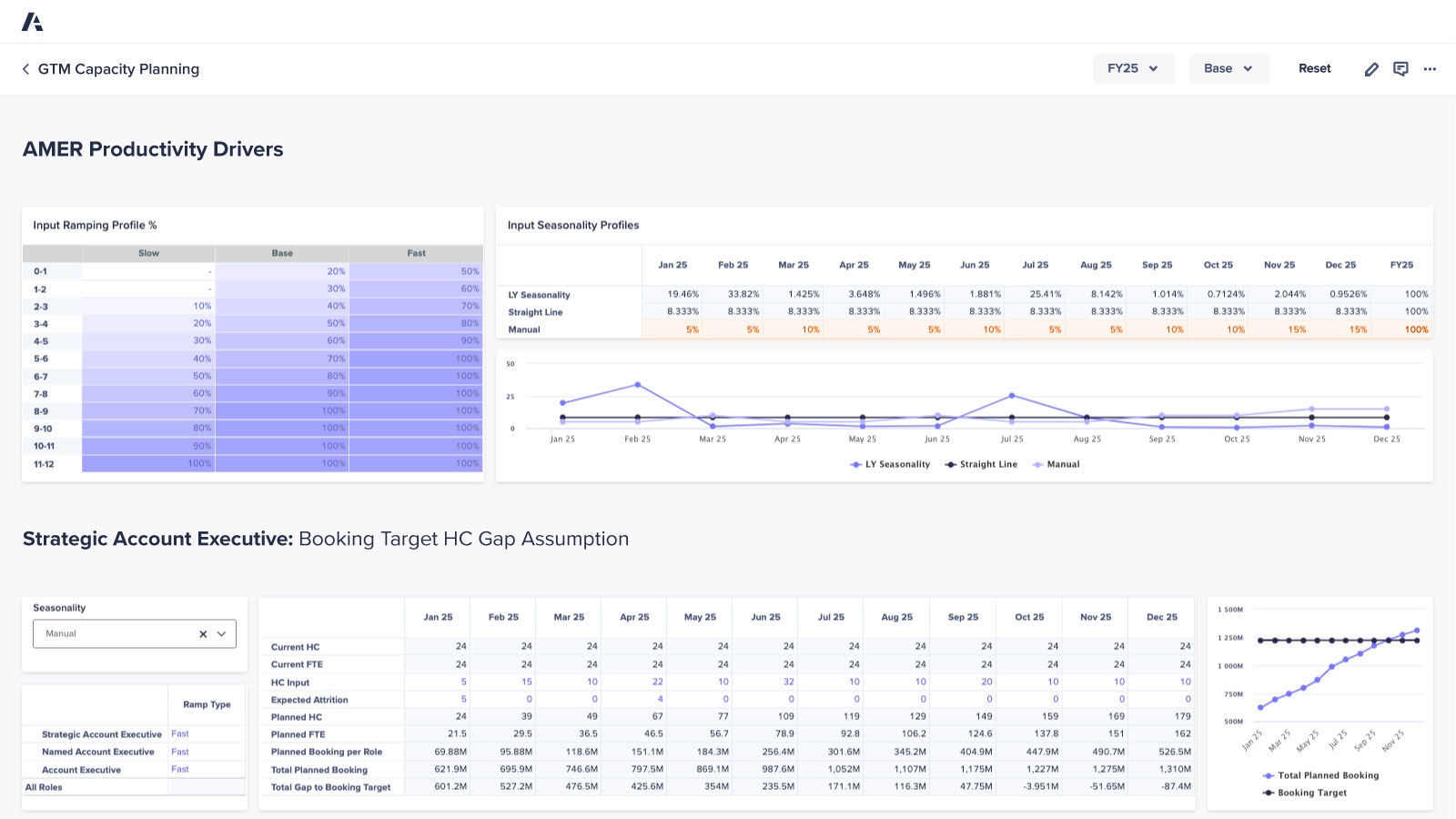
Anaplan’s capacity planning application works out headcount for each sales role month by month, and shows where the gaps are.
RevOps can test “what-if” ramp scenarios and compare how new hires ramp against what the plan expected. Attrition data adds expected departures to the plan. Headcount targets cascade from the company total down to regions and teams, with approvals built in.
Cost is where Anaplan stands out. It plans sales margin and the cost of each role within the budget, so the capacity plan matches the finance plan. Plans can be locked to protect the numbers, reopened for in-year changes, and compared as snapshots.
Anaplan is a broad business planning platform, and this application suits a large sales org with hierarchies, approvals, and a budget to plan against. A small team that needs a seller count may find it more than it needs.
Key features:
- Headcount views: headcount and full-time equivalents by role, hierarchy, and time.
- Ramp tracking: “what-if” ramp scenarios, plus new-hire performance against expected ramp time.
- Turnover planning: plan for expected departures with attrition data.
- Target distribution: headcount targets spread across hierarchies, with constraints and approvals.
- Margin planning: role-level cost data and sales margins within the budget.
- In-year control: lock, reopen, and compare versions of the plan.
Best for: Large sales orgs that plan headcount month by month against a budget.
Pricing: Anaplan doesn’t list prices. Custom demos need to be requested.
4. Pigment: Best for planning with finance and HR.
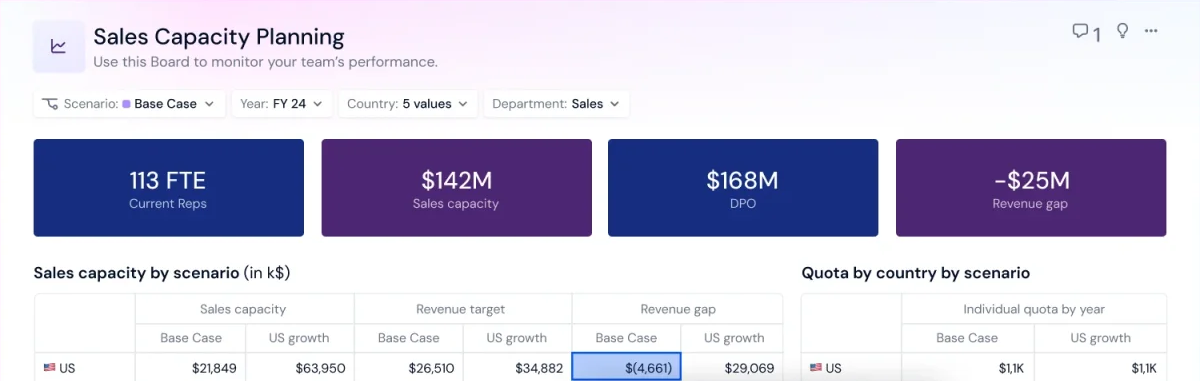
Pigment gives finance, HR, and sales one shared platform, with sales capacity as one of the models inside it.
The capacity model draws on live finance and HR data and keeps the plan aligned with the revenue target. RevOps can build ramp-ups and departures into it, mix top-down and bottom-up targets, and run “what-if” scenarios. Its Modeler Agent can draft or adapt the model from a plain-language description, and it waits for your approval before it builds.
The shared model is the main appeal. Each team works in one place under its own access rights, and can track changes and test ideas without breaking the model. So the sales plan begins with the same numbers finance and HR use.
Pigment is a general business planning platform, so your team sets up the capacity model even when the Modeler Agent drafts it. That work pays off most when finance and HR already plan in Pigment.
Key features:
- Live business data: current finance and HR figures feed the capacity model.
- Ramp and departures: the hiring plan adjusts for ramp-ups and attrition.
- Two-direction targets: top-down and bottom-up planning in one model.
- “What-if” scenarios: see how a change to one input moves the plan.
- Access rights: decide who can see or change each board, metric, or cell.
- Planning agents: a Modeler Agent that builds models and an Analyst Agent that tracks results.
Best for: Sales orgs where Pigment already holds the finance and HR plans.
Pricing: Pigment’s pricing combines a platform fee, the number of licenses, and a set of features. Pigment has a 14-day free trial.
5. Fullcast Plan: Best for plans that change mid-year.
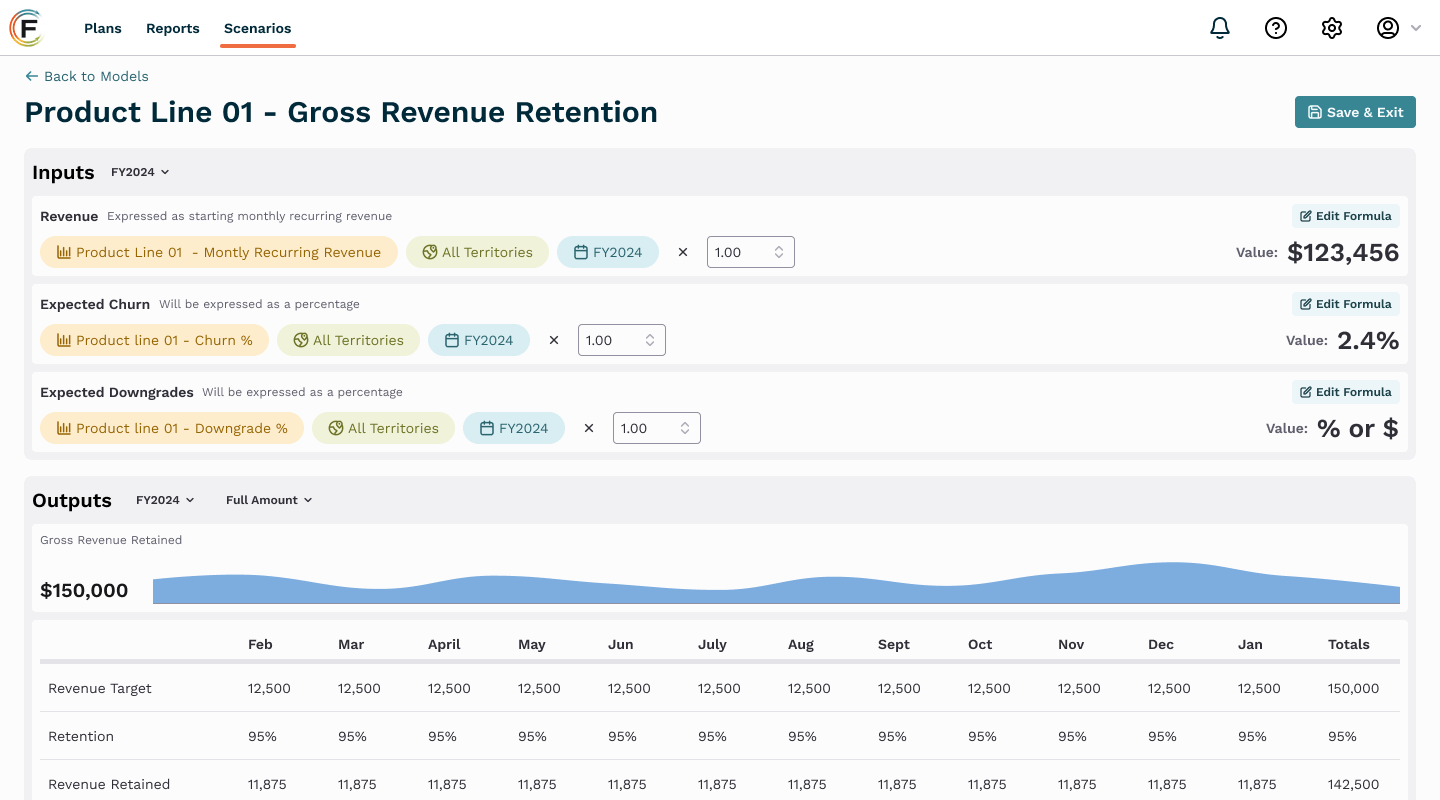
Fullcast Plan helps RevOps build headcount plans, model scenarios quickly, and push changes into Salesforce.
It sizes headcount in several ways, including by workload (how much work one seller can handle), market potential, or budget. RevOps can compare hiring timelines and territory layouts before settling on one. Fullcast also shows which territories need more sellers.
Fullcast is built for plans that change. If reps leave or the market shifts, RevOps can adjust the plan mid-year rather than wait for the annual cycle, and the update lands in Salesforce. It connects to HubSpot, Microsoft Dynamics, and ServiceNow too.
Fullcast plans territories, quotas, and capacity on the sales side. If finance leads your planning, Anaplan or Pigment may fit better.
Key features:
- Scenario types: workload, ratio, potential, budget, and funnel-conversion models.
- Timeline testing: try different start dates and territory structures before you pick one.
- Coverage gaps: find the territories that need more headcount.
- Mid-year updates: rework the plan after departures or market changes.
- Salesforce push: send the finished plan to Salesforce in one step.
- Other connections: HubSpot, Microsoft Dynamics, ServiceNow, and more.
Best for: RevOps teams whose plan changes mid-year and whose sellers work in Salesforce or a similar system.
Pricing: Fullcast quotes prices on request, and its territory, quota, and headcount planning is priced per user.
How to choose a sales capacity planning tool.
Test each tool on your own plan before you choose. These three tests work with any vendor:
Model a mid-year change before you commit.
Give each vendor a plan built on your own numbers, and ask them to make one change to it, such as a seller leaving in the second quarter or a territory splitting in two. Count the steps it takes, then check what updated with it: quotas, coverage, the hiring number, and start dates. If one change means rebuilding the plan, recruiting gets the number late.
Check how ramp and attrition are set.
Ask where the ramp is set, and whether it can differ by role or segment. Then ask how the plan accounts for sellers who leave. These two assumptions decide how many sellers the plan asks for, and when.
Check what the plan hands recruiting.
Recruiting turns the plan into searches, so it needs four details for every new seller. As you compare tools, check that each one can show all four:
- The territory each new seller covers, which tells recruiting where to search and which accounts they’ll sell to.
- The start month, which sets how early the role has to open.
- The ramp assumption. A longer ramp means new sellers need to start earlier, or the plan needs more of them.
- Whether the seller replaces someone who’s leaving. If the plan lists only new roles, it won’t show the searches to replace sellers who leave.
If you’re the recruiter, confirm the territory and start month with the sales leader who’ll manage the new seller, before the role opens. If they want a different month or territory, take changes back to RevOps while the plan can still move.
Where Metaview fits.
Once a role is confirmed, the intake call comes next: you and the sales leader agree on what the role needs.
We have a separate guide to “running a recruiter intake meeting.” It covers how to prepare for the call and the questions to ask.
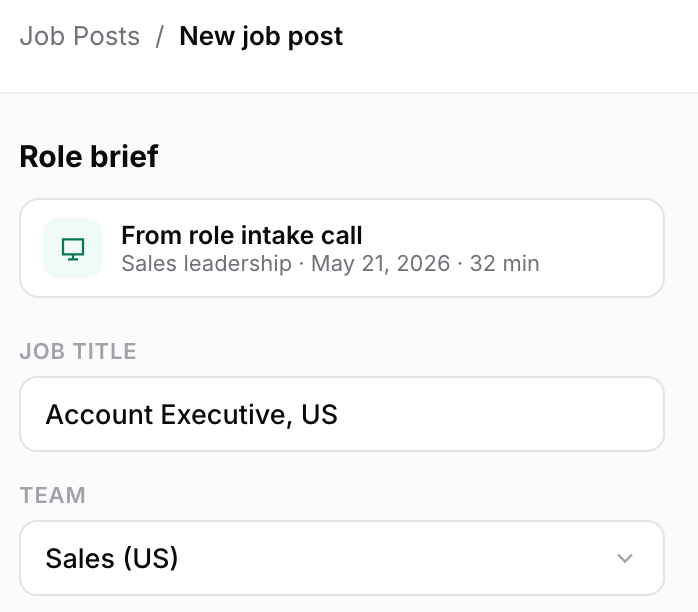
Our Job Posts product creates a tailored job post from a role’s intake call. It also checks live and draft posts, and suggests updates when interviews bring up something the post missed.
Which sales capacity planning tool should you choose?
Each suits a different kind of plan:
- Choose Varicent if you want pay, quotas, and territories planned as one model.
- Choose Xactly if sales pay already runs through Xactly Incent, or you want benchmarks from similar companies behind your assumptions.
- Choose Anaplan if headcount has to fit a budget across many teams.
- Choose Pigment if your finance and HR teams work in Pigment.
- Choose Fullcast if your plan is revised often and has to land in Salesforce.
Pick the tool that handles change.
All five can produce a sound seller count. The difference shows up mid-year, when a seller leaves or a target moves and the new number has to reach the people hiring.
So I’d judge each tool on how it handles mid-year change, and on whether it gives recruiting the four details for each seller without a spreadsheet in between.
Once the plan names a role, the recruiter still has to write its job post. We built Job Posts to create that post from the role’s intake call.
Hire for every role in your sales plan.
Book a demo and bring one of your own sales roles.
Frequently asked.
What is the best sales capacity planning tool?
It depends on what else the plan needs to include. Varicent and Xactly are the closest fit when the plan carries sales pay. Anaplan suits headcount planned against a budget, and Pigment suits a company that already plans finance and HR there. For a plan that’s revised often, look at Fullcast.
How do you calculate sales capacity?
Work out how many fully ramped sellers the revenue target needs. Subtract the current team, add replacements for expected departures, and allow for ramp. The result is the number of new sellers and when each should start.
What’s the difference between territory planning and capacity planning?
Territory planning decides which accounts and regions each seller covers. Capacity planning decides how many sellers a revenue target needs. Redrawing territories can change the seller count, and several tools here plan both together.
Can you do sales capacity planning in a spreadsheet?
Yes, for a small team with a plan that rarely changes. Once several people edit the plan, or it changes during the year, a spreadsheet makes it hard to keep the math connected and to see which version is current. That’s the gap these tools close.
How often should you update a capacity plan?
Whenever an input changes. A seller leaving, a new territory, or a revised target all move the hiring number. You should be able to change the plan mid-year.
What if the sales leader wants a later start date than the plan?
Take it back to RevOps first. A later start means the seller reaches quota later than the plan assumes. RevOps may then move another planned seller’s start earlier, or add a seller to the plan.
What if the plan changes after a role is already open?
Ask RevOps what the change means for that role before you pause or change the search. The role could stay open, move to a later month, or close if RevOps moves territories or changes quotas instead of hiring.
