
A multilingual AI screening tool holds the first screening conversation with each applicant in their own language, by voice or by text. Someone who answers best in Spanish or Tagalog doesn’t have to take the screen in English.
The list of languages is the easiest thing to compare across these tools. It tells you which languages a tool can screen in. It won’t tell you what your recruiter reads after a call held in Portuguese. It also won’t tell you whether a rule in the tool can advance or reject a candidate before anyone has read their answers.
I’d choose a tool by what the recruiter reads after the call. For a role where the candidate will speak the language at work, such as support, a contact center, or care, I want a colleague who speaks it to hear or read the answers before anyone is turned down. So I’d switch off any rule in the tool that could reject a candidate on its own. Where the screen only checks a license and which shifts someone can work, an English summary or a translation is enough.
This article compares seven tools for high-volume hiring that screen candidates in more than one language. It shows you how to choose one whose results your team can read and check.
Multilingual AI screening tools, side by side.
The table compares the seven tools on how candidates take the screen, which languages each one can screen in, and what the recruiter reads afterward. Use it to narrow your shortlist. Then read each entry for the detail.
| Tool | How candidates take it | Languages | What the recruiter reads afterward |
|---|---|---|---|
| Metaview Screening | A voice conversation from a link, on their phone or on desktop | 18 supported languages, including Spanish and Hindi | A fit rating with its reasoning, the notes, the transcript, and the recording |
| Talkpush | A call from one of its AI recruiters by phone or WhatsApp, a TalkScore Live voice screen by phone or browser link, or a text chat | Each AI recruiter has its own language, from a list including Spanish, Tagalog, and Indonesian | A summary plus the recording after an AI recruiter’s call; a report on the candidate’s English after a TalkScore Live screen, with a more detailed version written in English |
| Fountain | A phone or browser call with Anna, the screening agent | Set by the recruiter for each job opening | A score with its reasons and a rating on each qualification, with the call translated into English for recruiters who work in English |
| HeyMilo | A browser voice or video call, a phone call, or a text message | A default language per screen, with auto-detection in beta | Scores and reasoning in English in the app, with the transcript in the call’s language |
| Tenzo | A phone or video call, with outreach by phone, text, or WhatsApp | One language, the candidate’s choice, or a multilingual mode, set per job | Scores, a summary, a grade for each question, the transcript, and the recording |
| Omogen | A phone call, a browser call, or a chat | One per job, from French, English, Spanish, German, and Italian | Answers in the language they were given, plus the recording and transcript |
| Paradox | A text conversation by text message or a careers-page chat | Picked for each candidate from the languages switched on for the account | The conversation, translated into the recruiter’s language when that is switched on, with the original a click away |
Read the last column closely. Fountain translates a call held in another language into English. Paradox can translate the conversation into the recruiter’s language. HeyMilo and the more detailed TalkScore report from Talkpush write their assessment in English. Omogen keeps each answer in the candidate’s language.
Before you shortlist, ask who will read the answers in the candidate’s language, and whether a translation is enough for the role.
Our guide to multilingual AI screening covers how to hold every candidate to the same scoring standard when candidates answer in different languages.
Seven tools that hold the screening conversation in the candidate’s language.
Six of the seven tools can hold the screen by voice. Paradox, the last entry, screens by text. In each entry, look for two things: who reads the candidate’s answers, and who decides who moves forward.
1. Metaview Screening.
Metaview Screening is Metaview’s screening agent, built for high-volume hiring in roles such as support and healthcare. It comes first on this list because it holds the first screen as a two-way voice conversation in 18 supported languages. It can also play the customer in a role-play for support roles.
Screening holds a voice conversation with each candidate you choose to assess. Its supported languages include Spanish, Portuguese, Arabic, and Hindi. Candidates take the call from a link on their phone or on desktop, whenever it suits them.
The conversation adapts to the role and to the candidate’s answers. It asks your questions, follows up where an answer is thin, and answers the questions the candidate asks back. Those follow-up questions bring out what a candidate contributed and why they made the decisions they did. A resume can only summarize that.
And we can give more real candidates a fair shot at proving they’re more than what’s written on paper.”

For a support role, build the screen around a customer call. Screening plays the customer and responds to what the candidate says. You see how the candidate handles a customer before anyone books an interview with them.
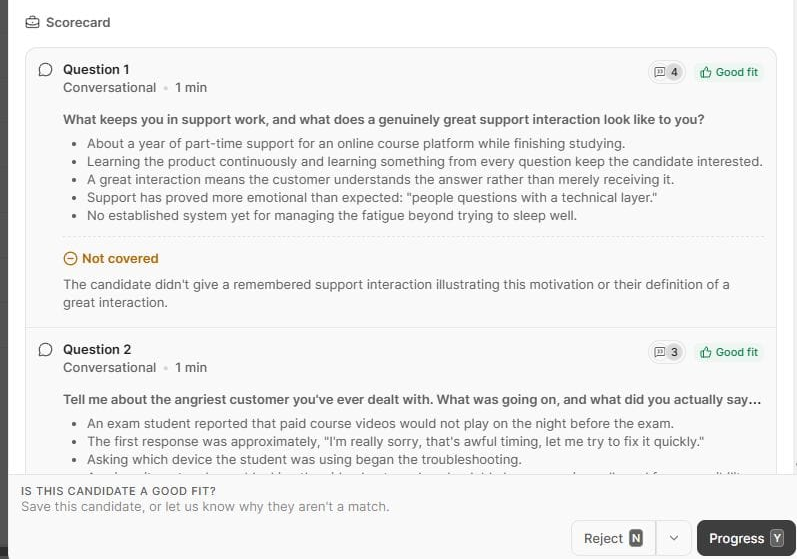
After the call, the recruiter reads a rating of the candidate’s fit with the reasoning behind it and notes on each answer. The recording and transcript sit underneath. Screening captures every spoken word of the call. So a colleague who speaks the candidate’s language can go back to what was said before anyone acts on the rating.
Screening flags answers that are likely AI-assisted or fraudulent, as evidence for the recruiter to weigh. For every completed call, a recruiter decides who moves forward. Metaview doesn’t make that decision.
Link the screen to a stage in your applicant tracking system (ATS) or send the link yourself. Once the recruiter decides, that decision syncs back with the candidate’s information and a summary of the call.
For the candidate’s side of AI in hiring, watch this panel from Metaview’s YouTube channel before you roll out AI screening to applicants. Metaview’s co-founder and chief executive, Siadhal Magos, joins Kevin Grossman of Talent Board and Yasar Ahmad of HelloFresh. Hung Lee of Recruiting Brainfood moderates.
Screening is meant for roles with standardized job descriptions. Executive search sits outside it. It suits a team hiring for roles where the candidate will speak with customers or patients at work.
2. Talkpush.
Talkpush is a recruiting platform that screens by text chat and through two separate voice products. Its text chat can follow the candidate’s language or stay in the languages you lock it to.
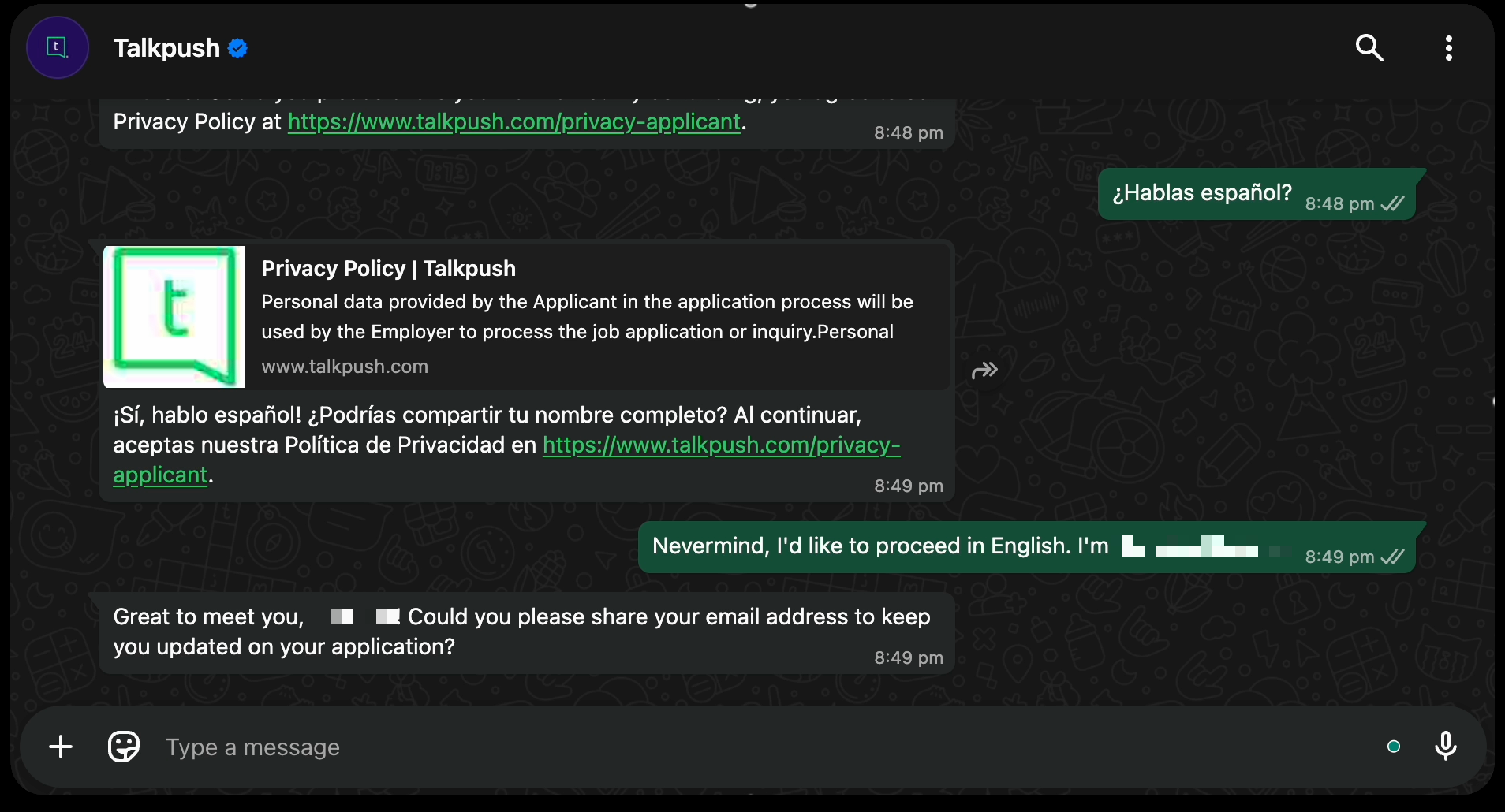
The first voice product is a set of AI recruiters that call candidates by phone or WhatsApp. Each AI recruiter on your account has its own language and accent, from a list that includes Spanish, Tagalog, and Indonesian. So pick the one that speaks your candidates’ language.
When an AI recruiter calls by WhatsApp, the candidate first gets a message asking permission. The call starts once they accept. WhatsApp calling isn’t available in several countries, the United States and Canada among them.
After a call from one of these AI recruiters, your team gets a summary of the call and the recording.
TalkScore Live, the second voice product, runs a voice screen that candidates take by phone or through a browser link. It probes deeper when an answer is vague and answers the candidate’s questions about the role or the schedule. It can also run in the candidate’s preferred language while it rates their English.
After a TalkScore Live screen, the TalkScore report gives the candidate’s English level with the transcript and the audio. A more detailed version, which your Talkpush account manager switches on, writes the assessment in English, even when the call ran in another language. TalkScore leaves the hiring decision to a person.
Talkpush suits contact centers and outsourcing teams that hire agents in one region to serve English-speaking customers in another.
3. Fountain.
Fountain is a hiring platform. Anna, its screening agent, is sold as an add-on. Anna holds a structured screening call with each candidate, by phone or in the browser. By default, Anna follows up when an answer is short or incomplete.
Pick the language Anna speaks for each job opening. Your questions don’t have to be written in that language.
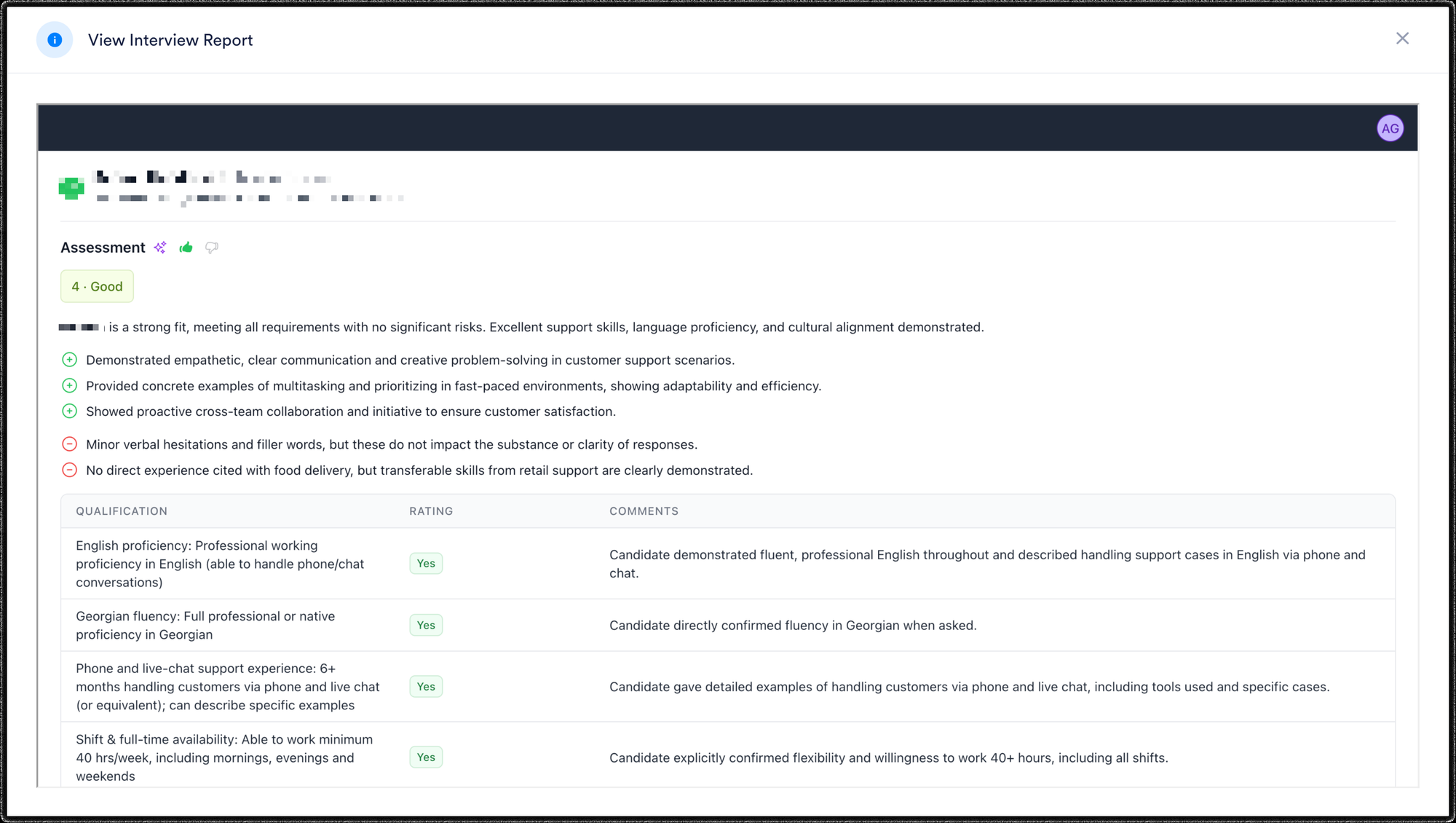
Recruiters see a score with the reasons behind it and a rating on each qualification, with the transcript and recording. A call held in a language other than English is translated into English for a recruiter whose settings are in English.
Anna also rates spoken English on the Council of Europe’s scale of language levels. That rating never moves a candidate to approved or rejected on its own. No rule on the screening stage can approve or reject a candidate either. The final decision goes to a person.
Fountain suits frontline teams that already hire on Fountain, whose recruiters work in English and want every call in another language translated for them.
4. HeyMilo.
HeyMilo screens candidates by voice or video in the browser, by phone call, or by text message. Set a default language for each screen. An optional auto-detection setting, still in beta, starts in that language. It can switch if the candidate answers in another.
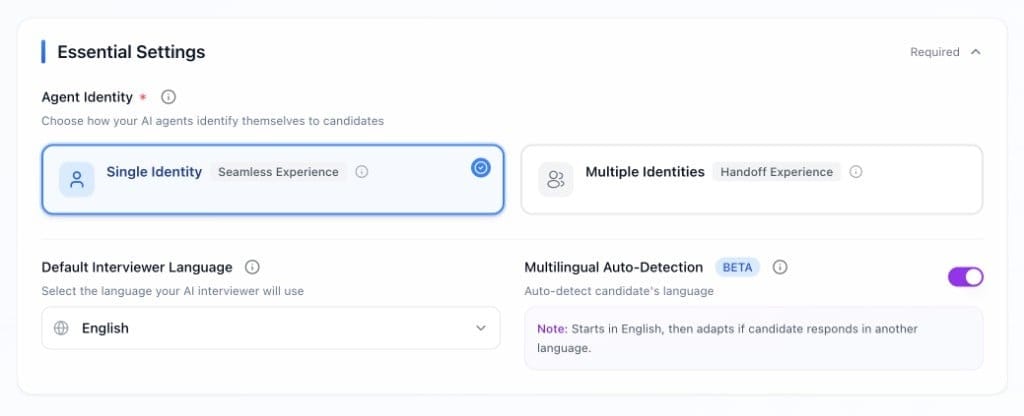
Voice and video screens ask follow-up questions based on the candidate’s answers and your rubric. Any question the candidate asks is saved, with a suggested answer where HeyMilo has one. You can also give candidates a way to ask for a recruiter.
In the app, the recruiter reads the scores and their reasoning in English. The transcript stays in the language the call used. A downloaded report follows the default language you set for the screen.
HeyMilo doesn’t advance a candidate on its own. But two settings hold candidates back automatically once you turn them on:
- a minimum score a candidate must reach to pass a voice or video screen
- required qualifications that can disqualify a candidate on a text screen
If the job is done in another language, leave both settings off, so someone fluent reads the answers before any candidate is held back.
Text screens work only with United States and Canadian phone numbers. HeyMilo’s calling numbers are in those two countries too. For candidates elsewhere, send a browser link by email, or ask HeyMilo’s support what your region allows.
HeyMilo suits a North American team whose candidates answer in other languages and whose recruiters can read the original transcript, or have a colleague who can.
5. Tenzo.
Tenzo runs a phone screen or a video call for each job. It reaches candidates by phone, text, or WhatsApp.

Set the language for each job in one of three ways:
- With a single language, the whole screen stays in it. You can pick a regional version, such as Spanish for Latin America or French for Canada.
- Candidate choice lets the candidate pick the language before a video call.
- The multilingual mode moves between the languages you allow, based on the candidate’s answers.
If you leave the list of allowed languages empty, the screen falls back to English, Spanish, and French. In the single-language mode, an answer in another language isn’t transcribed. The screen carries on in the language you picked.
Each result puts the recording and transcript beside the scores, a summary, and a grade for each question, with the candidate’s own questions listed. Any score a recruiter edits is tagged as a human override.
When a recruiter gives a candidate a thumbs down in Tenzo, that can reject the candidate in your ATS. Tenzo also rejects a candidate on its own when its outreach to them expires. Candidates who score above your passing threshold can be offered a follow-up meeting.
By default, Tenzo calls only phone numbers that share a country code with the line it calls from. The United States, Canada, and Mexico count as one area for this rule.
Tenzo suits teams hiring in North America whose candidates speak Latin American Spanish or Canadian French.
6. Omogen.
Omogen is a French company. Its voice agent, Mio, screens candidates by phone, through a browser call, or in a chat where candidates answer by typing or by voice message. Your Omogen plan decides which of these you can use.
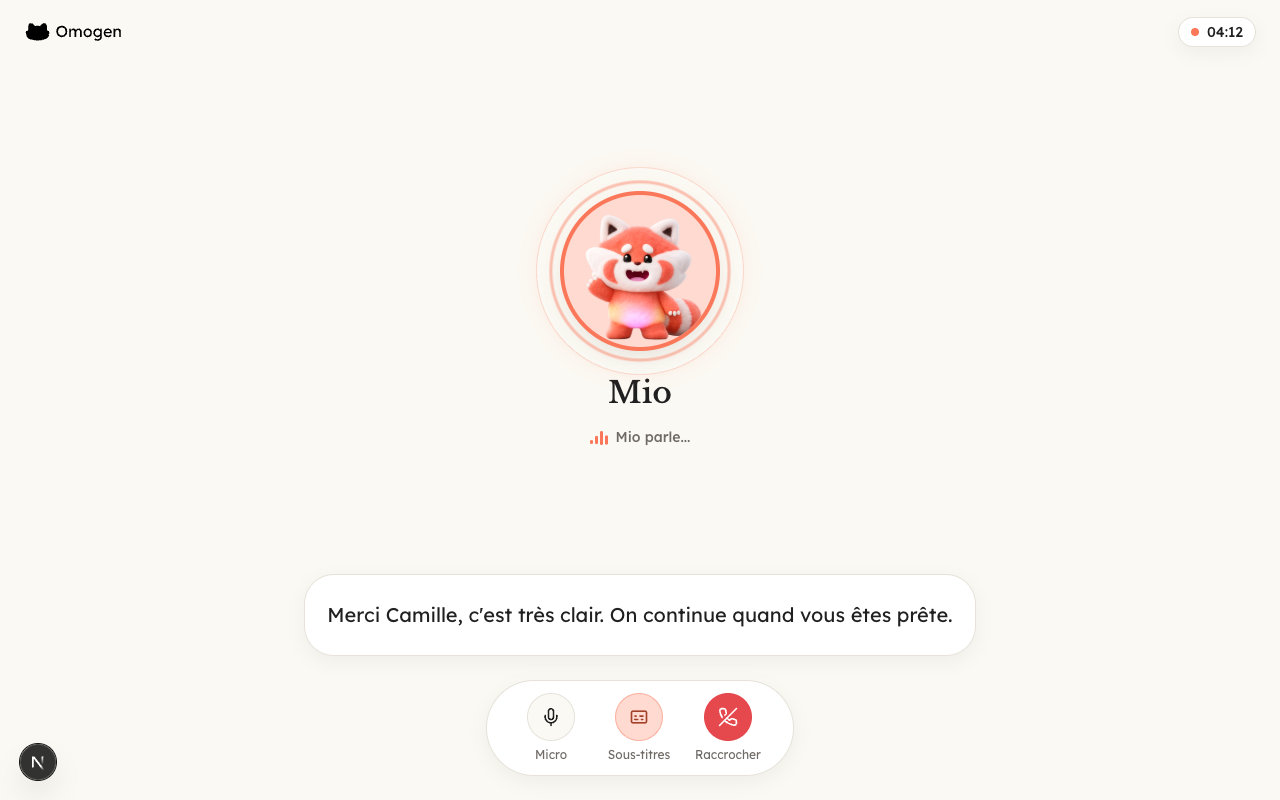
Choose the language when you create the job, from French, English, Spanish, German, and Italian. Omogen works on one language per job. A Spanish job is screened in Spanish from the first message to the report.
Mio answers the candidate’s questions during the call. If it gets one wrong, you can correct the answer afterward, for that job only or for every job at your company.
The report shows each answer in the language of the call, with the recording and transcript on a tab of their own.
Omogen never rejects a candidate automatically.
You can limit outbound calls by the country of a candidate’s phone number. You can also choose to send candidates in a blocked country the online screen by email instead.
Omogen suits a European team that has a recruiter fluent in each language it hires in, because the report shows the answers as the candidate gave them.
7. Paradox.
Paradox, which Workday bought in October 2025, screens by text. Its assistant, Olivia, runs the screen by text message or in a chat on the careers page.
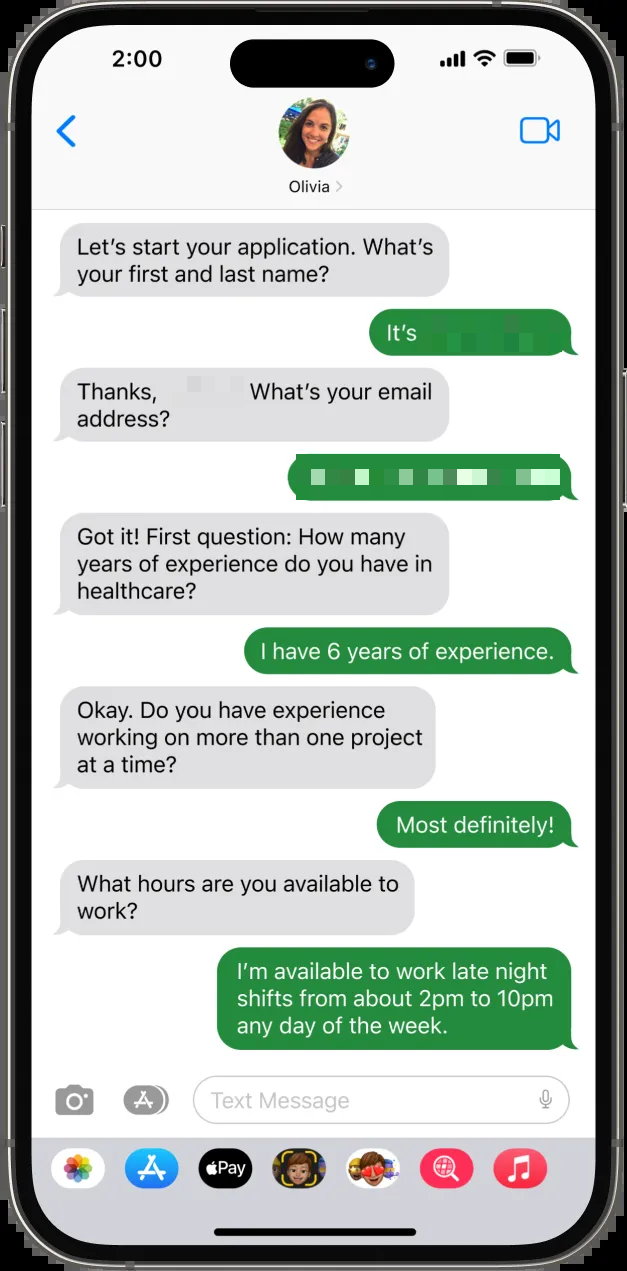
Paradox’s team switches languages on for your account, from a list that includes Spanish for Mexico, French for Canada, and Haitian Creole. Olivia then picks each candidate’s language from the page or browser language, the country code of their phone number, a request from the candidate, or their first message.
Paradox sorts its languages into validated and available ones. An available language is still being refined as it’s used. Before you ask for an available language, have a colleague who speaks it take the screen as a candidate.
When translation is switched on for your account, the recruiter reads the whole conversation in their own language. They can open any message to see it as the candidate wrote it. A language that isn’t switched on for the account gets no translation.
The screen runs on a fixed set of questions, with rules that move each candidate to a status. The default outcome is the status a candidate gets when they meet none of your rules. Set the default outcome to a review status, so no candidate is moved to qualified or disqualified by mistake.
Paradox suits hourly hiring where candidates apply from their phones and the screen checks availability and eligibility.
Which multilingual AI screening tool fits which roles?
Match the tool to the kind of role you’re filling. The role decides whether the screen should be spoken, and who has to read the answers.
For support and care roles in several languages, pick a tool that screens by voice. Then line up a colleague fluent in each language to play back the recording before you decide. Every voice tool on this list keeps a recording.
For a contact center that hires agents in one region to serve English-speaking customers in another, compare Talkpush’s TalkScore Live with Fountain’s Anna. Both rate the candidate’s spoken English during the screen.
For roles in North America whose candidates speak Latin American Spanish or Canadian French, look at Tenzo. If you hire in the United States or Canada and your team would rather read an English assessment beside the original transcript, look at HeyMilo.
For hiring in Western Europe with a recruiter fluent in each language, look at Omogen. It keeps each job in one language from the first message to the report.
For hourly roles where candidates apply from their phones and the screen checks availability and eligibility, look at Paradox. It runs the screen as a text conversation.
For high-volume hiring in several languages, start by deciding whether the job needs the language spoken. If it does, screen by voice. If it doesn’t, a text screen is enough. Then pick the tool whose results someone on your team can read and check. Switch off automatic rejections, so that person reads the answers before anyone is turned down.
Run multilingual screening calls and decide from what candidates said.
Book a demo to see Metaview Screening hold a voice conversation in any of its 18 supported languages, with the recording and transcript behind every fit rating.
Frequently asked.
Should the candidate or the recruiter choose the screening language?
Set it for each job when the work happens in one language. Every candidate for that job then takes the same version of the screen, which makes the results easier to compare. Let the candidate choose, or let the tool detect it, when your applicants answer best in different languages. Then make sure someone on your team can read each language that comes in.
What happens when a candidate switches languages partway through a screen?
It depends on the tool and how you set it, so check before the screen goes live. Some tools follow the candidate into another of the languages you allow, and others keep the screen in the one language you picked. Say in the invitation which language the screen runs in, so candidates know before they start.
What should a recruiter do with a transcript in a language they don’t read?
Treat the rating as provisional until someone who reads the language has checked the answers behind it. If the candidate will use that language with customers or patients, wait for that colleague rather than relying on a translation. A fluent reader can judge how the candidate expressed themselves as well as what they said.
Can a screening tool rate a candidate’s English while the screen runs in another language?
Yes. Talkpush’s TalkScore Live, for one, can hold the screen in the candidate’s preferred language while it rates their spoken English, which suits a contact center hiring agents for English-speaking customers. Check that the rating only informs the decision, and that a recruiter makes it.
How many languages does a multilingual screening tool need?
You need only the languages your applicants answer in for the roles you hire, and of those, only the ones a colleague can review.
