
Run fifteen interviews a week and by Friday, the answers blur. The candidate who lit up about ownership in Tuesday's call gets confused with the one who fumbled the same question on Thursday. The brain wasn't built for that many parallel jobs.
It's not a discipline problem. Recruiters do everything they're meant to. They take notes, they revisit transcripts, they push hard on the rubric.
But the brain wasn't built to listen and type at recall-quality at the same time. Something always drops.
The fix lives upstream of more training. It's making the call the data layer: capture, structure, route. This post is the at-the-desk playbook for doing that at volume, with the tools comparison that picks the right setup for your team.
Why interview notes break at scale.
The job description for an interviewer keeps stacking. Build rapport. Run rubric-aligned questions. Probe edge cases.
Time-check. Note specific examples. Score against competencies. The number of jobs running in parallel is the real problem, not any single one of them.
At volume, every shortcut compounds. The rushed bullet from Tuesday's call becomes the only context the hiring manager sees on Thursday's debrief. The signal that mattered six interviews ago is gone, and the debrief argues from memory and gut feel instead of evidence.
That cost stacks across the quarter.
According to Metaview's 2026 AI Hiring Alignment Report, surveying 505 recruiting leaders and hiring managers across North America and EMEA, the gap shows up across the funnel: from how teams rate the cross-functional relationship to how aligned they are at search kickoff, all the way through to whether qualified candidates make it to offer.
The fix lives upstream of more training. Capture earns the debrief, and the debrief earns the decision. The next five moves walk that chain from the recruiter's desk.
The 5-move note-taking workflow.
Each move depends on the one before. Skip the rubric anchor in Step 1, and the AI Notetaker in Step 2 captures everything except what you'll score against. Skip the ATS push in Step 4, and the structured output you spent the call producing never gets to the panel.
That's what makes this a chain, not a checklist.
1. Anchor the rubric before the call.
Notes only land if they're anchored against something. Before the call starts, the competency rubric needs to exist as a shared artifact the panel reviews, not as a Slack message from the hiring manager three days ago.
The two minutes to confirm what you're scoring against decide whether the next 45 minutes are evidence-gathering or transcription.
Specifically: each competency named. Each rated 1-5 with anchored behavior at each level. Each scheduled question mapped to one or two competencies. If the rubric isn't this concrete, the notes can't be either.
For the upstream unpack of how to write a rubric that survives the calibration cycle, our interview rubrics post is the prerequisite for this one.
2. Hand the capture to an AI Notetaker.
The single biggest move you can make is to stop being the typing apparatus. Capture the spoken record, not your real-time transcription of it.
An AI Notetaker like our Notetaker joins the call on Zoom, Teams, Google Meet, or phone, captures everything spoken, and frees the recruiter's eyes to stay on the candidate.
The difference shows up first in rapport, then in signal. Candidates respond to interviewers who are present in the conversation. Follow-up questions get sharper because you heard the hesitation in the answer, not just the words.
And the spoken record is the substrate every other move in the chain runs on.
3. Structure the spoken record against the rubric in minutes.
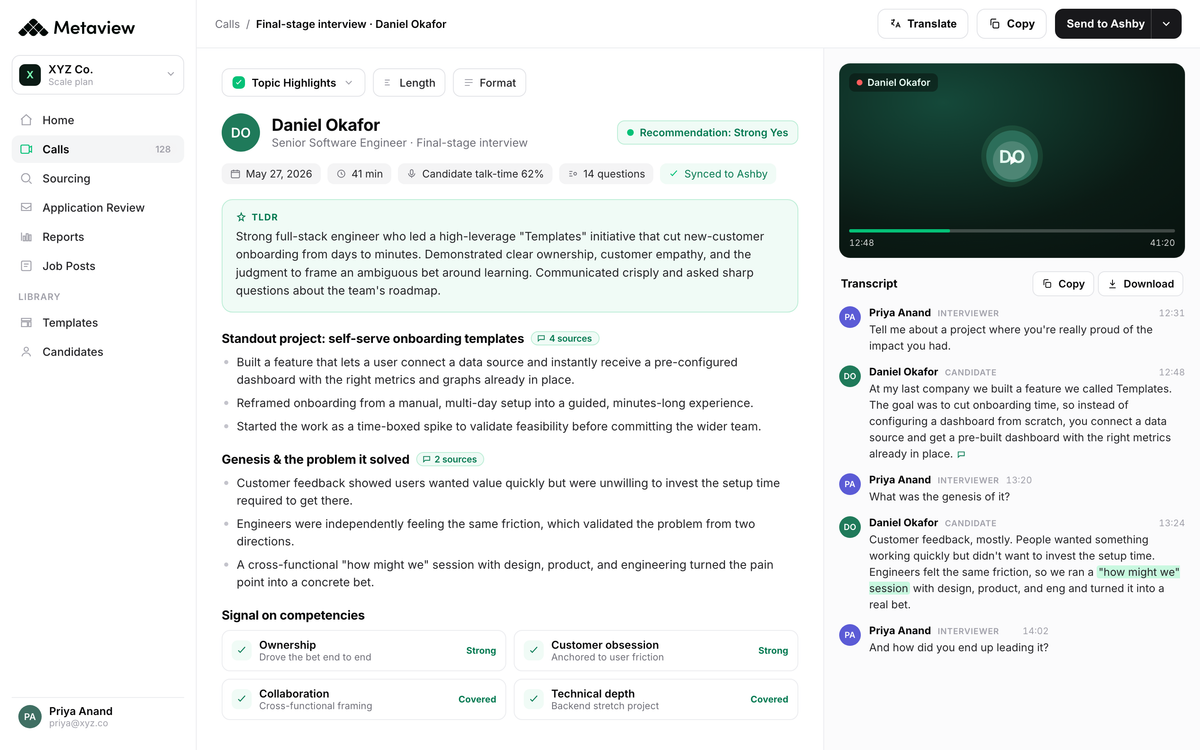
A raw transcript is the input to notes, not the finished product. The structuring move is where the rubric earns its place: the same competencies you anchored in Step 1 become the scaffolding the AI uses to pull evidence out of the conversation.
Each scored field pre-fills with the candidate's own words and the specific examples behind them.
What used to be 20 to 30 minutes of post-call wrangling becomes a two-minute review of an already-structured artifact.
Our AI Notes generate the structured summary against the rubric, surface follow-up questions you'd want for round two, and tag the evidence to specific moments in the recording for anyone who wants to verify.
4. Push to the ATS without rebuilding.
The structured notes only matter if the hiring manager and the next-round interviewer can see them. The fastest way to lose a strong note is to leave it in a private doc nobody opens.
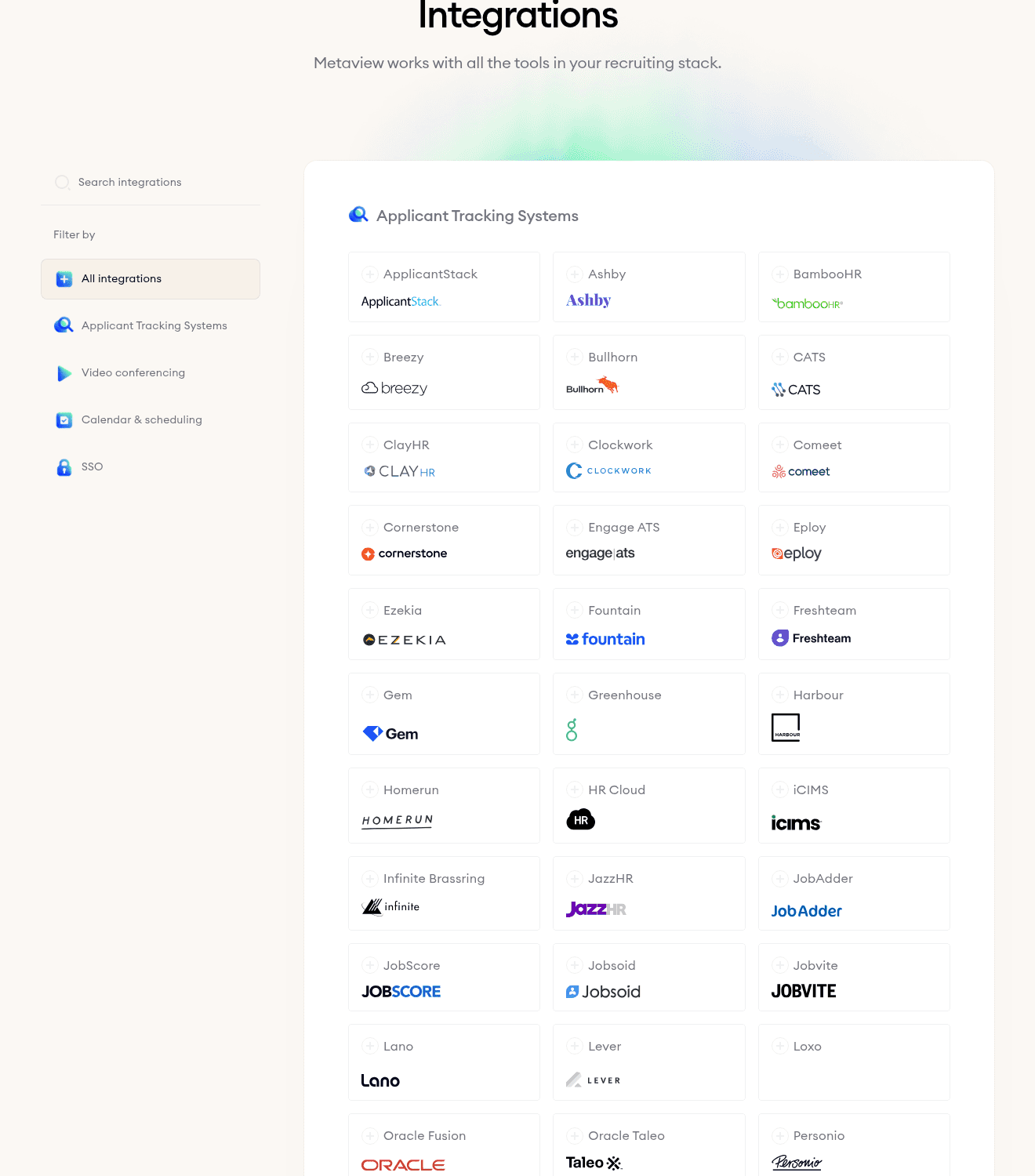
Native Integrations push the structured notes onto the candidate's profile in Ashby, Greenhouse, Lever, Workday, and the rest of the ATS roster, so notes land on the candidate profile without a copy-paste tour.
The setup is a one-time Settings > Integrations move per workspace. After that, every call's structured notes sync to the right candidate record, the right req, the right interview round, and the right scorecard field. The recruiter's job is the conversation, not the data hygiene.
5. Close the loop in the debrief.
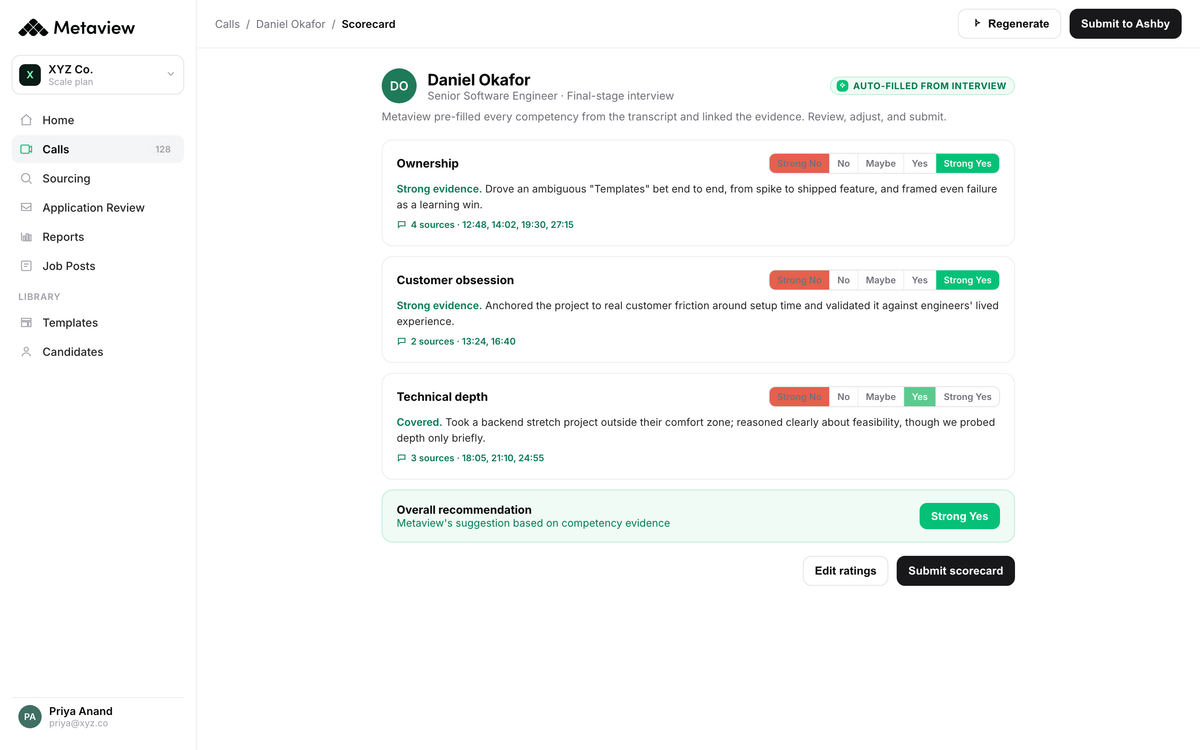
The reason all four prior moves earn their place is what happens in the debrief. The hiring manager opens the candidate record and sees the same structured summary the recruiter saw. The panel discusses the evidence on screen, not the bullet someone half-remembered from Tuesday.
The debrief closes the loop on evidence, and the decision comes faster and with more confidence.
The downstream save is what most teams underestimate. Cleaner debriefs mean cleaner offer briefs, cleaner calibration sessions, and a tighter feedback loop into the rubric for the next req. The chain doesn't end at the offer. It folds back into how the team interviews next time.
How to pick the right tool.
The right setup depends on what shape your team's in. ATS-native note fields inside Ashby, Greenhouse, Lever, and Workday keep the record next to the candidate profile and work fine at low volume, but the typing problem stays. They don't capture the call, they capture what you typed during it.
Generic transcription tools like Otter or Tactiq grab the audio but leave the structuring to you afterwards. For a deeper side-by-side of every notetaking tool worth evaluating, our AI notetaking apps post picks them apart.
For high-volume teams, the binary that matters is manual versus interview-specific AI Notetaker. The table below makes that concrete across the four features that decide it.
| Feature | Manual notes | Metaview AI Notetaker |
|---|---|---|
| Capture during the call | Splits attention; rapport drops, signal evaporates. | Captures the full spoken record, recruiter eyes on candidate. |
| Time per interview | 20 to 30 minutes of post-call wrangling. | Structured notes ready inside two minutes. |
| ATS routing | Copy-paste between Notion, Google Doc, and the ATS. | Native integrations push notes onto candidate profile. |
| Debrief readiness | Recruiter reconstructs from memory and bullets. | Hiring manager sees the same structured artifact. |
Each shape of team picks differently. A small panel running three interviews a week can survive on manual notes plus the ATS field. Once the volume crosses ten interviews a week, the post-call wrangle alone burns enough of a recruiter's day that the AI Notetaker pays for itself in week one.
Beyond fifteen a week, manual notes stop being the conservative choice and start being the risk.
What this changes for the recruiter.
The customer-side numbers carry better than any benchmark. Airalo runs interviews across 7,000+ team members in 100+ countries, with a recruiting team that needs every minute of their week to land in conversation, not in admin.
Capture-at-source is how that team gets the math to work.
We've completed over 1,900 calls using this platform, saving 77 full workdays. We're not just automating note-taking, we use the multi-source feature so each interviewer goes in unbiased but informed enough to cover new ground.”

77 workdays is a calendar of conversations the team got back. That's where the chain ends up: less wrangling, more time with candidates, and a structured record the next interviewer can build on instead of starting from scratch.
Spend less time writing notes, and more time interviewing. The structured record follows the candidate from screen to debrief to offer brief, and the recruiter runs the conversation instead of being the typing apparatus inside it.
Bring Metaview into your hiring stack.
Live notes, structured scorecards, and ATS sync - set up in under 10 minutes.
Frequently asked.
What should interview notes capture, in practice?
Evidence against the competency rubric: the specific examples the candidate gave, the language they used, and the behavior they demonstrated against each level of each competency. If you don't have a competency rubric yet, our interview rubrics post is the upstream prerequisite. Without a rubric, "good notes" is just transcription.
Does live note-taking hurt the candidate experience?
Manual live typing does, especially in high-stakes panel rounds where candidates expect undivided attention. An AI Notetaker removes the typing tell entirely. The candidate sees the interviewer present in the conversation. The structured record gets produced from the spoken audio after the call ends, not from anyone's keyboard during it.
How does AI notetaking handle confidential information?
For enterprise use, the relevant safeguards are encryption in transit and at rest, SOC 2 Type II certification, and GDPR-scoped data processing. Metaview meets all three and signs DPAs as a matter of course. The right starting point for compliance review is a 15-minute call between your legal team and ours.
Does AI interview notetaking work for phone interviews, or only video?
Yes. The Notetaker captures PSTN and mobile audio with the same fidelity as Zoom, Teams, and Google Meet, which matters most for high-volume screening calls. For the phone-modality-specific workflow, our phone interviews post walks the setup and the consent script.
What happens to notes from candidates who withdraw or don't get hired?
Retention is configurable per workspace, with defaults that match common policies in EU and US jurisdictions. For active pipelines, the structured notes stay on the candidate record so they're available if a strong silver-medalist comes back into scope later. Our candidate rediscovery post walks through how that re-engagement plays out in practice.
