
Open the applicant list for a busy role, and the first 20 resumes all read well. They have tidy bullets and your job post’s own keywords, and most lines carry a number. That polish tells you little now, because any applicant can get it from an AI chatbot.
AI-generated resumes make a shortlist easy to get wrong. If you pick candidates on how well a resume reads, you can end up advancing the people who got the most help writing theirs.
If you reject the ones that sound like AI, you act on a guess you can’t prove. And you can lose qualified people who used AI to describe real work.
I’d stop trying to spot AI. To review AI-generated resumes, check its claims against what the role needs, then test those claims in a screening call.
This guide is for recruiters and hiring managers reviewing inbound applications. It covers whether you can tell a resume was written with AI, what evidence to look for, how to check each claim, and what to ask on that call. It ends with three checks to run before you send a shortlist, and what to set up before the next role opens.
How can you tell if resumes are AI-generated?
From the writing alone, there’s no reliable way to tell whether AI wrote a resume. The signs people look for also turn up in resumes people write themselves, or with help from a template or a paid resume writer.
AI detectors don’t settle it. OpenAI, the company behind ChatGPT, withdrew its own AI-text detector in July 2023 because it wasn’t accurate enough. In a 2023 study, Stanford researchers found that popular detectors often labeled writing by non-native English speakers as AI-generated, and that AI-written text got past them once a chatbot reworded it.
So a detector can flag a qualified candidate who writes in a second language, and miss a resume a chatbot reworded. Even a correct result would only tell you who wrote the words. Whether the person can do the job is a separate question.
Here’s what each of the usual signs tells you, and what to check:
| What you notice | What it tells you | What to check |
|---|---|---|
| Phrases from your job post | The candidate read the post, or gave it to a chatbot | The work under each phrase |
| Tidy bullets that all open on a strong verb | Only that the format is clean | What each bullet claims |
| A number on most lines | The writer followed the usual advice to add numbers | What each number was measured against, and whose result it was |
| A summary that could describe anyone | Nothing about this person | The experience section, line by line |
| The same wording as other applicants | A shared template or chatbot | Whether anything else in the resume is specific |
| A high score from an AI detector | Little you can rely on | Nothing: leave the score out |
Keep “sounds like AI” out of the decision, too. You can’t check it, nor can you defend it to a hiring manager.
Decide what counts as evidence before you read.
Before you open the first resume, write an evidence list: what each requirement would need to look like on paper. That keeps your standard the same for every application, and it makes it harder for a well-written resume to change what you’re looking for.
Pick three to five must-haves, the requirements a candidate can’t do without. Take them from the job post and your intake call with the hiring manager.
For each one, write the evidence you’d accept, and an example of a line that falls short. Leave motivation and how someone works with others for the interview, since a resume can’t show them.
Here’s an evidence list for an example role, an account executive selling software to mid-market companies:
| Must-have | Evidence you’d accept | Not enough on its own |
|---|---|---|
| Has carried a new-business quota | The size of the quota, and how they did against it each year | “Consistently exceeded targets.” |
| Has sold to mid-market companies | The size of a typical customer or deal | “Worked with enterprise and mid-market clients.” |
| Has run deals from the first call to signature | Deals they ran themselves, and how long they took | “Drove revenue across the full sales cycle.” |
| Has sold to more than one decision maker | Who signed, and who else had to agree | “Built strong relationships with stakeholders.” |
The lines in the last column are easy for a chatbot to write, because they need no facts about the person. They describe the job in general terms, with nothing you could check.
Check each claim against the role.
Read each resume against your evidence list, one requirement at a time. Find the resume’s claim for each one, and mark each must-have with one of three labels:
- Shown: the resume makes a specific claim you could check, such as the quota and the result against it.
- Stated: the resume claims it with nothing behind it, like the examples in the evidence list’s last column.
- Missing: nothing on the resume speaks to it.
A claim counts as “shown” when it includes details like these:
- The scale of what they ran, such as the number of accounts or the budget.
- Their own part, kept apart from the team’s result.
- A starting point, so a result has something to be measured against.
- Software they name, with what they used it for.
A chatbot can add these details as easily as a person can, so a “shown” mark only decides who you call first. You still need the screening call to find out if it’s true.
Check the rest of the application against the resume, too. If the dates and titles on the candidate’s online profile or portfolio don’t match it, note a question to ask on the call.
Dates and titles can differ for ordinary reasons, such as a contract role or a company that renamed its job levels. Ask about the difference before you hold it against anyone.
Then sort the applications in this order:
- Turn down the ones missing a must-have, and write down which one as the reason.
- From the rest, call the applicants with the most “shown” marks.
- Then call those with “stated” marks.
That first step will turn down some people whose resumes were short. If something else in the application suggests the candidate has what’s missing, I’d call them anyway, with the “stated” group, and ask about it then.
When applications outnumber your screening slots, some people won’t get a call. Write a reason for them too, such as “not screened: others showed stronger evidence,” so every decision has one.
Test every must-have on the screening call.
The screening call is where you find out which marks hold. Ask about everything marked “stated.” Ask one question about each “shown” one too, because a chatbot adds details to a resume as easily as it adds polish.
Ask about what happened: where things stood before, what the candidate did, who else worked on it, and what changed. Someone who did the work should be able to take you through all four. If a figure or a customer’s name is confidential, ask for a range or the industry.
Here are four questions for the account executive example, one for each row of the evidence list:
- “Your resume says you beat your quota two years running. What was the quota, and where did you land each year?”
- “You list mid-market clients. How big were those companies, and what was a typical deal?”
- “Walk me through one of your deals, start to finish. What did you do yourself, and who else was involved?”
- “On that deal, who had to approve it before the contract was signed?”
Judge what each answer contains, and give no weight to how polished the English is. If a follow-up question still gets nothing beyond the resume line, record that requirement as not supported.
Write each answer beside what it tested, so the hiring manager can see which marks held.
We have a separate guide to strategic interview questions for the interviews that come after the screening call. It groups questions by the risk each one tests, and gives a strong answer and a red flag for each. Use it when an answer raises a question you can’t settle in one call.
Where Metaview fits in the first pass.
On a busy role, the first pass means reading each application against the same criteria before you know who to call.
Our Application Review product reads every application against the criteria you approve for the role. It sorts each application as a “Great,” “Good,” “Okay,” or “Poor” fit and shows its reasoning. It doesn’t detect AI writing.
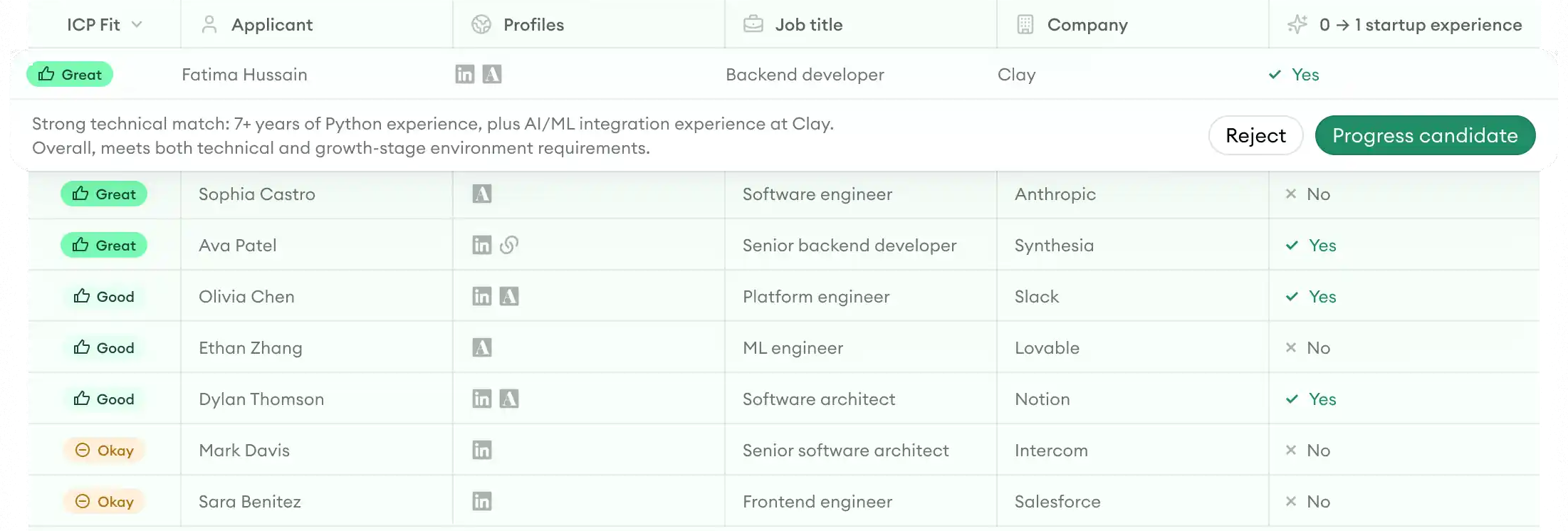
Then you decide who moves forward, and any claim the resume only states still goes to the screening call.
Send a shortlist built on evidence.
Run these three checks before a hiring manager sees your shortlist:
- Can you name the must-haves each candidate met, and how you know? If not, go back to your evidence list and your screening notes.
- Did you set anyone aside because their resume read like AI? Put them back and review their claims.
- Does each shortlisted candidate have an answer written down for everything you tested? If one doesn’t, get the answer before the shortlist goes out.
Before your next role opens.
I’d keep the evidence list after the role closes, with a note on which claims held up on screening calls. The next list for a similar role then starts from what you learned.
Put the details you plan to check in the job post, too. If the role needs someone who has run a large team or budget, ask applicants to say how large. Candidates then know what to include, however they write their resumes.
When a hiring manager asks why someone made the shortlist, or why someone didn’t, you can point to the reason you wrote down: a requirement the candidate met or didn’t, or your note on why you didn’t reach them.
Talk to our team about reviewing applications.
Book a demo and ask how Application Review would handle your busiest roles.
Frequently asked.
Why doesn’t keyword screening work on AI-generated resumes?
A chatbot given your job post can reuse its words, so tailored resumes can share the same keywords. The keywords then separate candidates less, and the claims under them have to do more of that work.
Should employers ban AI-generated resumes?
I wouldn’t. You can’t enforce a ban, because you can’t reliably check who used AI. Candidates who follow it write without AI, while those who ignore it still use a chatbot and can send a more polished resume. So the ban ends up penalizing the candidates who obey it. I’d tell candidates up front that the screening call will ask about the claims on their resume. Then they know to include only what they can explain.
What if a candidate’s AI-written resume overstates their experience?
Ask about it plainly, and give the candidate the chance to correct it. Some will say a chatbot overstated a line, and what they did may still be enough. If a candidate stands by a claim they can’t explain, don’t count it.
Should you verify degrees and certifications on AI-generated resumes?
Verify them on every resume, through your background check or the body that issued them. A screening call can’t confirm a credential.
How do you assess writing skills when candidates use AI?
Test the writing directly, with a short task the candidate does live in a later interview. A resume or cover letter is a poor sample of how someone writes, because so many people get help with both.
Is an AI-generated resume the same as a fake application?
Not necessarily. A fake application misrepresents who the person is, for example with a stolen identity, while an AI-generated resume can describe a real person’s real work. So check identity through your usual process, and check the claims with the method in this guide.
